
bdtui
v0.8.0
Published
Terminal UI (TUI) for the bd beads issue tracker - browse, filter, and update beads from the CLI with vim keybindings

Maintainers
 jsiovn
Readme
bdtui
Fast blessed-based terminal UI for the bd beads issue tracker.
Requirements
- Node ≥ 20
bdinstalled and on$PATH- A project with a
.beads/database (created bybd init) - (Optional) A clipboard helper for the
yyank key:- Linux/Wayland:
wl-clipboard(sudo apt install wl-clipboard) - Linux/X11:
xclip(sudo apt install xclip) orxsel - macOS:
pbcopy(preinstalled) - Windows:
clip.exe(preinstalled on Windows 10/11)
- Linux/Wayland:
Install
First install bd:
brew install beads          # macOS / Linux
npm install -g @beads/bd    # via Node.js
Then install bdtui:
npm install -g bdtuiUsage
bdtui              # use current directory
bdtui .            # explicit current directory
bdtui ~/www/myapp  # explicit project path
Layout
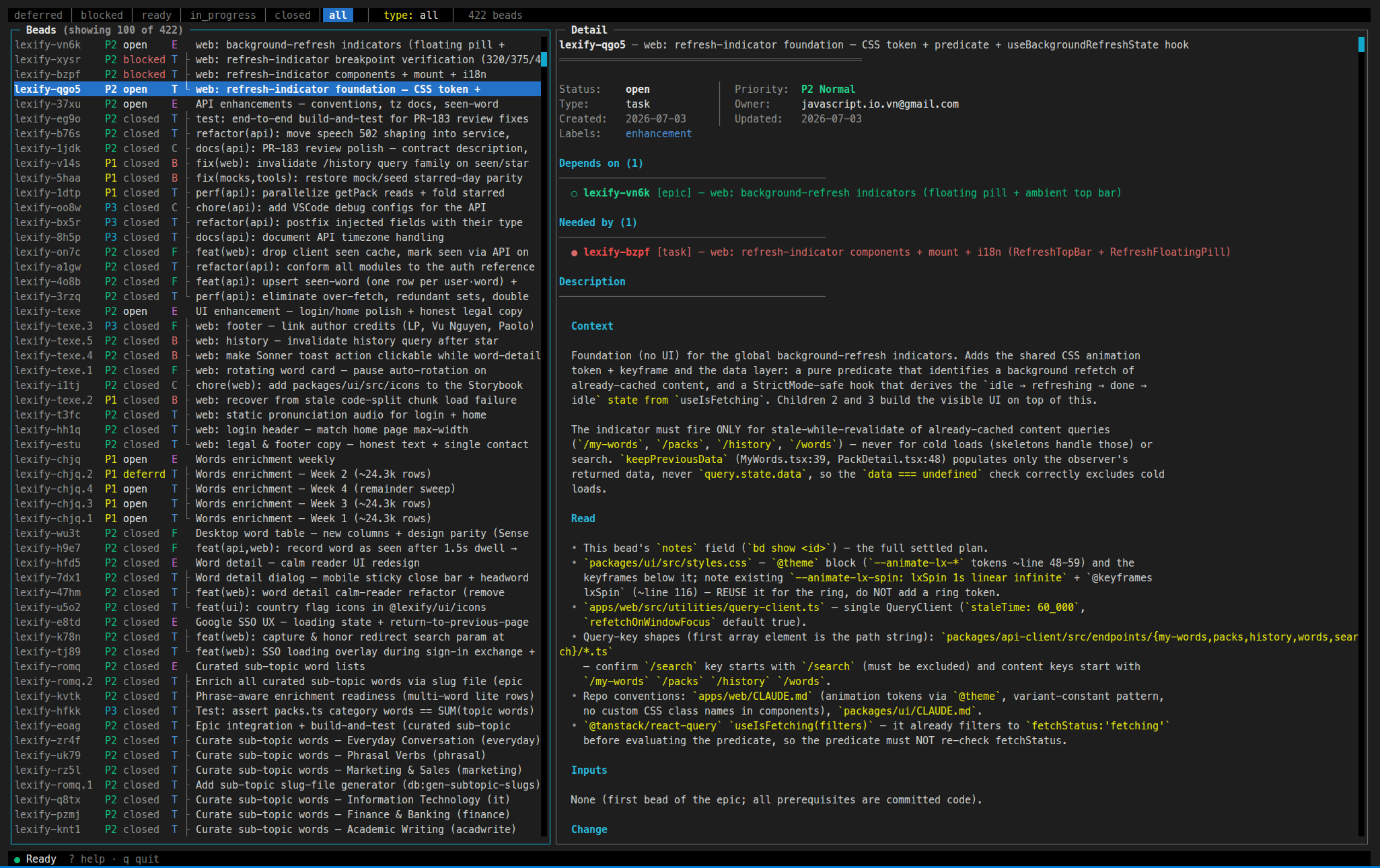
A top tab bar (the active status filter is highlighted — shown here as [ready] — followed by the live type: / epic: / search: and bead-count indicators), a two-pane body with the Beads list on the left and the Detail view on the right, and a bottom status bar:
┌──────────────────────────────────────────────────────────────────────────────────
│ deferred │ blocked │ [ready] │ in_progress │ closed │ all   type: all · 27 beads
├──────────────────────────────────────────────────────────────────────────────────
│ Beads (27)                        │ Detail
│ be-12 P1 in_prog T Fix login      │ be-12 — Fix login bug
│ be-13 P2 open    T Retry          │ ══════════════════════════════
│ be-10 P1 open    E Auth epic      │ Status:  in_progress  │ Priority: P1 High
│ be-11 P2 open    T ├ OAuth        │ Type:    bug          │ Owner:    alice
│ be-14 P2 closed  B └ CSRF         │ Created: 2026-06-01   │ Updated:  2026-06-14
│                                   │
│ list · 40%                        │ detail · 60%
├───────────────────────────────────────────────────────────────────────────────────
│ ● Ready   ? help · q quit
└───────────────────────────────────────────────────────────────────────────────────
Each list row reads id · priority · status · type-badge · title. The detail pane shows the selected bead's fields, its close reason (for closed beads), dependencies, and rendered description.
Beads with parent–child dependencies are shown as a tree inside the active filter — child rows nest under their epic with ├ / └:
be-10 P1 open    E Auth epic
be-11 P2 open    T ├ Add OAuth login
be-12 P2 open    T └ Refresh tokens
Keybindings
| Key | Action |
| ------------------- | ------------------------------------------------------------------------------------------------------------------------------------------------------------------------------------------------------------------------------------------------------------------------------------------------------------------------------------------------------------- |
| j / ↓ | Move down |
| k / ↑ | Move up |
| g / Shift+g | Jump to top / bottom |
| Enter / l | Focus detail pane |
| h / Esc | Back to list (from detail) |
| Tab / Shift+Tab | Next / previous status filter (deferred/blocked/ready/in_progress/closed/all) |
| t | Cycle type filter (all/epic/task/chore/bug) |
| e | Filter by epic (modal picker; x clears) |
| / | In-memory title filter (empty submit clears it) |
| r | Reload (keeps active filters) |
| Shift+r | Reset all filters (title / epic / type) and reload |
| s | Change status |
| c | Close with reason |
| Shift+c | Claim (in_progress + assign self) |
| o | Reopen |
| p | Change priority |
| h | Change parent (epic / standalone) |
| y | Yank bead ID to clipboard |
| w | Pick a workflow command and copy it with the selected bead's ID. Tasks list the per-bead executors (/executor-task, /executor-task-worktree, /executor-epic-task, /executor-epic-task-worktree, /executor-rework-in-place); epics list /executor-epic-sequential and /executor-epic-sequential-worktree. See Agent workflow. |
| m | Release mouse capture so you can drag-select & copy detail text with your terminal (toggle) |
| ? | Help overlay |
| q / Ctrl-C | Quit |
Agent workflow
Pressing w copies a slash-command for the selected bead, e.g. /executor-task be-12. Those /executor-* commands are Claude Code / Codex skills scaffolded by agent-workflow-beads — a planner → executor workflow backed by the same beads database. Install it globally, then bootstrap your repo so the copied commands resolve:
npm install -g agent-workflow-beads
agent-workflow-beads bootstrap /path/to/your-repo myprefix
Author
License
MIT