
bellsy
v0.3.4
Published
Notifications for local coding agents, scripts, and CLI tools when work finishes, fails, or needs approval.

Maintainers
 rkhooda
Readme
Bellsy 🔔



 ]
]
Stop babysitting your terminal.
Bellsy notifies you when local coding agents, scripts, and CLI tasks finish, fail, or need approval.
Perfect for Codex CLI, Gemini CLI, Claude Code, Blackbox, Cursor, build commands, test runs, and long-running local workflows.
✨ Why Bellsy?
Local AI agents are powerful, but easy to lose track of.
You switch tabs, start reading docs, grab coffee... and somewhere in the background your agent:
- ✅ finished successfully
- ❌ failed on an error
- 🙋 paused waiting for approval
Bellsy adds the missing attention layer so you can stay in flow instead of repeatedly checking whether something finished.
🚀 What You Get
- ⚡ One-command global CLI wrapper:
bellsy-run gemini,bellsy-run codex,bellsy-run claude - 🧭 Automatic local notification server startup
- 🔔 In-editor notification popups
- 🖥️ Native system notifications
- 🔊 Bundled sounds for completion and approval alerts
- 🎛️
FocusandVibesound modes - 👆 Click a system notification to jump back into your editor
- ⏳ Pending approval reminders
- 🌐 Local HTTP event endpoint with automatic port fallback
- 🤖 Support for local agent workflows and general CLI commands
💡 Best For
- Running Codex or Claude Code while working in another app
- Letting long test runs or build jobs finish in the background
- Catching approval prompts before an agent sits blocked
- Getting back to your editor quickly when work completes
🎬 Preview
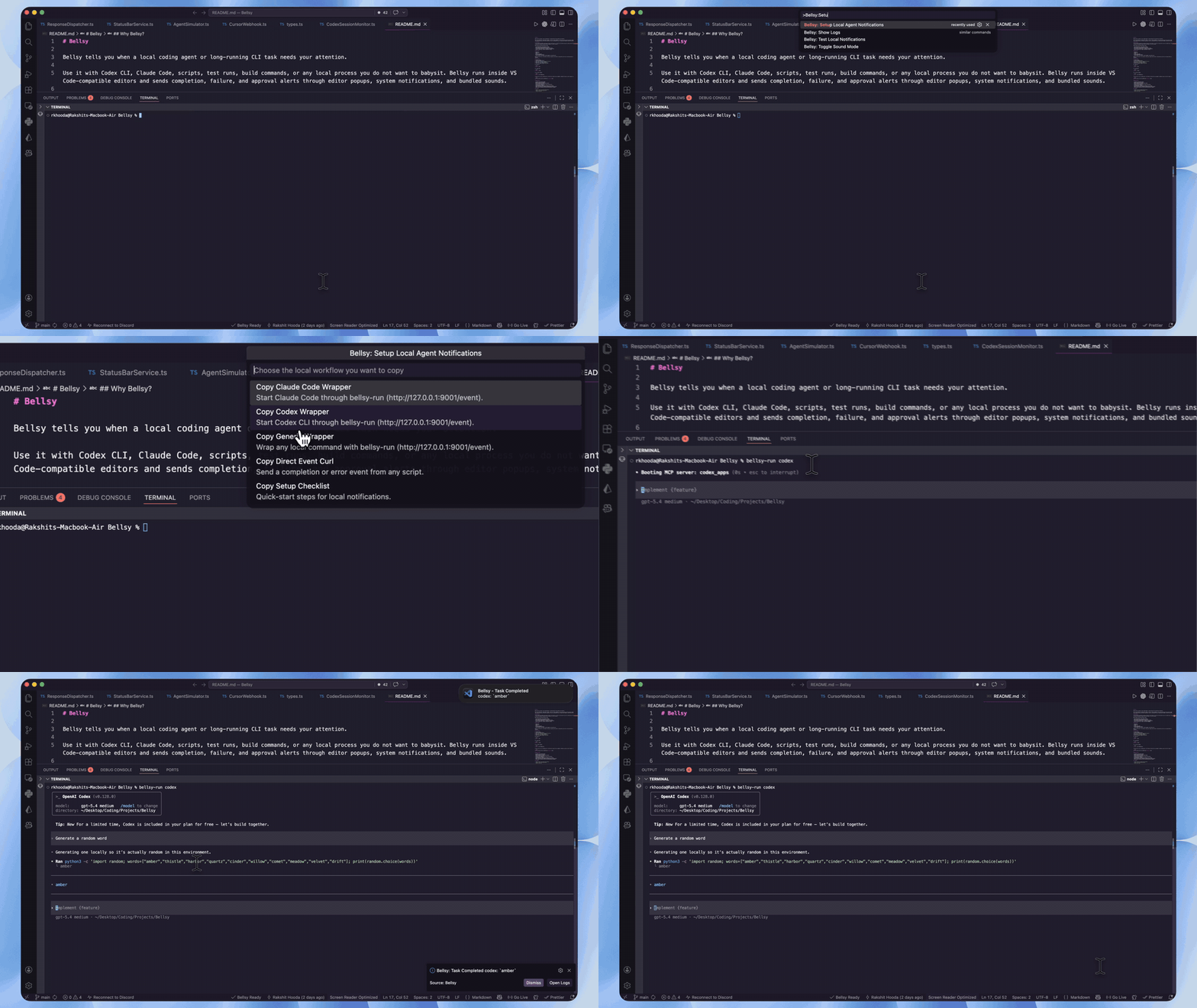
Full workflow: start a task and get notified
This preview shows the main Bellsy flow from setup to completion notification.
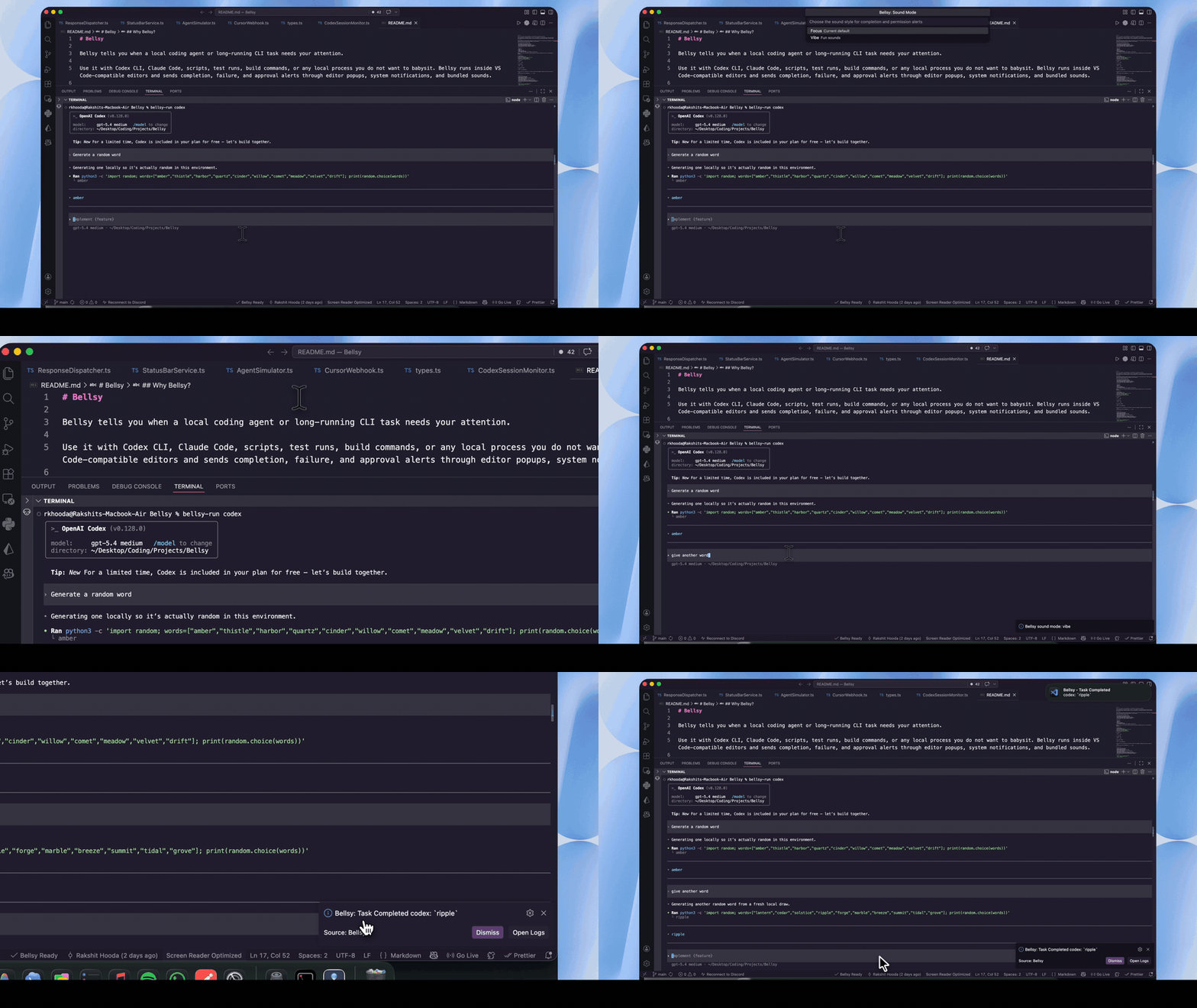
Extra feature: toggle between sound modes
This preview shows how to switch between Focus and Vibe sound styles.
🧠 Works With
- Codex CLI
- Gemini CLI
- Claude Code
- Blackbox CLI
- Cursor
- Visual Studio Code
- VS Code-compatible editors
- Local scripts, test runners, build commands, and custom tools
Bellsy is local-first. The terminal running your agent and the editor running Bellsy should be on the same machine, or at least within the same local network namespace.
🧩 Typical Flow
- Install Bellsy globally.
- Wrap your agent or CLI command with
bellsy-run. - Keep working in the same terminal flow.
- Bellsy alerts you when the task completes, fails, or needs approval.
⚡ Quick Start
Install the global CLI package:
npm install -g bellsyRun your agent through bellsy-run:
For Codex CLI:
bellsy-run codexFor Gemini CLI:
bellsy-run geminiFor Claude Code:
bellsy-run claudeFor Blackbox:
bellsy-run blackboxFor any other command:
bellsy-run your-command-herebellsy-run starts the local notification server in the background when needed. You do not need to run a second terminal window or manually start bellsy-run --serve.
For Gemini CLI, Bellsy installs a local Gemini AfterAgent hook on first run at:
~/.gemini/extensions/bellsy-notificationsThat hook is what lets Bellsy notify immediately after each Gemini response, even when Gemini's terminal UI does not print a clean completion marker.
If Bellsy has to use a fallback port, the status bar shows the live endpoint. Advanced scripts can still target it with BELLSY_URL:
BELLSY_URL=http://127.0.0.1:PORT/event bellsy-run codex🕹️ Commands
Bellsy: Setup Local Agent NotificationsBellsy: Test Local NotificationsBellsy: Show LogsBellsy: Toggle Sound Mode
Pending approval requests are intentionally surfaced through reminder prompts and the status bar, so the Command Palette stays clean and focused.
🔊 Sound Modes
Bellsy ships with two sound styles:
Focus: clean, professional sounds for work modeVibe: more playful sounds for a lighter workflow
Switch anytime with:
Bellsy: Toggle Sound Mode🌐 Local Event Endpoint
Bellsy listens on a local loopback HTTP endpoint:
http://127.0.0.1:9001/eventIf port 9001 is busy, Bellsy automatically picks another free local port. The setup command and status bar always show the active endpoint for the current editor session.
Example direct event:
curl -X POST http://127.0.0.1:9001/event \
  -H 'content-type: application/json' \
  -d '{"type":"task_completed","message":"Local task finished"}'
⚙️ Settings
bellsy.soundModebellsy.httpPortbellsy.soundEnabledbellsy.soundVolumebellsy.httpResponseTimeoutMsbellsy.permissionReminderEnabledbellsy.permissionReminderIntervalSeconds
🛠️ Troubleshooting
If notifications do not appear, run:
Bellsy: Show LogsIf local events fail, check the Bellsy status bar item for the live endpoint instead of assuming port 9001 is active.
For Gemini, confirm the hook is enabled:
gemini extensions list | grep bellsy-notificationsIf approval prompts seem stuck, use the reminder popup or status bar item to reopen the pending request list.
🔒 Privacy
Bellsy's production workflow is local-first. It listens on loopback, receives local events locally, and does not require a hosted relay for normal Codex, Claude Code, or script notifications.