
berryjs-engine
v0.1.0
Published
A lightweight JavaScript 2D game engine

Maintainers
 jrpiyush
Readme
Quick Start
npm create berryjs my-game
cd my-game
npm install
npm run dev
Open http://localhost:5173/ Or Open the Url shown in the terminal
Demo controls: Enter to start, arrow keys to move, Shift to run, Space to jump, Esc to return to the menu.
Your Project Will look like this:
my-game/
  index.html
  main.js              # creates the game and starts it
  scenes/
    MenuScene.js       # title screen
    GameScene.js       # the playable level, edit this to make your game
  public/
    assets/
      player-sheet.png
Manual Install (Not Recc By PiyusX 😁💩)
npm install berryjs-engineUse Vite to run BerryJS in your project. which resolved `import... from "berryjs-engine" fro you.
Hello World
A player that moves with the arrow keys and jumps with Space:
import { Game, Scene, Actor } from "berryjs-engine"

class Player extends Actor {
    update(dt) {
        const keyboard = this.game.keyboard

        if (keyboard.isDown("ArrowRight")) this.x += 200 * dt
        if (keyboard.isDown("ArrowLeft")) this.x -= 200 * dt

        if (this.grounded && keyboard.isDown("Space")) {
            this.vy = -420
            this.grounded = false
        }
    }
}

class MyScene extends Scene {
    start() {
        const floorY = this.game.height - 80

        const player = new Player(80, floorY - 100, 40, 40)
        player.color = "#ff4d6d"
        player.gravity = 800

        const floor = new Actor(0, floorY, 2000, 50)
        floor.solid = true
        floor.color = "#3ddc84"

        this.add(player)
        this.add(floor)
    }
}

const game = new Game({ width: 800, height: 600 })
game.setScene(new MyScene())
game.start()
Features
Game loop with delta time
Scenes with start, update, draw and end methods
Actors with movement, gravity and sprites
Collisions with solid and one-way platforms
Camera with actor following and world bounds
Sprite animations with horizontal flipping
Keyboard input using key codes
Sound with overlapping playback
Core Concepts
Game
const game = new Game({
    width: 800,            // canvas width (default 800)
    height: 600,           // canvas height (default 600)
    fullscreen: false,
    parent: document.body,
    background: "#111111"
})

game.setScene(scene)
game.start()
Scenes
Create screens (menu, level, game over) by extending Scene:
class MenuScene extends Scene {
    start() {}
        if (this.game.keyboard.isDown("Enter")) {
            this.game.setScene(this.game.gameScene)
        }
    }
    draw(ctx) {
        ctx.fillStyle = "white"
        ctx.fillText("Press Enter", 100, 100)
    }
    end() {}
}
Actors
Everything in the world is Actor. Override update(dt) for behavior and onOverlap(other) to react to touching other actors.
const coin = new Actor(400, 300, 24, 24)
coin.tag = "coin"
coin.color = "#ffd000"
Collecting a coin, for example:
class Player extends Actor {
    onOverlap(other) {
        if (other.tag !== "coin") return

        this.score += 1
        this.game.remove(other)
    }
}
Sprites
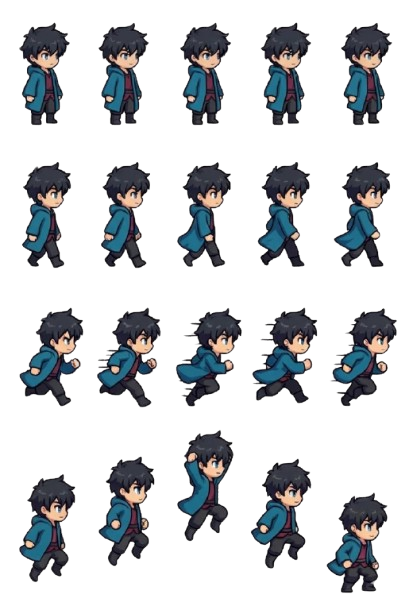
Load a sprite sheet where each row is an animation:
import { Sprite, loadImage } from "berryjs-engine"

const image = await loadImage("/assets/player-sheet.png")
const sprite = new Sprite(image, frameWidth, frameHeight)

player.setSprite(sprite)
sprite.setAnimation(1, 5)   // row 1, 5 frames
Here is the Example BluePrint

Camera
this.game.camera.follow(player)
this.game.camera.setBounds(0, 0, worldWidth, worldHeight)
this.game.camera.follow(null)   // stop following
Keyboard
this.game.keyboard.isDown("ArrowLeft")
this.game.keyboard.isDown("Space")
this.game.keyboard.isDown("KeyW")
this.game.keyboard.isDown("ShiftLeft")
Sound
import { Sound } from "berryjs-engine"

const jump = new Sound("/assets/jump.wav")
jump.play()
API Overview
| Export | Description |
|---|---|
| Game | Game setup and loop |
| Scene | Game screens and levels |
| Actor | Game objects |
| Sprite | Sprite animations |
| Camera | Camera movement and bounds |
| Collision | Collision detection |
| Sound | Sound playback |
| loadImage(src) | Loads an image |
Common Game methods: setScene(), start(), stop(), add(), remove() and clear().
Development
git clone <https://github.com/PiyuSX/BerryJs>
cd berryjs
npm install
npm run dev     # start the example with Vite
npm test        # run the test (Personally i pass all 😋)
Author
Made by Piyush.
Contributing
Issues and pull reqs are welcome.
License
MIT