
better-model-provider
v0.0.8
Published
Per-model reasoning efforts and input modalities for DeepSeek Harness — one settings section, no YAML.

Maintainers
 sanshan_3
Readme
better-model-provider
官方目录路由上的稀疏、非破坏性按模型覆盖——包括推理强度档位及其取值拼写——不替换整个目录。
自定义模型:编辑声明。官方模型:编辑覆盖。供应商配置仍归官方。
为什么
官方「模型」页也能改输入模态与 token 容量,但它的写法是整段重写该路由的 models 数组:只要动一个字段,这条路由上其余模型就停止跟随目录更新,而稀疏 modelOverrides 在该路由上随即变成非法写法。它也没有按模型的推理强度入口。
本页是另一条缝:在官方目录路由上,只写你动过的那一个模型的差量——含 reasoningEfforts 档位与其取值拼写——其余模型继续跟随目录;在你自己声明的路由上则直接编辑声明。
安装
dsh plugin --profile web add better-model-providernpm 包自带构建产物,此路径零本机构建。备选:github:sanshanya/better-model-provider#master(CI 在 main 每次全绿后向 master 分支重建并发布成品);裸默认分支(github:sanshanya/better-model-provider)本地构建:按提示为 pnpm 增加一个 allowBuilds 键后重跑 add;本地 link: 安装须先 npm install && npm run build。重启 dsh web,设置侧栏即现「模型能力」。
dsh plugin --profile web rm better-model-provider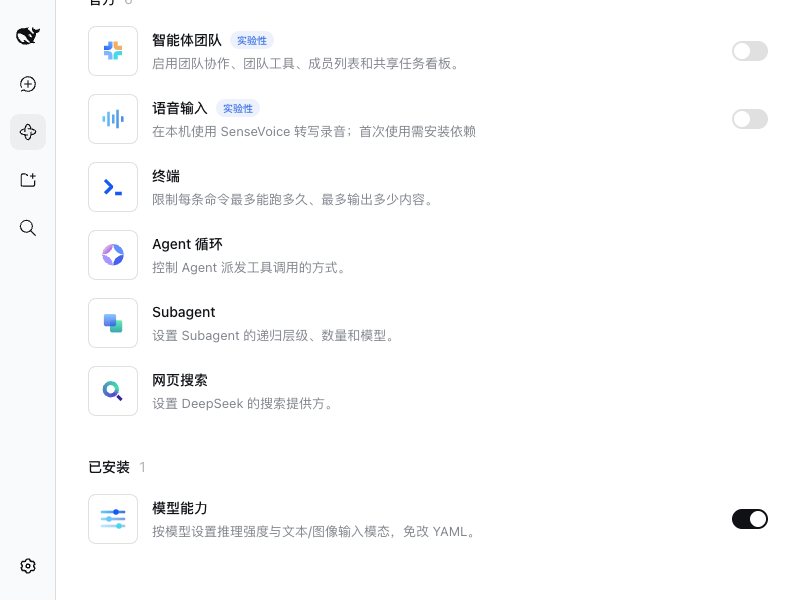
使用
- 先在官方「模型」页配好供应商与 API 密钥——密钥和路由的启用/停用始终归官方页管理,本页不重复这些功能。
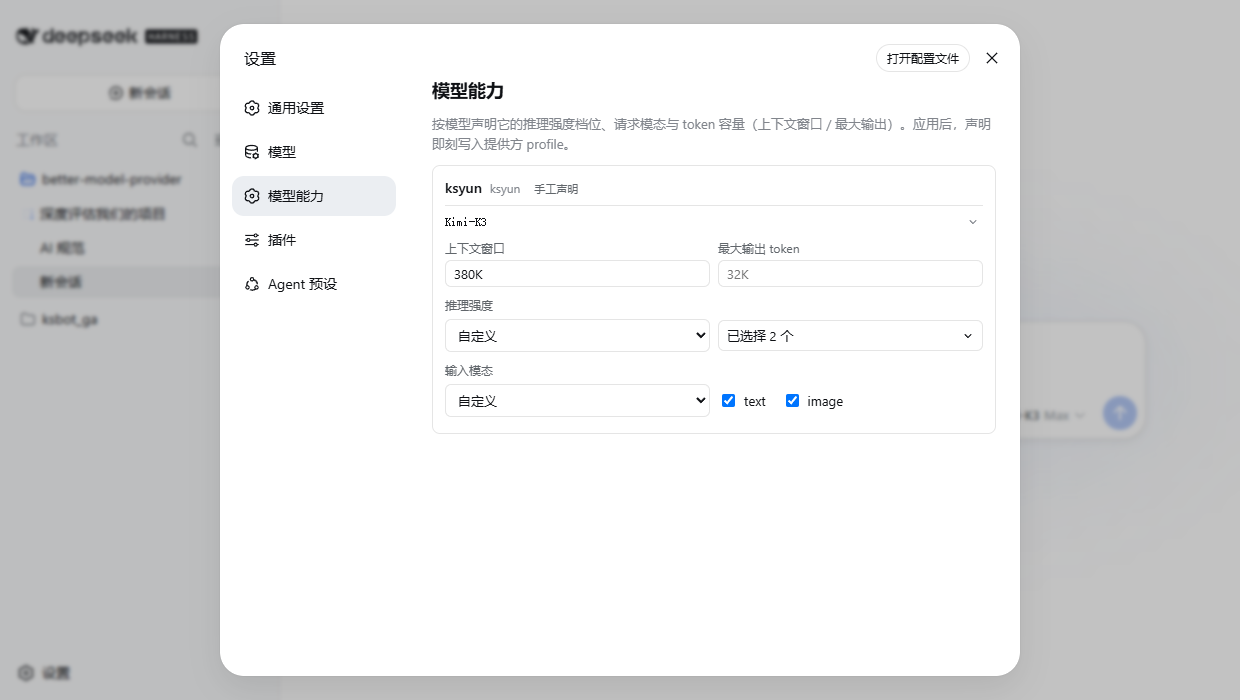
- 展开某个模型行,直接改它的能力:
- 推理强度:选「自定义」,勾需要的档位;希望「关」这一档也开放,就把 off 一并勾上(取值可留空)。
- 视觉模型:在输入模态里勾上 image——不勾,聊天里发图给这个模型会被拒收。
- 容量:直接填,K/M 写法更直观(
380K、1M)。改完点「应用」立即生效。
- 官方目录路由(官方已交给模型目录的路由):点「管理官方模型」后改。我们的每处改动只记「与官方默认不同的那一点」——其余部分官方日后更新了也照样跟随;改错了用「还原为官方默认」一键撤销该模型的全部改动。
- 「管理官方供应商(N)」里可以翻出还没配置的官方路由:选它、应用第一个改动,这条路由就诞生了。API 密钥仍需在官方页设。
官方「模型」页同样能改输入模态与容量——但它的做法是替换整段模型列表,那会让该路由不再跟随目录,也就排除了覆盖写法。只想改一个模型、让其余三十七个继续跟随目录时,用本页。若某条路由的列表已在官方页被替换过,本页就按声明路由的方式编辑那份列表。
内置的「DeepSeek」「OpenAI Codex」等专属适配器在它们自己的设置页声明能力,本页不显示它们。
兼容性
| Harness 线 | 状态 |
|---|---|
| dsh 0.2.0-rc.2(npm latest / next) | 端到端验证通过 |
| dsh 0.2.1-alpha.1 | 端到端验证通过 |
| dsh 0.1.7-rc.2 | 端到端验证通过 |
| dsh 0.1.5-rc.3 | 端到端验证通过 |
| 0.1.2-alpha.1 … 0.1.6-alpha.2 | 未验证:peer 范围接纳,但没有跑过车道 |
| 0.1.0-rc.7 … 0.1.1-rc.2 | 拒绝:本页已不再支持 connection.api 那一代 |
「验证通过」指两条车道都在真实 harness 上跑过:integration 启动本地检出并确认插件客户端模块确实被服务;functional 用真实浏览器完成一次能力写入与还原。两条车道都是可选项——BMP_DSH_DIR=/path/to/deepseek-harness npm run test:live(functional 见 CONTRIBUTING.md)——未设置时自动跳过。
peer 范围收敛为单一区间 >=0.1.2-alpha.1 <0.3.0:地板把已退役的 connection.api 一代挡在门外(0.1.0-rc.7 线仍被拒),天花板放行 dsh 0.2 线。安装时真正裁决这些 peer 的是 dsh 的准入闸——它以 includePrerelease: true 读预发布,而本插件的每次安装都走这条路;npm 自己的 peer 规则按更严格的 tuple 读法,对部分版本会得出相反的结论,但它不管辖这条安装路径。(0.0.6 及更早按已发布线逐条枚举分支——那是 npm 严格读法的历史残留;0.0.7 起按 dsh 语义收敛为一条。)每日金丝雀复验 latest、next、alpha 三个频道;频道解析成功而车道跳过的那条腿会判失败,而不是悄悄放行;重新转绿的腿会自行关掉该频道积存的红色追踪 issue。
字段重叠:本页可编辑按模型的 reasoningEfforts(档位及其取值拼写)与稀疏 modelOverrides——官方「模型」页两者都没有入口。它也能改 input、contextWindow、maxTokens,但这些官方页本来就能改,所以在本页只是顺手,而非独有能力。恢复:若路由的模型列表被官方页整组重写、而本页保存的覆盖残留在旁,写入校验即判该路由非法——卡片上的「移除残留覆盖」一键清除,且只有显式点击才生效。
许可证
MIT