
better-skills
v0.10.11
Published
A pnpm-inspired skills management CLI with content-addressable storage

Maintainers
 cheny341
Readme
better-skills (bsk)
A CLI for managing Agent skills with versioning, profiles, and multi-client sync.
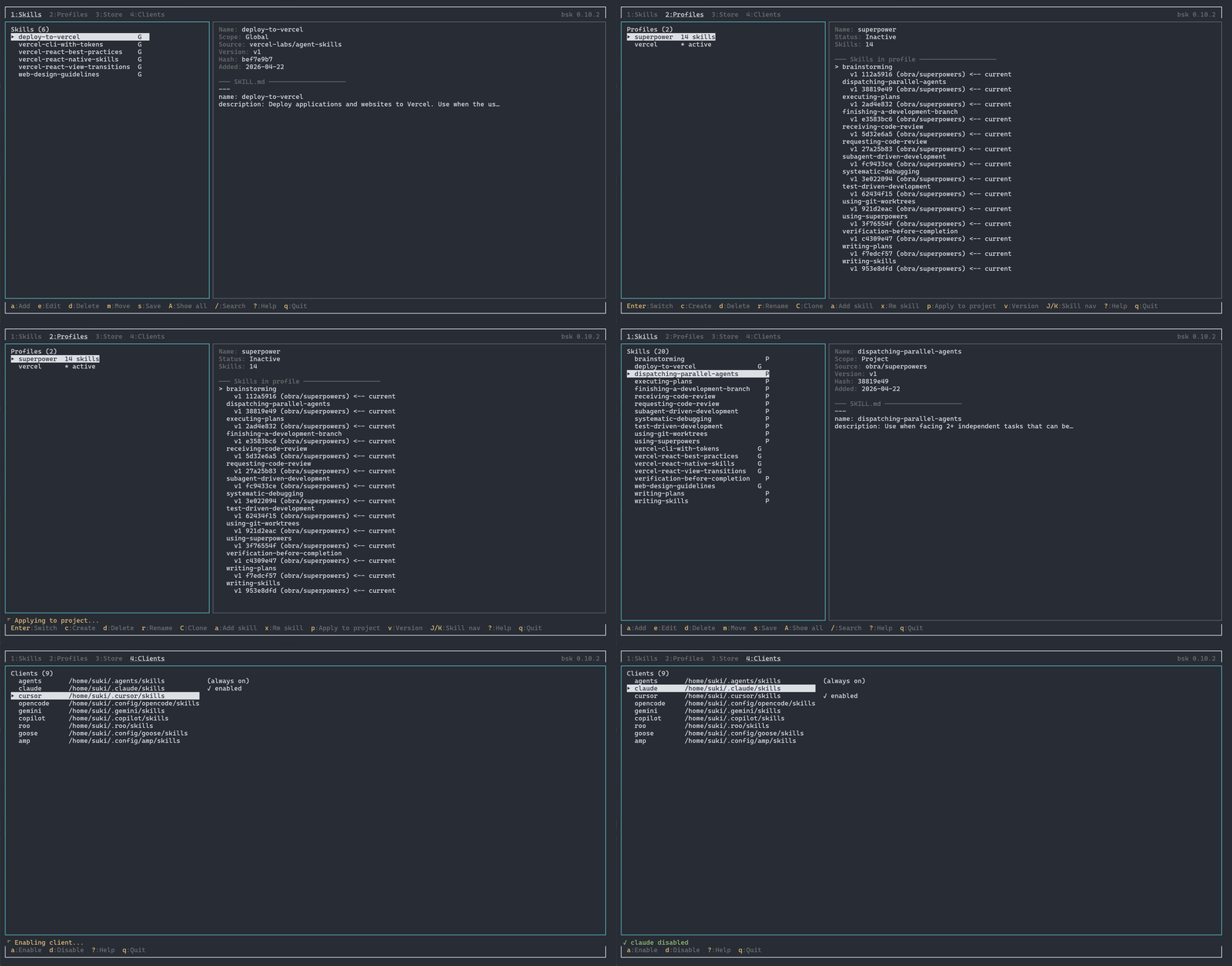
Features
- Interactive TUI — Manage skills, profiles, clients, and store operations from a terminal UI
- Content-addressable storage — Skills are SHA-256 hashed and deduplicated in a global store
- Profile management — Create named skill collections, switch between them instantly
- Version tracking — Every save creates a new version; reference any version by number
- Global & project scopes — Install skills user-wide or per-project, move them freely between scopes
- Multiple sources — Add skills from GitHub repos, git URLs, or local paths
- Multi-client support — Sync skills to Claude, Cursor, OpenCode, Gemini, Copilot, Roo, Goose, and Amp simultaneously
Already Have Skills?
Still managing your skills manually? Just one command to unlock the full power of bsk:
bsk saveYour existing skills are now managed by bsk — no manual migration needed.
How It Works
Installation
npm / pnpm / bun
npm install -g better-skills
pnpm add -g better-skills
bun add -g better-skills
Requires Node.js >= 18 (or Bun).
Binary
curl -fsSL https://raw.githubusercontent.com/anthod0/better-skills/main/packages/install/install.sh | bashInstalls a platform-specific binary to ~/.local/bin/. Supports Linux (x64/arm64) and macOS (x64/arm64).
You can also download binaries directly from the GitHub Releases page.
Quick Start
# Launch interactive TUI
bsk

# Add a skill from GitHub
bsk add owner/repo

# Add a skill from a subdirectory
bsk add owner/repo/path/to/skill

# Add from a local path
bsk add ./my-skill

# List active skills
bsk ls

# List all managed skills (including inactive)
bsk ls -a
Commands
Skill Management
bsk add <source>          # Add a skill (github, git, local path)
bsk install <source>      # Alias for add (also: bsk i)
bsk rm <name>             # Remove a skill
bsk ls [-a]               # List skills (-a for all managed)
bsk save [name]           # Save new/changed skills to management
bsk update [skill]        # Refresh git/GitHub-backed skills from upstream
bsk mv <skill> <scope>    # Move skill between global/project scope
bsk completion <shell>    # Generate bash, zsh, or fish completion script
Options for add / install:
-g, --global              # Install to global skills directory
-n, --name <name>         # Override the skill name
-f, --force               # Overwrite unmanaged skills
-s, --skill <skills...>   # Install specific skills by name; use '*' for all
-y, --yes                 # Skip confirmation prompts
--hardlink                # Use hard links instead of file copy
Source Formats
bsk add owner/repo                              # GitHub repo root
bsk add owner/repo/subdir                       # GitHub subdirectory
bsk add https://github.com/owner/repo           # Full GitHub URL
bsk add https://github.com/owner/repo/tree/main/subdir  # Branch + path
bsk add https://gitlab.com/owner/repo           # Any HTTPS git URL
bsk add [email protected]:owner/repo.git           # Git SSH
bsk add ./local/path                            # Local directory (also ../ and /abs)
Installing Specific Skills
bsk add owner/repo --skill my-skill
bsk add owner/repo --skill skill-a skill-b
bsk add owner/repo --skill '*'
bsk add ./local-repo --skill "Convex Best Practices"
Remote Updates
Skills installed globally from git or GitHub sources record the upstream commit SHA as remote metadata. Updating creates a new local vN version only when the skill content changes.
bsk update                 # Update remote-backed skills in the active profile
bsk update my-skill        # Update one managed skill
bsk update --all           # Update all remote-backed registry skills, including inactive ones
Local path sources are skipped because they do not have an upstream remote version.
Profiles
Profiles are named snapshots of skill collections with version references.
bsk profile create <name>     # Create a profile from current skills
bsk profile ls                # List all profiles
bsk profile show [name]       # Show profile details
bsk profile use <name>        # Switch to a profile
bsk profile add <skill>       # Add a skill to active profile
bsk profile rm <skill>        # Remove a skill from active profile
bsk profile clone <from> <to> # Clone a profile
bsk profile rename <old> <new>
bsk profile delete <name>
Version specifiers for profile operations:
bsk profile add my-skill@latest     # Latest version
bsk profile add my-skill@previous   # Previous version
bsk profile add my-skill@v2         # Specific version
bsk profile add my-skill@~1         # Relative (latest minus 1)
bsk profile add my-skill@abc123     # Hash prefix match
Multi-Client
Enable additional clients to automatically sync skills to their directories.
bsk client ls                          # List enabled clients
bsk client add claude cursor gemini    # Enable clients
bsk client rm cursor                   # Disable a client
Supported clients: claude, cursor, opencode, gemini, copilot, roo, goose, amp
Store
bsk store verify    # Check integrity of all store entries
bsk store ls        # List all store entries with skill/version info
bsk store prune     # Delete all orphan entries from the store
bsk store adopt     # Re-register orphan store entries into registry
Sync
~/.better-skills/ is a self-contained data directory. Sync it with any tool you prefer.
bsk sync restore          # Rebuild live skills from store and profile
bsk sync export           # Export ~/.better-skills/ as tar.gz
bsk sync import <file>    # Import tar.gz and restore
bsk cd                    # Open a shell in ~/.better-skills/
Quick start with git:
cd ~/.better-skills
git init && git add -A && git commit -m "init"
git remote add origin <your-repo> && git push

# On another machine:
git clone <your-repo> ~/.better-skills
bsk sync restore
Simple backup/transfer (no git needed):
bsk sync export                          # Machine A
bsk sync import better-skills-backup.tar.gz  # Machine B
rsync:
rsync -az ~/.better-skills/ remote:~/.better-skills/
ssh remote bsk sync restore
Syncthing / other:
Sync ~/.better-skills/ as a shared folder, then run bsk sync restore on each machine.
Shell completion
Generate shell completion scripts:
bsk completion bash
bsk completion zsh
bsk completion fish
Bash
Use for the current shell:
source <(bsk completion bash)Install permanently by adding it to ~/.bashrc:
echo 'source <(bsk completion bash)' >> ~/.bashrcZsh
Write the completion file to a directory in your fpath:
mkdir -p ~/.zsh/completions
bsk completion zsh > ~/.zsh/completions/_bsk
Make sure ~/.zsh/completions is in your fpath before compinit runs.
Fish
mkdir -p ~/.config/fish/completions
bsk completion fish > ~/.config/fish/completions/bsk.fish
Roadmap
- [x] TUI — Interactive terminal UI for managing skills
- [ ] Built-in
use better-skillsskill — A bundled skill that teaches agents how to usebsk - [ ] Skills security audit — Security review and sandboxing for skill content
Development
This is a Bun workspace monorepo.
bun install              # Install dependencies
bun run dev              # Run CLI from source
bun run build            # Build (tsdown → dist/cli.mjs)
bun run test             # Run tests
bun run typecheck        # TypeScript strict check
bun run build:binary     # Compile cross-platform binaries
License
MIT