
bigp-globals
v1.1.1
Published
A fairly light, reusable and extendable scaffolding module for WebApps.


Readme
bigp-globals
WARNING: under construction, use at your own risk!

So, you keep forgetting what you need to create a WebApp?
:earth_americas: :earth_africa: :earth_asia: Well whadayaknow... me too! :earth_asia: :earth_africa: :earth_americas:
:floppy_disk: Install
Run: npm install bigp-globals
:rabbit2: Quick Start
Once npm finishes its funky thing, you can start your app with a simple app.js file containing something like this:
// Example in file "app.js"
const $$$ = require('bigp-globals');

$$$.init() // <-- Yes, this is a promise!
  .then(status => trace(`Command returned: ${status}`.yellow))
  .catch(err => traceError(err));
And then in your CLI:
node app.js
Optionally, you can specify a command, like this:
node app.js -c prod (see options below)
You should then see some output indicating the Express server started. :clap: Congrats! :clap:
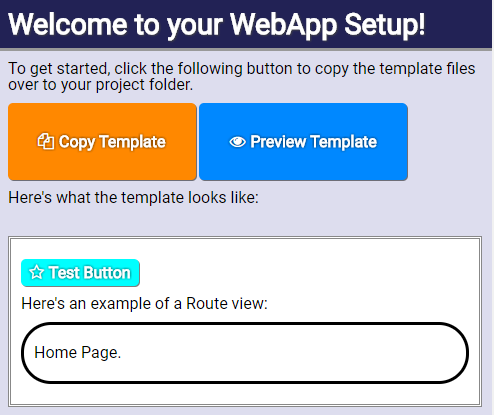
:camera: Screenshots
First Time Setup:
:heavy_check_mark: Features
This module basically sits in the background and provides a quick, effortless way to make WebApps.
| Features | Included |
| --- | --- |
| Show a User-Friendly startup guide for first time user experience? | :heavy_check_mark: |
| Automatically open the 'localhost:3333' URL in your default browser when starting? (only when it's not already opened) | :heavy_check_mark: |
| Hot-Reload on server & client code changes? (supports SCSS & CSS dynamic reloading) | :heavy_check_mark: |
| Serve files directly from your /public/ folder? (JS, CSS, media files, you name it!) | :heavy_check_mark: |
| Compile front-end files with Webpack? (creates a bundle.js file) | :heavy_check_mark: |
| Include jQuery, lodash, Vue, socket.io, HowlerJS, and other goodies? (if you want to add/remove, edit the index.html file)| :heavy_check_mark::heavy_check_mark::heavy_check_mark::heavy_check_mark::heavy_check_mark::heavy_check_mark: |
| Okay, but will this cause me headaches? | :x: :sweat_smile: |
:raising_hand: Why?
Simply because, overtime, I've noticed when I'm developing Web apps I'm rewriting the same code over and over, slightly differently, but usually behaving the same way in the end.
Coming from a Flash background, I've never been a big fan of writing console.log, so I generally make an alias to it with a global trace variable. You're welcome, fellow AS3 devs :metal:
:question: What's happening exactly?
A "Master cluster" process starts up. It then loops every few milliseconds to ensure a child-process is running your actual webapp (express, socket.io, etc).
This ensures that whenever the child-process kills itself from a server-side file modification (:running_man::gun: how dark!), the Master process simply relaunches it immediately.
The File-Watcher system is also responsible for differentiating between modifications applied to server-side, front-end JS, CSS, media files, and webpacked source files to notify and/or kill the respective event or process.
This way, whenever possible, it attempts to hot-reload dynamic resources (ex: CSS stylesheets) without doing a full page-refresh.
:page_with_curl: Options
You can configure the module by passing an options object to the init({...}) method.
Example:
$$$.init({
  /////////// Yargs command-line config:
  version: '2018.1.0',
  defaultCmd: 'auto',
  commands: {
    auto() {
      //Do something automatically...
      trace("No CLI command specified, running auto.");
      return 'auto';
    }
  },

  /////////// Express/Socket.IO config:
  server: {
  	port: 4444,
  	delay: 500,
  	isAutoStart: false,
  	isHelloWorld: true
  },

  /////////// Chokidar file-watcher config:
  watcher: {
  	dir: '/folder/to/keep/an/eye/on/'
  }
})
Here's the list of available options:
noConflict(Boolean, default=false) Prevents polluting the global-scope if true (will only write to$$$.globals).version: (String) When starting the app from the command-line, using-vwill display this version string.defaultCmd: (String, default=auto) The default command to call in your list of commands when no command parameter is specified in the CLI-c(if nocommandsfunctions are provided, just uses thebuilt-inone).commands: (Object of functions) Provide a list of commands to perform custom startup processes depending on the-c "command"specified in the CLI.server: Express and Socket.IO config:port: (Number, default=3333) The port to listen on the Express web server.delay: (Number, default=250) Milliseconds to wait before auto-starting the server.isAutoStart: (Boolean, default=true) Tells the server to start immediately. If you need to configure other server-related parts of your app manually, you can set this tofalseand call$$$.server.start()after your setup code.isHelloWorld: (Boolean, default=false) Serves a "Hello World" string on the root/URL.
watcher: Chokidar file-watcher config:dir: (String, default=...) Path of root-folder to detect file modifications. By default, the root is your web-app's project directory.
Hmm, I don't like the idea of polluting the global-scope. (ex: having lodash
_everywhere)
Easy fix, just set: $$$.init({noConflict: true})
What about those String, Number, Boolean, Array extensions?
Although noConflict takes care of some global conflicts,
there may be some extensions applied to the built-in Javascript types.
All I have to say about that is:
I really hope they won't conflict with your codebase, because they're designed to provide convenience methods used internally AND by the various web-apps created with this module.
#BuiltInExtensionsLivesMatters, right? :grinning:
:raised_hands: The Promise of $$$.init(...)
Once the module is initialized, it returns a Promise object.
The result passed in the resolved then((result) => {...})
callback should be the command name passed with the -c or --command CLI argument.
You may want to add a catch callback as well to pickup any potential internal issues during startup / runtime.
:family: Dependencies
What it uses under-the-hood:
express: serves files from/publicfolders (the internal one, plus the one you define in your project) and can be used to create other Routers, your own REST API, etc.chokidar: used to detect file-changes and hot-reload/restart the child-server process automatically.socket.io: handles the Client-Server communication.yargs: parses the CLI arguments when launching the server with special parameters.
On the client side, it uses:
vue: For layout, data-binding, client-router page updates, etc.socket.io: To communicate from/to the server.GSAP TweenMax: The best Web Animation library, hands down.EaselJS: A canvas-based drawing library (a-la-Flash).Push: Dispatches desktop notifications on server-refreshes.Showdown: To easily convert Markdown text to HTML (addmdclass to automatically parse your HTML tags)jQuery: Because, of course! :smile: