
binance-smart-money-oi-monitor
v1.12.1
Published
Binance Smart Money (Smart Signal) + Open Interest anomaly monitor — 17 whale fields the public fapi can't give you, an MCP server for any terminal AI, a shareable panel card, and a full-market Telegram alert bot. 7-layer 418 protection. A Bennie Strategy

Maintainers
 0xbennie
Readme
Binance 合约聪明钱 & OI 异动监控




English · 简体中文
Bennie Strategy 出品 · npm 包名
binance-smart-money-oi-monitor· 联系:X/推特 @0xBenniee · Telegram @OxBennie🚀 新手先读 新手指南 GUIDE.zh-CN.md —— 能做什么、两种用法怎么操作、BILL 真实案例走一遍。
生产级的 Binance Smart Signal("聪明钱 / Smart Money" 标签页) 抓取器 —— 拉取
公开 fapi 接口拿不到的完整 17 字段鲸鱼总览,并内置 7 层 418 / 429 / 403
限频封禁防护。
本仓库包含 一套工作流的两半 + 三种数据消费方式:
| 工具 | 技术栈 | 作用 |
|---|---|---|
| Smart Money 抓取器(根目录 src/) | TypeScript | 把 17 字段鲸鱼总览 + 头部账户 + OI 快照入 SQLite,并提供 Express 看板 |
| altmonitor(altmonitor/) | Python | 全市场 1 分钟价格异动(±3%)+ OI 异动监控,带 Telegram bot |
altmonitor 告诉你某个币何时异动(实时 Telegram 价格 / OI / 爆量告警);Smart Money 抓取器 / MCP / 看板告诉你是谁在建仓、鲸鱼是否在盈利 —— 把告警到的币直接丢进 get_full_picture / render_panel。
Smart Money 数据三种消费方式 —— 当 Node 库、走 HTTP JSON API、或通过自带的 MCP server 把它暴露成工具给任意终端 AI(Claude Code、Codex、Gemini CLI、Cursor……)。
这是 binance.com/zh-CN/smart-money/signal/<symbol> 页面背后调用的接口:
https://www.binance.com/bapi/futures/v1/public/future/smart-money/signal/overview?symbol=BTCUSDT无需 API key。多数 VPS 区域可直连 —— 若你所在区域被地区限制,设置
HTTPS_PROXY=http://host:port 即可把 Binance 请求走代理/VPS(1.9.3 新增)。但币安对此
web bapi 网关有未公开的单 IP 权重预算,一次莽撞的突发请求就可能换来 4 小时的
Retry-After。本仓库解决这个问题。
快速开始
最快方式 —— 不用 clone、不用 build。 把 MCP server 注册到你的 AI 客户端:
claude mcp add smartmoney -- npx -y binance-smart-money-oi-monitor@latest然后直接问 AI「ETH 现在的聪明钱持仓结构是什么?」它会调用
get_full_picture。7 个实时工具会直接请求 Binance,立即可用,不需要本地数据库。
4 个时序工具(
get_change、get_profit_trend、scan_extreme、render_chart)需要 tracker 历史。按从 clone 运行启动 tracker,并让 tracker、看板和 MCP server 使用同一个绝对路径SMART_MONEY_DB_PATH。
所有支持的环境变量都集中在 .env.example 和下方的
环境变量表中。
它能做什么
一个数据源(Binance 聪明钱 Smart Signal + OI + 头部账户 + 资金费),六种用法。下面全部现在就能用。
1. MCP server —— 11 个工具,接入任意终端 AI(零部署,首选)
注册一次(claude mcp add smartmoney -- npx -y binance-smart-money-oi-monitor@latest),用自然语言问就行。实时工具直连 Binance —— 不需要数据库、不需要配置:
| 工具 | 返回什么 |
|---|---|
| get_smart_money | 每一边(多/空):聪明钱仓位(USD)、庄家(鲸鱼)仓位、开仓均价、多少人在盈利 —— 公开 fapi 拿不到的 bapi 独有字段 |
| get_top_trader | 头部 20% 账户多空比 + Taker 主动买卖比(更短周期的资金流) |
| get_open_interest | 总持仓 OI(USD 和 张数)+ 5m/15m/1h/4h 变化率(按张数,非价格) |
| get_funding | 资金费率 → 年化 % + 每结算/每天/每年 支付或收取的 USD |
| get_full_picture | 一次拿全:聪明钱 + 鲸鱼 + 头部账户 + OI + 资金费 + 聪明钱占总 OI 比。最有用的一个调用 |
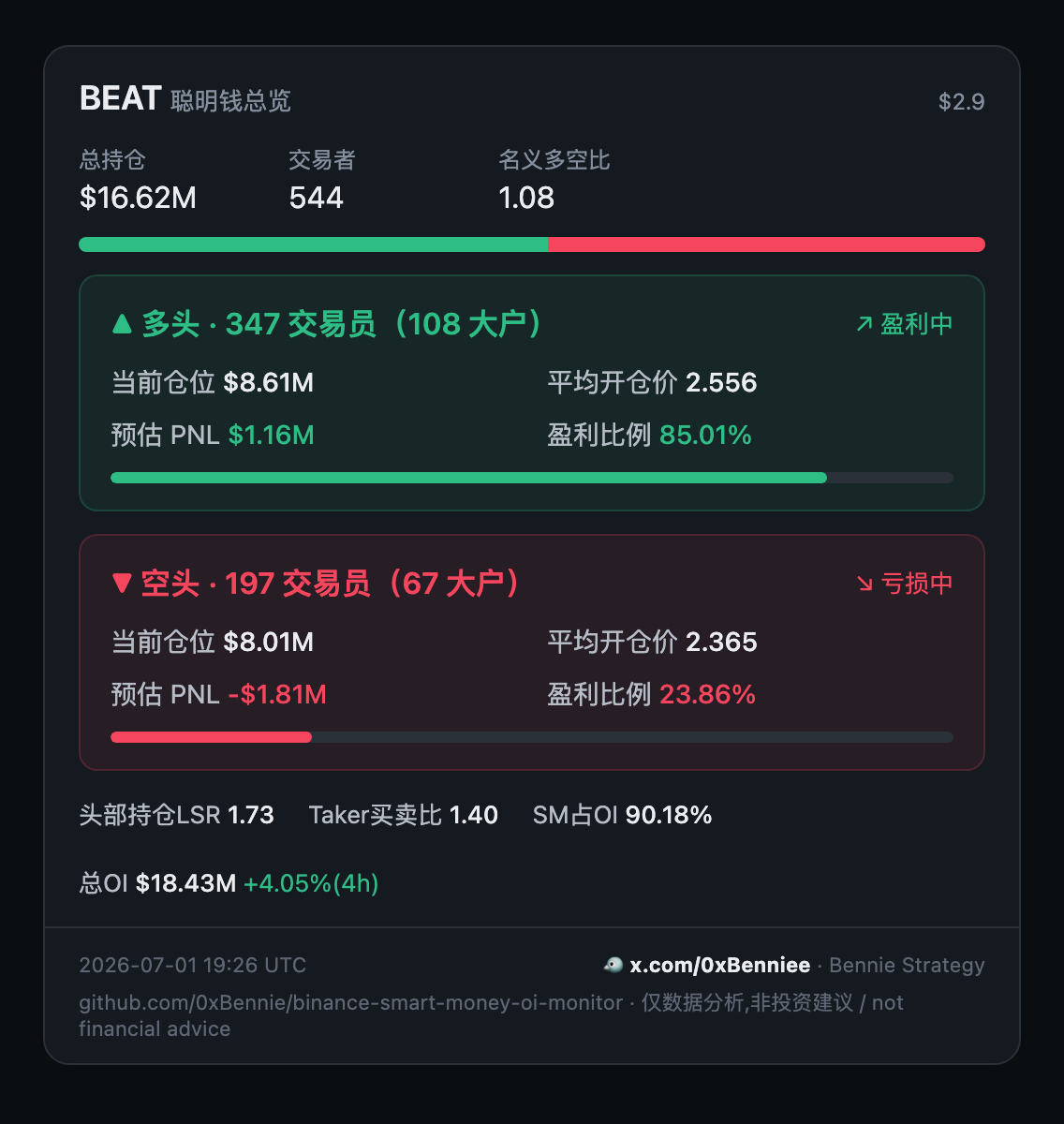
| render_panel | 可分享的暗色 HTML 卡片(binance.com 聪明钱同款)—— lang: zh\|en |
| render_push | Telegram 可直发的"巨鲸总览"HTML 消息 —— lang: zh\|en |
时序工具(需 tracker 在跑,见下):get_change(N 分钟内每边加/减了多少张)、get_profit_trend(每边盈利占比怎么变的)、scan_extreme(全市场多空比最高/最低的币)、render_chart(持仓 + 庄家成本 三面板图)。
外加开箱即用的 prompt 工作流:whale-cost。
2. CLI —— npm run <命令>(clone 后)
analyze <币>(完整终端报告)· change <币> [分钟] · trend <币> [分钟] · scan [数量] · chart <币> · doctor(环境/健康自检)· panel <币>(生成 HTML 卡片)。全部支持 --help;数据类命令支持 --json。
3. 可分享卡片
render_panel → 自包含暗色 HTML 卡片,截图发社媒;render_push → 紧凑的 Telegram 消息体。两者都支持中文或英文(SMART_MONEY_CARD_LANG=zh|en 或逐调用 lang 参数),并内置"仅数据分析,非投资建议"免责声明。
4. Tracker + 本地时序
smart-money-tick 按间隔把巨鲸总览(+ 头部账户 + OI)快照进 SQLite,可跟监控名单或全市场。让 tracker、MCP server、看板都指向同一个绝对路径 SMART_MONEY_DB_PATH,那 4 个时序工具和 CLI 就能读这段历史。
5. 可选的网页看板
npm run dashboard 在本地(127.0.0.1)起一张可排序的表:每个被跟踪币的 LSR、盈利占比、庄家均价、SM占OI、OI,外加单币 30 天历史和 JSON API。可选 —— 主查询路径是 MCP server。
6. 可选 Telegram 告警 + altmonitor
设 SMART_MONEY_ALERT_TG_TOKEN + _CHAT_ID,tracker 会在被盯的币聪明钱仓位越过阈值时推 Telegram 告警(默认关)。另有 Python altmonitor 盯全市场的 ±3% 价格波动 / OI 异动 / 爆量并实时告警 —— 它告诉你什么时候动了,聪明钱工具告诉你是谁在持仓。
也可当作普通 Node 库或走 HTTP JSON API。
相比公开 fapi,你多拿到什么
| 字段 | 公开 fapi/data | 本仓库 |
|---|---|---|
| longShortRatio | ✅ 经 topLongShortPositionRatio | ✅ |
| 头部 20% 账户/持仓多空比 | ✅ | ✅(附带) |
| Taker 主动买卖比 | ✅ | ✅(附带) |
| 全市场未平仓量(USD)+ 5m/15m/1h/4h 变化 | ✅ | ✅(附带) |
| longWhalesAvgEntryPrice / shortWhalesAvgEntryPrice(鲸鱼均价) | ❌ | ✅ |
| longProfitTraders / shortProfitTraders(盈利交易者数) | ❌ | ✅ |
| longProfitWhales / shortProfitWhales(盈利鲸鱼数) | ❌ | ✅ |
| 聪明钱占全市场 OI 的比例(衍生计算) | ❌ | ✅ |
加粗的那几行才是 Smart Signal 真正有用的地方 —— 它们不只告诉你哪边持仓更多,
而是此刻哪边真在赚钱、均价多少。公开 fapi 给不了这些。
数据示例
币种            多头盈利%   空头盈利%   鲸鱼均价 多/空
1000RATSUSDT    5%          92%         0.034 / 0.042
1000LUNCUSDT    71%         41%         0.085 / 0.092
多头/空头盈利% 是该方向当前处于盈利状态的交易者占比;鲸鱼均价 多/空 是多头鲸鱼
和空头鲸鱼各自的平均开仓价,看板的 Spread 列就是两者之差。这些数字对价格意味着
什么,由你自己判断 —— 本项目只报数字,不给观点。
架构
                    ┌──────────────────────────────────────────────────────┐
                    │                    库内核 (library core)              │
                    │  getSmartMoneyOverview / getTopTraderSnapshot /       │
                    │  getOpenInterest —— 实时直连 Binance (bapi + fapi/    │
                    │  data),7 层限频防护                                  │
                    └───────────────┬───────────────────────┬───────────────┘
                                    │                        │
        ┌───────────────────────────┘                        └────────────────────────┐
        │  轨道 A —— cron → 库 → 看板                          │  轨道 B —— 实时,无 DB    │
        ▼                                                     ▼  (实时直连 Binance,      │
┌─────────────────┐  cron 60m                                    无 cron / 无 sqlite)    │
│ smart-money-tick│──┐                                       ┌──────────────────────────┐
└─────────────────┘  │                                       │  • Node import 导入      │
┌─────────────────┐  │ 写入快照                              │      import { … }        │
│ top-trader-tick │──┤                                       │  • MCP server            │
└─────────────────┘  │                                       │      (stdio,11 个工具)  │
┌─────────────────┐  │                                       │  • panel HTML 看板卡片   │
│ oi-tick         │──┘                                       │      (render_panel)      │
└─────────────────┘  │                                       └──────────────────────────┘
                     ▼
┌─────────────────────────────────────────────┐
│           sqlite (data/snapshots.db)         │
│   ob_smart_money_snapshots (21 列)           │
│   ob_top_trader_snapshots  (12 列)           │
│   ob_oi_snapshots                            │
└────────────────────┬─────────────────────────┘
                     │ 只读
                     ▼
            ┌───────────────────┐
            │ Express 看板 + API │   http://your-host:3001/
└───────────────────┘- 轨道 A(
cron → sqlite → Express):定时 tick 把快照写入一个 sqlite 文件(两/三张表,30 天保留),由一个服务端渲染的 Express 看板 + JSON API 提供(无前端框架)。 - 轨道 B(实时,无 DB):同一份库内核被直接消费 —— 当 Node import
导入、走 MCP server(stdio,11 个工具 —— 7 个实时 + 4 个读本地 DB)、或通过 panel HTML
(
render_panel)。每次调用都实时直连 Binance,无需 cron、无需数据库。 - 共享内核:两条轨道都调用
getSmartMoneyOverview/getTopTraderSnapshot/getOpenInterest,因此同一套 7 层限频防护保护每条路径。
7 层 418/429 防护
Smart Signal 接口位于币安 web bapi 网关,比 fapi 更敏感。一次未协调的突发请求
就可能换来实测 3.85 小时的 Retry-After。下面 7 层默认全部启用:
- 真实解析
Retry-After—— 用币安返回的确切秒数,不靠猜。 - 权重预算追踪 —— 读每个 fapi 响应的
X-MBX-USED-WEIGHT-1M,利用率 > 70% 时下一次调用睡到下一分钟窗口。 - 预检 ping —— 每个 cron 入口先 ping
/fapi/v1/ping,遇 418/403 立即中止,不再发任何请求。 - 抖动间隔 —— smart-money 用 12s ± 3s,top-trader 用 1s ± 200ms,避免形成被 WAF 识别的固定节奏。
- 指数退避 —— 1 小时内连续软命中,冷却 5min → 15min → 60min 逐级升级。
- 进程级熔断 ——
isBinanceApiBlocked()短路同进程内所有下游调用。 - 内存缓存 —— smart-money 10min、top-trader 5min,窗口内重复请求同一币不触网。
没有任何忽略 Retry-After 的重试路径,这是故意的:把 5 分钟软封升级成多小时硬封的
最快方式,就是对 418 做重试循环 —— 别这么干。
从 clone 运行
需要 tracker、本地时序或浏览器看板时再 clone:
git clone https://github.com/0xBennie/binance-smart-money-oi-monitor.git
cd binance-smart-money-oi-monitor
npm install

# 1. 单次拉取(写入 data/snapshots.db)
npx tsx src/scripts/smart-money-tick.ts

# 2. 启动看板(读同一个 db)
PORT=3001 npx tsx src/scripts/smart-money-dashboard.ts
# → http://localhost:3001/

# 3. 可选:再拉 top-trader 补充(Taker 买卖比 + 5min LSR)
npx tsx src/scripts/top-trader-tick.ts
环境变量
所有变量均为可选。把 .env.example 复制为 .env,只取消
需要项的注释;真实 token 不要提交到 Git。
| 变量 | 默认 | 说明 |
|---|---|---|
| SMART_MONEY_DB_PATH | <cwd>/data/snapshots.db | 共享 SQLite 库的绝对路径;tracker、看板、时序 MCP 工具必须使用同一个文件 |
| SMART_MONEY_WATCHLIST | (无) | 逗号分隔的币种,如 BTC,ETH,SOL;留空表示全市场 |
| SMART_MONEY_WATCHLIST_FILE | watchlist.json | JSON 数组或 { "symbols": [...] } 文件;内容会与 SMART_MONEY_WATCHLIST 合并 |
| SMART_MONEY_INTERVAL_MIN | 0 | 0 表示单次抓取后退出;正数启用自调度 daemon |
| SMART_MONEY_POOL_MAX | 0 | 每轮 Smart Money 币种上限;0 表示全部 USDT 永续 |
| SMART_MONEY_SHARD_INDEX | 0 | 分片时的 0 基下标 |
| SMART_MONEY_SHARD_TOTAL | 1 | 总分片数,1 = 不分片 |
| TOP_TRADER_POOL_MAX | 0 | top-trader 币种上限;0 表示全部 |
| TOP_TRADER_SHARD_INDEX | 0 | top-trader 的 0 基分片下标 |
| TOP_TRADER_SHARD_TOTAL | 1 | top-trader 总分片数 |
| OI_POOL_MAX | 0 | OI 币种上限;0 表示全部 |
| OI_SHARD_INDEX | 0 | OI 的 0 基分片下标 |
| OI_SHARD_TOTAL | 1 | OI 总分片数 |
| SMART_MONEY_DASHBOARD_HOST | 127.0.0.1 | 看板绑定地址;0.0.0.0 会暴露到网络 |
| SMART_MONEY_DASHBOARD_PORT | 3001 | 看板监听端口 |
| SMART_MONEY_DASHBOARD_CORS | (关闭) | 精确允许的浏览器 origin;不会启用通配 CORS |
| PORT | 3001 | 看板端口的兼容回退变量 |
| SMART_MONEY_CARD_LANG | zh | render_panel / render_push 默认语言:zh 或 en;单次调用的 lang 优先 |
| SMART_MONEY_ALERT_TG_TOKEN | (无) | Telegram bot token;token 和 chat ID 缺一时告警关闭 |
| SMART_MONEY_ALERT_TG_CHAT_ID | (无) | Telegram 目标 chat ID |
| SMART_MONEY_ALERT_WINDOW_MIN | 30 | 告警回看窗口(分钟) |
| SMART_MONEY_ALERT_QTY_PCT | 5 | 触发告警的持仓数量绝对变化百分比 |
| HTTPS_PROXY / HTTP_PROXY | (无) | 把所有 Binance 请求走此代理(如 http://host:port)—— 用于被地区限制的区域。未设置则直连(1.9.3 新增) |
| NO_PROXY | (无) | 逗号分隔、需绕过代理直连的主机(标准 NO_PROXY 语义) |
当作库使用
import {
  getSmartMoneyOverview,
  getTopTraderSnapshot,
  getOpenInterest,
  smartMoneyNotionalUsd,
  smartMoneyShareOfOI,
} from 'binance-smart-money-oi-monitor';

const sym = 'BTCUSDT';
const [sm, tt, oi] = await Promise.all([
  getSmartMoneyOverview(sym),         // 17 个鲸鱼字段
  getTopTraderSnapshot(sym, '5m'),    // 头部账户/持仓 LSR + Taker 买卖比
  getOpenInterest(sym),               // 全市场 OI + 5m/15m/1h/4h 变化
]);

if (sm && oi) {
  console.log(`${sm.longWhales} 个多头鲸鱼 @ 均价 ${sm.longWhalesAvgEntryPrice}`);
  console.log(`${sm.longProfitTraders}/${sm.longTraders} 多头在盈利`);
  console.log(`全市场 OI: $${(oi.oiNowUsd / 1e6).toFixed(2)}M,4h 变化 ${oi.oiChg4h == null ? 'n/a' : oi.oiChg4h.toFixed(2) + '%'}`);

  // 聪明钱 USD 名义敞口,由 数量 × 均价 推导(不要用单位不一致的 totalPositions)。
  const smUsd = smartMoneyNotionalUsd(sm);
  const share = smartMoneyShareOfOI(sm, oi.oiNowUsd);
  console.log(`聪明钱名义敞口: $${(smUsd / 1e6).toFixed(2)}M`);
  console.log(`占全市场 OI: ${share == null ? 'n/a' : (share * 100).toFixed(1) + '%'}`);
}
为什么要 helper? 币安未公开的
totalPositions字段单位跨币种不一致(有时是币本位、有时是 USD)。smartMoneyNotionalUsd(sm)用单位已知的字段(数量 × 均价)确定性地算出 USD 名义敞口。不要拿totalPositions去除任何东西,用这个 helper。
本库还一并导出了所有限频 helper(isBinanceApiBlocked、preflightBinanceFapi、
waitForBinanceWeightHeadroom),你可以把同一套熔断器接进自己的其他 Binance 调用,
让多个模块共用一份权重预算。
直接从 GitHub 安装:
npm install github:0xBennie/binance-smart-money-oi-monitorHTTP JSON API
看板进程同时是一个对 sqlite 内容只读的 JSON API —— 任何 HTTP 客户端(包括能 fetch 的 AI agent)都能拉:
npm run dashboard # 默认 PORT=3001| 路由 | 返回 |
|---|---|
| GET /api/snapshots | 每个币最新快照(smart-money 关联 OI),附盈利% 和 占 OI 比例 |
| GET /api/symbol/:symbol/history?days=30 | 单币快照历史 |
| GET /health | { ok: true, port } 存活探针 |
| GET / | 人看的 HTML 看板(可排序表格) |
| GET /symbol/:symbol | 单币 30 天 HTML 视图 |
API 返回的是 cron 已写入
data/snapshots.db的内容。先至少跑一次抓取器(npm run smart-money:tick),否则响应为空。
HTML 看板提供币种搜索、匹配数量、数据时间/加载时间、字段提示和折叠图例;窄屏下表格可横向滚动,空库会显示如何启动 tracker,而不是一张空白页。
MCP server(从任意终端 AI 调用)
自带的 MCP server 把实时的 Smart Money / Top Trader / OI 库(含内置限频防护)暴露成 Model Context Protocol 工具 —— 无需 cron、无需本地数据库。兼容任意 MCP 客户端: Claude Code、Claude Desktop、Codex CLI、Gemini CLI、Cursor、Windsurf、Cline、Zed、Continue ……
一行注册到你自己的 AI —— 不用 clone、不用 build:
claude mcp add smartmoney -- npx -y binance-smart-money-oi-monitor@latest更新:
npx会缓存包。需要强制升级时,移除并重新添加smartmoney, 或清理 npx 缓存,再重启客户端。
等价的 JSON 配置:
{
  "mcpServers": {
    "smartmoney": {
      "command": "npx",
      "args": ["-y", "binance-smart-money-oi-monitor@latest"]
    }
  }
}
npx 会自动下载包、运行 binance-smart-money-oi-monitor 这个 bin(即 MCP server),
你的 AI 就拿到下面 11 个工具(7 个实时 + 4 个读本地 tracker DB)。该 server 是纯 stdio
JSON-RPC,在你调用 DB 类工具(get_change / get_profit_trend / scan_extreme / render_chart)之前不加载
任何原生模块 —— 7 个实时工具始终不碰原生模块(不拉 better-sqlite3/express)。
时序工具必须共享同一个 DB。 在 MCP 进程环境中设置绝对路径
SMART_MONEY_DB_PATH,并让 tracker 使用同一个值。否则不同进程可能回退到各自的cwd/data/snapshots.db,然后正确地返回「没有历史数据」。
{
  "mcpServers": {
    "smartmoney": {
      "command": "npx",
      "args": ["tsx", "src/scripts/mcp-server.ts"],
      "cwd": "/绝对路径/binance-smart-money-oi-monitor",
      "env": {
        "SMART_MONEY_DB_PATH": "/绝对路径/binance-smart-money-oi-monitor/data/snapshots.db"
      }
    }
  }
}
或直接 npm run mcp 在前台启动 stdio server。
暴露的工具:
| 工具 | 参数 | 返回 |
|---|---|---|
| get_smart_money | symbol | 分多空返回聪明钱 + 鲸鱼各自的仓位(USD)、均价、盈利者数 —— fapi 拿不到 |
| get_top_trader | symbol, period? | 头部账户(top 20% 保证金)LSR + Taker 买卖比 |
| get_open_interest | symbol | 全市场 OI(USD + 币数)+ 5m/15m/1h/4h 变化 |
| get_full_picture | symbol, period? | 分多空的聪明钱 + 鲸鱼仓位、头部账户、OI + 占比 —— "X 现在什么仓位"的一键调用 |
| get_funding | symbol, notionalUsd? | 资金费率 → 年化 % + 一笔仓位每次 / 每天 / 每年 付(收)多少 U(默认 1万U);自动识别 8h/4h/1h 周期 |
| render_panel | symbol, includeHtml?, lang? | 可分享的深色 HTML 聪明钱卡片;lang 可为 zh 或 en;返回 { summary, html, disclaimer } |
| render_push | symbol, lang? | 中文或英文 Telegram parse_mode:HTML 卡片,并附数据非建议免责声明 |
| get_change | symbol, minutes? | 近 N 分钟多空各加仓/减仓多少(qty 口径,非 USD)—— 读本地 DB,需 tracker 在跑 |
| scan_extreme | limit?, maxAgeMin? | 全市场多空比最高 / 最低代币(按聪明钱 LSR)—— 读本地 DB |
| render_chart | symbol, hours? | 深色 HTML 时序图 —— 三面板折线:多头持仓量、空头持仓量、庄家均价 vs 现价 —— 读本地 DB |
| get_profit_trend | symbol, minutes? | 每侧盈利占比(交易员+庄家)N 分钟内的变化 —— 捕捉"由亏转盈/由盈转亏"翻转 —— 读本地 DB |
最后四个读本地快照 DB(见 时序跟踪);其余走币安实时、无需 DB。解释性输出统一带“仅供数据分析、不构成投资建议”声明;原始指标工具不重复添加。
get_full_picture ETH 返回示例:
{
  "symbol": "ETHUSDT",
  "smartMoney": { "longShortRatio": 0.288, "shortProfitPct": 72, "notionalUsd": 1860314867 },
  "topTrader": { "topPositionLsr": 1.50, "takerBuySellRatio": 1.16 },
  "openInterest": { "oiNowUsd": 3610164191, "oiChg4h": 0.55 },
  "smartMoneyShareOfOI": 0.515
}
生成可分享的看板
把任意币的鲸鱼仓位做成一张自包含深色 HTML 卡片(币安 Smart Signal 那种样式)—— 截图发推,或把 HTML 串嵌进自己的网站。
npm run panel -- BEAT # 生成 beatusdt-panel.html,浏览器打开截图即可为保持兼容,卡片默认中文。设置 SMART_MONEY_CARD_LANG=en,或在
render_panel / render_push 单次调用中传 lang: "en",即可显示展开缩写的英文标签。
三种方式,同一张卡:
import { buildPanel, renderPanelHtml } from 'binance-smart-money-oi-monitor';
const html = renderPanelHtml((await buildPanel('BEAT'))!);   // 当库用
第三种方式是 MCP 工具 render_panel(见上方工具表),让你的 AI 当场生成看板。
无论用哪种方式,卡片都零依赖(无外链),到哪都能渲染、截图干净。
时序跟踪(本地 DB)
上面的单币查询都是当下快照。想回答"近 15 分钟空头减了多少""现在哪些币多空最一边倒", 就让 tracker 在本地攒快照,再查历史。
1. 自动追踪监控名单(自调度 daemon,无需外部 cron):
SMART_MONEY_WATCHLIST=BEAT,BIRB,MAGMA SMART_MONEY_INTERVAL_MIN=15 npm run track也可用 watchlist.json(["BEAT","BIRB"] 或 {"symbols":[...]})代替环境变量。
名单 ≤ ~70 个币可安全 15 分钟刷一轮(12 秒/币);留空则全市场(要用更长间隔/分片)。
写入 data/snapshots.db(保留 30 天)。
把
SMART_MONEY_DB_PATH设成绝对路径,让 tracker 和 MCP server / 看板读同一个库, 否则各自回落到自己cwd/data/snapshots.db,时序工具会静默读到空库。(docker compose 已帮你设好。)
通过 npm 安装(非 clone)? 这个包带了多个
bin——MCP server (binance-smart-money-oi-monitor/-mcp)以及 tracker (binance-smart-money-oi-monitor-track)。npm run track只在 clone 里存在, 所以从已安装的包里直接用npx跑 tracker bin:SMART_MONEY_WATCHLIST=BEAT,BILL \ SMART_MONEY_DB_PATH=/abs/path/snapshots.db \ SMART_MONEY_INTERVAL_MIN=15 \ npx binance-smart-money-oi-monitor-track在它对着 MCP server 用的同一个
SMART_MONEY_DB_PATH跑起来之前,get_change/scan_extreme/render_chart一直是空的。
2. 查攒下来的历史:
npm run change -- MAGMA 15 # 人类可读表格(近 ~15 分钟 qty 差值)
npm run trend -- MAGMA 120 # 交易员/庄家盈利占比趋势
npm run --silent change -- MAGMA 15 --json # 不带 npm 横幅的机器可读 JSON
npm run scan               # → 按 LSR 列多空比最高 / 最低的币
npm run chart -- BEAT 24 # → beat-chart.html:多空持仓 + 均价 24h 时序图同样有库函数(getChange/scanExtreme/buildChart+renderChartHtml)和 MCP 工具
(get_change/scan_extreme/render_chart)。持仓变化用 qty(张数)而非 USD 名义 —— 避免把涨价误算成加仓。
CLI 命令速查
从 clone 里 npm run <命令>(安装后的 bin 还支持 --help / --version):
| 命令 | 作用 |
|---|---|
| npm run analyze -- <币> | 一条命令出人话报告 |
| npm run panel -- <币> | 可分享深色看板卡 |
| npm run doctor | 自检:币安连通 / DB / 原生依赖;最终 READY/NOT READY 可用于 CI 门禁 |
| npm run track | tracker daemon(SMART_MONEY_WATCHLIST、_INTERVAL_MIN) |
| npm run change -- <币> [分钟] [--json] | 仓位变化表格或 JSON;需 tracker 历史 |
| npm run trend -- <币> [分钟] [--json] | 盈利占比趋势表格或 JSON;需 tracker 历史 |
| npm run scan · npm run chart -- <币> | 全市场扫描 / HTML 图;需 tracker 历史 |
| npm run dashboard · mcp | 看板+API · MCP server |
池规模 & cron 节奏
默认行为是全部 USDT-PERPETUAL 币种(2026 年约 500 个合约)。按你对数据新鲜度的容忍度选部署模式:
| 模式 | 币数 | smart-money cron | top-trader cron | OI cron | 分片 |
|---|---|---|---|---|---|
| 轻量 | 上限 100 | 7 * * * *(1×/h) | */30 * * * * | 15,45 * * * * | 无 |
| 标准 | 上限 200 | 7 * * * *(1×/h) | */30 * * * * | 15,45 * * * * | 无 |
| 全量,2h 刷新 | ~500 全部 | 0 */2 * * *(1×/2h) | */30 * * * * | 15,45 * * * * | 无 |
| 全量,1h 刷新 | ~500 全部 | 7,37 * * * *(2×/h,各跑一半) | */30 * * * * | 15,45 * * * * | 2 分片 |
"1h 刷新"读作每个币在 1 小时内都拿到一次新快照,靠 :07 和 :37 两个 cron 各拉一半(分片 0/2 和 1/2)实现。
算账:smart-money 用 12s ± 3s 间隔(web bapi 对频率敏感),500 币 ≈ 100 分钟,不分片塞不进 1 小时。 top-trader 和 OI 都走 fapi/data、1s 间隔,500 币 ≈ 8 分钟,随便放。
分片
币种按 index % SHARD_TOTAL == SHARD_INDEX 确定性切分,每个分片永远拉同一批(缓存局部性好,且分片间不会在同一窗口撞同一个币)。
数据保留
三张表由每次 smart-money-tick 结尾的 storage.cleanup() 修剪到 30 天。要更长历史就调大
src/storage.ts 里的 RETENTION_DAYS 重新构建,或在每日 cron 前备份。
默认节奏下(500 币、smart-money 每小时 + top-trader/OI 各 30min)磁盘占用约 30–80 MB/月(开 WAL)。
生产部署(pm2)
A. 标准 —— 上限 200,每小时
// ecosystem.config.js
module.exports = {
  apps: [
    {
      name: 'smart-money-tick',
      script: 'node_modules/.bin/tsx',
      args: 'src/scripts/smart-money-tick.ts',
      cron_restart: '7 * * * *',        // 每小时 :07
      autorestart: false,
      env: { SMART_MONEY_POOL_MAX: '200' },
    },
    {
      name: 'top-trader-tick',
      script: 'node_modules/.bin/tsx',
      args: 'src/scripts/top-trader-tick.ts 5m',
      cron_restart: '*/30 * * * *',
      autorestart: false,
    },
    {
      name: 'oi-tick',
      script: 'node_modules/.bin/tsx',
      args: 'src/scripts/oi-tick.ts',
      cron_restart: '15,45 * * * *',    // 与 top-trader 错开
      autorestart: false,
    },
    {
      name: 'smart-money-dashboard',
      script: 'node_modules/.bin/tsx',
      args: 'src/scripts/smart-money-dashboard.ts',
      autorestart: true,
      env: { PORT: '3001' },
    },
  ],
};
B. 全量覆盖 + 1h 刷新 —— 2 路分片
两个 pm2 入口,各在错开的时间拉一半币种:
module.exports = {
  apps: [
    {
      name: 'smart-money-tick-a',
      script: 'node_modules/.bin/tsx',
      args: 'src/scripts/smart-money-tick.ts',
      cron_restart: '7 * * * *',        // :07
      autorestart: false,
      env: { SMART_MONEY_SHARD_INDEX: '0', SMART_MONEY_SHARD_TOTAL: '2' },
    },
    {
      name: 'smart-money-tick-b',
      script: 'node_modules/.bin/tsx',
      args: 'src/scripts/smart-money-tick.ts',
      cron_restart: '37 * * * *',       // :37 —— 与 A 错开 30 分钟
      autorestart: false,
      env: { SMART_MONEY_SHARD_INDEX: '1', SMART_MONEY_SHARD_TOTAL: '2' },
    },
    // ... top-trader-tick 和 dashboard 与模式 A 相同
  ],
};
C. 全量覆盖,刷新更慢 —— 2 小时 cron,不分片
不需要每小时新鲜度时最省的方案:
{
  name: 'smart-money-tick',
  args: 'src/scripts/smart-money-tick.ts',
  cron_restart: '0 */2 * * *',          // 每 2 小时
  autorestart: false,
  // 无需 env —— 默认全部币种
}
为什么要错峰
熔断器活在每个进程各自的模块状态里。两个同时运行的 cron 进程无法直接共享
isBinanceApiBlocked() 状态,但每个进程在发出任何数据请求前都会先用
preflightBinanceFapi() 做 ping 探测 —— 所以如果进程 A 刚吃到 418,进程 B 的
预检就会捕捉到并干净地中止。无论如何都把时间错开,好让 IP 权重窗口在两次突发
之间有时间回落。
伴随工具:altmonitor(价格 / OI / 爆量 异动监控)
altmonitor 机器人在 GitHub 仓库里(不随 npm 包发布)。
altmonitor/ 是一个自包含的 Python 工具(本仓库 Python 那一半),
监控全部 USDT 永续合约,推送三类 Telegram 告警:
- 价格异动 —— 单根 1 分钟 K 线涨/跌 ≥ ±3%,带价 × 仓四象限 + 振幅 + 多空比
- OI 异动 —— 未平仓量在 1 分钟 或 5 分钟 窗口内骤变超阈值
- 爆量(成交量) —— 收盘 1m 成交额突增到自身近 N 根中位的 ≥ N 倍
- 单条 WebSocket 订阅全市场
@kline_1m(价格 + 成交量) - 后台每 60s 扫全市场
fapi/v1/openInterest,存进带时间戳的环形缓冲算 1m/5m 变化 - Telegram 命令(
/set_pump、/set_oi、/set_vol、/watch、/history、/stats……)实时调参,无需重启,持久化到state.json - 可选 SQLite 告警历史(三类都存),供
/history、/stats复盘 - 全部免费公开接口 —— 无需 API key,不烧额度
最快上手:配置向导(校验 bot token、自动抓取 chat_id、写好 .env,再询问本地 / Docker / 部署到你的服务器):
cd altmonitor && pip install -r requirements.txt && python setup.py一条命令部署到自己的 VPS(先试 SSH key 再用密码,装 Docker,同步代码 + .env,运行,上线后 Telegram 通知你):
python altmonitor/deploy.py # 或在 setup.py 最后选"部署到我的服务器"Docker 一键部署(在仓库根目录)。docker compose 现在起整套 —— altmonitor + tracker + 看板(后两者共享一个 DB 卷,看板/API 直接看到 tracker 写的数据):
cp altmonitor/.env.example altmonitor/.env       # altmonitor: TG_BOT_TOKEN + TG_CHAT_ID
export SMART_MONEY_WATCHLIST=BEAT,BIRB,MAGMA      # tracker: 要采的币
docker compose up -d                             # 构建 + 全起,崩溃自动重启
docker compose up -d altmonitor                  # …或只起某一个
或直接运行:
cd altmonitor
python3 -m venv .venv && source .venv/bin/activate
pip install -r requirements.txt
cp .env.example .env          # 填入 TG_BOT_TOKEN + TG_CHAT_ID
python monitor.py
完整配置、Telegram 命令表、Docker compose、systemd 配置见 altmonitor/README.md。
常见问题
完整清单见 TROUBLESHOOTING.md。最常踩的几个:
- 某个币报
no data / 可能不支持,但明明有这个合约(如 POWER)→ 多半是bapi接口临时抽风,重试一两次通常就回来了;若get_open_interest/get_funding能出,说明只是抽风。少数低量合约确实没有聪明钱覆盖(OI/费率仍可用)。别凭一次 null 就断定"不支持"。 - 所有工具都报
temporarily rate-limited/blocked→ 熔断器被 418/403 触发,等 stderr 里的 TTL,或换到能连币安的地区/VPS 跑。 get_change/scan_extreme/render_chart说"没数据" → 它们读本地data/snapshots.db;注册 MCP 时用绝对cwd、并让 tracker 在同一目录跑。7 个实时工具不需要 DB。npm publish报EOTP/ 发布流水线报ENEEDAUTH→ 用**勾了「Bypass 2FA」**的 npm token(或配 Trusted Publisher);普通 token / 安全密钥 2FA 无法非交互发布。
本仓库不包含
- ❌ 不交易,纯数据。
- ✅ 已支持代理(1.9.3 起)。设置
HTTPS_PROXY=http://host:port(可选NO_PROXY)即可把 Binance 请求走代理/VPS —— 被地区限制的区域很有用。若你的 IP 仍吃到硬 403(CloudFront WAF),就等或换 IP/代理;防护层的意义正是永远走不到那一步。 - ❌ 无链上数据、无盘口、无聚合成交。这些见致谢里的项目。
作者 & 联系
由 Bennie Strategy 开发维护。
- 🐦 X / 推特:@0xBenniee(0x 是数字零加 x,双写 e)
- 💬 Telegram:@OxBennie(Ox 是大写字母 O)
两个 handle 都是对的,不是打错。有问题、想法或想要某个功能?两个渠道都可以找我,也欢迎提 issue / PR。
致谢
- andychien555/binance-smart-money-tracker
—— 最早逆向出
bapi/futures/v1/public/future/smart-money/signal/overview接口。他们的版本基于 Cloudflare Workers + R2 + 静态 SPA 前端;本仓库是 Node + sqlite + express 版,限频防护更强。架构不同,数据洞见同源。 - y18929284608-byte/BNSmartMoneyMonitor 与 6551Team/opentrade —— 平行实现,印证了接口契约。
许可证
MIT —— 见 LICENSE。