
bitt
v0.2.2
Published
An extremely lightweight zero dependency JavaScript framework.
Downloads
78


Readme
bitt
Bitt is an extremely lightweight (~5kb) zero dependency reactive JavaScript framework. It's built for vanilla code, which means it can be loaded anywhere without a compiler.
Features
- Simple component system with a reactive state
- Built in asynchronous router with next to no configuration
- Super flexible and short syntax
- As little abstraction as necessary to remain intuitive
Prerequisites
- Node.js 12+
- Support for ES6 Proxies
Index
Installation
npm
npm install bittimport { router } from 'bitt'cdn
import { router } from 'https://unpkg.com/bitt'Bitt will work right out of the box on the CDN.
Examples
mounting
<body>
  <script>
    import { mount } from 'https://unpkg.com/bitt'

    const helloWorld = ['h1', 'Hello world!']

    mount(document.body, helloWorld).catch(console.error)
  </script>
</body>
routing
<body>
  <script>
    import { router } from 'https://unpkg.com/bitt'

    const helloWorld = ['h1', 'Hello world!']
    const about = ['p', 'Bitt is a cool framework.']

    const routes = [
      {
        regex: /^$/,
        component: helloWorld,
      },

      {
        regex: /^about$/,
        component: about,
      }
    ]

    router(document.body, routes).catch(console.error)
  </script>
</body>
Documentation
syntax
There are several ways to write your components, each with their own use case. They're typically written like this:
const Component = [nodeName = '', attributes? = {}, children? = [] || '']Attributes and children are optional, and you may define children as the second argument, skipping attributes.
These can be written like this, with the children argument being either text or an array of components/text.
// any attribute can be defined in the attributes object
const Component = ['span', {
  class: 'bold'
}, [
  'bold text!!!',
  ['em', 'emphasized text!!!']
]]
Numbers and booleans will be converted to text nodes as well.
You may also find yourself needing to use a function in your component. To do this, simply return your component and pass the function in place of the component.
const Component = () => {
  const sum = 2 + 3

  return ['p', sum]
  // <p>5</p>
}
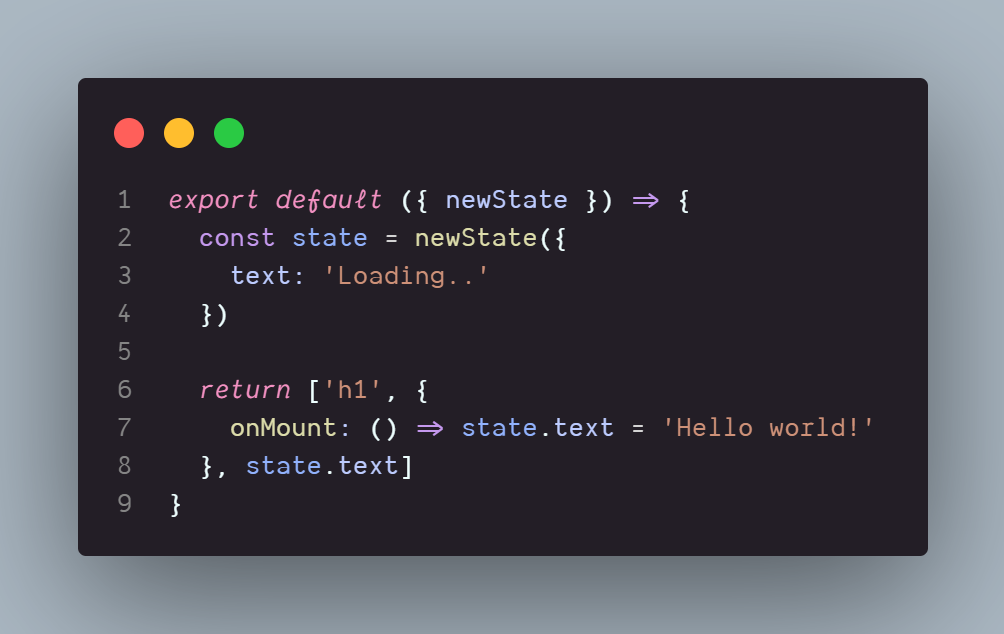
However, because the function is called on every rerender, instantiating can become tough. To fix that, all you need is a state.
const Component = ({ newState }) => {
  const state = newState({
    hasSandwiches: true
  })

  return ['p', state.hasSandwiches ? "you have sandwiches!" : "you don't have any sandwiches :(" ]
  // <p>you have sandwiches!</p>
}
The state is reactive, and your component will reflect changes to it.
Event listeners can be added with the onEvent syntax. They're placed alongside attributes.
const Component = ({ newState }) => {
  const state = newState({
    sandwiches: 4
  })

  return ['p', {
    onClick: () => state.sandwiches++
  }, state.sandwiches]
  // <p>4</p>
  // *click* <p>5</p>
}
There are a few special events that can be helpful in certain cases:
onMountis called once the component has been mounted. This is only executed once after render.onUnmountis called once the component has been unmounted. This helps with cleanup, and is also only executed once.
Conditionally rendered reactive components can accomplished by passing an object with a key. These keys can be any arbitrary string, but they must be unique.
const Component = ({ newState }) => {
  const state = newState({
    isLoggedIn: false,
    username: 'apple',
  })

  return state.isLoggedIn
    ? { key: 'denied', component: ['h3', 'please log in'] }
    : { key: 'welcome', component: ['h3', `welcome, ${state.username}!`] }
}
You can also use the key helper if you prefer.
import { key } from 'bitt'

const Component = ({ newState }) => {
  const state = newState({
    isLoggedIn: false,
    username: 'apple',
  })

  return state.isLoggedIn
    ? key('denied', ['h3', 'please log in'])
    : key('welcome', ['h3', `welcome, ${state.username}!`])
}
Unparented sibling components can be written by wrapping your component twice.
// all of these are valid components types
const Component = [[
  ['h1', 'hello world!'], ['br'], () => 'i am coding!\n',
  'mic check ', 1, 2, 3, '\n'
  'this is normal ', ['b' 'this is bold'],
]]
/*
  <h1>hello world!</h1><br>i am coding!
  mic check 123
  this is normal <b>this is bold</b>
*/
mount
The mount function is used to render a component to your page. It takes an HTMLElement and a component parameter.
mount(document.body, ['h1', 'cool beans']).catch(console.error)mount returns a promise, so be sure to catch errors.
router
The router function takes an additional routes object and mounts/unmounts components automatically when the path changes. Each route's regex property defines the pattern to match in the pathname, minus the first slash.
const routes = [
  {
    regex: /^hello$/,
    component: ['h3', 'hi!'],
  }
]

router(document.body, routes).catch(console.error)
router also returns a promise.
If you'd like use an asynchronous module, you can use the module property instead of component.
const routes = [
  {
    regex: /^hello$/,
    module: () => import('./helloWorld.js'),
  }
]
Note that this requires support for dynamic imports.
If you would like to use URL hashes rather than the history API, you may provide an options object with the mode property set to "hash".
router(document.body, routes, { mode: 'hash' }).catch(console.error)link
The link component will generate an anchor with the provided attributes and children. This will trigger a change in the router without causing the browser to reload the page.
import { link } from 'bitt'

const Component = link({ href: "/home" }, 'click me!')
// <a href="/home">click me!</a>
You may choose to specify only a string in place of attributes for convenience.
const Component = link("/home", 'click me!')goto
The goto function allows you to navigate programmatically.
import { goto } from 'bitt'

const Component = ['div', {
  onClick: () => goto('/home')
}]