
blk-theme
v0.1.9
Published
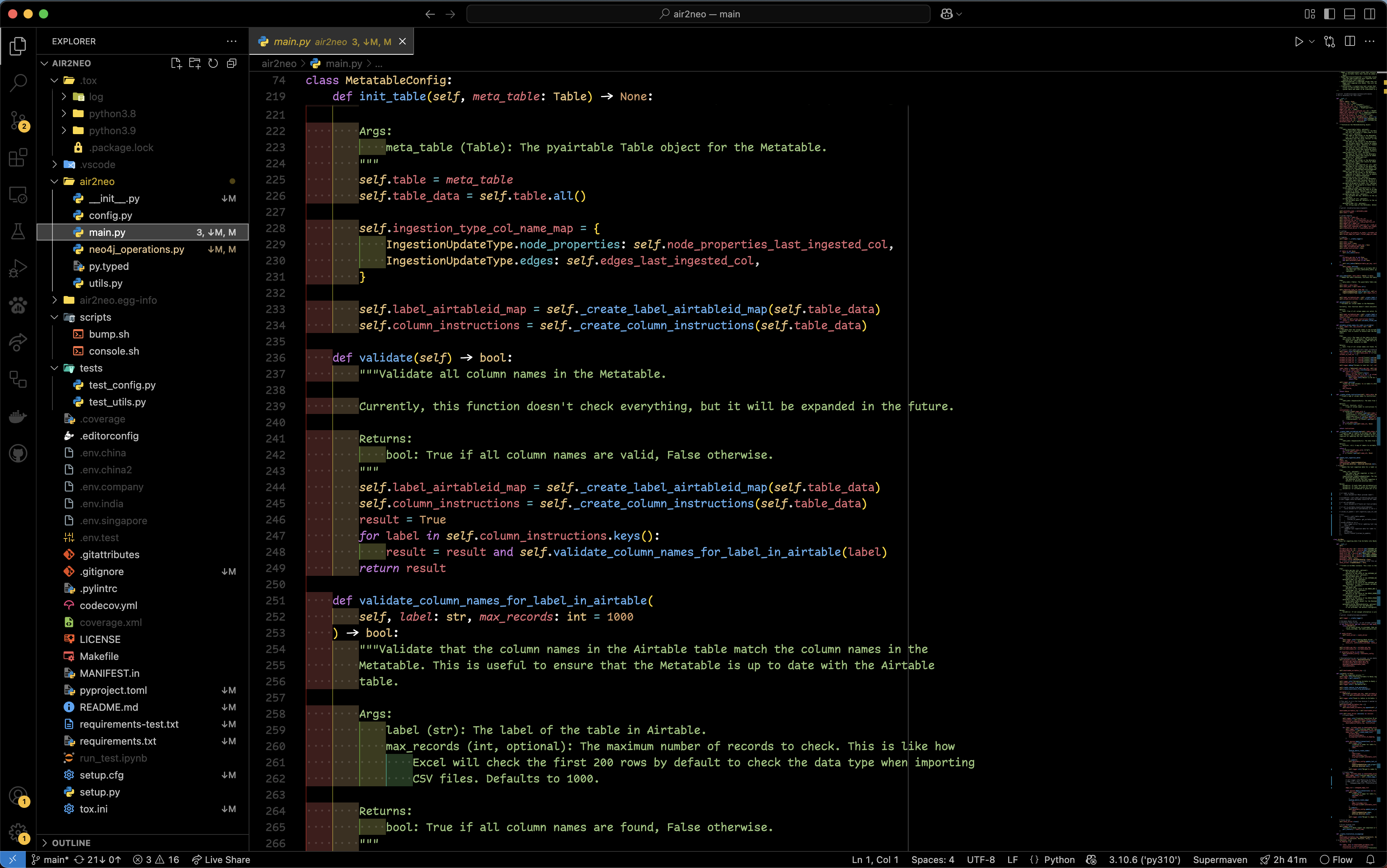
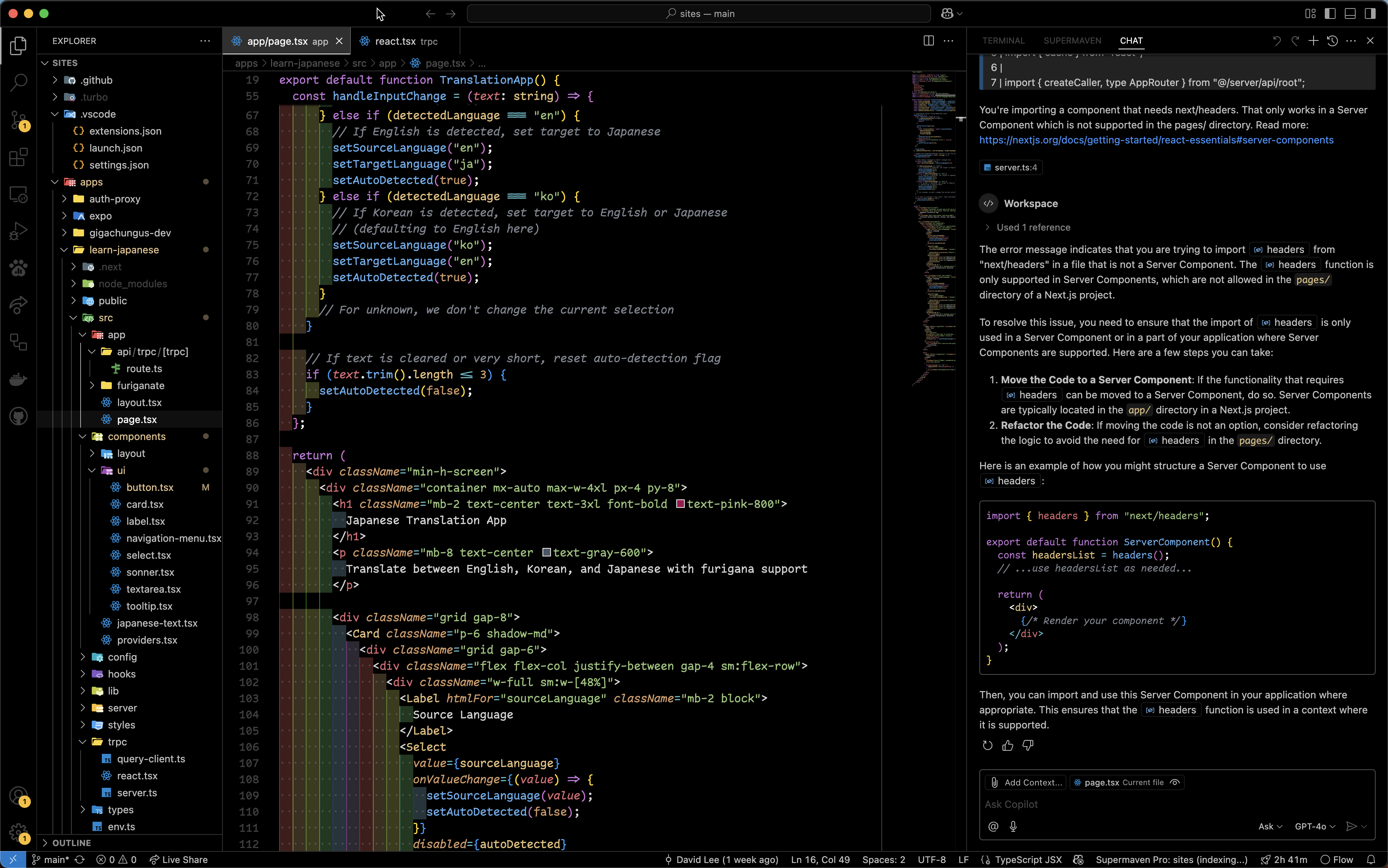
A sleek, pitch-black AMOLED-friendly theme for VS Code.


Readme
BLK Theme
Features
- True Black Background: Perfect for OLED displays and dark environment coding
- High Contrast Syntax Highlighting: Carefully selected colors for optimal readability
- Semantic Highlighting: Enhanced code understanding with semantic token coloring
- Two Variants: Standard and Borderless options to suit your preference
- Optimized for Long Sessions: Reduced eye strain during extended coding sessions
- Language Support: Extensive language-specific syntax highlighting
Installation
- Open Extensions sidebar in VS Code (
Ctrl+Shift+X/⌘+Shift+X) - Search for
BLK Theme - Click Install
- Click Reload to activate
- Open the Command Palette (
Ctrl+Shift+P/⌘+Shift+P) and select Preferences: Color Theme - Select either BLK or BLK Borderless
Screenshots
Python
Next.js/TSX/Typescript/Javascript
Theme Variants
BLK (Standard)
The standard variant includes subtle borders between UI elements for clear visual separation.
BLK Borderless (Work in Progress)
The borderless variant minimizes borders for a more seamless, distraction-free coding experience.
Color Palette
The BLK theme uses a carefully selected color palette:
| Scope | Color | Hex |
| ------------- | ------ | --------- |
| Background | Black | #000000 |
| Foreground | White | #FFFFFF |
| Strings | Green | #98c379 |
| Keywords | Purple | #c678dd |
| Functions | Blue | #61afef |
| Variables | Red | #e06c75 |
| Types/Classes | Yellow | #e5c07b |
| Constants | Orange | #d19a66 |
| Comments | Gray | #7f848e |
| Operators | Cyan | #56b6c2 |
Recommended Settings
For the best experience with BLK Theme, consider these settings:
{
  "editor.fontFamily": "'Comic Code Ligatures', 'JetBrains Mono', Menlo, Monaco, 'Courier New', monospace",
  "editor.fontLigatures": true,
  "editor.fontSize": 14,
  "editor.lineHeight": 1.5,
  "editor.cursorBlinking": "phase",
  "editor.cursorSmoothCaretAnimation": "on",
  "editor.renderLineHighlight": "all",
  "workbench.colorCustomizations": {
    "[BLK]": {
      // Add your custom overrides here
    }
  }
}
Font Recommendation: Comic Code Ligatures is a fantastic coding font that combines readability with personality.
Customization
You can customize the BLK theme by adding overrides in your settings.json:
"workbench.colorCustomizations": {
  "[BLK]": {
    "editor.background": "#000000",
    "editor.foreground": "#ffffff",
    // Add more customizations as needed
  }
}
Contributing
Contributions are welcome! Feel free to submit issues or pull requests on the GitHub repository.
License
This theme is released under the MIT License.
Acknowledgements
BLK Theme was inspired by various dark themes in the VS Code ecosystem, with a focus on creating a true black background experience optimized for OLED displays and night-time coding with a rainbow effect (I like rainbows).
Enjoy coding in the dark!