
blueprint-render
v0.2.3
Published
框架无关的 UE 蓝图 / 材质图查看器:<blueprint-viewer> Web Component + BlueprintUE 增强渲染器,VuePress / Astro / 原生 HTML 通用

Maintainers
 megestus
Readme
blueprint-render


English | 中文
A framework-agnostic <blueprint-viewer> Web Component + BlueprintUE modified renderer for embedding interactive UE Blueprint / Material graphs into notes and blogs.
Motivation: As a TA / environment artist, I got tired of taking low-resolution screenshots of blueprint graphs. Now you can paste blueprint text directly and get an interactive, zoomable, copyable diagram.
Also available as an Obsidian plugin: obsidian-blueprint-viewer
Preview
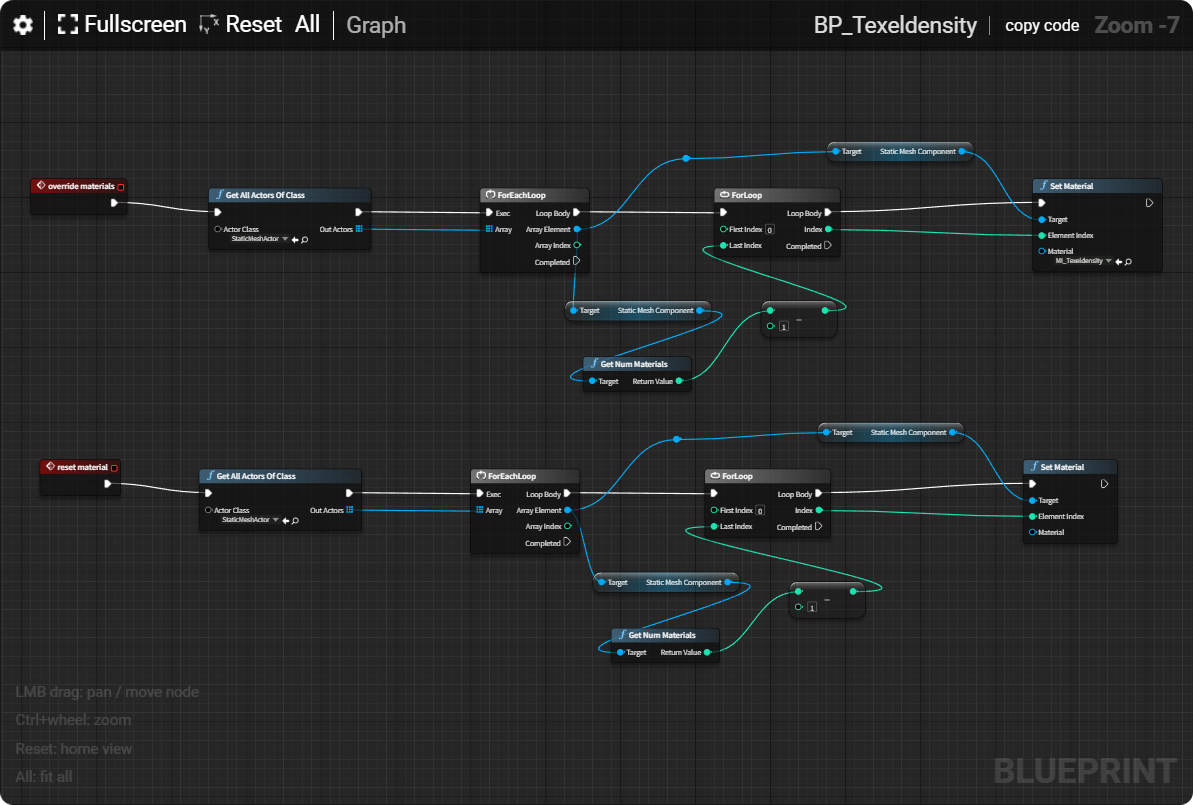
Toolbar: pan / zoom, All (fit all nodes), copy code (one-click copy back to UE), name label (auto-extracted from filename or manual).
What is this
- core:
<blueprint-viewer>custom element (light DOM) — loads blueprint text, renders it, includes copy-code button, All (fit-to-screen), operation hint, and watermark. - renderer: Based on BlueprintUE official render.js (MIT), with modifications: left-drag pan (was right-drag to avoid browser gesture conflicts), All button,
translate3d()GPU acceleration, English hints, smaller watermark. - adapters:
src/vuepress/BlueprintRender.vue(VuePress 2),src/astro/BlueprintViewer.astro.
Quick Start
0. Prepare blueprint files
In UE editor, select blueprint/material nodes → copy → paste and save as .txt files. Place them in your project's public/blueprints/ directory (served from site root at build time).
Astro (simplest)
npm install blueprint-render---
import BlueprintViewer from "blueprint-render/astro";
---
<BlueprintViewer src="/blueprints/xxx.txt" height="643" />The component lazy-loads the core internally — no manual script or CSS needed.
VuePress 2
npm install blueprint-render- Copy
node_modules/blueprint-render/src/vuepress/BlueprintRender.vueto your project's.vuepress/components/directory (VuePress auto-registers it globally). - Use it directly in Markdown:
<BlueprintRender src="/blueprints/xxx.txt" height="643" />The core is dynamically import()-ed in onMounted, so only pages that use the component load it.
Vanilla HTML / other builders
Method 1: npm + bundler (recommended)
npm install blueprint-render// Import once in your entry JS to register the custom element
import "blueprint-render";<blueprint-viewer src="/blueprints/xxx.txt" height="643"></blueprint-viewer>Method 2: No bundler, single file
Copy node_modules/blueprint-render/dist/blueprint-viewer.js (~330 KB self-contained ESM) to your static directory:
<script type="module" src="/blueprint-render/blueprint-viewer.js"></script>
<blueprint-viewer src="/blueprints/xxx.txt" height="643"></blueprint-viewer>
Attributes
| Attribute | Type | Default | Description |
|---|---|---|---|
| src | string | — | URL of blueprint text file (takes priority over text) |
| text | string | — | Pass blueprint text directly |
| height | number | 643 | Render area height (px) |
| name | string | auto from src | Name label shown next to copy code; auto-extracted from filename if omitted |
| show-copy | boolean | true | Show the copy code button |
| auto-fit | boolean | false | Auto fit all nodes after render (off by default, set auto-fit="true" to enable) |
| title | string | Blueprint | Accessibility / tooltip title |
Interaction
Basic
| Action | Result | |---|---| | Left-drag on empty space | Pan canvas | | Ctrl + scroll wheel | Zoom | | All button | Fit all nodes on screen | | Reset button | Reset zoom and pan | | copy code button | Copy raw blueprint text (paste back into UE editor) | | Hamburger menu (☰) top-left | Save as image |
Sub-graph navigation (double-click to enter)
Double-click a node to enter its sub-graph. The breadcrumb shows the current level (Graph > NodeName); click Graph to return to the top level.
Sub-graphs only exist when child nodes are embedded in the copied text:
| Type | Double-click to enter? | Why | |---|---|---| | Collapsed Nodes | ✅ Yes | Child nodes embedded in copied text | | Blueprint Macro | ✅ Yes | Expanded macro nodes embedded in text | | Animation State Machine | ✅ Yes | Sub-states embedded in text | | Material Function Call | ❌ No | Only an external asset reference; internal nodes not in text | | Material Layer | ❌ No | Same — external asset reference |
Collapse Nodes tip (the only way to create sub-graphs in material graphs)
Material functions are not sub-graphs — they're standalone assets, and copying only includes a reference. To create a double-clickable sub-graph in a material graph, use Collapse Nodes:
- In the Material Editor, select the nodes you want to bundle
- Right-click → Collapse Nodes
- Name the collapsed node (double-click title to rename)
- Select all → copy → paste and save as
.txt - In the renderer, double-click the collapsed node → enter sub-graph; breadcrumb shows
Graph > NodeName - Click
Graph→ return to top level
Nodes inside a collapsed node are fully embedded in the copied text, so the renderer can display them correctly.
Development
npm install        # zero dependencies (build script is dependency-free)
npm run build      # outputs dist/blueprint-viewer.js (self-contained single file)
Core source: src/core/ (render.js / render.css are the single source of truth, blueprint-viewer.js is the component). Build output dist/blueprint-viewer.js is a self-contained ESM usable directly by Vite / Astro / <script type="module">.
Roadmap
- More builder adapters: Hugo shortcode, VitePress, Hexo, Next.js / Nuxt wrappers. The core
<blueprint-viewer>is builder-agnostic — any site supporting custom elements can use it via<script type="module">. - Renderer improvements: more UE new-version node styles, large-graph performance, light/dark theme.
- Toolchain: direct
.uassetfile parsing (waiting for official uasset-reader-js to support blueprint node parsing).
Docs
License & Attribution
Project License
This project is released under the MIT License — see LICENSE.
Third-Party Attribution
The renderer is based on BlueprintUE Self-Hosted Edition:
src/core/render.js— Blueprint rendering enginesrc/core/render.css— Blueprint stylesheet
Original project info:
- Project: BlueprintUE Self-Hosted Edition
- Repository: blueprintue/blueprintue-self-hosted-edition
- License: MIT License
- Copyright: © BlueprintUE Contributors
Modifications made on top of the original (see header of src/core/render.js):
- Left-drag pan (was right-drag)
- Added All (fit-to-screen) button
getStyleTransformCSSusestranslate3d()to force GPU compositing- English operation hints, smaller watermark
- Web Component wrapper (
<blueprint-viewer>)
This project retains the original copyright notice and attributes the original project per MIT license terms.
Support
If this project saves you time, consider buying me a coffee ☕