
blurly
v1.0.0
Published
Blurred image placeholders with blurhash and thumbhash in one package. Encode, decode, PNG data URLs, CSS, a CLI and file support in Node. Zero dependencies.

Maintainers
 ckgiri
Readme
blurly
Blurred image placeholders for browsers and Node. Supports both blurhash and thumbhash in one package.



A placeholder is something you show in place of an image until the real image loads. A blurred placeholder is a very small, blurry copy of the image. With it, the page does not jump. The user sees the colours and shapes of the image right away.
The placeholder is saved as a short piece of text called a hash, for example 'LEHV6nWB2yk8pyo0adR*.7kCMdnj'. You make the hash once, when the image is uploaded. Then you save it next to the image.
blurly does two things:
- It encodes images. Encode means "turn an image into a hash".
- It decodes hashes. Decode means "turn a hash back into a small image". You can get the result as pixels, as CSS or as a data URL.
Examples
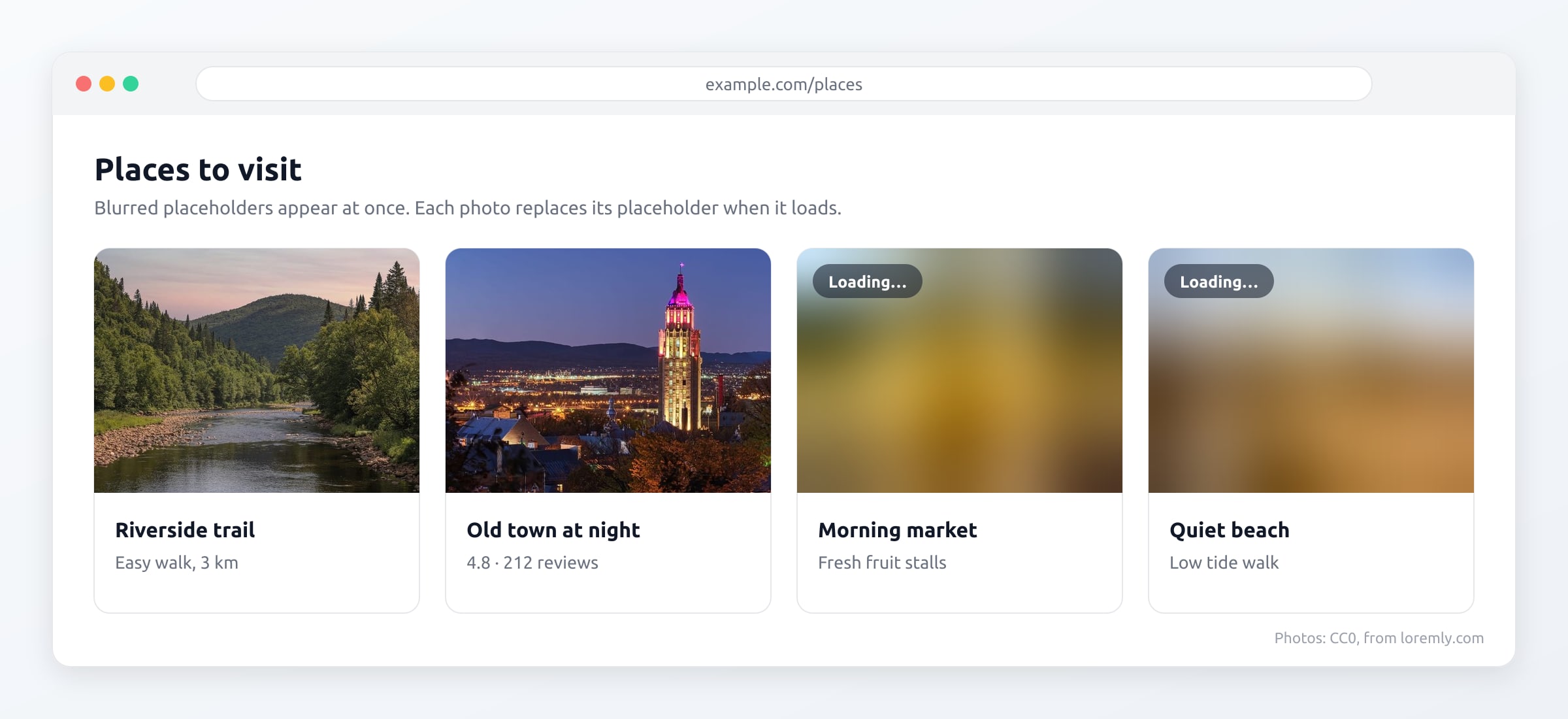
On a real page: the blurred placeholders show at once, and each photo replaces its placeholder when it loads.
One photo and its two placeholders. Each hash is only 28 characters:
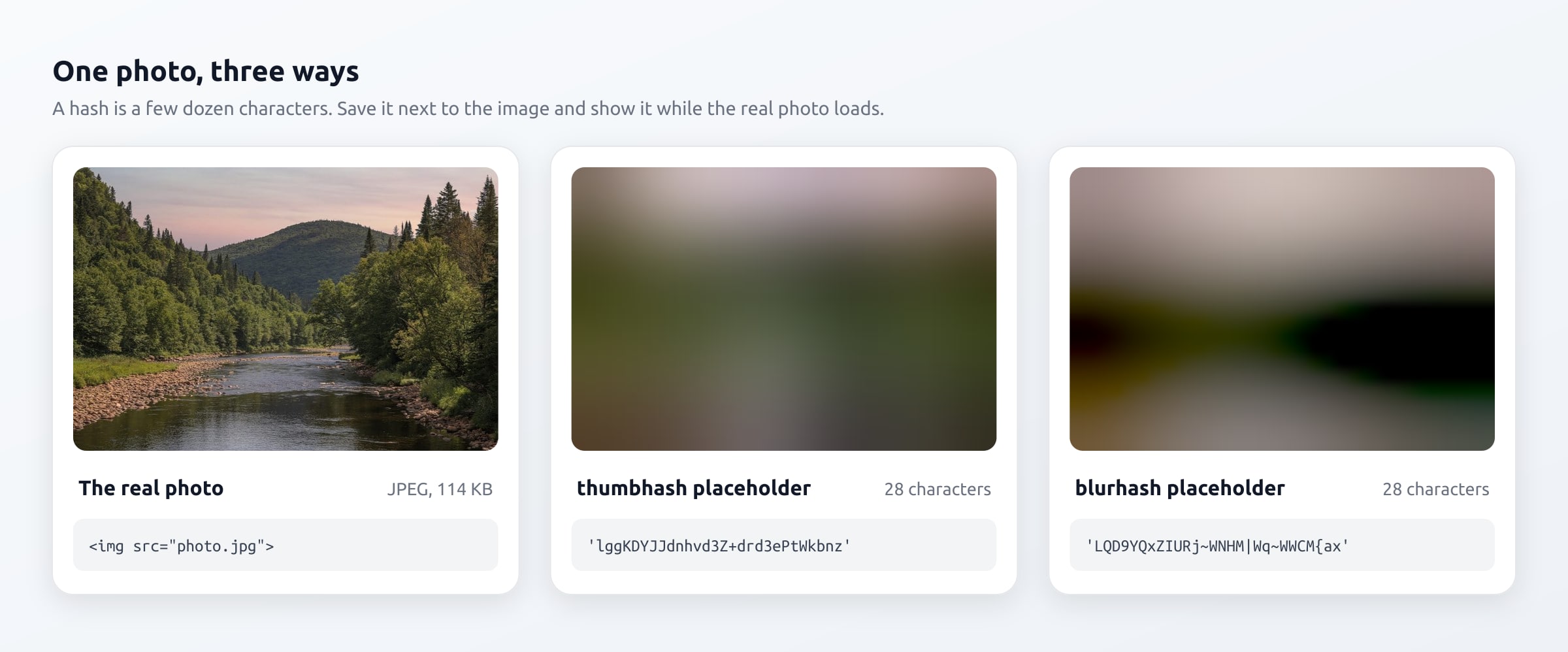
The photos are CC0 (free to use), from loremly.com.
Features
- Two formats in one package. blurhash and thumbhash are two popular ways to store a blurred image as text. blurly gives the same output, byte for byte, as the
blurhashandthumbhashpackages. - Finds the format for you.
decode(),toDataURL()and the other functions accept either kind of hash. - Output you can use right away:
- a PNG data URL (an image written as text, so you can put it straight into
srcor CSS), - RGBA pixels (4 numbers per pixel: red, green, blue and alpha, which means transparency),
- the average colour,
- the aspect ratio (width divided by height),
- CSS for a background.
- a PNG data URL (an image written as text, so you can put it straight into
- Reads image files in Node.
encodeFile('photo.jpg')reads JPEG, PNG, WebP, AVIF, GIF, TIFF and SVG. It needs the optionalsharppackage (a fast image library for Node). - Browser helpers. Make a hash from an
<img>, aFileor a canvas. Show a placeholder on an<img>until it loads. - A command line tool.
npx blurly photo.jpg. - Small and simple. No other packages needed. About 7.5 KB gzipped. ESM and CommonJS. TypeScript types included. Safe to import on the server.
Installation
npm install blurlyOr with another package manager:
pnpm add blurly
yarn add blurly
bun add blurly
To read image files in Node, also install sharp. You need it for blurly/node and the command line tool. You do not need it in the browser, or if you only decode hashes.
npm install sharpQuick start
Get started in 3 steps
- Make a hash from your image when it is uploaded.
- Save the hash with the image, for example in your database.
- Show the placeholder from the hash while the real image loads.
Step 1. Make a hash from an image file, in Node:
import { encodeFile } from 'blurly/node'

const { hash, width, height, averageColor } = await encodeFile('photo.jpg')
// hash         => 'jNcFNIgGeHuelHhzinQFaWSQNw=='   (a thumbhash)
// width        => 3840
// height       => 2160
// averageColor => '#223739'
Step 2. Save the hash next to the image. Save width and height too.
Step 3. Turn the hash into a placeholder when you show the image:
import { toDataURL, placeholderStyle, averageColor, aspectRatio } from 'blurly'

const hash = 'jNcFNIgGeHuelHhzinQFaWSQNw=='

toDataURL(hash)          // => 'data:image/png;base64,iVBORw0KGgo...' (a 32x18 PNG)
averageColor(hash)       // => '#223739'
aspectRatio(hash)        // => 1.75
placeholderStyle(hash)   // => { backgroundColor: '#223739', backgroundImage: 'url("data:image/png;base64,...")', backgroundSize: 'cover', ... }
A blurhash works the same way. blurly finds the format from the hash:
import { detectFormat, averageColor, decode } from 'blurly'

detectFormat('LEHV6nWB2yk8pyo0adR*.7kCMdnj')   // => 'blurhash'
averageColor('LEHV6nWB2yk8pyo0adR*.7kCMdnj')   // => '#979695'
decode('LEHV6nWB2yk8pyo0adR*.7kCMdnj')         // => { format: 'blurhash', width: 32, height: 32, data: Uint8ClampedArray(4096) }
With CommonJS, use const { toDataURL } = require('blurly') and const { encodeFile } = require('blurly/node').
Table of contents
Usage
Make a hash from an image file in Node
encodeFile() reads an image file with sharp. Then it does three things:
- It turns the image the right way up. (Phone photos often store their rotation separately, in EXIF data.)
- It makes the image smaller.
- It makes the hash.
You can pass a file path, a Buffer, a Uint8Array or an ArrayBuffer.
import { encodeFile, encodeFiles } from 'blurly/node'

await encodeFile('photo.jpg')
// => { hash: 'jNcFNIgGeHuelHhzinQFaWSQNw==', format: 'thumbhash', width: 3840, height: 2160, averageColor: '#223739' }

await encodeFile('photo.jpg', { format: 'blurhash' })
// => { hash: 'L57dtUI_0Z-5~9Sl5ZxY1Qn+=Ebb', format: 'blurhash', width: 3840, height: 2160, averageColor: '#413e3f' }

// More detail for blurhash: more components (1 to 9 in each direction)
await encodeFile('photo.jpg', { format: 'blurhash', componentsX: 6, componentsY: 4 })

// File contents work too, for example from an upload
await encodeFile(request.body)
In a blurhash, components control the detail. More components across (componentsX) and down (componentsY) give more detail and a longer hash.
width and height are the size of the original image, not of the placeholder. Save them too. Then the browser can keep the right amount of space for the image.
For many files, use encodeFiles(). It reads 4 files at the same time. The results stay in the same order as your list:
const results = await encodeFiles(['a.jpg', 'b.png'])
// => [{ file: 'a.jpg', hash: '...', format: 'thumbhash', width: 1200, height: 800, averageColor: '#...' }, ...]
If sharp is not installed, these functions throw an error. The error says: install it with: npm install sharp.
Everything from blurly is also exported from blurly/node.
Make a hash in the browser
encodeImage() accepts an <img>, an ImageBitmap, a Blob or File, a <canvas> or an OffscreenCanvas. It makes the image smaller with a canvas, then makes the hash.
This is useful for user uploads. You can make the hash before the upload starts.
import { encodeImage } from 'blurly'

const input = document.querySelector('input[type=file]')
input.addEventListener('change', async () => {
  const { hash, width, height } = await encodeImage(input.files[0])
  // send hash, width and height to your server with the file
})

// From an image on the page (it must be on the same site, or allow CORS)
const { hash } = await encodeImage(document.querySelector('img'), { format: 'blurhash' })
Importing blurly never touches the page (the DOM). So the same import works in server-side rendering. Only call encodeImage() in the browser.
Make a hash from pixels
You may already have RGBA pixels, for example an ImageData from a canvas. Then use the encoders directly.
pixels is { width, height, data }. data has 4 values per pixel: red, green, blue and alpha (transparency).
import { encodeBlurhash, encodeThumbhash } from 'blurly'

const pixels = {
  width: 2,
  height: 2,
  data: new Uint8ClampedArray([255, 0, 0, 255,  0, 255, 0, 255,  0, 0, 255, 255,  255, 255, 255, 255]),
}

encodeBlurhash(pixels)                                    // => 'L~Lqe9|ldL|l~h|c_X|cfH|T|c|T'
encodeBlurhash(pixels, { componentsX: 2, componentsY: 2 }) // => 'A~Lqe9|l~h|c'
encodeThumbhash(pixels)                                   // => 'IAhCtyx2CYmWaGmHiJiGCYlpSPeKj9gI'
encodeThumbhash(pixels, { output: 'bytes' })              // => Uint8Array(24) [32, 8, 66, ...]
Size limits:
- A thumbhash is made from at most 100x100 pixels.
- A blurhash can be made from any size, but large images are slow.
So make images smaller first: about 100x100 for thumbhash, and 32x32 for blurhash. encodeFile() and encodeImage() do this for you.
Show the placeholder
Plain HTML
Add the placeholder as an inline style on the server. When the image loads, it covers the background:
import { placeholderStyle } from 'blurly'

const style = placeholderStyle(hash, { output: 'string' })
// => 'background-color: #223739; background-image: url("data:image/png;base64,..."); background-size: cover; background-position: center; background-repeat: no-repeat'

const html = `<img src="photo.jpg" width="1200" height="675" style='${style}' alt="">`
In the browser, use lazyImage(). It does three things:
- It sets the placeholder.
- It turns on the browser's own lazy loading.
- It removes the placeholder after the image loads.
import { lazyImage } from 'blurly'

// <img src="photo.jpg" data-hash="jNcFNIgGeHuelHhzinQFaWSQNw==" width="1200" height="675" alt="">
for (const img of document.querySelectorAll('img[data-hash]')) {
  lazyImage(img, img.dataset.hash)
}
applyPlaceholder() does the same, but does not change loading. Both return a function. Call it to remove the placeholder and the event listeners.
React
placeholderStyle() returns an object with camelCase names. So you can pass it straight to style:
import { placeholderStyle } from 'blurly'

function Photo({ src, hash, width, height, alt }) {
  return <img src={src} width={width} height={height} alt={alt} loading="lazy" style={placeholderStyle(hash)} />
}
The background stays behind the image after it loads. That is fine for photos. For images with transparent parts, call applyPlaceholder() in an effect instead. Return its cleanup function from the effect.
Next.js
Next.js <Image> shows a blurDataURL while the image loads. toDataURL() makes one from a hash:
import Image from 'next/image'
import { toDataURL } from 'blurly'

export function Photo({ photo }) {
  return (
    <Image
      src={photo.url}
      width={photo.width}
      height={photo.height}
      alt={photo.alt}
      placeholder="blur"
      blurDataURL={toDataURL(photo.hash)}
    />
  )
}
Canvas
decode() returns RGBA pixels. You can draw them on a canvas:
import { decode } from 'blurly'

const { width, height, data } = decode(hash)
const canvas = document.createElement('canvas')
canvas.width = width
canvas.height = height
canvas.getContext('2d').putImageData(new ImageData(data, width, height), 0, 0)
Choose blurhash or thumbhash
Both formats store a blurred image in a short string. Use thumbhash unless you have a reason to use blurhash. Thumbhash is the default in encodeFile(), encodeImage() and the CLI.
| | thumbhash | blurhash |
|---|---|---|
| Length | 20 to 36 characters | 28 characters with 4x3 components (6 to 166) |
| Keeps transparent parts | Yes | No |
| Stores the shape (aspect ratio) | Yes | No |
| Stores the average colour | Yes | Yes (as the first component) |
| You can choose the amount of detail | No | Yes (componentsX, componentsY) |
| Libraries in other programming languages | Fewer | Many (C, Kotlin, Python, Swift and more) |
Choose blurhash in two cases:
- Your apps or services already use it.
- You want to control the amount of detail.
See Notes and limitations for more.
Use the CLI
The CLI is the command line tool. Run it from your terminal:
npx blurly photo.jpgIt prints one line per file. Each line has the file, the hash, the original size and the average colour, separated by tabs:
photo.jpg jNcFNIgGeHuelHhzinQFaWSQNw== 3840x2160 #223739You can pass many files, choose blurhash, and print JSON:
npx blurly images/*.jpg --format blurhash --json[
{
"file": "images/photo.jpg",
"hash": "L57dtUI_0Z-5~9Sl5ZxY1Qn+=Ebb",
"format": "blurhash",
"width": 3840,
"height": 2160,
"averageColor": "#413e3f"
}
]| Option | What it does |
|---|---|
| -f, --format <name> | thumbhash (default) or blurhash |
| -x, --components-x <n> | Blurhash only: components across, 1 to 9 (default 4) |
| -y, --components-y <n> | Blurhash only: components down, 1 to 9 (default 3) |
| --json | Prints JSON instead of text |
| -h, --help | Shows the help |
| -v, --version | Shows the version |
Exit codes (the number the tool returns when it ends):
0: success.1: a file could not be read.2: an option is wrong.
The CLI needs sharp.
Store hashes in your database
Store the hash as text. Put it next to the image URL, width and height.
Do not store the data URL. It is about 100 times longer than the hash. Make it when you show the page instead.
import { encodeFiles } from 'blurly/node'

const results = await encodeFiles(['uploads/a.jpg', 'uploads/b.jpg'])
for (const r of results) {
  await db.query(
    'INSERT INTO images (path, hash, width, height, color) VALUES ($1, $2, $3, $4, $5)',
    [r.file, r.hash, r.width, r.height, r.averageColor],
  )
}
How long a hash can be:
- A thumbhash is at most 36 characters.
- A blurhash is 28 characters with the default 4x3 components. It is at most 166 characters (9x9).
A text or varchar(255) column fits both.
You can also store a thumbhash as bytes with encodeThumbhash(pixels, { output: 'bytes' }). Every function that reads a thumbhash also accepts a Uint8Array.
Handle invalid hashes
A wrong hash throws a BlurlyError. The message says what is wrong:
import { decode, detectFormat, isBlurhash, isThumbhash, BlurlyError } from 'blurly'

try {
  decode('LEHV6nWB2yk8pyo0adR*.7kCMdn')
} catch (error) {
  error instanceof BlurlyError   // => true
  error.message
  // => 'decode(): "LEHV6nWB2yk8pyo0adR*.7kCMdn" is not a valid hash. As a blurhash: a 4x3 blurhash has 28 characters, this one has 27. As a thumbhash: a thumbhash string must be base64 (A-Z, a-z, 0-9, +, / and = at the end).'
}

detectFormat('hello')                           // => null
isBlurhash('LEHV6nWB2yk8pyo0adR*.7kCMdnj')      // => true
isThumbhash('jNcFNIgGeHuelHhzinQFaWSQNw==')     // => true
API
All functions below are exported from blurly and from blurly/node. encodeFile() and encodeFiles() are only in blurly/node.
A hash argument can be:
- a blurhash string,
- a thumbhash string in base64 (a way to write bytes as letters, numbers and a few symbols). Standard or URL-safe base64 both work, with or without
=at the end. - thumbhash bytes (
Uint8Array).
encodeBlurhash(pixels, options?)
function encodeBlurhash(pixels: Pixels, options?: BlurhashEncodeOptions): stringMakes a blurhash from RGBA pixels. The result is the same as encode() from the blurhash package.
| Option | Type | Default | What it does |
|---|---|---|---|
| componentsX | number | 4 | Components across, from 1 to 9. More gives more detail and a longer hash. |
| componentsY | number | 3 | Components down, from 1 to 9. |
decodeBlurhash(hash, width?, height?, options?)
function decodeBlurhash(hash: string, width?: number, height?: number, options?: BlurhashDecodeOptions): Uint8ClampedArrayMakes RGBA pixels from a blurhash. width and height are 32 if you leave them out. The result is the same as decode() from the blurhash package.
| Option | Type | Default | What it does |
|---|---|---|---|
| punch | number | 1 | Contrast. A higher value gives stronger colours. |
encodeThumbhash(pixels, options?)
function encodeThumbhash(pixels: Pixels, options?: ThumbhashEncodeOptions): string | Uint8ArrayMakes a thumbhash from RGBA pixels. The image can be at most 100x100. Returns a base64 string, or bytes with output: 'bytes'. The bytes are the same as rgbaToThumbHash() from the thumbhash package.
| Option | Type | Default | What it does |
|---|---|---|---|
| output | 'base64' \| 'bytes' | 'base64' | 'base64' returns a string. 'bytes' returns a Uint8Array. |
decodeThumbhash(hash)
function decodeThumbhash(hash: string | Uint8Array): DecodedImageMakes RGBA pixels from a thumbhash: { width, height, data }. The hash decides the size. The long side is at most 32 pixels, and the shape matches the original image. The pixels are the same as thumbHashToRGBA() from the thumbhash package.
decode(hash, options?) and toPixels(hash, options?)
function decode(hash: Hash, options?: DecodeOptions): DecodedHash
function toPixels(hash: Hash, options?: DecodeOptions): DecodedHash
Makes RGBA pixels from either kind of hash: { format, width, height, data }. toPixels() is the same function with another name.
| Option | Type | Default | What it does |
|---|---|---|---|
| format | 'blurhash' \| 'thumbhash' | detected | The format of the hash. Set it if you always know the format. |
| width | number | 32 | Blurhash only: width of the result. Thumbhash picks its own size. |
| height | number | 32 | Blurhash only: height of the result. |
| punch | number | 1 | Blurhash only: contrast. |
toDataURL(hash, options?)
function toDataURL(hash: Hash, options?: DecodeOptions): stringMakes a PNG image from a hash. Returns it as a data:image/png;base64,... URL. Takes the same options as decode(). The PNG is not compressed, so the browser needs no extra compression library.
placeholderStyle(hash, options?)
function placeholderStyle(hash: Hash, options?: PlaceholderStyleOptions): PlaceholderStyle | stringReturns CSS that shows the placeholder as a background. It has:
backgroundColor: the average colour,backgroundImage: the data URL,backgroundSize: 'cover',backgroundPosition: 'center',backgroundRepeat: 'no-repeat'.
If a thumbhash has transparent parts, backgroundColor is 'transparent'. Takes the options of decode(), and:
| Option | Type | Default | What it does |
|---|---|---|---|
| output | 'object' \| 'string' | 'object' | 'object' returns camelCase properties (for React). 'string' returns CSS text for a style attribute. |
averageColor(hash, options?)
function averageColor(hash: Hash, options?: FormatOptions): stringReturns the average colour of the image as '#rrggbb'. A thumbhash stores this colour. For a blurhash, it is the first (DC) component. Transparency is ignored. Option: format.
aspectRatio(hash, options?)
function aspectRatio(hash: Hash, options?: FormatOptions): number | undefinedReturns the approximate aspect ratio (width / height) of the original image, from a thumbhash. A blurhash does not store it, so the result is undefined. Option: format.
detectFormat(hash), isBlurhash(hash), isThumbhash(hash)
function detectFormat(hash: unknown): 'blurhash' | 'thumbhash' | null
function isBlurhash(hash: unknown): boolean
function isThumbhash(hash: unknown): booleandetectFormat()returns the format of a valid hash, ornull.isBlurhash()checks two things. Every character must be base83 (the 83 characters blurhash uses). The length must match what the first character says.isThumbhash()checks that the hash is base64, and that the length matches what its header says.
encodeImage(source, options?)
function encodeImage(source: ImageSource, options?: EncodeOptions): Promise<EncodeResult>Browser only. Makes a hash from an <img>, ImageBitmap, Blob, File, <canvas> or OffscreenCanvas. Returns { hash, format, width, height, averageColor }. width and height are the size of the original image.
| Option | Type | Default | What it does |
|---|---|---|---|
| format | 'thumbhash' \| 'blurhash' | 'thumbhash' | The format of the hash. |
| componentsX | number | 4 | Blurhash only: components across, from 1 to 9. |
| componentsY | number | 3 | Blurhash only: components down, from 1 to 9. |
| maxSize | number | 100 (thumbhash), 32 (blurhash) | First, the image is made smaller to fit in a square of this size. At most 100 for thumbhash. |
applyPlaceholder(img, hash, options?) and lazyImage(img, hash, options?)
function applyPlaceholder(img: HTMLImageElement, hash: Hash, options?: ApplyPlaceholderOptions): () => void
function lazyImage(img: HTMLImageElement, hash: Hash, options?: ApplyPlaceholderOptions): () => void
Browser only. Sets the placeholder as the background of an <img>. Removes it when the image fires load.
- If the image is already loaded, nothing changes.
- If the image fails to load, the placeholder stays.
- Both return a function that removes the placeholder and the event listeners.
lazyImage()also setsloading="lazy"anddecoding="async"if the image does not have them.
For a blurhash, the placeholder uses the shape from the width and height of the <img>. Takes the options of decode(), and:
| Option | Type | Default | What it does |
|---|---|---|---|
| fade | boolean \| number | 300 | After the image loads, fades out the placeholder colour over this many milliseconds. false or 0 turns it off. There is no fade if the user prefers reduced motion. |
encodeFile(input, options?)
function encodeFile(input: string | Buffer | Uint8Array | ArrayBuffer, options?: EncodeOptions): Promise<EncodeResult>Node only, from blurly/node. Needs sharp. Makes a hash from an image file path or the file contents. Returns { hash, format, width, height, averageColor }. Takes the same options as encodeImage().
encodeFiles(paths, options?)
function encodeFiles(paths: string[], options?: EncodeFilesOptions): Promise<FileResult[]>Node only, from blurly/node. Needs sharp. Runs encodeFile() for each path. Returns { file, hash, format, width, height, averageColor } for each, in the same order. Fails (rejects) if a file cannot be read. Takes the options of encodeFile(), and:
| Option | Type | Default | What it does |
|---|---|---|---|
| concurrency | number | 4 | How many files to read at the same time. |
BlurlyError
class BlurlyError extends Error {}Thrown for:
- invalid hashes,
- invalid pixels,
- invalid options,
- image files that cannot be read,
- a missing
sharp.
Types
All types are exported: HashFormat, Hash, Pixels, DecodedImage, DecodedHash, EncodeResult, ImageSource, PlaceholderStyle, and the option types BlurhashEncodeOptions, BlurhashDecodeOptions, ThumbhashEncodeOptions, FormatOptions, DecodeOptions, PlaceholderStyleOptions, EncodeOptions and ApplyPlaceholderOptions. blurly/node also exports FileInput, FileResult and EncodeFilesOptions.
Comparison
| | blurhash | thumbhash | plaiceholder | blurly |
|---|---|---|---|---|
| Makes and reads blurhash | Yes | No | No | Yes |
| Makes and reads thumbhash | No | Yes | No | Yes |
| Finds the hash format for you | No | No | No | Yes |
| Works in the browser | Yes | Yes | No | Yes |
| Works without sharp | Yes | Yes | No | Yes (except image files) |
| Reads image files in Node | No | No | Yes | Yes |
| PNG data URL from a hash | No | Yes | No | Yes |
| Average colour from a hash | No | Yes | No | Yes |
| Aspect ratio from a hash | No | Yes | No | Yes |
| CSS for a placeholder | No | No | Yes | Yes |
| Helpers for <img> elements | No | No | No | Yes |
| Command line tool | No | No | No | Yes |
| Works with CommonJS require() | Yes | No | No | Yes |
| TypeScript types | Yes | Yes | Yes | Yes |
| New release since 2024 | No | No | No | Yes |
Checked against blurhash 2.0.5 (February 2023), thumbhash 0.1.1 (March 2023) and plaiceholder 3.0.0 (May 2023). We read their package.json files, type declarations and READMEs. plaiceholder makes its placeholder from an image file, not from a saved hash.
Migrating from blurhash
Before:
import { encode, decode, isBlurhashValid } from 'blurhash'

const hash = encode(imageData.data, imageData.width, imageData.height, 4, 3)
const pixels = decode(hash, 32, 32)
isBlurhashValid(hash).result
After:
import { encodeBlurhash, decodeBlurhash, isBlurhash } from 'blurly'

const hash = encodeBlurhash(imageData)          // 4x3 components by default
const pixels = decodeBlurhash(hash, 32, 32)     // the same Uint8ClampedArray
isBlurhash(hash)
What is different:
encodeBlurhash()takes{ width, height, data }, likeImageData. The component counts are options.- The hashes and pixels are the same, with one exception:
punch. Theblurhashpackage rounds it withpunch | 1, so2becomes3and0.5becomes1. blurly uses the value you give. With the default (1) and odd whole numbers, the results are the same. - Errors are
BlurlyError, notValidationError. - You also get
toDataURL(),averageColor()andplaceholderStyle(). You can switch to thumbhash later without changing the code that shows placeholders.
From thumbhash
Before:
import { rgbaToThumbHash, thumbHashToRGBA, thumbHashToDataURL, thumbHashToAverageRGBA, thumbHashToApproximateAspectRatio } from 'thumbhash'

const bytes = rgbaToThumbHash(width, height, rgba)
const base64 = btoa(String.fromCharCode(...bytes))
const { w, h, rgba: pixels } = thumbHashToRGBA(bytes)
const url = thumbHashToDataURL(bytes)
const { r, g, b, a } = thumbHashToAverageRGBA(bytes)
const ratio = thumbHashToApproximateAspectRatio(bytes)
After:
import { encodeThumbhash, decodeThumbhash, toDataURL, averageColor, aspectRatio } from 'blurly'

const hash = encodeThumbhash({ width, height, data: rgba })   // base64 string
const { width: w, height: h, data: pixels } = decodeThumbhash(hash)
const url = toDataURL(hash)
const color = averageColor(hash)                              // '#rrggbb'
const ratio = aspectRatio(hash)
What is different:
- blurly uses base64 strings by default. Use
{ output: 'bytes' }to get the sameUint8ArrayasrgbaToThumbHash(). Every function accepts both. decodeThumbhash()returns{ width, height, data }with aUint8ClampedArray. You can pass it straight tonew ImageData(). The pixel values are the same.averageColor()returns a hex colour.thumbHashToAverageRGBA()returns values from 0 to 1.- The PNG from
toDataURL()has the same pixels, but the file bytes differ. When the image has no transparent parts, blurly writes RGB instead of RGBA. - blurly works with
require()too.
Notes and limitations
- Which format to choose. Use thumbhash for new projects. It keeps transparent parts and stores the aspect ratio. It usually shows more of the image's colours, in a string of about the same length. Use blurhash when other parts of your system already use it. (Blurhash has libraries for many languages and platforms.) Also use it when you want to set the detail with
componentsXandcomponentsY. You can use both: every function that reads a hash finds the format. - Thumbhash reads at most 100x100 pixels.
encodeThumbhash()throws an error for larger images.encodeFile()andencodeImage()make images smaller first. - Blurhash does not store the aspect ratio. Pass
widthandheighttodecode()andtoDataURL(). If you don't, the result is 32x32. Withbackground-size: cover, a square placeholder is cut to the shape of the image. This usually looks fine. - Data URLs are larger than hashes. The PNG is not compressed. As a data URL, a 32x18 thumbhash placeholder is about 2.4 KB. A 32x32 blurhash is about 4.3 KB, and a 16x12 blurhash about 0.9 KB. Store the hash, and make the data URL when you show the page.
- Hashes from
encodeImage()andencodeFile()can differ a little for the same image. The browser canvas andsharpmake images smaller in different ways. Both are valid placeholders. - Format detection. A few blurhash strings are also valid thumbhash strings. For those, blurly checks the content to decide. In tests with more than 100,000 hashes, it chose correctly every time. If you always know the format, pass
format. - The fade after load is small. One
<img>element cannot fade its own image in over its own background. So after the image loads, the placeholder picture is removed and the background colour fades out. You see the fade only where the image is transparent. - Images from other sites need CORS headers for
encodeImage(). Without them, the browser does not let a canvas read the pixels. - Blurhash
punchis used as given. Theblurhashpackage rounds it withpunch | 1.
Requirements
- Node.js 20 or newer. The core also works in browsers, Bun and Deno.
encodeImage()needs a browser withOffscreenCanvasor a<canvas>. For aBloborFile, it also needscreateImageBitmap().blurly/nodeand the CLI needsharp0.33 or newer. It is an optional peer dependency: you install it yourself only if you need it.- Works with ESM (
import) and CommonJS (require). - TypeScript types included.
- No other packages needed.
Credits
blurly has its own code for two MIT-licensed algorithms:
- BlurHash by Wolt. Copyright (c) 2018 Wolt Enterprises. MIT License.
- ThumbHash by Evan Wallace. Copyright (c) 2023 Evan Wallace. MIT License.
The full notices are in the LICENSE file.
License
MIT