
bm-vlogin
v1.3.3
Published
基于vue的登录注册、手机登录、重置密码(包含手机国际区号选择)


Readme
bm-vlogin
介绍
基于vue的移动端登录组件库。 包含:普通登录页面,手机登录页面和国际区号选择页面
特性
展示
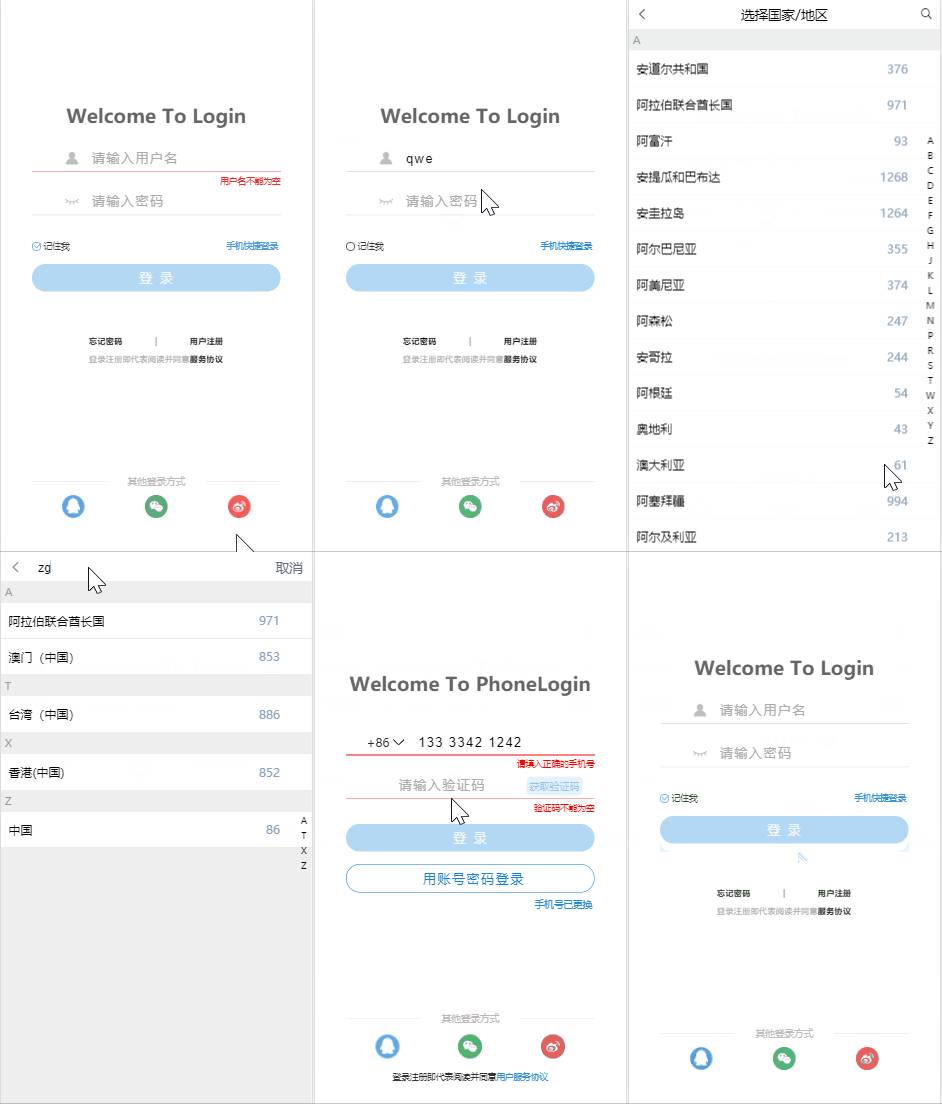
安装
npm install bm-vlogin --save引入
//main.js中

//全部引入
import bmVlogin from 'bm-vlogin'
Vue.use(bmVlogin)

//按需引入
import {bm_login,bm_phone_login,bm_select_code} from 'bm-vlogin'
Vue.use(bm_login);
Vue.use(bm_phone_login);
Vue.use(bm_select_code);
使用
示例的路由配置
 routes: [
    {
      path: '/',
      name: 'login',
      component: login
    },
    {
      path: '/phoneLogin',
      name: 'phoneLogin',
      // route level code-splitting
      // this generates a separate chunk (about.[hash].js) for this route
      // which is lazy-loaded when the route is visited.
      component: () => import('./views/phone_login.vue')
    },
    {
      path: '/phoneLogin/selectCode',
      name: 'selectCode',
      component: () => import('./views/select_code.vue')
    }
  ]
使用示例
template
 <bm_login :base-config="myConfig"
           v-on:phoneLogin="to_phoneLogin"
           v-on:forgetPassword="to_forgetPassword"
           v-on:toProtocol="to_protocol"
           v-on:register="to_register"
           v-on:qqLogin="qq_login"
           v-on:weixinLogin="weixin_login"
           v-on:weiboLogin="weibo_login"
           @parent_rememberMe="rememberMe"
           @parent_login="login">
      <!-----------------------可以自定义内容放在header中(以下为示例)--------------------------->
       <template v-slot:header>
           <div style="display: flex;flex-direction: row;justify-content: space-around;align-items: center">
               <h2>Welcome To Login</h2>
           </div>
       </template>
 </bm_login>
script
    data(){
        return{
            myConfig:{
                forgetPwd_register_protocol: true,
                    //为false时,下面三项设置为true无效
                forgetPassword:true,
                register:true,
                protocol:true,
                quickLogin:true,
                otherLoginWays: true
            }
        }
    },
    methods:{
     //根据配置自行选择需要的方法
        to_phoneLogin(){
            //进入手机登录页面
            this.$router.push({path:'/phoneLogin'});
        },
        to_forgetPassword(){
            //进入忘记密码页面
        },
        to_register(){
            //进入注册页面
        },
        to_protocol(){
            //阅读协议
        },
        qq_login(){
            //qq登录
        },
        weixin_login(){
            //微信登录
        },
        weibo_login(){
            //微博登录
        },
        /**
            * 记住我功能
            * 关闭掉了客户端的cookie实现,请开发者自行与服务端通信实现该功能
            */
        rememberMe(isActive) {
            console.log("rememberMe:::", isActive);  // 该功能是否开启
        },
        login(input_info){
            //登录
            console.log(input_info);    //用户输入的用户名和密码
            let params = new URLSearchParams();
            params.append('YourParamsName1',input_info.username);
            params.append('YourParamsName2',input_info.password);
            this.axios.post('xxx',params)
                .then((res) => {
                console.log(res);
                })
                .catch((err) => {
                    console.log(err);
                })
        }
    }
使用示例 template
  <bm_phone_login  v-on:accountLogin="to_account_login"
                   v-on:changedPhone="to_change_phone"
                   v-on:qq_login="qqLogin"
                   v-on:weixin_login="weixinLogin"
                   v-on:weibo_login="weiboLogin"
                   @parent_choose_area="to_chooseArea"
                   @parent_get_code="getCode"
                   @parent_phone_login="phoneLogin"
                   :base-config="myConfig">
        <!-----------------------可以自定义内容放在header中(以下为示例)--------------------------->
        <template v-slot:header>
            <div style="display: flex;flex-direction: row;justify-content: space-around;align-items: center">
                <h2>Welcome To PhoneLogin</h2>
            </div>
        </template>
        <!--------------------------------初始区号:+86(建议不要改变)-------------------------->
        <template v-slot:country_tel>+{{countryTel}}</template>
    </bm_phone_login>
script
    data(){
        return{
            countryTel:"",
            myConfig: {
                //根据需要自行修改
                code_length:'4',
                accountLogin:true,
                changedPhone: true,
                protocol: true,
                otherLoginWays: true
            }
        }
    },
    methods:{
        to_chooseArea(){
            // 跳转到区号选择页面
            this.$router.push({path:'/phoneLogin/selectCode'});
        },
        to_account_login(){
            // 跳转到账号密码登录页面
            this.$router.push({path:'/'});
        },
        to_change_phone(){
            //跳转到更改手机号页面
        },
        getCode(tel){
            //获取验证码
            console.log("tel:"+tel);//用户输入的手机号
            let params = new URLSearchParams();
            //参数:手机号(可根据自己需要自行添加)
            params.append('YourParamName',tel);
            //发送请求
            this.axios.post('xxx',params)
                .then((res) => {
                    console.log(res);
                })
                .catch((err) => {
                    console.log(err);
                });
        },
        phoneLogin(inputInfo){
            //登录
            console.log(inputInfo);//用户输入的手机号及验证码
            let params = new URLSearchParams();
            //参数:手机号,验证码(可根据自己需要自行添加)
            params.append('YourParamName1',inputInfo.phone);
            params.append('YourParamName2',inputInfo.code);
            //发送请求
            this.axios.post('xxx',params)
                .then((res) => {
                    console.log(res);
                })
                .catch((err) => {
                    console.log(err);
                });
        },
        qqLogin(){},
        weixinLogin(){},
        weiboLogin(){}
    },
    mounted() {
        this.countryTel = this.$route.params.tel || 86;
    }
template
<bm_select_code v-on:choose="selectCountry($event)"></bm_select_code>script
    methods:{
        selectCountry(event){
            let country_tel = event.tel;
            //向手机登录页面传参
            this.$router.push({name:"phoneLogin",params:{tel:country_tel}})
        }
    }