
bmad-compass
v0.5.1
Published
Local web dashboard that visualizes BMAD-Method project progress alongside Claude Code.

Maintainers
 pcornelissen
Readme
BMAD Compass
Local web dashboard that visualizes the progress of a BMAD-Method project alongside Claude Code.
Usage
cd /path/to/your/bmad-project
npx bmad-compass
Flags:
--dir <path>: project directory (default: cwd)--port <n>: fixed port (default: OS-assigned)--no-open: don't auto-open browser
Features
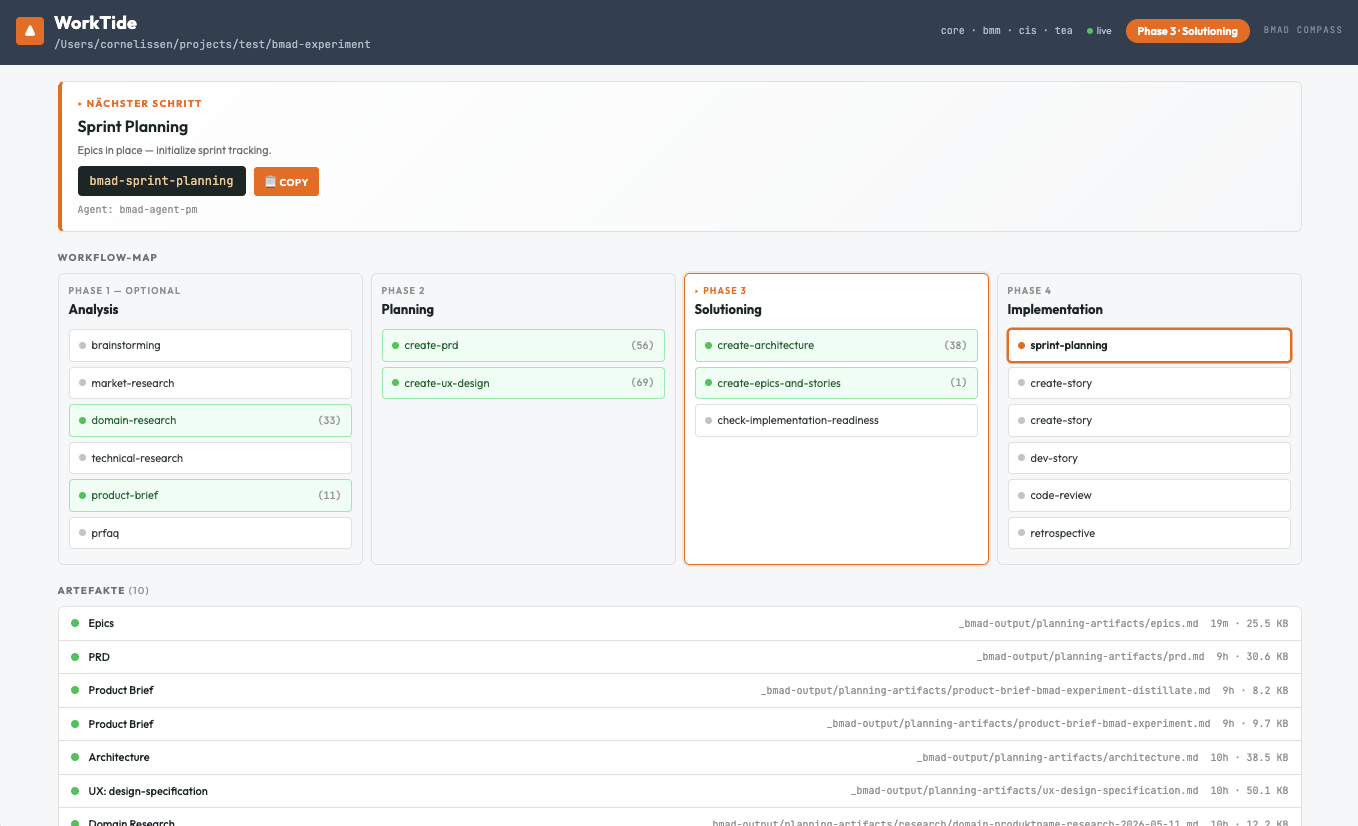
The dashboard is organized as tabs so each view has the full viewport:
- Workflow-Map — the 4 BMAD phases and all workflows as a swimlane, plus an anytime helpers row and a side panel with sub-step progress
- Abhängigkeiten — workflow
requiresrelationships as a layered SVG graph (same-column edges route around the boxes) - Sprint-Board — Kanban view of stories from
sprint-status.yaml, grouped by status; a Blocked column appears only when needed; Done collapses to a narrow strip so the active columns get more width - Artefakte — list of detected files under
_bmad-output/with markdown preview
Pinned above the tabs: the next-step recommendation with a copy-ready command. Live updates via file watcher — no reload needed.
The retrospective status is aggregated across all epic-N-retrospective entries in sprint-status.yaml (done iff no actionable retro remains), so the helper pill goes green automatically once you wrap up.
Module Support
BMAD Compass automatically discovers all workflows from your installed BMAD modules by reading _bmad/_config/manifest.yaml and each module's module-help.csv. When the manifest is absent (e.g. for older projects) it falls back to a built-in workflow list.
For document-heavy workflows (PRD, Architecture, UX Spec) Compass also shows sub-step progress: real markdown sections are listed as done, and a small set of world-knowledge hints suggests sections you might still want to add.
Project Hints (.compass-hints.yaml)
Override the built-in sub-step suggestions on a per-project basis by adding .compass-hints.yaml (or .compass-hints.yml) at your project root:
workflows:
  create-prd:
    sectionHints:
      - Problem Statement
      - Compliance Constraints
      - Data Retention
  create-architecture:
    sectionHints:
      - Components
      - Event Schema
      - Deployment Topology
  dev-story:
agent: my-custom-dev-agentsectionHintsreplaces the built-in suggestions for that workflow — these surface ashintedsub-steps until you add a matching heading to the markdown artifact.agentonly fills in when the workflow has no agent set by the manifest; it does not override a manifest agent.
Workflows you don't mention keep their built-in hints.
Architecture
- Single Node process (Express + ws + chokidar) serves a built React SPA
- No LLM calls, no cloud, no account
- Read-only: never modifies your BMAD project files