
bootstrap-tags
v1.0.0
Published
Bootstrap styled tag pills
Downloads
41

Maintainers
 serhioromano
Readme
Bootstrap Tags
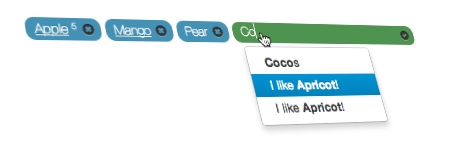
I just did not know how to name it in english, I named it after my task. I did it to use in my application to manage article tags.
Please see demo here. Demo is updated automatically on every push to repository so it always contains latest version.
TOC
Features
Based on templates. Thus you can change any HTML markup of any element, and fully control how this UI components looks.

Flexible API. There are few methods to make the same thing like pre-populate, remove or add tags/pills. You can use it as standard element with form submission or on fully AJAXed sites.
Not only manage tags on the form but in the article or simply fetch(list) tags without management.
Chose tags only from suggestions or create new values
Set who can delete or create tags
Install
You can install with bower
$> bower install bootstrap-tags-pillsto see what files to use run
$> bower list --pathHow to use
<!DOCTYPE html>
<html>
<head>
    <title>Bootstrap tags - pills UI component</title>
</head>
<body>
    <div id="bs-tags"></div>
</div>

<script type="text/javascript" src="components/jquery.min.js"></script>
<script type="text/javascript" src="components/bootstrap.bundle.js"></script>
<script type="text/javascript" src="components/bootstrap3-typeahead.js"></script>
<script type="text/javascript" src="components/jquery.color.js"></script>
<script type="text/javascript" src="js/bootstrap-tags.js"></script>
<script type="text/javascript">
    $('#bs-tags').tags({});
</script>
</body>
</html>
The minimal requirements are Bootstrap, jQuery and bootstrap3-typeahead loaded and bootstrap-tags.js. There is not css file for this element. Just use default style here and you can make your adjustment to it. It is already in roadmap to make this element themable.
Feed format
As for default values or typeahead suggestions the format is the same. It is an array of values. Values can be string or object or mixed.
[
    {
        "id": "1",
        "name": "Apple",
        "suggest": "Apple (5)",
        "num": 5
    },
    {
        "id": "3",
        "name": "Mango",
        "suggest": "mango (10)",
        "url": "/",
        "title": "Click here to see all articles of only Mango's"
    },
    "Banana"
]
Object may contain following properties
Property | Required | Description
---------|----------|------------
id | Yes | Required only if object. If it is a string, the same value for text and id will be used.
name | Yes | Used as tag text.
suggest | No | If not set text will be used. This property is used to display in typeahead suggestions.
num | No | If set, number will be shown after the text.
url | No | If set, text will be as link. Not that there is tag_link_target option. Eg. $('#bs-tags').tags({tag_link_target:"_blank"});
title | No | Title will create Bootstrap tooltip. It will be used only if url property exists.
Options
You can use following options on construction $('#bs-tags').tags(options);
Option | Default | Description
-------|---------|------------
values | [] | Default values to pre-populate component with tags/pills. Alternatively use onLoadDefaults event.
values_url | | Url to fetch default values. GET request will be made to that URL. Alternatively use onLoadDefaults event.
tag_link_target || Default target for tags/pills with links like _blank. To add link to tag you have to set url property in feed object. See Feed format for details.
can_delete | true | Set if current user can delete tags/pills
can_add | true | Set if current users can add new tags
remove_url | | Set URL where POST request will be sent on tag/pill removal with id parameter from item.id. Alternatively use onRemove event.
input_name | tags[] | Set name of the hidden <input> element to be added with every tag/pill. It should end with [] in order to support multiple values.
double_hilight | #0B3549 | Color to highlight tag on double entry attempt.
limit | 0 | Maximum amount of tags to add. 0 - no limits.
only_suggestions | false | You can allow only add from suggestions and not add new tags/pills.
suggestion_limit | 15 | Maximum number of suggestions for typeahead.
suggestion_url | | Url to fetch suggestion. POST request will be send with q and limit parameters. q - search string and limit - how many suggestions maximum.
suggestions | [] | Array of suggestion.
templates | Object | Set HTML markup. This let you fully manage and style output as you want. No limitations. See Templates for more details.
placeholder | String | Placeholder for input element.
Templates
Templates option allow you fully manage how tags/pills will look like. Then with additions of few CSS styles you may create very beautiful outputs. See demo for examples.
You can path template through templates option.
$('#bs-tags').tags({
	templates: {
		pill: '<span class="badge badge-info" data-tag-id="{1}">{0}</span>',
        delete_icon: '<i class="icon-remove-sign"></i>',
        number: ' <sup><small>{0}</small></sup>'
	}
});
Template | Default | Description
---|---|---
pill | <span class="badge badge-info badge-pill tag-badge p-3 mr-2">{0}</span> | This is main HTML element of the pill. This is also what will be passed to onRemove(pill) method. After full pill creation it will include also hidden <input>, number if passed and remove icon. {0} is the tag text.
add_pill | <span class="badge badge-success badge-pill p-2 tag-badge">...</span> | Main wrapper for pill with button to show input
input_pill | <div class="d-none input-group mt-2" style="min-width:200px"></div> | Main wrapper for typeahead input
number | <sup><small>{0}</small></sup> | If num property exists in feed then number will be added. This is template how to format it.
delete_icon | <i class="icon icon-plus"></i> | This is delete icon. If you use FontAwesome or IcoMoon you can change it to display better icon.
plus_icon | <i class="ml-2 icon icon-cancel"></i> | Icon to show tag input
ok_icon | <div class="input-group-append"><span class="input-group-text"><i class="icon icon-ok"></i></span></div> | Icon to confirm entered tag
input | <input data-provide="typeahead" class="tag-input typeahead form-control" autocomplete="off" type="text"> | Input element to search tags
Final pill may look like this.
<span class="badge badge-info badge-pill tag-badge p-3 mr-2" data-tag-id="2">
<a class="tag-link" data-toggle="tooltip" title="" target="" href="http://www.apple.com" data-original-title="Click here to see all "records" of only Apple's">Apple</a>
<sup><small>5</small></sup>
<a href="javascript:void(0)" class="tag-remove"><i class="ml-2 icon icon-cancel"></i></a>
<input data-tag-hidden="2" name="tags[]" type="hidden" value="2">
</span>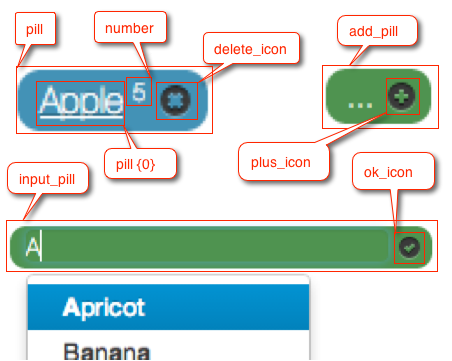
Events
With extended events API you can affect almost anything.
onLoadDefaults(values)
This method is triggered right before fetch tags pills and after values_url has been fetched. What you return will be used to pre-populate component with tags/pills.
values- List of items already populated withvaluesandvalues_urloptions. Thus you basically have to merge values if you want to add some values.
Example
$('#bs-tags').tags({
	onLoadDefaults:function(values){
    	return $.merge(values,["apple", "banana"]);
	}
});
onRemove(pill)
Triggered before removing HTML element of tag/pill.
pill- HTML element. headsup: every HTML element hasdata-tag-idattribute populated fromitem.idof the tags feed element.
Example
$('#bs-tags').tags({
	onRemove: function(pill){
    	var id = pill.data('tag-id');
    	// do something...
	}
});
onError(num, msg)
This alerts error message by default. But if you have your own error management system you can use this callback.
num- error number.msg- error text.
Error | Text ------|------ 10 | You have reached limit of only {0} tags to be added. 11 | Not correct object format to create tag/pill
This event is triggered before HTML element appended to pills list. This method has to return pill.
pill- an HTML element ready to be appended to list.item- tag object with all properties likeis,text,suggest,url, ... It will also contain all other custom properties you add to feed.
This event is triggered after suggestions_url has been fetched right before show suggestions in typeahead.
values- List of items already populated withsuggestionsandsuggestions_urloptions. Thus you basically have to merge values if you want to add some values.
The same as onLoadDefaults but for typeahead suggestions.
###onDuplicate
This event is triggered as a duplicate tag is being added. This method can return true or false. If the method returns true the the duplicate tag is added, however, if the method returns false the duplicate tag will not be added. By default the tag is not added and a small visual effect is used to alert the user. Two parameters are passed to the callback:
original- The first tag in the list that is equal to the tag that is being addedduplicate- The value of the tag that is being added
Example
$('#bs-tags').tags({
    onDuplicate: function(original, duplicate){
        //do something...
    }
});
###onBeforeRemove
This event is triggered before a tag is removed. The function for this event should return true or false. If the function returns true then the tag is removed, however, if the function returns false then the tag will not be removed. If there is a removal request to the server, it will happen after this function returns true. By default, the tag is removed, but this event can be useful if you want to make certain tags unremovable. One parameter is passed to the callback:
pill- HTML element. headsup: every HTML element hasdata-tag-idattribute populated fromitem.idof the tags feed element.
Example
$('#bs-tags').tags({
    onBeforeRemove: function(pill){
        if($(pill).data('tag-id') === 'Apple') {
            return false; // "Apple" tags are unremovable.
        } else {
            return true;
        }
    }
});
Examples
Load default values
There are 3 methods to load default values or pre-populate tags/pills. Methods are listed in order of execution.
First method is to pass default values as
valuesoption.$('#bs-tags').tags({values:["banana", "apple"]});Second method to provide URL where through
GETit will fetch default values$('#bs-tags').tags({values_url:"urls/defaults.json"});And last method is to use callback function
 $('#bs-tags').tags({
     onLoadDefaults:function(values){
         return $.merge(values,["apple", "banana"]);
     }
 });
Here
valuescontain already loaded values with previous methods.
Or you can use all methods at once. All values will be merged.
Remove tag/pill
First there is can_delete option to allow or disallow tags removing.
$('#bs-tags').tags({can_delete:true});This will allow simply remove tag HTML element with hidden <input>. But if you want callback on the event you can use onRemove(pill) callback.
$('#bs-tags').tags({
    can_delete: true,
    onRemove(pill) {
        // do something...
    }
});
Where pill is an HTML element.
And another way to control removal, is to set special URL where POST request will be sent with id parameter.
$('#bs-tags').tags({can_delete: true, remove_url: 'http://mysite.com/removetag.php'});Load suggestions
There are 3 methods to load suggestions to typeahead dropdown.
First method is to pass default values as
suggestionsoption.$('#bs-tags').tags({suggestions:["banana", "apple"]});Second method to provide URL where through
GETit will fetch default values$('#bs-tags').tags({suggestions_url:"urls/defaults.json"});And last method is to use callback function
 $('#bs-tags').tags({
     onLoadSuggestions: function(values){
         return $.merge(values,["apple", "banana"]);
     }
 });
Here
valuescontain already loaded values with previous methods.
Roadmap
- do not show in suggestion elements that are already added
- themable interface. jQuery UI theme.
Changelog
1.0.0 - beta
- switch to bootstrap 4
0.0.2 - beta
- better documentation
- added -
add_pillandinput_pilltemplates bootstrap-tags.cssdepreciated. There are no general CSS styles that would apply to all styles. It make sense to apply style only to currently used style. Just copy/paste CESS from example.
0.0.1 - beta
Initial release