
boring-cms
v0.23.0
Published
Open-source headless CMS. One deploy, many projects.

Maintainers
 amit_yadav
Readme
Boring CMS
Headless CMS that runs as a single Node process with SQLite. One deploy serves multiple projects, each with its own database, API keys, and content model. No build step, no framework, zero runtime dependencies.
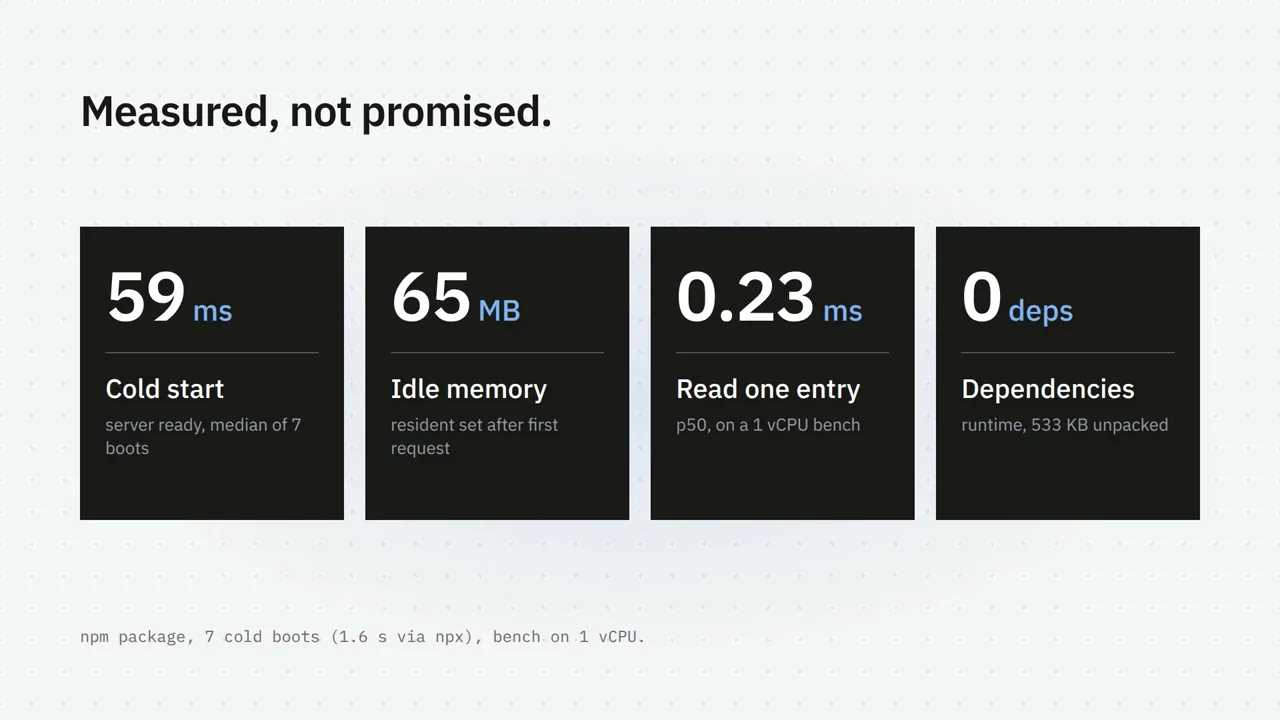
Watch the 22 second launch video on thetechbasket.com.
What you get:
- Admin UI with collections, custom fields, draft/publish workflow, field-level revisions with revert
- REST API with ETag caching and Bearer auth (read and write scopes)
- MCP server per project (Streamable HTTP) so AI agents can manage content
- Media library with local disk or S3-compatible storage (R2, MinIO, S3)
- Webhooks on publish/unpublish/delete
- Full export/import (JSON and CSV) with dry-run preview
- Passkeys (WebAuthn), Google OAuth, and email/password auth
- Per-project schema-as-code for version-controlled content models
Quick start
npx boring-cmsOpens on http://localhost:3000. Create the admin account at /setup,
then manage everything under /admin. Data lives in ~/.boring-cms
(override with BORING_CMS_HOME). On first run a .env with a random
SECRET_KEY is generated automatically.
Configuration
All configuration is in .env inside the data directory. Environment
variables override the file.
| Variable | Default | Description |
|---|---|---|
| SECRET_KEY | auto-generated | Encrypts stored settings and signs session cookies. Back it up: losing it makes encrypted settings unreadable and logs everyone out. |
| PORT | 3000 | HTTP listen port. |
| BORING_CMS_HOME | ~/.boring-cms | Data directory: databases, media, .env. |
| TRUST_PROXY | 0 | Set to 1 behind a reverse proxy that terminates TLS. Honors X-Forwarded-*, marks cookies Secure. Required for passkeys in production. |
| FORCE_PASSWORD_RESET | 0 | Set to 1 to force every user to choose a new password at next login. |
Google OAuth and S3 storage are configured from the admin UI under Global Settings (not env vars).
Content model
Each project is its own SQLite database. You define collections with custom fields:
- Field types: text, markdown, number, boolean, date, datetime, json, image, relation, counter
- Options per field: required, unique, localized, hidden, read-only
- Revisions: field-level diffs with configurable retention, atomic revert to any prior version
- Draft/publish: edits stay in draft until you publish; the API serves the published snapshot
See GUIDE.md for every field type, the counter field with drop-in scripts for likes, views, polls and quizzes, and API usage.
Admin UI
The admin provides: project management, collection editor, entry list with search and filtering, a markdown editor, media library with drag-and-drop upload, revision history, import/export, API key management, webhook configuration, and user/auth settings.
Content API
Create an API key under your project, then fetch content:
# List entries (supports limit, offset, updated_since)
curl -H "Authorization: Bearer yn_..." \
  http://localhost:3000/api/v1/<project>/<collection>

# Single entry by slug
curl -H "Authorization: Bearer yn_..." \
  http://localhost:3000/api/v1/<project>/<collection>/<slug>
Responses carry an ETag tied to the project's content version. Send
If-None-Match for cheap 304 responses until the next publish.
Every MCP tool is also callable over REST:
POST /api/v1/<project>/call/<tool> with tool arguments as JSON body
(write tools need a write-scope key).
Media upload
Multipart upload with a write-scope key:
curl -H "Authorization: Bearer yn_..." \
  -F [email protected] -F path=uploads/2026/09 \
  http://localhost:3000/api/v1/<project>/media
Optional resized variants (320px, 1024px) when sharp is installed.
50 MB limit per file.
Backup and restore
# Export (read-scope key)
curl -H "Authorization: Bearer yn_..." \
  http://localhost:3000/api/v1/<project>/export > backup.json

# Restore: idempotent upsert by slug (write-scope key)
curl -X POST -H "Authorization: Bearer yn_..." \
  -H "Content-Type: application/json" --data-binary @backup.json \
  http://localhost:3000/api/v1/<project>/import
Restore applies schema then creates or updates each entry, preserving
publish state. Entries absent from the dump are left alone;
?delete_missing=1 drops collections absent from the dump.
MCP
Each project is an MCP server at POST /mcp/<project> (Streamable HTTP),
authenticated with Bearer API keys.
- Read scope:
list_collections,list_entries,get_entry - Write scope: full entry lifecycle (create, update, publish, unpublish, delete)
- Rate limit: 60 requests/min per key (
429withRetry-After)
Agent edits are normal revertable revisions. The API keys page shows a ready-to-paste config:
{
  "mcpServers": {
    "my-site": {
      "type": "http",
      "url": "https://cms.example.com/mcp/my-site",
      "headers": { "Authorization": "Bearer yn_..." }
    }
  }
}
Webhooks
Per-project webhook URL and optional HMAC secret under Project settings.
Fires on entry.publish, entry.unpublish, entry.delete with a JSON
payload (event, project, collection, slug, at). With a secret,
includes an X-Boring-Signature: sha256=<hex> header. 10s timeout,
2 retries, never blocks other requests.
Media storage
Local disk by default (data/media/<project>/). For production, add
S3-compatible storage under Global Settings (R2, MinIO, S3). Each project
picks its storage backend independently.
Uploads go browser-to-bucket via presigned PUT (bucket needs a CORS PUT rule; falls back to server-side upload). "Migrate media to current storage" copies files and rewrites entry URLs. "Sync storage" reconciles the bucket against the library.
Auth
- Email + password: default, always available as fallback
- Passkeys (WebAuthn): added from Account settings, requires
TRUST_PROXY=1behind a proxy - Google OAuth: configure
google_client_idandgoogle_client_secretin Global Settings; redirect URI ishttps://<host>/auth/google/callback
Google OAuth and passkeys are alternative login methods for existing
accounts only. They never create new users. The first account is created
at /setup; no one else can sign in unless you create their account first.
Once a passkey or Google is set up, password login can be turned off from
Account. It re-enables itself if both alternatives disappear.
FORCE_PASSWORD_RESET=1 is the break-glass path.
Production deployment
One Node process plus a SQLite file. Runs on any small always-on box. Node 24+ is the only requirement.
Install a pinned version:
npm i -g boring-cmsSet a persistent data directory (not the throwaway
npxcache):export BORING_CMS_HOME=/home/boring/.boring-cmsWrite
.envinside that directory:SECRET_KEY=<generate once, keep forever> PORT=3000 TRUST_PROXY=1Generate
SECRET_KEY:node -e "console.log(require('node:crypto').randomBytes(32).toString('base64url'))"Keep it running with pm2:
pm2 start "$(which boring-cms)" --name cms
pm2 save && pm2 startup
Put a TLS reverse proxy (nginx, Caddy) in front, routing your domain to
127.0.0.1:3000and forwardingX-Forwarded-*headers.Open
https://cms.example.com/setupand create the admin account.
License
MIT