
bosun-x-dashboard
v0.4.1
Published
The bosun-x dashboard: every project, task board, handoff, server and backup your AI agents touch, on one self-hosted page. Plain files underneath.
Downloads
801

Maintainers
 team-x-hakt
Readme
bosun-x dashboard
One page for everything your AI agents are working on. Every project's task board, the live handoff between agents, your servers and what's running on them, backups that actually get checked, and ideas that aren't projects yet. Self-hosted, and built on a folder of plain Markdown and YAML that you, Claude, Codex or any other agent can read and write directly.
npx bosun-x-dashboard --demoThat runs it on sample data at http://localhost:3010. Nothing to set up, and nothing is kept when you stop it.
What you get
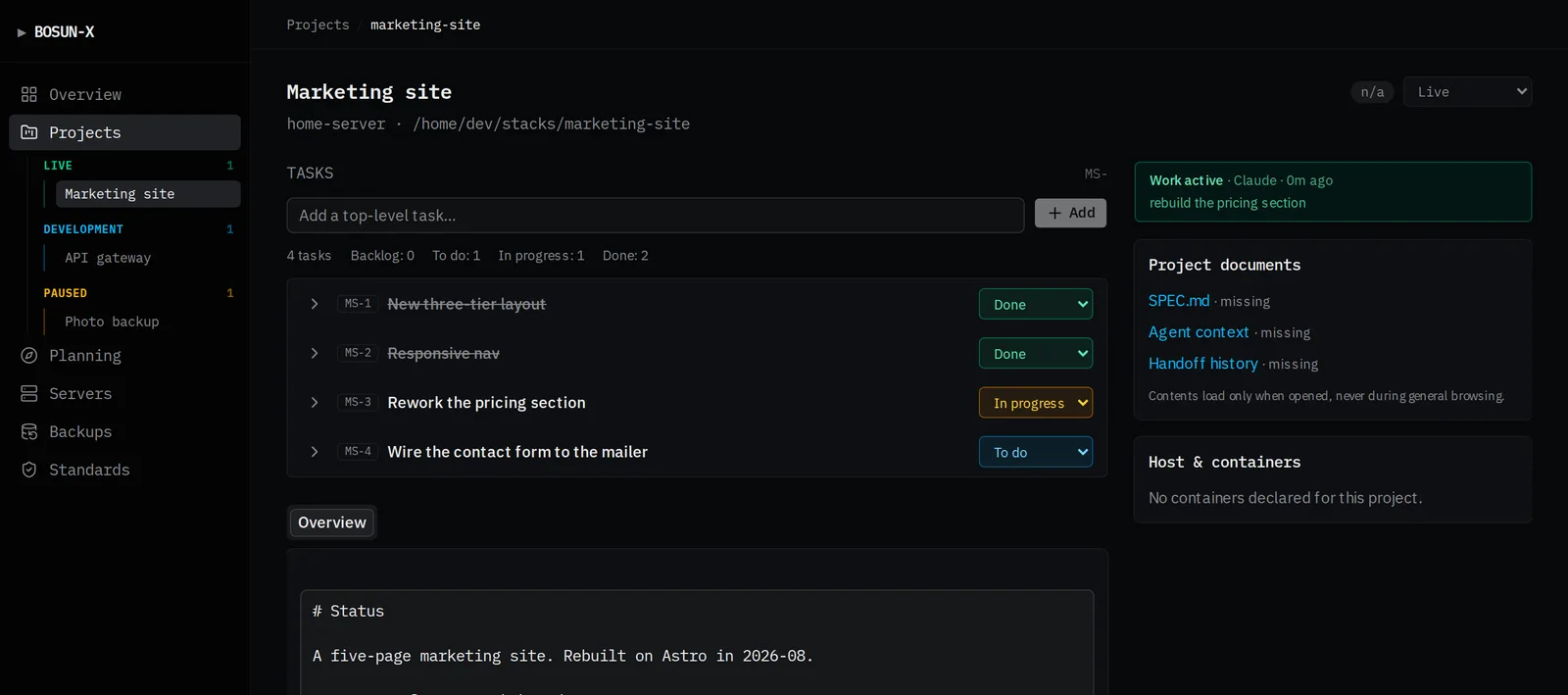
- Projects: one page per project with its task board, spec, status and the running handoff log, all rendered from files in the data folder and editable in place.
- Handoff: which agent holds each project right now, what it last did, what's next, and a staleness clock, so the next session (Claude, Codex or you) resumes instead of re-deriving everything.
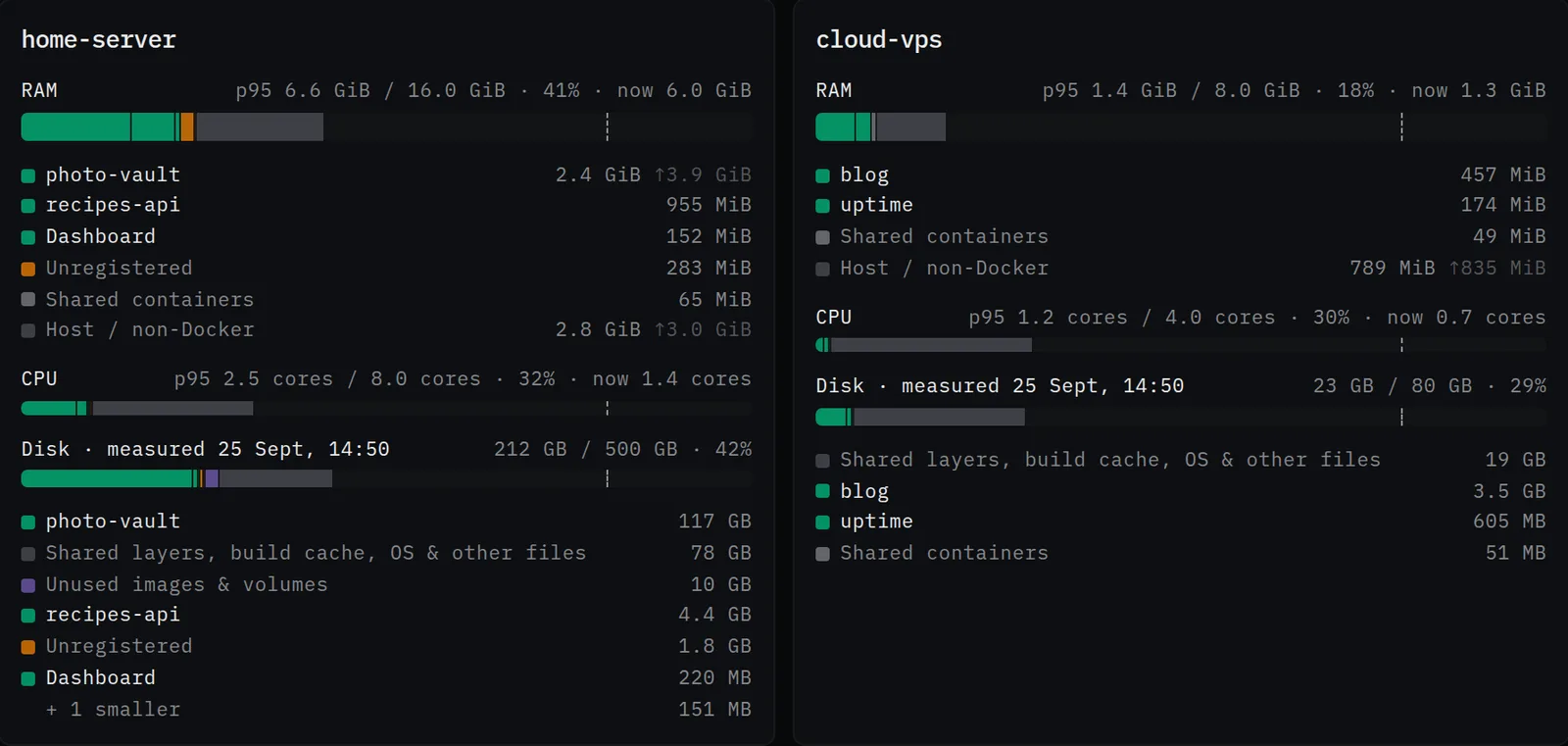
- Servers and capacity: live containers per server, grouped into projects; RAM, CPU and disk split by project with typical (p95) and peak usage; a move simulator that says whether a project would fit on another server before you try it.
- Standards: checks like "has a git remote", "has a spec", "backup fresh", scored against every project from git, the filesystem and Docker, never a ticked box.
- Backups: which jobs ran, which quietly didn't, restore runbooks and a weekly restore test.
- Planning: ideas and sub-ideas with a discussion thread each, graduating into projects when they're ready.
- Client portal (optional): a second deployment that shows each client only the work you've shared with them, with replies and sign-off.
- Works on a phone too.
Use it with your own data
The dashboard reads a data folder: one directory per project under projects/,
plus an optional config.yml. Make one with the bosun-x CLI's setup wizard:
mkdir ~/bosun-data && cd ~/bosun-data
npx bosun-x setup            # timezone, who can sign in, where your projects live
npx bosun-x-dashboard        # run from inside the data folder...
npx bosun-x-dashboard --data ~/bosun-data   # ...or point at it from anywhere
Or through the CLI, which finds the same data folder it uses for handoffs:
npm install -g bosun-x
bosun dashboard
Options:
| | |
|---|---|
| --data <dir> | the data folder (default: $BOSUN_DATA, else the current folder if it has projects/ or config.yml) |
| --demo | a fresh copy of the sample data instead; reads nothing from this machine (no Docker, host stats, SSH or project folders) |
| --port <n> | default 3010 |
| --host <addr> | default 127.0.0.1 (this machine only) |
| --open | open your browser once it's up |
Before you open it up
Out of the box there is no sign-in, which is fine on localhost and nowhere
else. Before binding it to a network (--host 0.0.0.0) or putting it behind a
domain, configure Google, GitHub or any OIDC provider plus an email allowlist, or
put it behind your own authenticating proxy. The launcher warns you if you try
otherwise. See docs/auth.md.
Requirements
- Node.js 20 or newer.
- For the live server features: the
dockerCLI and access to the Docker socket (or Podman viaDOCKER_HOST),git, andsshfor remote servers. Without them, projects, tasks, handoff, planning and notes all still work; the server panels just show nothing live.
Linux, macOS
Linux is the full experience. macOS works with one gap: everything runs, including
your local containers, but this machine's own memory, disk and load (the host tiles
and its capacity bars) are read with Linux tools and stay empty; the server page says
so. The capacity sampler scripts are Linux-only too. Remote servers are unaffected:
the dashboard on a Mac reads your Linux servers over SSH like anywhere else. With
Docker Desktop, if no local containers show, point at its socket:
DOCKER_HOST=unix://$HOME/.docker/run/docker.sock. Windows: use WSL.
Prefer containers? The same dashboard ships as an image,
ghcr.io/x-hakt/bosun-x-dashboard. See
docs/deploying.md.
Learn more
- Getting started: install, your first data folder, wiring an AI agent, running it as a service.
- All docs: configuration, discovery, capacity, backups and restore, the client portal, security.
- bosun-x: the CLI and MCP server your agents use to check in and out. The dashboard is where you look at all of it at once.
- x-hakt.com/locker/bosun-x: the product page.
MIT licensed.