
botkit-rocketchat-connector
v0.0.17
Published
A external connector to integrates botkit with RocketChat
Downloads
65

Maintainers
 arthurtemporim
Readme
botkit-rocketchat-connector
Brief
A Botkit platform connector for Rocket.Chat
This is a work in progress for the two communities to collaborate on to achieve the integration proposed in this issue on the main Rocket.Chat project.
We will follow the guide here to create a module that can be required by Botkit bots as a controller for Rocket.Chat. The outcome will be something like the current Slack integration, which is packaged with Botkit, here.
This work will pair with another project to provide a starter bot, implimenting this connector. The starter bot will provide most of the documentation. e.g Similar to botkit-start-slack, problably a botkit middleware will be used to build it.
It may also end up being moved to be maintained under the howdyai organisation, depending on what makes sense for the contributors doing most of the maintenance.
The code have some console.log() and // TO DO: [...] comments, this annotations will not remain when version 1.0 is ready.
botkit-starter-rocketchat
Do not forget to see the botkit-starter-rocketchat there the connector is used and the needed configuration is made to make your botkit run in RocketChat.
Organization
The RocketChat connector with Botkit it's mainly inside the RocketChatBot.js file. The image bellow exemply the configuration inside it:
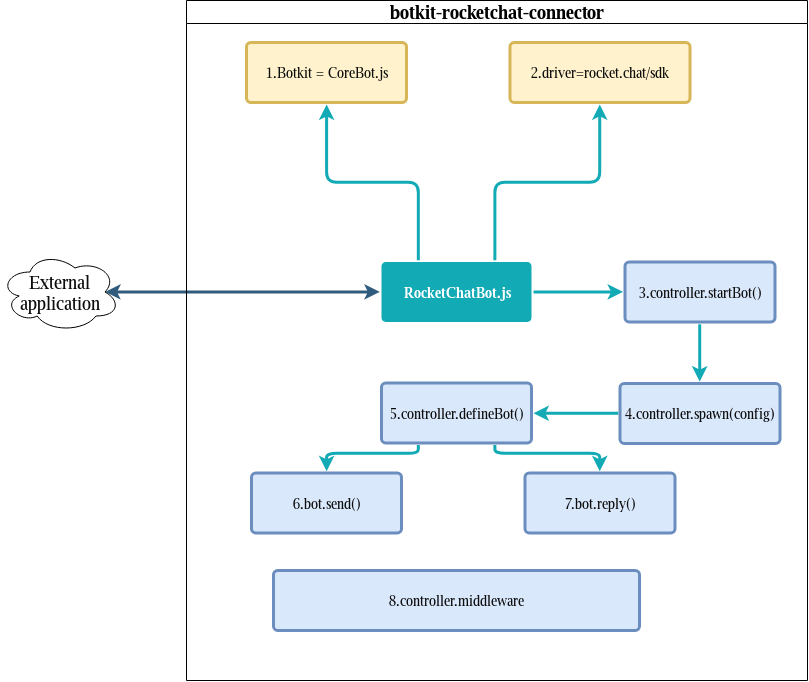
External applicationit's the application that's make use of the connector to make the needed configuration, like the botkit-starter-rocketchat.
In yellow are the imports, Botkit
CoreBot.jsRocketchat
sdk driver.The function
controller.startBot()make the connection with RocketChat using SDK and send a simple message to the channel.After the connection is made, the function
controller.spawn(config)callcontroller.defineBot()using some configurations.controller.defineBot()Defines some importants functions likebot.send()andbot.reply()Every message that's appers in the RocketChat side is sent using
bot.send()function.bot.reply()is used to reply messages.To make all things work, it's needed pass throught some
middlewares, this is a pipeline fromCoreBot.jsto configure the message and others things.