
bpmn-designer
v0.0.1
Published
A properties panel extension example


Readme
Properties Panel Extension Example
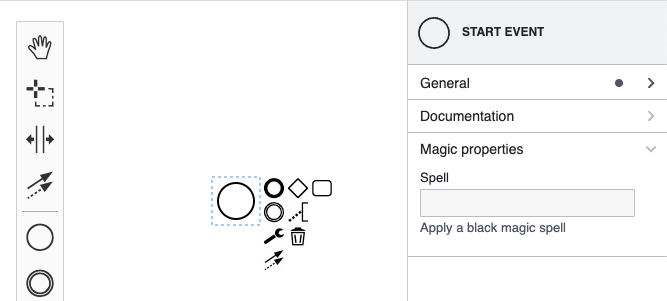
This example shows how to extend the bpmn-js-properties-panel with custom properties.
About
If you need more information about setting up take look at the basic properties example first.
In this example we extend the properties panel to allow editing a magic:spell property on all start events. To achieve that we will walk through the following steps:
- Add a tab called "Magic" to contain the property
- Add a group called "Black Magic" to this tab
- Add a "spell" text input field to this group
- Create a new moddle extension
The property magic:spell will be persisted as an extension as part of the BPMN 2.0 document:
<?xml version="1.0" encoding="UTF-8"?>
<bpmn2:definitions ... xmlns:magic="http://magic" id="sample-diagram">
  <bpmn2:process id="Process_1">
    <bpmn2:startEvent id="StartEvent_1" magic:spell="WOOO ZAAAA" />
  </bpmn2:process>
  ...
</bpmn2:definitions>
Let us look into all the necessary steps in detail.
Create a Properties Provider
The first step to a custom property is to create your own PropertiesProvider.
The provider defines which properties are available and how they are organized in the panel using tabs, groups and input elements.
We created the MagicPropertiesProvider which exposes all basic BPMN properties (via a "general" tab) as well as the "magic" tab.
function MagicPropertiesProvider(eventBus, bpmnFactory, elementRegistry) {

  ...

  this.getTabs = function(element) {

    ...

    // The "magic" tab
    var magicTab = {
      id: 'magic',
      label: 'Magic',
      groups: createMagicTabGroups(element, elementRegistry)
    };

    // All avaliable tabs
    return [
      generalTab,
      magicTab
    ];
  };
}
Define a Group
As part of the properties provider we define the groups for the magic tab, too:
// Require your custom property entries.
// The entry is a text input field with logic attached to create,
// update and delete the "spell" property.
var spellProps = require('./parts/SpellProps');

// Create the custom magic tab
function createMagicTabGroups(element, elementRegistry) {

  // Create a group called "Black Magic".
  var blackMagicGroup = {
    id: 'black-magic',
    label: 'Black Magic',
    entries: []
  };

  // Add the spell props to the black magic group.
  spellProps(blackMagicGroup, element);

  return [
    blackMagicGroup
  ];
}
Define an Entry
The "spell" entry is defined in SpellProps. We reuse EntryFactory#textField to create a text field for the property. Note that we make sure that the entry is shown if a start event is selected:
var entryFactory = require('bpmn-js-properties-panel/lib/factory/EntryFactory');

var is = require('bpmn-js/lib/util/ModelUtil').is;

module.exports = function(group, element) {
  // only return an entry, if the currently selected element is a start event
  if (is(element, 'bpmn:StartEvent')) {
    group.entries.push(entryFactory.textField({
      id : 'spell',
      description : 'Apply a black magic spell',
      label : 'Spell',
      modelProperty : 'spell'
    }));
  }
};
You can look into the EntryFactory to find many other useful reusable form input components. You can also go further and define what happens if you enter text in an input field and what is shown in it if the element is selected. To do so you can override entry#set and entry#get methods. A good example for this is DocumentationProps.
To get a better understand of the lifecycle of updating elements and the properties panel this forum post may be helpful.
Create a Moddle Extension
The second step to create a custom property is to create a moddle extension so that moddle is aware of our new property "spell". This is important for moddle to write and read BPMN XML containing custom properties. The extension is basically a json descriptor file magic.json containing a definition of bpmn:StartEvent#spell:
{
  "name": "Magic",
  "prefix": "magic",
  "uri": "http://magic",
  "xml": {
    "tagAlias": "lowerCase"
  },
  "associations": [],
  "types": [
    {
      "name": "BewitchedStartEvent",
      "extends": [
        "bpmn:StartEvent"
      ],
      "properties": [
        {
          "name": "spell",
          "isAttr": true,
          "type": "String"
        },
      ]
    },
  ]
}
In this file we define the new type BewitchesStartEvent which extends the type bpmn:StartEvent and adds the "spell" property as an attribute to it.
Please note: It is necessary to define in the descriptor which element you want to extend. If you want the property to be valid for all bpmn elements, you can extend bpmn:BaseElement:
...

{
  "name": "BewitchedStartEvent",
  "extends": [
    "bpmn:BaseElement"
  ],

  ...
},
Plugging Everything together
To ship our custom extension with the properties panel we have to wire both the moddle extension and the properties provider when creating the modeler.
var propertiesPanelModule = require('bpmn-js-properties-panel'),
    propertiesProviderModule = require('./provider/magic'),
    magicModdleDescriptor = require('./descriptors/magic');

var canvas = $('#js-canvas');

var bpmnModeler = new BpmnModeler({
  container: canvas,
  propertiesPanel: {
    parent: '#js-properties-panel'
  },
  additionalModules: [
    propertiesPanelModule,
    propertiesProviderModule
  ],
  moddleExtensions: {
    magic: magicModdleDescriptor
  }
});
Running the Example
Install all required dependencies:
npm install
npm install -g grunt-cli
Build and run the project
grunt auto-buildLicense
MIT