
brainstorm-mind-elixir
v5.2.68
Published
Fork of Mind elixir with some bespoke features
Downloads
102

Maintainers
 obiran
Readme
English | 中文 | Español | Français | Português | Русский | 日本語 | 한국어
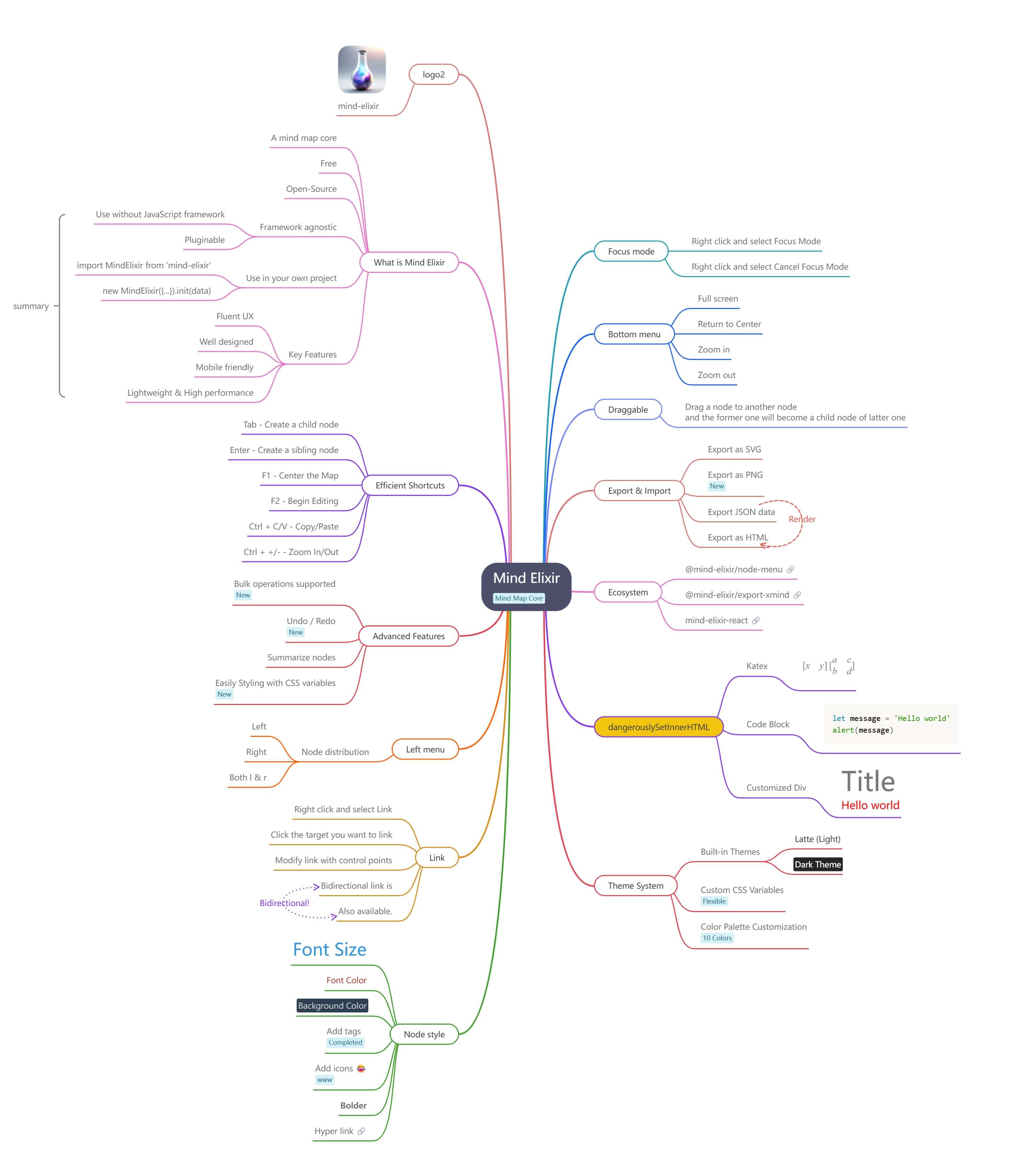
Mind elixir is a open source JavaScript mind map core. You can use it with any frontend framework you like.
Features
🎨 User Experience
- Fluent UX - Smooth and intuitive interactions
- Well designed - Clean and modern interface
- Mobile friendly - Touch events for mobile devices
- Efficient shortcuts - Keyboard shortcuts for power users
⚡ Performance & Architecture
- Lightweight - Minimal bundle size
- High performance - Optimized for large mind maps
- Framework agnostic - Works with any frontend framework
- Pluginable - Extensible architecture
🛠️ Core Features
- Interactive editing - Built-in drag and drop / node edit capabilities
- Bulk operations - Multi-node selection and operations
- Undo / Redo - Complete operation history
- Node connections & summarization - Custom node linking and content summarization
📤 Export & Customization
- Multiple export formats - SVG / PNG / HTML export
- Easy styling - Customize mindmap with CSS variables
- Theme support - Built-in themes and custom styling
- Features
- Try now
- Documentation
- Usage
- Export as a Image
- Theme
- Shortcuts
- Who's using
- Ecosystem
- Development
- Thanks
- Contributors
Try now
https://mind-elixir.com/
Playground
- Vanilla JS - https://codepen.io/ssshooter/pen/vEOqWjE
- React - https://codesandbox.io/p/devbox/mind-elixir-3-x-react-18-x-forked-f3mtcd
- Vue3 - https://codesandbox.io/p/sandbox/mind-elixir-3-x-vue3-lth484
Documentation
https://docs.mind-elixir.com/
- Incremental API docs:
readme/incremental-api.md
Usage
Install
NPM
npm i mind-elixir -Simport MindElixir from 'mind-elixir'
import 'mind-elixir/style.css'Script tag
<script type="module" src="https://cdn.jsdelivr.net/npm/mind-elixir/dist/MindElixir.js"></script>And in your CSS file:
@import 'https://cdn.jsdelivr.net/npm/mind-elixir/dist/style.css';Init
<div id="map"></div>
<style>
  #map {
    height: 500px;
    width: 100%;
  }
</style>
import MindElixir from 'mind-elixir'
import 'mind-elixir/style.css'
import example from 'mind-elixir/dist/example1'
let options = {
el: '#map', // or HTMLDivElement
direction: MindElixir.LEFT,
draggable: true, // default true
toolBar: true, // default true
zoomIndicator: false, // default false (set true to show zoom overlay)
nodeMenu: true, // default true
keypress: true, // default true
locale: 'en', // [zh_CN,zh_TW,en,ja,pt,ru] waiting for PRs
overflowHidden: false, // default false
mainLinkStyle: 2, // [1,2] default 1
mouseSelectionButton: 0, // 0 for left button, 2 for right button, default 0
contextMenu: {
focus: true,
link: true,
extend: [
{
name: 'Node edit',
onclick: () => {
alert('extend menu')
},
},
],
}, // default true
before: {
insertSibling(type, obj) {
return true
},
},
zoomDetail: {
enabled: true,
depthStops: [
{ scale: 0.95, depth: Infinity }, // show everything when zoomed in
{ scale: 0.8, depth: 6 },
{ scale: 0.65, depth: 4 },
{ scale: 0.5, depth: 3 },
{ scale: 0.38, depth: 2 },
{ scale: 0, depth: 1 },
],
promotionBoost: 0.3, // how much to scale parents when aggregating
},
// Custom markdown parser (optional)
// markdown: (text) => customMarkdownParser(text), // provide your own markdown parser function
}
let mind = new MindElixir(options)
mind.install(plugin) // install your plugin
// create new map data
const data = MindElixir.new('new topic')
// or `example`
// or the data return from `.getData()`
mind.init(data)
// get a node
MindElixir.E('node-id')Data Structure
// whole node data structure up to now
const nodeData = {
  topic: 'node topic',
  id: 'bd1c24420cd2c2f5',
  style: { fontSize: '32', color: '#3298db', background: '#ecf0f1' },
  expanded: true,
  parent: null,
  tags: ['Tag'],
  icons: ['😀'],
  hyperLink: 'https://github.com/ssshooter/mind-elixir-core',
  image: {
    url: 'https://raw.githubusercontent.com/ssshooter/mind-elixir-core/master/images/logo2.png', // required
    // you need to query the height and width of the image and calculate the appropriate value to display the image
    height: 90, // required
    width: 90, // required
  },
  children: [
    {
      topic: 'child',
      id: 'xxxx',
      // ...
    },
  ],
}
Event Handling
mind.bus.addListener('operation', operation => {
  console.log(operation)
  // return {
  //   name: action name,
  //   obj: target object
  // }

  // name: [insertSibling|addChild|removeNode|beginEdit|finishEdit]
  // obj: target

  // name: moveNode
  // obj: {from:target1,to:target2}
})

mind.bus.addListener('selectNodes', nodes => {
  console.log(nodes)
})

mind.bus.addListener('expandNode', node => {
  console.log('expandNode: ', node)
})
Data Export And Import
// data export
const data = mind.getData() // javascript object, see src/example.js
mind.getDataString() // stringify object

// data import
// initiate
let mind = new MindElixir(options)
mind.init(data)
// data update
mind.refresh(data)
Markdown Support
Mind Elixir supports custom markdown parsing:
// Disable markdown (default)
let mind = new MindElixir({
  // markdown option omitted - no markdown processing
})

// Use custom markdown parser
let mind = new MindElixir({
  markdown: (text) => {
    // Your custom markdown implementation
    return text
      .replace(/\*\*(.*?)\*\*/g, '<strong>$1</strong>')
      .replace(/\*(.*?)\*/g, '<em>$1</em>')
      .replace(/`(.*?)`/g, '<code>$1</code>')
  },
})

// Use any markdown library (e.g., marked, markdown-it, etc.)
import { marked } from 'marked'
let mind = new MindElixir({
  markdown: (text) => marked(text),
})
For detailed markdown configuration examples, see docs/markdown-configuration.md.
Adaptive zoom detail
When you zoom out, Mind Elixir now hides distant (deep) nodes and slightly enlarges their parents so that the overall structure stays readable.
This behavior is on by default and can be tuned/disabled via the zoomDetail option:
const mind = new MindElixir({
  // ...
  zoomDetail: {
    enabled: true,
    depthStops: [
      { scale: 0.95, depth: Infinity }, // no filtering when scale >= 0.95
      { scale: 0.65, depth: 4 },
      { scale: 0.5, depth: 3 },
      { scale: 0.38, depth: 2 },
      { scale: 0, depth: 1 },
    ],
    promotionBoost: 0.3, // max extra scale applied to aggregated parents
    fadeDepthBuffer: 1, // number of depth levels that fade before hiding
  },
})
depthStops are processed from top to bottom; the first entry whose scale is less than or equal to the current zoom selects how deep nodes remain visible.
Nodes that exceed the active stop move into a lod-fading state for fadeDepthBuffer extra depth levels (with the fade intensifying as you keep zooming out) before finally receiving lod-hidden. Their parent node gets a lod-promoted class (with --lod-promote-scale applied) so you can highlight that branch as you zoom back in.
Need to see the current zoom while tuning these stops? Set zoomIndicator: true to display a small overlay in the canvas showing the active scale percentage (updates live as you zoom).
Live minimap overlay
Mind Elixir can render a live minimap in the bottom-right corner that mirrors the entire map and highlights the portion currently visible on screen. The minimap reacts instantly to every pan/zoom gesture (mouse, touch, trackpad, keyboard) and can also be used to navigate: drag the blue rectangle or click anywhere inside the minimap to jump there.
const mind = new MindElixir({
  // ...
  minimap: {
    enabled: true,       // opt-in (defaults to false)
    width: 240,          // pixels
    height: 160,
    padding: 12,         // inner padding around the rendered map
    visible: true,       // start shown (mind.hideMinimap() to hide later)
    position: {
      corner: 'top-right', // TL | TR | BL | BR (default BR)
      offsetX: 24,
      offsetY: 24,
    },
    viewportColor: 'rgba(10, 132, 255, 0.35)',
    viewportBorderColor: '#0a84ff',
  },
})

mind.hideMinimap()  // programmatically hide
mind.showMinimap()  // show again
mind.toggleMinimap()
All color-related properties are optional; if omitted, sensible theme-friendly defaults are used. The position block lets you pick any screen corner and specify exact offsets, so the minimap can avoid clashing with your own overlays. When the minimap is disabled or hidden it incurs zero runtime cost.
Operation Guards
let mind = new MindElixir({
  // ...
  before: {
    async addChild(el, obj) {
      await saveDataToDb()
      return true
    },
  },
})
Export as a Image
Install @ssshooter/modern-screenshot, then:
import { domToPng } from '@ssshooter/modern-screenshot'

const download = async () => {
  const dataUrl = await domToPng(mind.nodes, {
    padding: 300,
    quality: 1,
  })
  const link = document.createElement('a')
  link.download = 'screenshot.png'
  link.href = dataUrl
  link.click()
}
Theme
const options = {
  // ...
  theme: {
    name: 'Dark',
    // main lines color palette
    palette: ['#848FA0', '#748BE9', '#D2F9FE', '#4145A5', '#789AFA', '#706CF4', '#EF987F', '#775DD5', '#FCEECF', '#DA7FBC'],
    // overwrite css variables
    cssVar: {
      '--main-color': '#ffffff',
      '--main-bgcolor': '#4c4f69',
      '--color': '#cccccc',
      '--bgcolor': '#252526',
      '--panel-color': '255, 255, 255',
      '--panel-bgcolor': '45, 55, 72',
    },
    // all variables see /src/index.less
  },
  // ...
}

// ...

mind.changeTheme({
  name: 'Latte',
  palette: ['#dd7878', '#ea76cb', '#8839ef', '#e64553', '#fe640b', '#df8e1d', '#40a02b', '#209fb5', '#1e66f5', '#7287fd'],
  cssVar: {
    '--main-color': '#444446',
    '--main-bgcolor': '#ffffff',
    '--color': '#777777',
    '--bgcolor': '#f6f6f6',
  },
})
Be aware that Mind Elixir will not observe the change of prefers-color-scheme. Please change the theme manually when the scheme changes.
Shortcuts
See Shortcuts Guide for detailed information.
Who's using
Ecosystem
- @mind-elixir/node-menu
- @mind-elixir/node-menu-neo
- @mind-elixir/export-xmind
- @mind-elixir/export-html
- mind-elixir-react
PRs are welcome!
Development
pnpm i
pnpm dev
Test generated files with dev.dist.ts:
pnpm build
pnpm link ./
Update docs:
# Install api-extractor
pnpm install -g @microsoft/api-extractor
# Maintain /src/docs.ts
# Generate docs
pnpm doc
pnpm doc:md
Use DeepWiki to learn more about Mind Elixir
Thanks
Contributors
Thanks for your contributions to Mind Elixir! Your support and dedication make this project better.