
branch-ai
v1.1.0
Published
The reasoning canvas for any AI CLI. Works with Claude Code, OpenAI Codex, Google Gemini, and Factory.ai Droid — captures each tool's reasoning as a navigable, forkable tree.

Maintainers
 nikolas.sapa
Readme
branch-ai
The reasoning canvas for any AI CLI. Works with Claude Code, OpenAI Codex, Google Gemini, or Factory.ai Droid — captures each tool's reasoning as a navigable, forkable tree. Walk backward through the thinking, explore alternative paths from any point, or add a new fact mid-thought and watch how the conclusion changes.
See it live: Try the public demo — view real reasoning trees. To create your own and fork them, install locally below.
Why this exists. When an AI works through a hard problem, the reasoning vanishes the moment you see the answer. Branch preserves every reasoning step, lets you rewind to any point, and explore "what if I changed this assumption?" — without starting over.
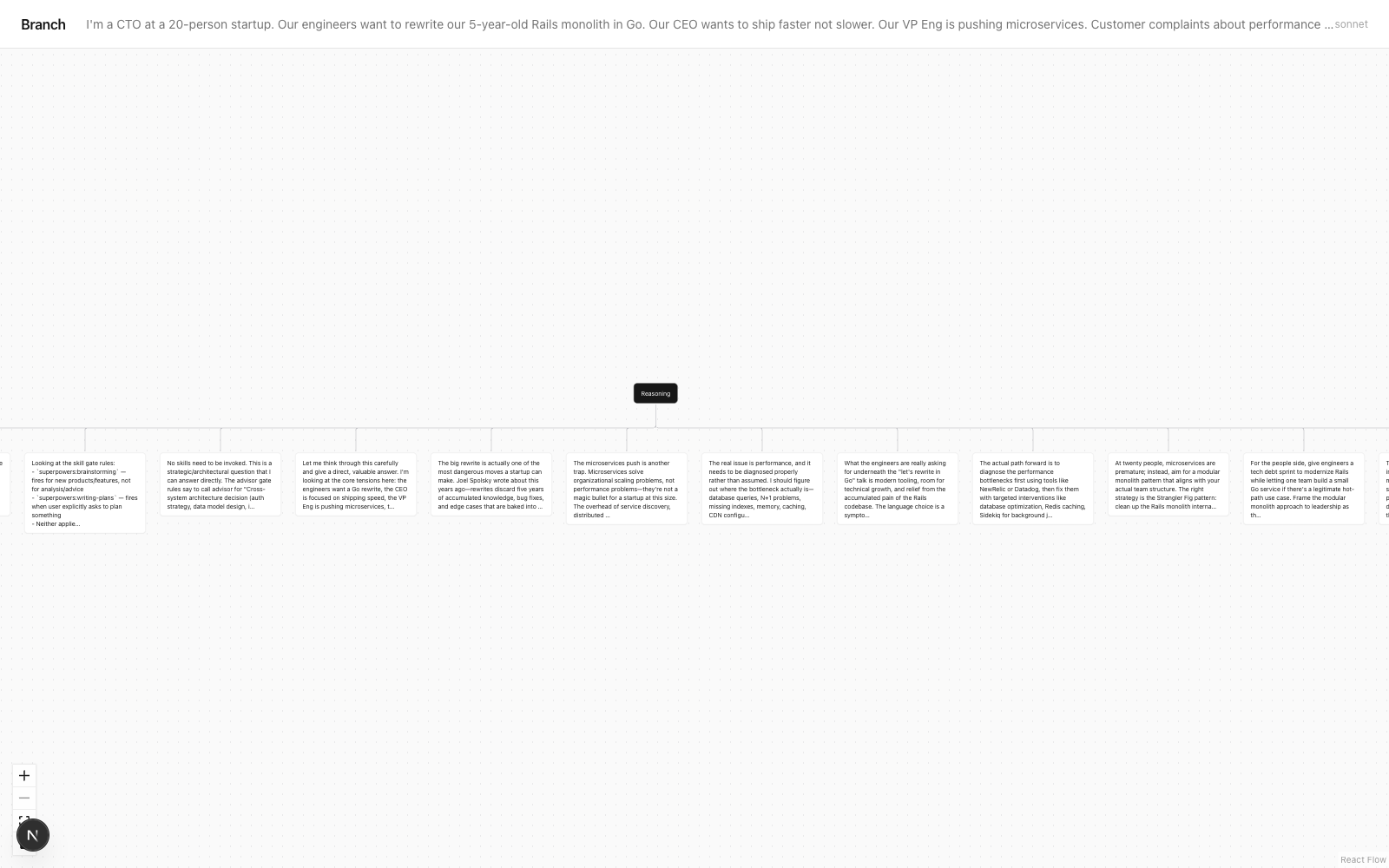
Supported CLIs
- Claude Code — full thinking-block capture (richest reasoning)
- OpenAI Codex CLI — captures reasoning summaries from o3 / gpt-5
- Google Gemini CLI — captures Flash thinking-mode output
- Factory.ai Droid — routes across underlying models; captures thinking when the routed model supports it
Run branch doctor after install to see which are available on your PATH.
What you get
branch "prompt"— CLI that captures reasoning as a navigable tree (auto-detects which AI CLI to use, or pass--cli claude|codex|gemini)branch-mcp— MCP server so Claude Code agents can externalize their own reasoning, fork it, or add facts mid-thought- Web viewer — React Flow canvas where you click any node to explore an alternative path or add a new fact
branch decide— record what you decided, what you rejected, and what would change the answer laterbranch doctor— see which AI CLIs are installed and which one Branch will use by default
Requirements
- Node 20+
- At least one AI CLI on PATH:
- Claude Code signed in (Claude Pro, Max, or Team subscription)
- OpenAI Codex CLI (
codexbinary) - Google Gemini CLI (
geminibinary) - Factory.ai Droid (
droidbinary)
- Branch uses your existing CLI auth — no API keys required by Branch itself
Install
npm install -g branch-aiQuickstart
# Terminal 1 — start the viewer
git clone https://github.com/84yk8btb9f-prog/branch-ai && cd branch-ai
npm run viewer
# viewer runs on http://localhost:7432

# Terminal 2 — run the CLI
branch "Should I deploy on Friday afternoon? Think carefully through the tradeoffs"
# opens the reasoning tree in your browser automatically
CLI
branch [--cli claude|codex|gemini|droid] [--model <model>] [--local] "your prompt"--cli— pick an AI CLI. Defaults to auto-detect (first available on PATH).--model— model name (each adapter has its own defaults; e.g.sonnetfor Claude,gpt-5for Codex,gemini-2.5-flashfor Gemini,defaultfor Droid)--local— skip auto-sharing for a single run whenBRANCH_AUTO_SHARE=1is set (auto-share is OFF by default — see Privacy section)
Run branch doctor to see which CLIs are available and which Branch will use by default.
Sessions are saved to ~/.branch/sessions/<id>.json. The viewer reads them from there.
All commands
| Command | What it does |
|---|---|
| branch "prompt" | Run a prompt and open the reasoning tree |
| branch list | Recent sessions |
| branch search <query> | Search across all sessions including decision conclusions |
| branch share <id> | Upload a session to Vercel Blob for sharing |
| branch decide <id> | Record a decision anchor for a session |
| branch decisions | List all sessions with recorded decisions |
| branch export <id> | Export as Markdown or Mermaid |
| branch diff <a> <b> | Compare two sessions |
| branch tag <id> <tag> | Tag a session |
| branch pin <id> | Pin a session to the top of the list |
| branch replay <id> [--model X] | Re-run a session's original prompt (optionally with a different model) and link the new run back to the source |
| branch merge <a> <b> | Synthesize two sessions into a third — finds agreement, divergence, and a unified answer |
| branch watch on\|off\|status | Install/remove a Claude Code Stop hook that auto-saves every CC session as a Branch tree |
| branch mcp install <client> | Add the branch-mcp server to a client's config file (claude-code, claude-desktop, cursor, codex, cline) |
| branch mcp install --all | Install branch-mcp into every supported client at once |
| branch mcp uninstall <client> | Remove branch-mcp from a client's config |
| branch mcp status | Show which clients have branch-mcp installed |
Environment variables
BRANCH_VIEWER_URL— override where the CLI prints the viewer link. Default:http://localhost:7432.BLOB_READ_WRITE_TOKEN— Vercel Blob token. Required forbranch share <id>(manual upload). By itself, this does NOT cause auto-upload — seeBRANCH_AUTO_SHARE.BRANCH_AUTO_SHARE— set to1to opt in to auto-upload of everybranch "prompt"run. Off by default. Use--localto opt out per-run when auto-share is on.
Decision anchors
After a reasoning session, record what you actually decided:
branch decide <sessionId>
# interactive prompts: conclusion, rejected alternatives, confidence, revisit trigger

# or non-interactive:
branch decide <id> --conclusion "Build modular monolith" --rejected "Microservices;Mongo migration" --confidence high --revisit-if "Team grows past 15 engineers"
Decisions show up in branch list with a [decided] marker and the conclusion line. branch decisions shows only settled questions. The viewer renders a decision card at the top of the session.
Gallery
The viewer ships a /gallery route with a hardcoded list of curated reasoning examples you can explore in the tree canvas:
http://localhost:7432/galleryClick any card to open the full session — fork from any node, add a new fact, or compare with branch diff.
Privacy note: The gallery is NOT auto-populated. Only the sessions explicitly listed in viewer/lib/gallery.ts and bundled into viewer/public/gallery-sessions/ ship with the viewer. Your own sessions in ~/.branch/sessions/ are private to your machine unless you choose to share them.
Privacy
By default, Branch is fully local:
- Sessions save to
~/.branch/sessions/<id>.json— only on your machine - The viewer reads from your local disk
- Nothing leaves your machine unless you explicitly share
Sharing is opt-in per use:
branch share <id>— manual upload of one session to public Vercel BlobBRANCH_AUTO_SHARE=1(env var) — opt in to auto-upload every run; remove the var to stop--localflag — skip auto-share for a single run whenBRANCH_AUTO_SHARE=1is set
When you share, the entire session JSON (prompt + reasoning tree + final answer + decision) is uploaded to a publicly readable URL. Don't share sessions containing secrets, internal company data, or anything you wouldn't post on GitHub.
MCP server — use Branch from inside Claude Code
Add this to ~/.claude.json under mcpServers:
"branch": {
  "type": "stdio",
  "command": "branch-mcp",
  "env": { "BRANCH_VIEWER_URL": "http://localhost:7432" }
}
Restart Claude Code. From inside any CC session you'll have 13 tools:
branch_think({ prompt, model? })— externalize Claude's own reasoning as a tree. Returns viewer URL.branch_fork({ sessionId, nodeId, modifier })— fork from any node in an existing session.branch_inject({ sessionId, nodeId, fact })— inject a new fact at a node and re-reason from there.branch_list_sessions({ limit? })— recent trees.branch_search({ query, limit? })— full-text search across all sessions (recall before duplicating effort).branch_decide({ sessionId, conclusion, rejected?, confidence, revisitIf })— record a decision anchor (conclusion + rejected + confidence + revisit-if).branch_diff({ sessionA, sessionB })— compare two sessions semantically (shared / changed / only-A / only-B).branch_export({ sessionId, format })— export as markdown or mermaid flowchart.branch_replay({ sessionId, model? })— re-run a session's original prompt with a (possibly different) model.branch_merge({ sessionA, sessionB })— synthesize two sessions into a new combined session.branch_tag({ sessionId, tags })— add tags to a session for organization.branch_pin({ sessionId, pinned })— pin/unpin a session to the top of the list.branch_share({ sessionId })— upload to public Vercel Blob and return a shareable URL (requiresBLOB_READ_WRITE_TOKEN).
Hosted mode (optional)
By default Branch is local-only. To share sessions with people who don't have your machine, use Vercel Blob storage.
Hosted = read-only. When the viewer is deployed to Vercel (or any non-localhost host), fork, inject, and the prompt form are hidden and replaced with an install CTA. Those actions spawn a
claudesubprocess locally — they don't exist on Vercel. Visitors can browse and navigate trees; to create or fork them they need a local install.
Setup (one-time, free tier):
- Create a free Vercel account
- Create a Blob store at https://vercel.com/dashboard/stores → Create → Blob
- Copy the
BLOB_READ_WRITE_TOKENfrom the store settings export BLOB_READ_WRITE_TOKEN=vercel_blob_rw_xxxxxxxx— enablesbranch share <id>. Does NOT auto-upload anything.
Manual share (recommended — explicit per session):
branch share <sessionId>
# Prints a public URL anyone can fetch
Auto-share every session (opt-in, off by default):
export BLOB_READ_WRITE_TOKEN=vercel_blob_rw_xxxxxxxx
export BRANCH_AUTO_SHARE=1
branch "your prompt"   # now auto-uploads
branch --local "your prompt"  # opt out for one run
Self-hosted viewer:
Deploy the viewer/ directory to Vercel. See viewer/README-DEPLOY.md for step-by-step instructions.
Environment variables (hosted mode)
BLOB_READ_WRITE_TOKEN— Vercel Blob token. Required forbranch share <id>andbranch_shareMCP tool. By itself, it does NOT auto-upload anything.BRANCH_AUTO_SHARE— set to1to opt in to auto-upload of everybranch "prompt"run. Off by default.BRANCH_BLOB_BASE— base URL of your Blob store. Set on the viewer deployment so it can serve shared sessions.
How it works
- CLI spawns
claude --output-format=stream-json --verbose --print "<prompt>" - Parses the assistant stream for
type: "thinking"blocks (reasoning steps) - Splits reasoning by headings / paragraphs into a tree
- Saves to
~/.branch/sessions/<id>.json - Next.js viewer reads the file and renders it with React Flow
- Click any node → explore an alternative path or add a new fact mid-thought
What it captures — and what it doesn't
- Captures the surfaced reasoning steps when extended reasoning is on
- Simple factual prompts ("A or B?") often skip reasoning → sparse tree
- Tool-using sessions lose reasoning between tool calls (only pre-tool reasoning is captured)
- Implicit model cognition (attention patterns, token-level reasoning) is never exposed by any API — Branch captures what Claude narrates, not everything it "thinks"
Project structure
branch-ai/
├── src/           SDK + CLI + MCP server
├── viewer/        Next.js tree renderer (React Flow)
├── scripts/       feasibility test
├── tests/         vitest suite
└── dist/          published build
Security
- Viewer has no authentication. It is designed to run on
localhostonly. Do not expose the viewer port to a network or the public internet — any host on the same network could call the/api/forkand/api/injectroutes and triggerclaudesubprocesses against your subscription. - The
branch-mcpserver binds to stdio, so only the parent Claude Code process can talk to it. Untrusted transports cannot connect. - Session IDs are validated with
^[a-zA-Z0-9_-]+$before being used in file-system paths, preventing path traversal. - Prompts are passed as positional argv items to
claude(not shell-interpolated), so they are not subject to shell injection.
Real-time presence
Branch supports multi-user presence on the same session URL. Open the same viewer link in two browsers and you'll see each other's cursors and selected nodes live.
The viewer uses Yjs awareness over a tiny WebSocket server (no auth, no persistence). The dev script starts both the Next.js viewer and the WS server with npm run viewer. Custom port: BRANCH_WS_PORT=7434 npm run viewer. Custom WS URL on the client: NEXT_PUBLIC_BRANCH_WS_URL=ws://your-host:7433.
Contributing
PRs welcome. Please run npm test before submitting.
License
MIT © Nikolas Sapalidis