
brewbar
v1.0.0
Published
A localhost web GUI for managing macOS package managers — Homebrew plus npm, pip, cargo, go, gem, bun and pnpm. Real terminal, command preview, transactional operation queue, CVE scanning, on-demand disk-size & update scans, and an optional AI assistant.
Downloads
29

Maintainers
 gps949
Readme
🍺 brewbar
一个跑在本机的 Web 图形界面,用来管理 macOS 上的各种包管理器 —— Homebrew 及其同类,看得见地管理。


English · 中文
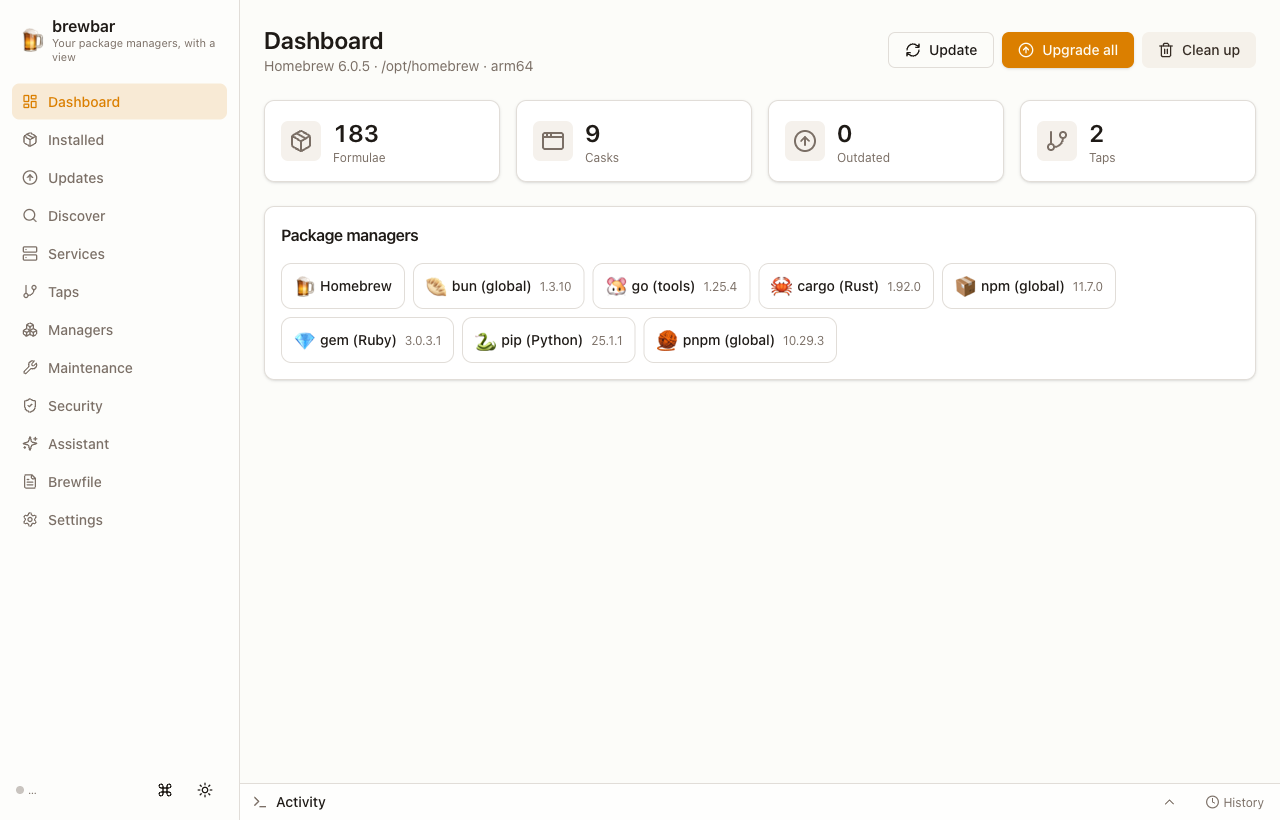
brewbar 把你日常使用的命令行包管理器,变成一个完全运行在本机的、快速的单页 Web 应用。它把 Homebrew 作为一等公民,同时把 npm、pip、cargo、go、gem、bun、pnpm 当作同等的"提供方"——安装、升级、卸载、查看、审计,全部在一个界面里完成。
功能特性
- 8 个包管理器,一个界面 —— Homebrew(formula + cask)外加 npm、pip、cargo、go、gem、bun、pnpm。切换提供方,以一致的方式管理每一个。
- 真实终端 —— 操作在浏览器内的 PTY(xterm.js)中执行,能响应
sudo/[Y/n]提示;你直接在底部「活动」坞里输入。 - 命令预览 —— 每个操作执行前都会展示将要运行的确切命令,所见即所执行。
- 事务式操作队列 —— 多选、排队、重试、取消任务,实时状态与日志。
- 每个提供方都有包详情 —— 简介、主页/仓库、已安装与最新版本、磁盘占用,以及配置的「源」(registry)。
- 按需扫描(带进度) —— 像垃圾清理工具一样:点一下扫描磁盘占用(按大小排序),或检查更新(连 bun/cargo/go 这类没有原生"检查更新"能力的管理器也能查)。
- CVE 漏洞扫描 —— 通过 OSV.dev 免费、免密钥地扫描 npm/PyPI/crates.io/RubyGems/Go 生态的已知漏洞。
- 依赖关系图 —— Homebrew formula 的交互式一跳关系图:"谁依赖它 / 它依赖谁"。
- Brewfile 三方对比 —— 查看已安装 vs. 声明的差异并同步。
- 可选的 AI 助手 —— 自带密钥。支持 Anthropic 以及任意 OpenAI 兼容端点(DeepSeek、智谱 GLM、月之暗面 Kimi、xAI Grok、Google Gemini……),流式输出。密钥仅存本地,绝不下发到浏览器。
- 精致的体验 —— 明/暗主题、
⌘K命令面板、完整的中英文本地化,以及从手机到桌面都自适应的布局。
环境要求
- macOS(brewbar 会调用 macOS 工具和各包管理器的路径)。
- Bun ≥ 1.0 —— 唯一需要的运行时。无需 Node、Electron 或 Xcode。
- Homebrew 可选;若未安装,会有引导页指导安装。其他管理器在存在时会被自动检测。
安装与运行
免安装直接运行
bunx brewbar全局安装
bun install -g brewbar
# 或:npm install -g brewbar (brewbar 命令仍然在 Bun 下运行)
brewbar
无论哪种方式,brewbar 都会启动一个本地服务、打印一个 URL 并自动打开浏览器:
🍺 brewbar running at http://127.0.0.1:4321/?token=<随机串>用 Ctrl-C 停止。
选项: brewbar --port=5000(指定端口)、brewbar --no-open(不自动打开浏览器)。
从源码运行
git clone https://github.com/gps949/brewbar.git
cd brewbar
bun install
bun run prod        # 先构建前端,再启动服务
工作原理
brewbar 是单个 Bun 进程:一个 Hono API + WebSocket 服务,同时托管预构建的 React/Vite/Tailwind 前端。它只监听 127.0.0.1,并在每次启动时生成新的随机访问 token,因此网络上其他设备都无法访问。包操作通过真实 PTY(借助 macOS 的 script)执行——这正是交互式提示和 sudo 无需任何特权守护进程就能工作的原因。
安全性
- 仅监听 localhost;每次启动生成新的访问 token,嵌入在自动打开的 URL 中。
- 无遥测、无账号、无付费墙。
- AI 助手的 API 密钥(若你配置了)存储在
~/.config/brewbar/ai.json,权限0600,绝不返回给浏览器。
使用手册
逐页讲解每个功能,见 docs/USAGE.zh.md(中文) · docs/USAGE.md(English)。
开发
bun install
bun run dev:server   # API + WebSocket,带 --watch(不自动打开)
bun run dev:web      # 前端的 Vite 开发服务器
bun test ./server    # 服务端测试
bun run build        # 构建前端到 web/dist
本仓库是 Bun workspace monorepo:shared/(类型)、server/(Hono API、providers、任务)、web/(React 应用)。
许可证
MIT © gps949