
bridge-id-sdk
v0.5.8
Published
Attribution and analytics SDK for Circle CCTP bridge integrators
Downloads
94

Maintainers
 0xbuild
Readme
🌉 bridge-id-sdk


Attribution and analytics SDK for Circle CCTP bridge integrators.
Gives every bridge a unique ID, tracks the full burn→attestation→mint lifecycle, and exposes transaction history and analytics that works with any CCTP-compatible bridge.
Source Code
- SDK Repository: github.com/heyeren2/bridge-id-sdk
- Backend Template: github.com/heyeren2/bridge-id-backend-template
How It Works
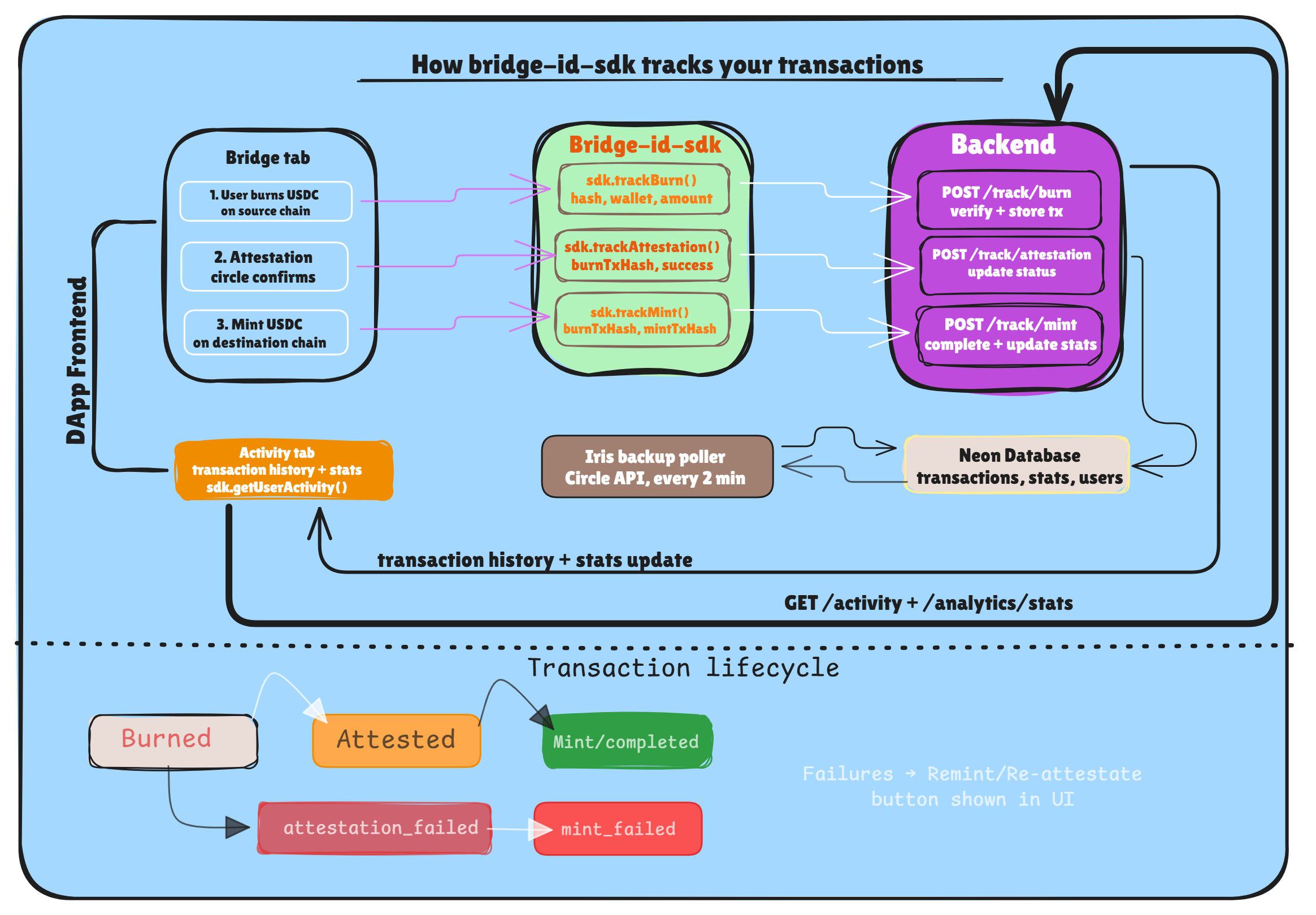
Your analytics backend stores these steps, allowing you to show a clean Activity history with statuses across multiple chains. A backup poller in the backend also checks the Iris API every 2 minutes for any missed updates.
Installation
npm install bridge-id-sdkStep 1: Generate Your Bridge ID
Run this once when setting up. This unique ID links all your bridge transactions to your analytics backend. Pass your Project Name and Fee Recipient address to generate a unique, deterministic ID.
From your project folder (where bridge-id-sdk is installed):
npx bridgeidsdk --name "MyBridge" --address "0xYOUR_FEE_RECIPIENT_ADDRESS"Output:
✅ Your Bridge ID:

   mybridge_a3f9c2

Add this to your .env:

   VITE_BRIDGE_ID=mybridge_a3f9c2
⚠️ Never change this ID. All historical transactions are permanently linked to it.
Step 2: Initialize the SDK
import { BridgeAnalytics } from "bridge-id-sdk"

const sdk = new BridgeAnalytics({
  bridgeId: import.meta.env.VITE_BRIDGE_ID,
  apiUrl: "https://your-analytics-backend.xyz",

  // Optional — pass your own RPC URLs for status checking
  rpcUrls: {
    sepolia: import.meta.env.VITE_SEPOLIA_RPC,
    base:    import.meta.env.VITE_BASE_RPC,
    arc:     import.meta.env.VITE_ARC_RPC,
  }
})
Step 3: Track Bridge Lifecycle
Call these as the bridge transaction progresses. In your frontend, use these inside your "status update" callbacks.
Track the Burn
Call this as soon as the source chain transaction is confirmed.
await sdk.trackBurn({
  burnTxHash: "0x...",
  wallet: userAddress,
  amount: "100.00",
  sourceChain: "sepolia",
  destinationChain: "base",
})
Track the Attestation
Call this when the Circle attestation is fetched.
await sdk.trackAttestation({
  burnTxHash: "0x...",
  success: true, // or false if it failed
})
Track the Mint
Call this once the destination chain transaction is confirmed.
await sdk.trackMint({
  burnTxHash: "0x...",
  mintTxHash: "0x...", // required if success is true
  success: true,
})
Step 4: Check Transaction Status
Use this to show real-time bridge progress to your users. The SDK checks both your backend and on-chain for accuracy.
const status = await sdk.getStatus("0xBURN_TX_HASH")

// status.status is one of:
//   "burned"             — burn confirmed, waiting for attestation
//   "attested"           — Circle signed it, ready to mint
//   "attestation_failed" — Circle could not attest the burn
//   "mint_failed"        — transaction failed on destination (manual mode)
//   "completed"          — bridge cycle finished successfully
//   "not_found"          — transaction not tracked or recognized

if (status.status === "attested") {
  // Pass these to CCTP's receiveMessage() on the destination chain
  console.log("Ready to mint:", status.messageBytes, status.attestation)
}
Step 5: Fetch Analytics & History
User Activity
A flattened list of transactions for a specific user, perfect for an "Activity" tab.
const activity = await sdk.getUserActivity(walletAddress)Transaction Search
Filter/search specifically for your bridge transactions.
const txs = await sdk.getTransactions({
  wallet: userAddress, // or "all"
  limit: 20,
})
Error Handling
All SDK methods throw a BridgeError on failure.
import { BridgeError } from "bridge-id-sdk"

try {
  await sdk.trackBurn({ ... })
} catch (err) {
  if (err instanceof BridgeError) {
    console.error(`Error Code: ${err.code}`, err.message)
  }
}
| Code | When it happens |
|-----------------|------------------------------------------------------|
| INVALID_INPUT | Bad tx hash, wallet address, amount, or missing field |
| NETWORK_ERROR | RPC call or backend request failed |
| NOT_FOUND | Transaction not found in backend or on-chain |
| CONFIG_ERROR | Missing bridgeId or apiUrl on SDK init |
Backend
This SDK requires a running analytics backend to store and serve transaction data. We provide a ready-to-deploy template with Express, Drizzle ORM, and Neon (PostgreSQL).
Quick start:
git clone https://github.com/heyeren2/bridge-id-backend-template.git
cd bridge-id-backend-template
npm install
The backend handles:
- Burn verification → confirms transactions on-chain before storing
- Lifecycle tracking → stores burn, attestation, and mint status updates
- Analytics → volume, transaction count, and user stats per bridge ID
- Activity feed → paginated transaction history per wallet
Full setup guide (Neon, Render, environment variables): 👉 Backend README
What the SDK Does NOT Do
- Does not execute any bridge transactions on-chain.
- Does not custody funds or wrap CCTP.
- Does not handle the "Remint" UI logic (your frontend provides the button).
- Does not store sensitive private keys.
SDK USECASE?
The SDK helps you track and show bridge transactions using Circle CCTP. By adding it to your bridge, you get:
- Uniform Attribution: Identify which bridges and partners are driving the most volume.
- User Experience: Provide users with a reliable "Activity" history that persists across sessions and devices.
- Reliability: The built-in Iris API poller ensures that even if a user closes their tab mid-bridge, the transaction is eventually tracked as "Completed".
- Simplified Development: Expose transaction history and analytics that work out-of-the-box with any CCTP-compatible bridge.
License
MIT