
bstreeview
v1.2.0
Published
Bootstrap 4 simple treeview.

Maintainers
 schniter
Readme
Bootstrap 4 Tree View

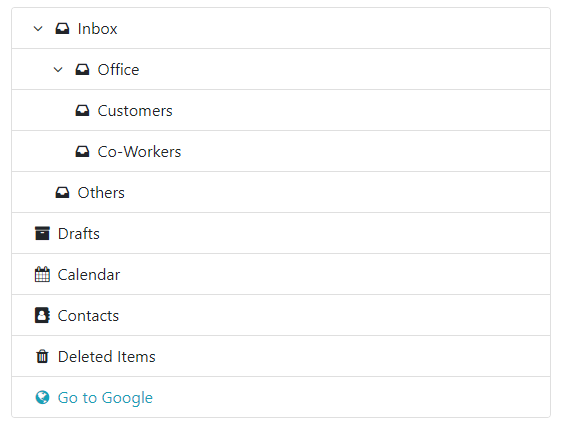
A very simple plugin to build a basic and elegant Treeview with boostrap 4.
Dependencies
Where provided these are the actual versions bootstrap-treeview has been tested against.
Getting Started
Install
You can install using npm (recommended):
$ npm install bstreeviewor download manually.
Usage
Add the following resources for the bootstrap-treeview to function correctly.
<!-- Required Stylesheets -->
<link href="bootstrap.css" rel="stylesheet">

<!-- Required Javascript -->
<script src="jquery.js"></script>
<script src="bstreeview.js"></script>
The component will bind to any existing DOM element.
<div id="tree"></div>Basic usage may look something like this.
function getTree() {
  // Some logic to retrieve, or generate tree structure
  return data;
}

$('#tree').bstreeview({ data: getTree() });
Data Structure
In order to define the hierarchical structure needed for the tree it's necessary to provide a nested array of JavaScript objects.
Example
var tree = [
  {
    text: "Node 1",
    icon: "fa fa-folder",
    nodes: [
      {
        text: "Sub Node 1",
        icon: "fa fa-folder",
        nodes: [
          {
            id:    "sub-node-1",
            text:  "Sub Child Node 1",
            icon:  "fa fa-folder",
            class: "nav-level-3",
            href:  "https://google.com"
          },
          {
            text: "Sub Child Node 2",
            icon: "fa fa-folder"
          }
        ]
      },
      {
        text: "Sub Node 2",
         icon: "fa fa-folder"
      }
    ]
  },
  {
    text: "Node 2",
    icon: "fa fa-folder"
  },
  {
    text: "Node 3",
    icon: "fa fa-folder"
  },
  {
    text: "Node 4",
    icon: "fa fa-folder"
  },
  {
    text: "Node 5",
    icon: "fa fa-folder"
  }
];
This property text is required to display nodes.
{
  text: "Node 1"
}
Node Properties
text
String Mandatory
The text value displayed for a given tree node.
icon
String Optional
The icon displayed on a given node.
href
String Optional
A custom href attribute value for a given node.
class
String Optional
A class name or space separated list of class names to add to a given node.
id
String Optional
ID attribute value to assign to a given node.
Options
data
String Mandatory
Json or string array of nodes.
expandIcon
String Optional
Expand icon class name, default is fa fa-angle-down fa-fw.
collapseIcon
String Optional
Collapse icon class name, default is fa fa-angle-right fa-fw.
indent
number with decimals Optional
Custom indent between node levels (rem), default is 1.25.
parentsMarginLeft
String Optional
margin-left value of parent nodes, default is 1.25rem.
openNodeLinkOnNewTab
Boolean Optional
Open node link on new browser Tab, default is true.
// Example: initializing the bstreeview
$('#tree').treeview({
  data: data,
  expandIcon: 'fa fa-angle-down fa-fw',
  collapseIcon: 'fa fa-angle-right fa-fw',
  indent: 1.25,
  parentsMarginLeft: '1.25rem',
  openNodeLinkOnNewTab: true
});
Methods
Events
Copyright and Licensing
Copyright 2020 Sami CHNITER
Licensed under the Apache License, Version 2.0 (the "License"); you may not use this file except in compliance with the License. You may obtain a copy of the License at http://www.apache.org/licenses/LICENSE-2.0
Unless required by applicable law or agreed to in writing, software distributed under the License is distributed on an "AS IS" BASIS, WITHOUT WARRANTIES OR CONDITIONS OF ANY KIND, either express or implied. See the License for the specific language governing permissions and limitations under the License.