
bswitch
v0.1.0
Published
Zero-dependency, bring-your-own-model suggestion SDK for AI chat inputs — initial suggestions and Tab-complete ghost text. Framework-agnostic core, optional React bindings.

Maintainers
 todteera
Readme
bswitch
Zero-dependency, bring-your-own-model suggestions for AI chat inputs — a
predicted next message when it's the user's turn, and Copilot-style Tab
autocomplete as they type, both grounded in the conversation. Plug it into
ai-elements, assistant-ui, or your own components; backed by whatever model you
point it at.
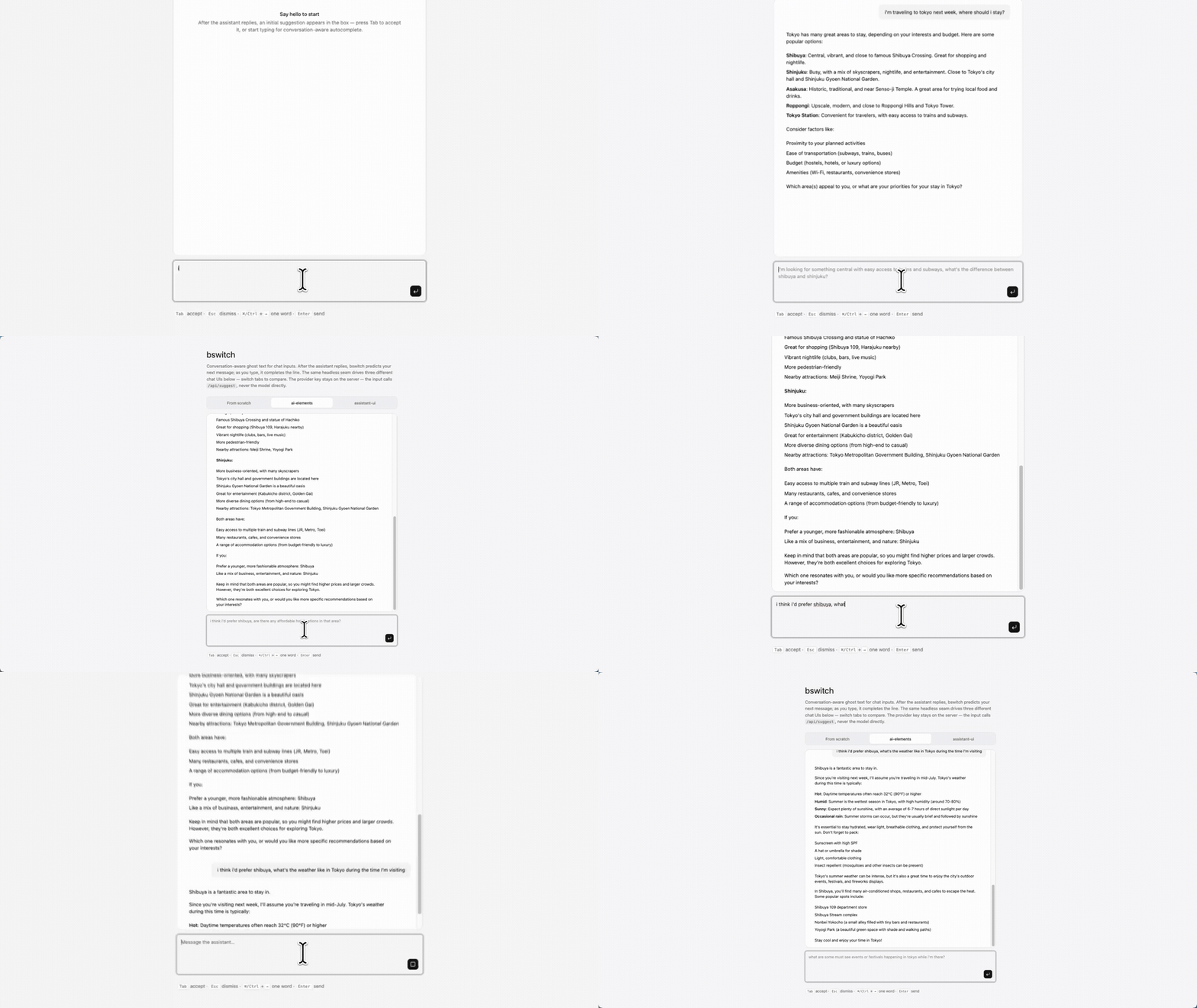
- Two features, one primitive. An initial suggestion ghosts the user's
likely next message into the empty box; as they type, it becomes
conversation-aware completion.
Tabaccepts either. Each is independently switchable. - BYOM. Any OpenAI-compatible endpoint (OpenAI, Groq, Together, Fireworks, vLLM, Ollama) or any function you write. No hosted service, no lock-in.
- Keys stay yours. A
CompletionSourceis just a function — point it at your own backend route and the provider key never reaches the browser. - Zero runtime dependencies. Native
fetch, a pure state machine, and one frozenCompletionSourcecontract. - Private by design. Telemetry callbacks carry counts, timings, and enums — never your users' text or conversation. Enforced by a test.
Install
pnpm add bswitchReact (>=18) is an optional peer dependency — needed only for the
bswitch/react entry, not for the framework-agnostic core.
Quickstart
bswitch is headless: a hook that binds to a <textarea> you render, plus an
overlay that draws the ghost over it. That's what makes it drop into any chat
input — ai-elements' PromptInputTextarea, assistant-ui's composer, or your own.
import type { CompletionSource, Message } from "bswitch";
import { GhostOverlay, useGhostText } from "bswitch/react";

// A CompletionSource that calls YOUR backend route — the key stays server-side.
const source: CompletionSource = async (ctx) => {
  const res = await fetch("/api/suggest", {
    method: "POST",
    body: JSON.stringify({ textBefore: ctx.textBefore, messages: ctx.messages }),
    signal: ctx.signal,
  });
  return (await res.json()).text as string;
};

function Composer({ messages, busy }: { messages: Message[]; busy: boolean }) {
  const ghost = useGhostText({ source, messages, busy });

  return (
    <div style={{ position: "relative" }}>
      <textarea {...ghost.getTextareaProps()} placeholder="Message…" />
      <GhostOverlay ghost={ghost} />
    </div>
  );
}
Hand bswitch the two things every chatbot already has — the messages so far
(mapped to { role, content }[]) and a busy flag that's true while the
assistant is responding — and it does the rest:
- When the last turn is the assistant's and
busyisfalse, it's the user's turn: the box ghosts a predicted next message.Tabfills it in. - As the user types, the ghost becomes a conversation-aware continuation.
Tabaccepts,Escdismisses,Cmd/Ctrl+→accepts one word.
It never suggests mid-stream, never on an empty conversation with an empty box, and typing through the initial suggestion flows straight into completion.
One wiring note: keep messages referentially stable (memoize the mapping) — a
new array identity restarts the initial suggestion's settle timer, so an array
rebuilt on every render can keep it from ever firing.
Turning the features on and off
useGhostText({
  source,
  messages,
  busy,
  initialSuggestion: true, // predict the next message (default on)
  completion: true,        // tab-complete while typing (default on)
});
Need a custom trigger — fire on conversation load, a button, a websocket event?
The hook also returns suggest(), an imperative escape hatch (a no-op unless the
box is empty).
Placeholders overlap the initial suggestion. The initial suggestion ghosts into an empty box — exactly where a native
placeholderrenders — so hide it while a suggestion shows:placeholder={ghost.suggestion ? undefined : "…"}.
Composing with an input you don't own
getTextareaProps() returns an onKeyDown (Tab accepts, Esc dismisses). If your
input has its own key handling — ai-elements' Enter-to-send, say — run ours
first and honor its preventDefault:
const props = ghost.getTextareaProps();

<PromptInputTextarea
  {...props}
  onKeyDown={(e) => {
    props.onKeyDown(e);              // bswitch first
    if (e.defaultPrevented) return;  // it claimed the key (e.g. Tab)
    if (e.key === "Enter" && !e.shiftKey) submit(e);
  }}
/>
Bring your own model
openaiCompatible is a built-in factory returning a CompletionSource. That
contract is the entire BYOM surface — and it's conversation-aware:
export type Message = { role: "user" | "assistant" | "system"; content: string };

export type CompletionContext = {
  textBefore: string; // "" for an initial suggestion; the in-progress line otherwise
  textAfter: string;  // reserved for FIM; always "" today
  messages?: readonly Message[]; // the conversation, oldest first
  meta?: Record<string, unknown>; // app-provided context: user, domain
  signal: AbortSignal;
};

export type CompletionSource = (
  ctx: CompletionContext,
) => Promise<string> | AsyncIterable<string>;
Write your own against any backend — return a string (or an
AsyncIterable<string>; the display buffers it). When textBefore is empty,
predict the next message from messages; otherwise continue the line.
The built-in adapter, and where the key lives
import { openaiCompatible } from "bswitch";

const source = openaiCompatible({
  baseUrl: "https://api.openai.com/v1",
  model: "gpt-4o-mini",
  apiKey: process.env.OPENAI_KEY,
});
Run this on your server (a route handler) and expose a thin fetch source
to the browser — as in the Quickstart — so the key never ships to the client.
openaiCompatible sends the whole conversation as context and switches
automatically between predicting the next message (empty textBefore) and
continuing the line. For a keyless local model you can call it straight from
the browser:
const source = openaiCompatible({
  baseUrl: "http://localhost:11434/v1", // Ollama's OpenAI-compatible endpoint
  model: "qwen2.5-coder",
  // no apiKey — the Authorization header is simply omitted
});
The same factory reaches any OpenAI-compatible gateway (Vercel AI Gateway,
OpenRouter, LiteLLM): set model to "creator/model". For gateways that mint
short-lived tokens, apiKey also takes a resolver — apiKey: () => getToken().
Building from scratch?
If you don't have an input component, the drop-in is a ~20-line composition of the two primitives:
import type { ComponentProps } from "react";
import type { CompletionSource } from "bswitch";
import { GhostOverlay, useGhostText } from "bswitch/react";

function GhostTextarea(props: { source: CompletionSource } & ComponentProps<"textarea">) {
  const { source, ...rest } = props;
  const ghost = useGhostText({ source });
  return (
    <div style={{ position: "relative", display: "grid" }}>
      <textarea {...rest} {...ghost.getTextareaProps()} />
      <GhostOverlay ghost={ghost} />
    </div>
  );
}
useGhostText returns { state, suggestion, getTextareaProps, accept,
acceptWord, dismiss, suggest, getElement } and is SSR-safe.
Telemetry
Optional, sink-agnostic callbacks — pass any of onShown, onAccepted,
onWordAccepted, onDismissed, onError to useGhostText or
createGhostText. Payloads are counts, timings, ids, and enums only; a test
asserts no input, suggestion, or conversation text can ever appear in them.
useGhostText({
  source,
  messages,
  busy,
  onAccepted: (e) => track("ghost_accepted", { chars: e.acceptedChars }),
});
Why not just build it yourself?
The hard part isn't the fetch — it's the edge cases: debounce versus stale
responses, salvaging a suggestion as you type through it, converting a predicted
message into a continuation, IME composition, undo-safe insertion, caret
tracking, abort-on-keystroke, and only ever suggesting on the user's turn.
bswitch's core is a pure state machine with a behavior matrix, each row a
deterministic test. The matrix is documented in CLAUDE.md.
See examples/nextjs-prompt-box for a full
chatbot on AI SDK useChat, with both the chat and the suggestion calls held
server-side. A tab switcher runs the same bswitch integration through three
composers — a hand-rolled <textarea>, ai-elements' PromptInput, and
assistant-ui's Composer — so you can see the headless seam is identical across
all three.
License
MIT