
btp-lens
v0.1.0
Published
Read-only scanner for Cloud Foundry landscapes on SAP BTP: inventory, runtime health, outdated libraries and security posture.

Maintainers
 smarches
Readme
BTP Lens
A read-only health and security scanner for Cloud Foundry landscapes on SAP BTP. Open source under Apache-2.0, free for everyone, built in public, and it runs on your machine.
Point BTP Lens at a Cloud Foundry org. With nothing more than the Space Auditor role, it inventories every app, flags stale deployments, and writes an offline HTML report plus JSON, CSV and SARIF. Checks for end-of-life runtimes, outdated buildpacks and libraries, known vulnerabilities and risky configuration follow in the next releases.
It sends only GET requests to the Cloud Foundry API. It contacts no third party except for public version and vulnerability lookups, and it never writes user names, tokens or secret values into its output.



Status: 0.1.0, first public release. It includes guided mode, the app inventory, the
APP_NO_RECENT_DEPLOYrule, all report formats and the HTML report. The other rules are planned in docs/rules.md and the roadmap. Feedback from real landscapes is very welcome in the issues.This first release is aimed at developers and platform teams. Guided mode and the no-terminal guide were written for non-developers but have not yet been tested with them in usability sessions; those sessions are planned for 0.1.1. If you are not a developer and try it anyway, every hesitation you report is a contribution.
Try it in five minutes (guided mode)
You need Node.js (the LTS installer, next-next-finish) and a BTP login with the Space Auditor role, which is read-only. You do not need the cf CLI.
npx btp-lensGuided mode asks four questions: where your landscape is (pick a region or paste the API endpoint from the cockpit), how to sign in (your browser opens your company login and shows a one-time code), which org, and whether to start. The report then opens in your browser. Never used a terminal? Follow the step-by-step guide with screenshots. Something not working? npx btp-lens doctor checks Node.js, network, certificates, login and the output folder and tells you what to do in one sentence each.
Quickstart for developers and CI
cf login -a https://api.cf.eu10.hana.ondemand.com      # any user with Space Auditor
npx btp-lens scan --api https://api.cf.eu10.hana.ondemand.com --org my-org
open reports/btp-lens-report.html                      # works offline
To run the latest development version from source (Node.js 22.12 or later):
git clone https://github.com/sebastianomarchesini/BTP-Lens.git && cd BTP-Lens
npm ci && npm run build
node packages/cli/dist/cli.js                          # guided mode
node packages/cli/dist/cli.js scan --api https://api.cf.eu10.hana.ondemand.com --org my-org
Credentials
BTP Lens uses the first of these that is set:
BTP_LENS_ACCESS_TOKEN, for exampleBTP_LENS_ACCESS_TOKEN="$(cf oauth-token)".BTP_LENS_CLIENT_IDandBTP_LENS_CLIENT_SECRET, for an OAuth client with a CF role.- Your cf CLI session (
~/.cf/config.json, or$CF_HOME/.cf/config.json). It must target the same API as--api. An expired token is refreshed in memory only, and the file is never written.
Behind a corporate proxy, set HTTPS_PROXY and NODE_USE_ENV_PROXY=1 so that Node.js routes requests through it. That variable exists from Node.js 22.21 and 24.0; older versions ignore it, and btp-lens doctor says so.
Commands
btp-lens                       guided mode (four questions, report opens in the browser)
btp-lens guided [--no-open]    the same, explicitly
btp-lens doctor [--api <url>]  checks Node.js, network, certificates, login and output folder
btp-lens scan   --api <cf api url> --org <name> [--space <name>] [--deep]
                [--out ./reports] [--format html,json,csv,sarif] [--fail-on <severity>] [--concurrency 5]
btp-lens report --from <snapshot.json> [--format html,json,csv,sarif] [--out ./reports] [--fail-on <severity>]
btp-lens version- With no arguments on a terminal, guided mode starts; in a script it prints usage and exits 2.
- Guided mode signs in the way
cf login --ssodoes (one-time code from your company login) or with username and password, keeps the session in memory only, and writes to./btp-lens-reports/<date-time>/. scanwrites one snapshot (snapshot-<time>.json) and the requested reports.report --fromre-runs every rule on a snapshot offline, for example after you upgrade BTP Lens.- Exit codes:
0: no findings at or above--fail-on(the default,none, never fails).1: findings met the threshold.2: tool error.
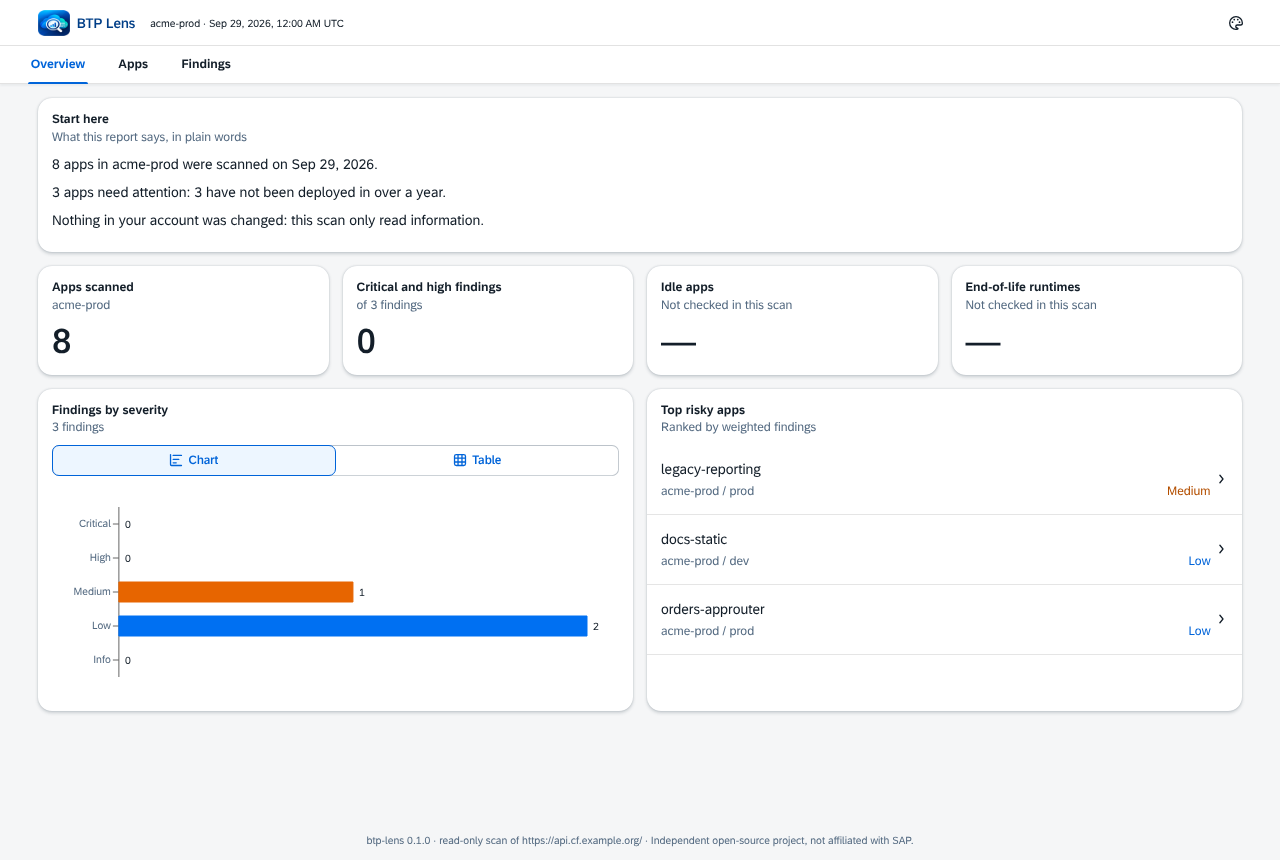
The HTML report is a single file. Fonts, themes and data are embedded, it follows your light or dark system setting, and it works at phone width. It carries a Content Security Policy with connect-src 'none', so the browser itself refuses to let it connect anywhere, and only the scripts bundled at build time may run. The CSV output is UTF-8 with a byte-order mark, so Excel shows non-ASCII names correctly, and it neutralizes spreadsheet formulas (a name starting with =, +, - or @ gets a leading apostrophe). The SARIF output (2.1.0) is ready for code-scanning tools. Report folders and files are created readable by you only.
Permissions
| Check | Minimum CF role | Default |
| --- | --- | --- |
| App inventory and current droplets (collect.apps, collect.droplets), rule APP_NO_RECENT_DEPLOY | Space Auditor | on |
| Planned: processes, buildpacks, stacks, routes, binding metadata and the rules built on them | Space Auditor | on, in the next releases |
| Planned: plain-text secrets in environment variable names (ENV_SECRET_PLAINTEXT) | Space Developer or Space Supporter | --deep only |
The Cloud Foundry list endpoints answer with what your user may see rather than with 403, so a user who can see the org but none of its spaces gets a clear message and exit code 2 instead of an empty report. When a call does return 403, the check is recorded as skipped: insufficient role and the scan continues. Details are in docs/permissions.md.
Privacy
- Read-only: the HTTP client refuses any method other than
GETto the CF API. The onlyPOSTrequest goes to the OAuth token endpoint. - No data leaves your machine: 0.1.0 talks to your CF API and its login server (UAA) and to nothing else. The egress allow-list also names
api.osv.dev,endoflife.date,ui5.sap.comandregistry.npmjs.orgfor the version and vulnerability rules of the next releases; none of them is contacted yet. There is no telemetry. - No personal data: user names, emails and IDs are never written. Audit-event actors are dropped when the events are read.
- No secrets: tokens, environment variable values and service credentials are never printed or stored. Credentials in buildpack URLs are stripped, everything printed to the terminal passes through a redaction filter, and the endpoints that return credentials (
/v3/apps/:guid/env, bindingdetails) are refused by the allow-list even forGET.
See docs/privacy.md, docs/faq.md, docs/data-sources.md and the security review.
Sample report
| Findings (dark theme) | Apps |
| --- | --- |
|  |
|  |
|
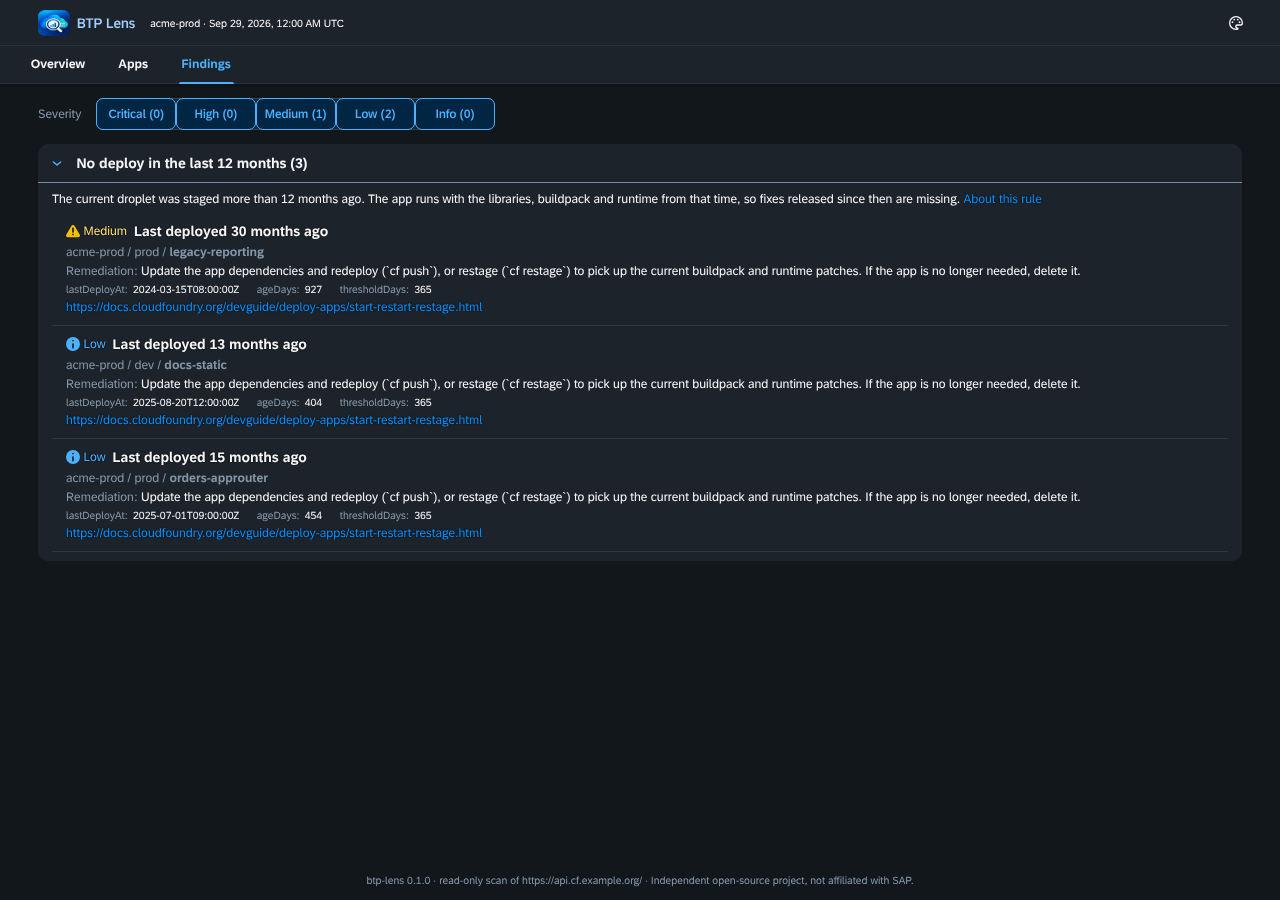
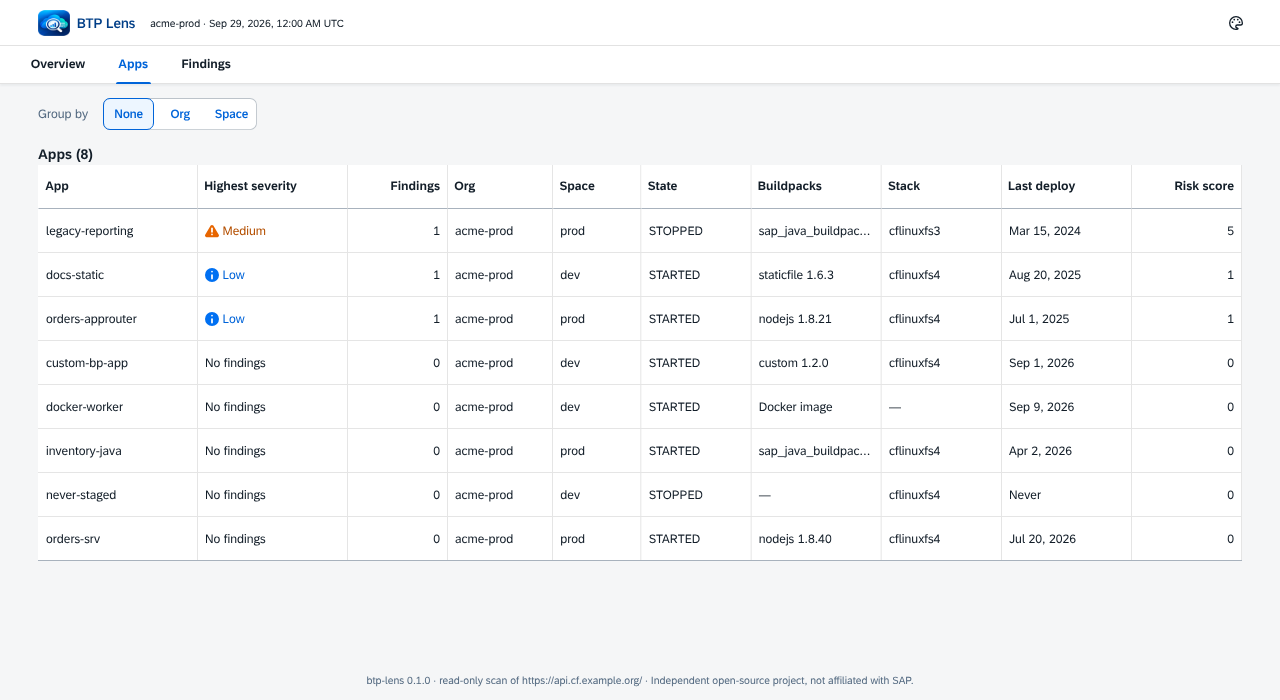
These screenshots use the synthetic acme-prod fixture landscape. Run npm run sample to generate the same report in reports/sample/.
Development
npm ci
npm run build        # UI single-file template, then the CLI
npm test             # unit and fixture tests (no live calls)
npm run lint && npm run typecheck && npm run format:check
npm run sample       # sample reports from the fixture snapshot
npm run e2e          # opens the HTML report with networking disabled (Playwright)
The repository is an npm workspaces monorepo:
packages/cliholds thebtp-lensCLI.packages/uiholds the React and UI5 Web Components report.docs/holds the verified data sources, rules, permissions and privacy notes.
Contributing and community
BTP Lens is built in public. The roadmap and governance are in the repository, rules can be proposed by anyone with the "Rule proposal" issue template, and CONTRIBUTING.md has a 15-minute first contribution and the recipe for adding a rule. Non-developers are welcome: testing guided mode, answering questions in the issues and improving the docs count as much as code. Please read the Code of Conduct. Contributions need a signed Contributor License Agreement. To report a vulnerability, see SECURITY.md.
Support the project
BTP Lens is free and will stay free. If it saved you an afternoon of clicking, consider sponsoring. The first goal is a code-signing certificate, so that administrators can run a downloadable executable without warnings. Sponsors are listed in SPONSORS.md; sponsorship never influences what the tool reports.
Not affiliated with SAP
BTP Lens is an independent open-source project. It is not affiliated with, endorsed by or sponsored by SAP SE or its affiliates. "SAP", "SAP BTP", "SAPUI5" and "Fiori" are trademarks of SAP SE, used here only to describe compatibility. The report uses the open-source UI5 Web Components (Apache-2.0) for its look and feel, and carries no SAP logo.
License
Apache-2.0. Third-party notices are in NOTICE, and every HTML report embeds the licenses of the software it bundles.