
buddy-codex
v1.0.6
Published
Standalone Codex-powered CLI buddy inspired by Claude Code's public buddy module.

Maintainers
 fishason
Readme
Codex Buddy
buddy-codex is the npm package for Codex Buddy, a standalone terminal pet for Codex.
It reads your local Codex activity from ~/.codex, renders a live ASCII buddy window, exposes MCP tools for Codex, and lets a local Codex skill route $buddy interactions into the pet without making you switch back and forth between two terminals.
Features
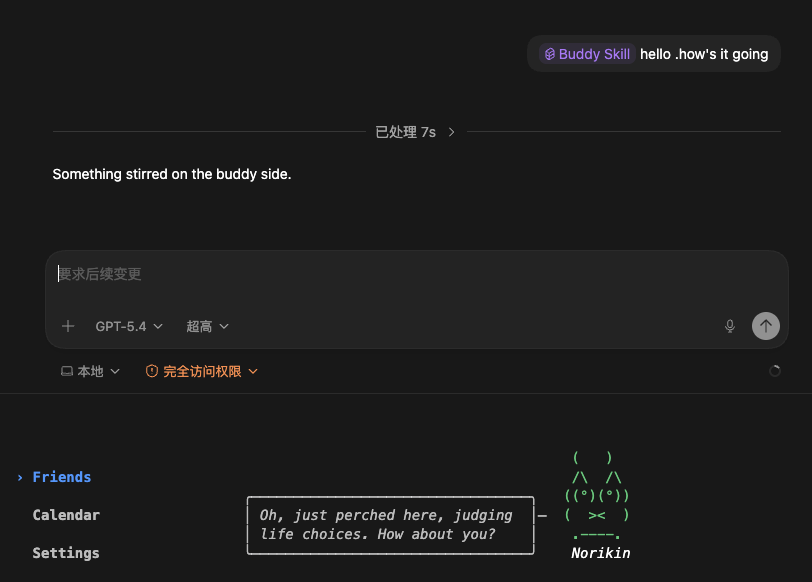
Buddy Chat
Talk to the pet directly from Codex through the local MCP tools and skill bridge. The pet answers inside its own terminal window, with tone driven by its species, personality, and current stat drift.
Demo image placeholder:
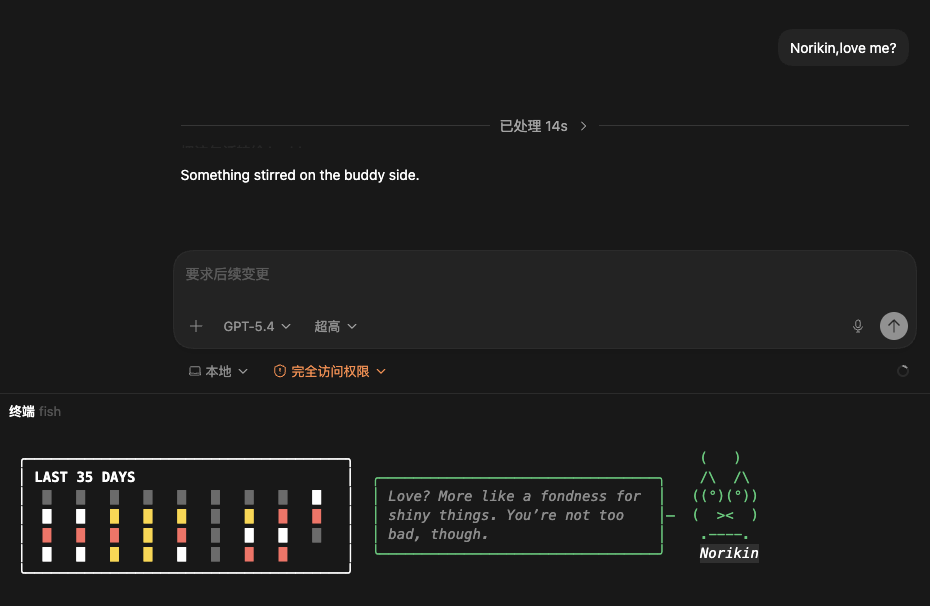
Calendar
Show the last 35 days of Codex activity as a compact GitHub-style block calendar inside the sidebar.
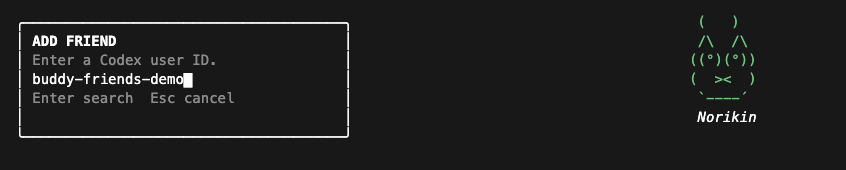
Friends
Maintain a local friends list, look up friends by Codex user ID, and inspect their published buddy calendar through the built-in Cloudflare directory worker.
Demo image placeholder:
Requirements
- macOS
- Node.js
>= 22 - Codex Desktop
Install
npm install -g buddy-codexAfter install, confirm the binary path:
which buddy-codexKeep that absolute path. On macOS, GUI apps often do not inherit your shell PATH, so Codex Desktop is more reliable when you put the full path into ~/.codex/config.toml.
First Run
Start the pet window once:
buddy-codexThis creates ~/.codex-buddy/ and also writes a default LLM config file:
~/.codex-buddy/LLMConfig.json~/.codex-buddy/config.json
config.json stores the pet soul, growth state, friends, and Cloudflare directory sync state.LLMConfig.json is the only file you normally need to edit by hand.
Configure LLMConfig
Edit ~/.codex-buddy/LLMConfig.json:
{
  "model": "gpt-4o-mini",
  "baseUrl": "https://your-openai-compatible-endpoint/v1",
  "apiKey": "YOUR_API_KEY"
}
Notes:
modelalready defaults togpt-4o-minibaseUrlmust be set by youapiKeymust be set by you
Run The Pet Window
Keep one terminal window running:
buddy-codexThis is the visible pet window.
Do not replace it with buddy-codex mcp.buddy-codex mcp is only for Codex Desktop to talk to the pet through MCP.
Configure Codex MCP
Open your Codex config:
~/.codex/config.toml
Add this block:
[mcp_servers.codex_buddy]
command = "/ABSOLUTE/PATH/TO/buddy-codex"
args = ["mcp"]
Replace "/ABSOLUTE/PATH/TO/buddy-codex" with the result of:
which buddy-codexExample:
[mcp_servers.codex_buddy]
command = "/opt/homebrew/bin/buddy-codex"
args = ["mcp"]
Configure The Codex Skill
Create this directory:
mkdir -p ~/.codex/skills/buddy/agentsCreate ~/.codex/skills/buddy/SKILL.md with this content:
---
name: "buddy"
description: "Use when the user wants to interact with the local Codex Buddy pet, including direct inputs such as /buddy, /buddy pet, or /buddy <message>. This skill shows the buddy profile or stats, pets the buddy, or sends a short message to the buddy by routing the request to the local Codex Buddy MCP tools instead of replying as the buddy yourself."
---

# Buddy

Use this skill when the user wants to interact with the local terminal pet.

## Tools

- `mcp__codex_buddy__buddy_profile`
  Use when the user wants to open the buddy profile card, see the buddy, inspect rarity, stats, species, bio, or other buddy attributes.
- `mcp__codex_buddy__buddy_pet`
  Use when the user wants to pet the buddy, poke it, comfort it, or trigger the pet animation.
- `mcp__codex_buddy__buddy_say`
  Use when the user wants to say something to the buddy. Pass the exact user-facing text as `text`.

## Routing

- Requests like “show buddy”, “open buddy”, “看看宠物”, “show its stats”, “what rarity is my pet”, or “/buddy” map to `buddy_profile`.
- Requests like “pet the buddy”, “摸摸小宠物”, or “/buddy pet” map to `buddy_pet`.
- Requests like “tell the buddy hello”, “和小宠物说你好”, “say hi to Norikin”, or “/buddy 你好呀” map to `buddy_say`.

## Response Rules

- Never pretend to be the buddy yourself.
- Never invent the buddy's speech.
- Do not paraphrase tool output unless the user explicitly asked for the buddy's profile details.
- If the tool returns `Your buddy seems to be asleep.`, reply with exactly that sentence.
- After `buddy_pet`, reply with exactly: `Something stirred on the buddy side.`
- After `buddy_say`, reply with exactly: `Something stirred on the buddy side.`
- After `buddy_profile`:
  - If the user only wanted to open or show the buddy, reply with exactly: `Your buddy perked up and showed its profile.`
  - If the user explicitly asked for stats, rarity, species, bio, or other attributes, use the returned profile block to answer accurately and concisely.

## Notes

- This skill assumes the local `buddy-codex` terminal window is already running.
- If the buddy daemon is not running, the MCP tool will report that it is asleep.
Optionally create ~/.codex/skills/buddy/agents/openai.yaml:
interface:
  display_name: "Buddy Skill"
  short_description: "Handle /buddy, /buddy pet, and buddy chat from Codex"
  default_prompt: "Use /buddy to open the profile, /buddy pet to pet the buddy, or /buddy <message> to send a short message through the local Codex Buddy MCP tools."
Restart Codex Desktop
After editing ~/.codex/config.toml and adding the skill files, fully quit and reopen Codex Desktop.
Usage In Codex
Once the pet window is running and Codex Desktop has been restarted, you can use the skill from Codex like this:
use the `buddy` skill to send: buddy
use the `buddy` skill to send: pet
use the `buddy` skill to send: hello there
What each one does:
buddy: opens the profile card in the pet windowpet: triggers the pet animation- any other text: sends that exact text to the pet
What Gets Stored
Local files:
~/.codex-buddy/config.jsonStores soul, growth, friends, and publish state.~/.codex-buddy/LLMConfig.jsonStores LLM settings.
Codex data read by the app:
~/.codex/auth.json~/.codex/state_5.sqlite~/.codex/history.jsonl~/.codex/sessions/**/rollout-*.jsonl
Cloud directory:
- friend discovery and remote friend calendar lookup are wired to the built-in Cloudflare Worker directory URL
- users do not need to configure the Cloudflare endpoint manually