
bugpack-mcp
v1.0.6
Published
Pack bug screenshots into AI coding instructions with MCP Server integration
Downloads
136

Maintainers
 duhuazhu
Readme
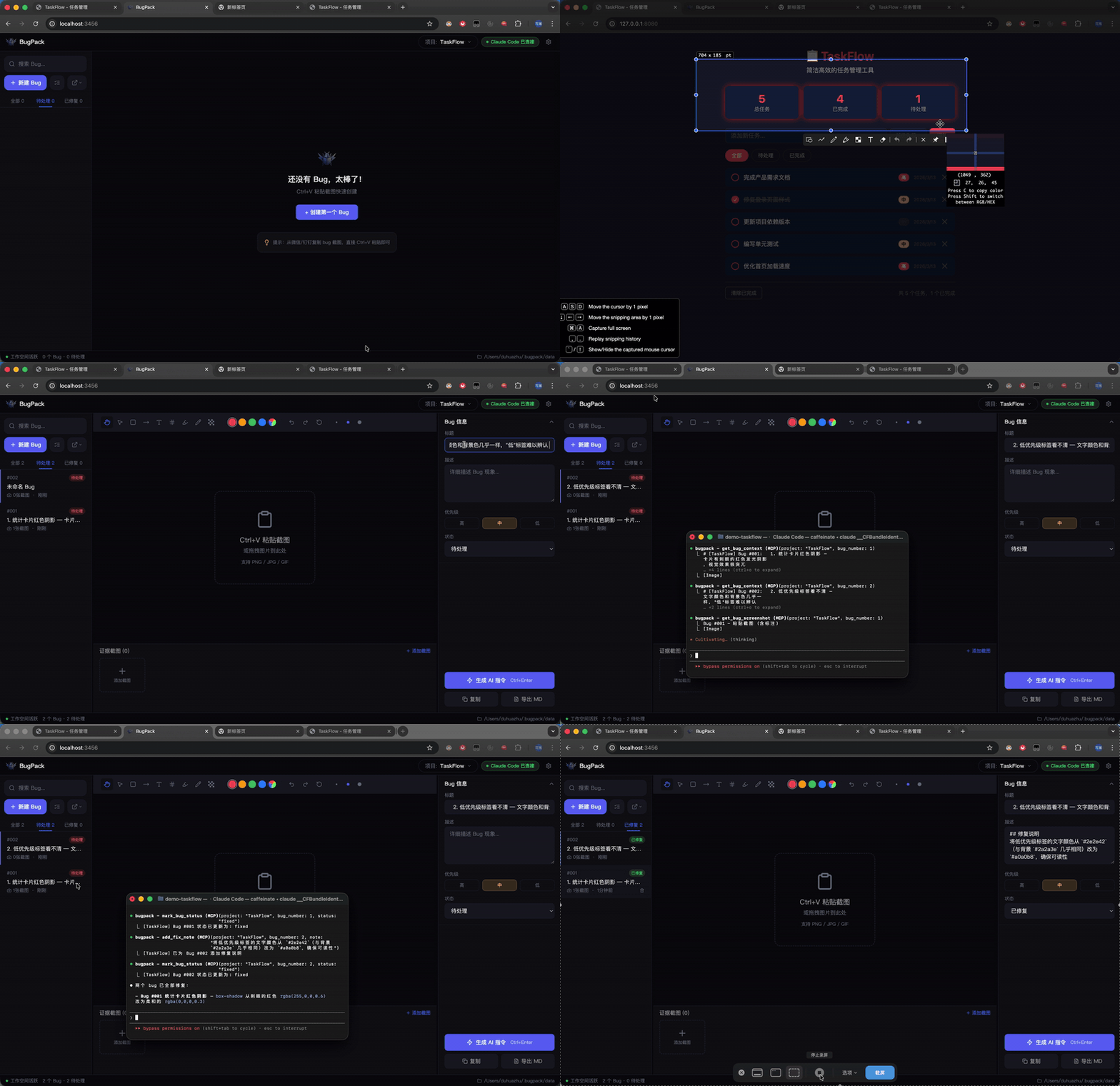
什么是 BugPack?
BugPack 是一个本地优先的工具,将 Bug 截图打包为结构化的、AI 可读的修复指令。
测试人员在群里发了截图 → 你 Ctrl+V 粘贴到 BugPack → 标注问题区域 → 生成结构化指令 → 喂给 AI 编程助手。
或者跳过复制粘贴:BugPack 内置 MCP Server,让任何兼容 MCP 的 AI 编程工具(Claude Code、Cursor、Windsurf、Cline 等)直接读取 Bug 上下文并自动修复代码。
为什么用 BugPack?
AI 编程助手改变了我们写代码的方式,但没有改变我们传递 Bug 上下文的方式。
每次修 Bug 仍然需要:保存截图 → 创建文件 → 写路径 → 描述问题 → 粘贴给 AI。 一天 10 个 Bug = 1-2 小时的纯重复劳动。
BugPack 把这个过程压缩到 30 秒。
环境要求
- Node.js >= 18
- 操作系统 — Windows / macOS / Linux
- 浏览器 — Chrome / Edge / Firefox(推荐 Chrome)
快速开始
npx bugpack-mcp打开 http://localhost:3456,Ctrl+V 粘贴你的第一张 Bug 截图即可开始。
MCP 配置
BugPack 兼容任何支持 MCP 的 AI 编程工具。以下是常见配置示例。
Claude Code — 添加到 ~/.claude.json:
{
  "mcpServers": {
    "bugpack": {
      "type": "stdio",
      "command": "npx",
      "args": ["bugpack-mcp", "--mcp"]
    }
  }
}
Cursor (.cursor/mcp.json):
{
  "mcpServers": {
    "bugpack": {
      "command": "npx",
      "args": ["bugpack-mcp", "--mcp"]
    }
  }
}
Windsurf (~/.codeium/windsurf/mcp_config.json):
{
  "mcpServers": {
    "bugpack": {
      "command": "npx",
      "args": ["bugpack-mcp", "--mcp"]
    }
  }
}
VS Code (.vscode/mcp.json):
{
  "servers": {
    "bugpack": {
      "command": "npx",
      "args": ["bugpack-mcp", "--mcp"]
    }
  }
}
Cline / Roo Code(VS Code 设置):
{
  "cline.mcpServers": {
    "bugpack": {
      "command": "npx",
      "args": ["bugpack-mcp", "--mcp"]
    }
  }
}
Trae (trae/mcp.json):
{
  "mcpServers": {
    "bugpack": {
      "command": "npx",
      "args": ["bugpack-mcp", "--mcp"]
    }
  }
}MarsCode(设置 → MCP):
{
  "mcpServers": {
    "bugpack": {
      "command": "npx",
      "args": ["bugpack-mcp", "--mcp"]
    }
  }
}
Augment (augment/mcp.json):
{
  "mcpServers": {
    "bugpack": {
      "command": "npx",
      "args": ["bugpack-mcp", "--mcp"]
    }
  }
}
所有兼容 MCP 的工具配置方式相同 — command 指向 npx,args 设为 ["bugpack-mcp", "--mcp"]。
配置完成后,直接告诉你的 AI:
- "显示待修复的 Bug" → AI 调用
list_bugs - "修复 Bug #3" → AI 调用
get_bug_context,定位代码并修复 - "标记 Bug #3 为已修复" → AI 调用
mark_bug_status
OpenClaw 技能
BugPack 提供 OpenClaw 技能包,支持 OpenClaw 协议的 AI 助手可直接使用。
通过 CLI 安装:
clawhub install bugpack或添加到 ~/.openclaw/openclaw.json:
{
  "skills": {
    "entries": {
      "bugpack": {
        "enabled": true
      }
    },
    "extraDirs": ["./skills"]
  }
}或手动安装:将本仓库的 skills/ 目录复制到你的工作区或 ~/.openclaw/skills/。
BugPack 包含 3 个内置技能:
| 技能 | 触发方式 | 说明 |
|------|----------|------|
| bugpack-list-bugs | "显示 Bug" / "列出 Bug" | 列出所有 Bug,支持状态过滤 |
| bugpack-view-bug | "查看 Bug" / "Bug 详情" | 获取完整 Bug 详情,包含截图和关联文件 |
| bugpack-fix-bug | "修复 Bug" / "修 Bug" | 读取上下文 → 定位代码 → 修复 → 更新状态 |
注意: OpenClaw 技能需要 BugPack 服务运行中(
npx bugpack-mcp)。技能通过 REST API 与本地服务通信(http://localhost:3456)。
功能特性
截图与标注
- 剪贴板粘贴 —
Ctrl+V从任何聊天工具直接粘贴截图 - 拖放上传 — 拖放图片文件到画布
- 9 种标注工具 — 拖拽/平移、选择、矩形、箭头、文字、编号、高亮、画笔、马赛克
- 对比模式 — 并排对比"当前效果"与"预期效果"
- 撤销/重做 — 完整操作历史
AI 指令生成
- 一键生成 — 生成结构化 Markdown 修复指令
- 通用 MCP 支持 — 兼容任何支持 MCP 的 AI 编程工具
MCP Server
内置 MCP Server 让 AI 编程助手直接访问 Bug 上下文:
| 工具 | 说明 |
|------|------|
| list_bugs | 列出所有 Bug,支持状态/项目过滤 |
| get_bug_context | 获取完整 Bug 上下文(描述 + 截图 + 环境 + 文件) |
| get_bug_screenshot | 获取单张标注截图(base64) |
| mark_bug_status | 更新 Bug 状态 |
| add_fix_note | 修复后添加备注 |
平台集成
从项目管理平台导入 Bug,同步修复状态:
- 禅道 · Jira · Linear · TAPD
更多
- 100% 本地 — 数据不离开你的机器,SQLite 存储
- 多项目管理 — 按项目独立管理 Bug
- 深色/浅色主题 — 跟随你的偏好
- 国际化 — 中文 / 英文
- 快捷键 — 高效工作流
工作流
粘贴截图 → 描述问题 → 生成指令 → AI 修复代码
    │                       │                │
    │          ┌────────────┘                │
    ▼          ▼                             ▼
 BugPack    复制 Markdown                MCP Server
  画布     粘贴给 AI 工具           AI 直接读取并修复
数据存储
所有数据存储在本地:
- 数据目录:
~/.bugpack/data/ - 数据库:
bugpack.db(SQLite) - 截图:
uploads/{项目名}/{uuid}.{ext}
技术栈
| 层级 | 技术 | |------|------| | 前端 | React 18 · TypeScript · Tailwind CSS · Zustand | | 标注 | Fabric.js v6 | | 后端 | Node.js · Express | | 数据库 | SQLite (better-sqlite3, WAL 模式) | | MCP | @modelcontextprotocol/sdk |
贡献
请查看 CONTRIBUTING.md 了解贡献指南。
许可证
如果 BugPack 帮到了你,请给个 Star!
