
buncargo
v10.3.0
Published
A Bun-powered development environment CLI for managing Docker Compose services, dev servers, and environment variables
Downloads
16,070

Maintainers
 hanskristoffer
Readme
Buncargo
A Bun-first development environment toolkit. Define Docker services, app servers, ports, env, migrations, and tunnels in one typed dev.config.ts.
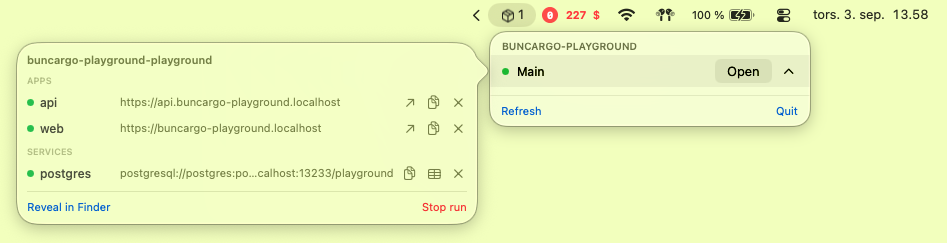
BuncargoBar, the optional menu bar app: every running project, worktree, app and service - open a URL, copy a connection string, or stop one of them.
Why Buncargo?
Local development environments are fragile: hand-written compose files, scattered ports, and conflicts when two checkouts run at once. Buncargo is the single source of truth. It generates Compose, allocates a unique port block per project (and per worktree), starts only the services the selected apps need, and tears containers down when the CLI is gone.
Key Features
- Single config file - services, apps, ports, URLs, migrations, hooks
- Auto-generated Docker Compose - stamped with
buncargo.*labels - Port allocation - hash of
projectPrefix+ worktree, then probe and persist.buncargo/ports.json - Built-in presets - Postgres, Redis, ClickHouse
- Dev server orchestration - reuse healthy apps, kill own orphans, fail on foreign port owners
- Attached apps - one process owns the TTY (Expo menus)
- Phased public tunnels - start backend, wait for health, open tunnels, then start apps that need
*_PUBLIC_URL - Prisma integration -
bunx buncargo prismawith the rightDATABASE_URL - Named HTTPS URLs - opt-in
https://api.myapp.localhostvia a shared loopback proxy (mkcert +:443) - Watchdog - one sweeper per machine removes containers once their run has ended, their checkout is deleted, or they are left stopped
- Run registry + menu bar app - every active run in
~/.buncargo/runs.json, surfaced bybuncargo runsand BuncargoBar
Buncargo requires Bun 1.4.2 or newer on macOS or Linux (WSL on Windows).
Quick Start
1. Install
bun add -d buncargo2. Create dev.config.ts
import { defineDevConfig, service } from "buncargo";

export default defineDevConfig({
	projectPrefix: "myapp",
	services: {
		postgres: service.postgres({ database: "mydb" }),
		redis: service.redis(),
	},
	apps: {
		api: {
			port: 3000,
			devCommand: "bun run dev",
			cwd: "apps/backend",
			requiredServices: ["postgres", "redis"],
			envVars: (_ports, urls) => ({
				API_BASE_URL: urls.api,
			}),
		},
		web: {
			port: 5173,
			devCommand: "bun run dev",
			cwd: "apps/frontend",
			requiredApps: ["api"],
			envVars: (_ports, urls) => ({
				VITE_API_URL: urls.api,
			}),
		},
	},
});
3. Add scripts
{
	"scripts": {
		"dev": "bunx buncargo dev",
		"dev:up": "bunx buncargo dev --up-only",
		"dev:down": "bunx buncargo dev --down",
		"dev:reset": "bunx buncargo dev --reset",
		"dev:expose": "bunx buncargo dev --expose",
		"prisma": "bunx buncargo prisma"
	}
}
4. Run
bun run devStarter recipes
Minimal single service
import { defineDevConfig, service } from "buncargo";

export default defineDevConfig({
	projectPrefix: "myapp",
	services: {
		postgres: service.postgres({ database: "myapp" }),
	},
});
Monorepo API + Vite
apps: {
	api: {
		port: 3000,
		devCommand: "bun run dev",
		cwd: "apps/api",
		healthEndpoint: "/health",
		requiredServices: ["postgres"],
	},
	web: {
		port: 5173,
		devCommand: "bun run dev",
		cwd: "apps/web",
		requiredApps: ["api"],
		envVars: (_ports, urls) => ({ VITE_API_URL: urls.api }),
	},
}
API + Vite + Expo with tunnels
expoApp: {
	port: 8081,
	cwd: "apps/expo",
	devCommand: "bunx expo start",
	interactive: true,
	needsPublicUrls: true,
	healthEndpoint: false,
	expose: true,
	requiredApps: ["api"],
	envVars: (ports, _urls, { localIp, publicUrls }) => ({
		// Metro inlines EXPO_PUBLIC_* from its own environment, so this
		// belongs on the Expo app. The LAN IP works in the simulator and on a
		// phone on the same network.
		EXPO_PUBLIC_API_URL: `http://${localIp}:${ports.api}`,
		...(publicUrls.expoApp ? { EXPO_PACKAGER_PROXY_URL: publicUrls.expoApp } : {}),
	}),
}
Add integrations: [expo()] (from buncargo/expo): every app whose devCommand runs expo then gets RCT_METRO_PORT, so each worktree's Metro listens on its own port instead of asking for 8081. See Expo and the iOS simulator.
{
	"scripts": {
		"dev:with-api": "bunx buncargo dev --apps=expoApp",
		"dev:expose": "bunx buncargo dev --apps=expoApp,platform --expose"
	}
}
buncargo dev --apps=expoApp -- --clear appends --clear to the attached Expo command.
Shopify app
import { defineDevConfig, service } from "buncargo";
import { shopify } from "buncargo/shopify";

export default defineDevConfig({
	projectPrefix: "sebprint",
	services: { postgres: service.postgres(), redis: service.redis() },
	apps: {
		api: { port: 3000, cwd: "apps/backend", devCommand: "bun run dev", requiredServices: ["postgres", "redis"], healthEndpoint: "/health" },
		platform: { port: 5173, cwd: "apps/platform", devCommand: "bun run dev", requiredApps: ["api"] },
	},
	integrations: [shopify({ config: "shopify.app.toml", frontend: "platform", backend: "api" })],
	profiles: { default: { apps: ["shopify"] } },
});
# shopify.app.toml: buncargo owns every process; the CLI gets one web that starts nothing.
web_directories = [".buncargo/shopify/web"]shopify() adds a shopify app running shopify app dev --config …, interactive, started only once platform, api and every extension watcher are up. It adds a watcher per extension workspace (apps/extension-*, extensions/* with a dev script), each built once with its build script before the watcher starts. It adds SHOPIFY_APP_URL (the captured tunnel URL, through the capture's env), SHOPIFY_API_KEY (client_id from the toml), SHOPIFY_APP_CONFIG and SHOPIFY_DEV_STORE for every process, and an exclusive lease on the dev app, so two worktrees cannot both rewrite its URL. The web_directories line matters: when it is empty, Shopify CLI starts every shopify.web.toml it finds, a second API and a second Vite beside buncargo's. The generated web has the frontend's port and a dev command that only waits for it (buncargo wait --app=platform --hold), so the tunnel reaches buncargo's Vite through the CLI's proxy, and Vite's /api proxy (buncargoVite({ proxy: { "/api": "api" } })) reaches the API. Webhooks, the app proxy and customer-account extension calls all arrive through that one URL. bunx buncargo setup patches the toml, and checks the login, the link and version agreement between the tomls.
The app, preview and GraphiQL URLs are labelled captures and the admin and dev store links are the integration's describe rows, so bunx buncargo url lists them all and bunx buncargo open "shopify admin" or open previewUrl opens one. bunx buncargo shopify env prints the app toml. An app that reads SHOPIFY_APP_URL at startup sets restartOn: ["captured.appUrl"]. A generated file can carry the URL into an extension (see captures). example/shopify-plugin is a runnable version, booted end to end in CI with a fake shopify binary.
Built-in service helpers
All of service.postgres(), redis(), clickhouse(), mailpit(), typesense() accept port, expose, healthCheck, serviceName, and docker. Beyond that each takes only what it honors: database / user / password on postgres and clickhouse (their URLs carry credentials), secondaryPort on clickhouse and mailpit, apiKey on typesense. Anything else is a type error - use service.custom({ ... }) for a service that needs more.
Health check defaults follow what each image can actually run: pg_isready on postgres, redis-cli on redis, in-container HTTP on clickhouse, and tcp on mailpit and typesense, whose images ship no wget or curl to probe with. A tcp check emits no Compose healthcheck and is polled from the host instead.
Custom service
rabbitmq: service.custom({
	port: 5672,
	healthCheck: false,
	env: { RABBITMQ_URL: "url" },
	docker: {
		image: "rabbitmq:3-management-alpine",
		ports: ["${RABBITMQ_PORT:-5672}:5672"],
	},
}),
CLI reference
bunx buncargo dev                 # Start containers + selected apps
bunx buncargo dev --apps=api,web  # Named apps plus transitive requiredApps
bunx buncargo dev --profile=full  # The apps of profiles.full
bunx buncargo dev --attach=expoApp
bunx buncargo dev --expose
bunx buncargo dev --expose=api
bunx buncargo dev --up-only
bunx buncargo dev --migrate
bunx buncargo dev --seed
bunx buncargo dev --down
bunx buncargo dev --down --all    # Remove every buncargo env on this machine
bunx buncargo dev --reset
bunx buncargo dev --takeover        # Stop apps running elsewhere, run them here
bunx buncargo dev --keep-containers
bunx buncargo dev --watchdog-timeout=5
bunx buncargo dev --no-docker-autostart
bunx buncargo dev --no-hosts
bunx buncargo dev --runtime=apple  # Run services on Apple container
bunx buncargo dev --timing         # Entry through app readiness, including preparation
bunx buncargo dev --timing-json    # Same measurements and numeric counters as JSON
bunx buncargo dev --apps=expoApp -- --clear
bunx buncargo ls
bunx buncargo runs                # What is running on this machine
bunx buncargo runs --json         # Same, machine-readable
bunx buncargo stop api            # Stop one dev server
bunx buncargo stop postgres       # Stop one service's container
bunx buncargo stop --all          # Stop this checkout's whole run
bunx buncargo sim                 # Open the Expo app in this checkout's own simulator
bunx buncargo status
bunx buncargo doctor
bunx buncargo doctor --fix
bunx buncargo hosts install
bunx buncargo hosts status
bunx buncargo hosts sync
bunx buncargo hosts prune
bunx buncargo hosts daemon      # Run the proxy in the foreground
bunx buncargo hosts uninstall
bunx buncargo bar install         # Install the macOS menu bar app
bunx buncargo bar status
bunx buncargo env
bunx buncargo env --get ports.api
bunx buncargo url                 # Every URL this run knows, by name
bunx buncargo open                # The primary app; or `open <name>` from `url`
bunx buncargo exec -- bun scripts/maintenance.ts
bunx buncargo exec --app=api -- bun scripts/inspect-runtime.ts
bunx buncargo prisma <args>
bunx buncargo prisma migrate-check  # Fail when migrations and schema differ
bunx buncargo wait --app=api --hold   # Block until an app is healthy (and stay)
bunx buncargo generate            # Render generatedFiles without starting anything
bunx buncargo build --discovered  # Every discovered app's build, in order
bunx buncargo secrets ls --app=api   # Key names and their source, never values
bunx buncargo shopify env         # An integration's own commands
bunx buncargo expo sim            # (`buncargo sim` still works)
bunx buncargo run                 # List tasks
bunx buncargo run db:seed -- --dry-run
bunx buncargo setup               # Run the fix of every failing check
bunx buncargo ci --migrate --seed -- bun test
bunx buncargo typecheck
bunx buncargo help
bunx buncargo version
buncargo env prints JSON (portOffset, portOffsetProvenance: hash | lockfile | env | shifted). --get ports.api prints one raw value for scripts.
buncargo typecheck runs each workspace's own typecheck script in parallel (longest job first), plus the root dev.config.ts on its own - that file belongs to no workspace, so nothing else checks it. Default concurrency is the CPU count, capped at 4 locally and 2 in CI; override with --concurrency=N or BUNCARGO_TYPECHECK_CONCURRENCY. --only=platform (path or basename) checks one workspace. The config run generates .buncargo/config-typecheck.tsconfig.json and records durations in .buncargo/typecheck-timings.json; keep .buncargo/ in .gitignore.
Execute with the checkout environment
Use exec for maintenance scripts and tooling that need the checkout's allocated
URLs and environment:
bunx buncargo exec -- bun scripts/maintenance.ts
bunx buncargo exec --app=api -- bun scripts/inspect-runtime.ts
bunx buncargo exec --cwd=packages/prisma -- bun seed.ts --profile=internal
Shared generated values are always available. --app adds that app's environment
overlay and uses its configured directory; otherwise the working directory is the
repository root. An explicit relative --cwd resolves from that root, including
when the command is launched inside a workspace.
The required -- separates buncargo options from unchanged child arguments.
Invoke a shell explicitly for shell syntax, for example -- sh -c 'command1 && command2'.
Standard streams, interrupt signals and the child's exit status propagate to the
caller. Exec does not start apps or infrastructure, migrate, generate, or seed.
Exec, Prisma and environment reads reuse persisted checkout ports without probing
running services as foreign occupants. On a cold checkout, they compute a
deterministic allocation without starting infrastructure or writing the allocation;
those endpoints are a preview until dev resolves conflicts and persists them.
Read-only commands retain existing persisted endpoints across base-port edits;
new keys use the persisted offset until startup reconciles. An explicit
BUNCARGO_PORT_OFFSET overrides allocation.
Programmatically, env.exec(["bun", "scripts/maintenance.ts"], { app: "api", cwd: "." })
uses the same environment and directory rules. String commands use a shell; argv
arrays preserve each argument. It returns { exitCode, stdout, stderr } and throws
on failure unless throwOnError: false is supplied.
Checks, tasks and profiles
import { defineDevConfig, exists, service } from "buncargo";

export default defineDevConfig({
	projectPrefix: "shop",
	services: { postgres: service.postgres() },
	apps: {
		shopify: { port: 3000, devCommand: "bun run dev", cwd: "apps/shopify" },
		api: { port: 4000, devCommand: "bun run dev", cwd: "apps/api", requiredServices: ["postgres"] },
		forecastService: { port: 4100, devCommand: "bun run dev", cwd: "apps/forecast" },
	},
	checks: [
		{
			name: "GraphQL types",
			check: () => exists("packages/shopify-admin-graphql/graphql/generated"),
			fix: "bun run graphql-codegen",
		},
	],
	tasks: {
		"shop:seed": {
			command: "bun scripts/shop-seed.ts",
			description: "Seed the dev store",
			app: "api",
			requiredServices: ["postgres"],
		},
	},
	profiles: {
		default: { apps: ["shopify"] },
		full: { apps: ["shopify", "forecastService"] },
		api: { apps: ["api"] },
	},
});
Checks are preconditions of the checkout. buncargo dev runs the fast ones before it starts anything and stops with each failing check's fix, instead of failing deep inside whichever app imports the missing file first. buncargo setup runs all of them: core checks (Bun matches .bun-version, the container runtime is up, .buncargo/ and gitignore: true generated files are ignored, Infisical is readable, the Prisma client matches the schema), then the config's, then the integrations' (Shopify: CLI version, login, link, web_directories, tomls agreeing). It offers each fix in turn, runs them all with --yes or in CI, and checks again. It is idempotent. buncargo doctor lists them too. A check returns true, false or { ok, detail }; fix is a command or a function; fast: false keeps an expensive check out of dev; severity: "warning" reports without failing. A check that throws counts as failed. exists(path) resolves against the monorepo root, whatever directory dev was started from.
Tasks are the one-off scripts a project accumulates. buncargo run shop:seed is exec with that app's env, secrets and working directory, after starting requiredServices (and their Compose dependencies) if they are down. Services a task starts are held on the same idle timer as a dev run's. Arguments after -- are appended to the command without being re-parsed by the shell. buncargo run alone lists the tasks, buncargo help shows them too, and BuncargoBar puts a run button next to each one.
Profiles replace a dev:* script per combination of apps. buncargo dev --profile=full runs that profile's apps, exactly like --apps=shopify,forecastService. A profile named default is what a bare buncargo dev runs; without one, dev runs every app as before. --profile and --apps cannot be combined.
CI
- uses: actions/checkout@v5
- uses: HansKristoffer/buncargo/actions/setup@main
- run: bunx buncargo ci --migrate --seed -- bun test
- run: bunx buncargo prisma migrate-check
buncargo ci [--migrate] [--seed] [--services=a,b] -- <command> starts the configured services (all of them, or --services), applies migrations and the seed with the same config as local, runs the command with the checkout env, and tears everything down, volumes included. It runs as its own <project>-ci stack, with its own ports and compose file, so running it on a laptop never touches the checkout's dev database. A PR workflow then needs no services: postgres block or hand-written DATABASE_URL, and "migrations apply" and "the seed works" are tested exactly as they run locally. Without a command it only prepares; the exit code is the command's, or the seed's when that fails. seed.check is skipped, because a CI database is never warm.
buncargo prisma migrate-check wraps prisma migrate diff --from-migrations prisma/migrations --to-schema prisma/schema.prisma --exit-code against a shadow database. The shadow database (<database>_shadow) is created inside the configured Postgres service, so no host psql is needed. Prisma 6 and older get it as --shadow-database-url (and --to-schema-datamodel, their name for the flag). Prisma 7 removed that flag and reads the shadow URL from prisma.config.ts, so point datasource.shadowDatabaseUrl at env("SHADOW_DATABASE_URL"), which buncargo sets. --migrations=<dir> and --schema=<path> override the paths (relative to prisma.cwd), and arguments after -- go to migrate diff. Exit code 2 means the schema has changes no migration contains.
The actions/setup composite action installs Bun from .bun-version (or bun-version), restores a cache keyed on bun.lock and the Bun version, and runs bun install --frozen-lockfile. The cache covers the Bun store and every workspace's node_modules (apps/*, packages/*, extensions/* by default; set node-modules to change it), because the isolated linker puts links in each workspace and a root-only cache never skips the install.
Integrations
Project-type knowledge lives in integrations rather than in every project's scripts: buncargo/shopify and buncargo/expo today. An integration is a plain object in integrations: [...]. It can transform the config (add apps, env, generated files), add hooks and checks, contribute commands under its own name (buncargo shopify env), add env to one app's process, and describe itself in buncargo env, the run registry and BuncargoBar. docs/integrations.md covers writing one, with the Shopify and Expo integrations as references.
Run bun run benchmark:startup for the regression matrix: cold and warm service starts, four concurrent runs, app-only selections, port allocation, workers, preparation, shared-checkout reuse, and cancellation. Results and violations are saved to .buncargo/benchmarks/startup.json, including failed runs. Each scenario has its own timing and subprocess limits in scripts/startup-budgets.ts; for example, single-run warm startup has a 700ms ceiling, shared-checkout reuse 350ms, and cancellation 300ms. CI takes five samples per worker and applies --budget-scale=1.5 to timing limits for hosted-runner variation. Counters include process identity subprocesses. These measure orchestration overhead with simulated containers; they do not include image pulls or external network providers. The fixture owns its watchdog sentinel and isolates both container binaries.
For smaller regressions, compare with a saved successful run on the same platform and Bun version using --baseline=path/to/startup.json. The default allowance is 25% or 50ms, whichever is larger; --max-regression-percent changes the percentage. Explicit --max-p95, --max-cold-p95 and --max-subprocesses override the scenario ceilings. Capture a baseline on the same machine under similar load.
bun scripts/benchmark-startup.ts --scenario=allocation --parallel=4 --apps=2
bun scripts/benchmark-startup.ts --scenario=reuse --same-checkout --parallel=4
bun run benchmark:startup --samples=10 --baseline=.buncargo/benchmarks/baseline.json
Startup ordering
startAfter: ["api"] spawns an app only once api is healthy (a worker: spawned and alive). Unlike requiredApps, which only adds apps to the selection, this orders them in every mode, not just around --expose tunnels. It selects its targets too, and a cycle is a config error. prebuild runs a command to completion before an app's devCommand starts, beside the prebuilds of its wave; the app spawns only after it succeeds.
buncargo wait --app=<name> [--timeout=<seconds>] [--hold] blocks until an app of this checkout's run is healthy, then exits 0. With --hold it stays alive until the app or its run stops. That is what a script or Playwright needs ("wait for the stack, then test"), and what the Shopify integration's generated web runs.
Discovered workspaces
apps: {
	...discoverApps({ globs: ["apps/extension-*", "extensions/*"], prebuild: "build" }),
}
discoverApps makes a worker for every workspace matching the globs that defines the script (default dev), named after its directory. A server kind takes a base port. When a workspace defines the prebuild script, it runs once, before the watcher starts. Two workspaces with the same name are an error, not a silent overwrite. buncargo build --discovered runs every discovered app's build in order, for CI and deploys.
Set runner: "npm", "pnpm", or "yarn" to use that package manager for the dev, prebuild, and build scripts; Bun remains the default. Script names are passed literally.
import { defineDevConfig, discoverApps, mergeConfigs } from "buncargo/config";

const shared = defineDevConfig({
  projectPrefix: "shared",
  services: {},
  env: () => ({ LOG_LEVEL: "info" }),
});
export default mergeConfigs(shared, {
  projectPrefix: "my-project",
  apps: discoverApps({ globs: ["apps/*"], runner: "pnpm", prebuild: "build" }),
  env: () => ({ LOG_LEVEL: "debug", PROJECT_FEATURE: "enabled" }),
});
mergeConfigs keeps added service, app, and env keys in its result type. Both shared env builders run, with override values winning. App and service entries are replaced by key, while hooks, options, tasks, and profiles merge by key.
Captured output and generated files
apps: {
	shopifyCli: {
		kind: "worker", interactive: true, devCommand: "shopify app dev",
		captures: {
			appUrl: { pattern: /Using URL:\s*(https:\/\/[^\s│|)]+)/, as: "publicUrl" },
			ready: { pattern: /Ready, watching for changes in your app/, as: "event" },
		},
	},
	api: { port: 3000, devCommand: "bun run dev", restartOn: ["captured.appUrl"] },
},
generatedFiles: [{
	path: "extensions/customer-account-prints/src/application-url.generated.ts",
	render: ({ captured, env }) =>
		`export const APPLICATION_URL = ${JSON.stringify(captured.appUrl ?? env.BASE_URL ?? "")}\n`,
	gitignore: true,
}],
captures read an app's stdout and stderr, with colour codes and box-drawing characters stripped and only complete lines matched. The interactive app runs under a pseudo-terminal (script) so it keeps its TTY while its output is read. A publicUrl capture becomes publicUrls.<app> and <APP>_PUBLIC_URL, exactly like a tunnel URL, normalized to its origin. A value capture becomes captured.<name> in hooks, envVars, generated files and buncargo env --get captured.<name>. An event capture only fires onCapture, which every kind also fires. A capture's label shows the value in buncargo env, buncargo url / open, the run registry and BuncargoBar, and its env sets that env var for every process, beneath the config's own env. So stripe listen needs no integration to put its webhook secret in STRIPE_WEBHOOK_SECRET. A value is reported when it appears and whenever it changes. When one changes, generated files re-render, and apps whose restartOn names it restart with fresh env.
generatedFiles render before servers start (render a placeholder for what is not known yet) and again when a capture, a tunnel URL or a port changes. They are written atomically, and not at all when the content is unchanged, so watchers stay quiet. buncargo generate renders them once without starting anything; it uses a live run's captures, or what the environment hands it in CI (BASE_URL=https://… bunx buncargo generate). setup and doctor warn about a gitignore: true file that git does not ignore.
Exclusive leases
exclusive: "shopify-app:<client_id>" marks a resource only one run on the machine may use at a time: one Shopify dev app, whose URL is rewritten by whoever ran app dev last; one Stripe webhook forwarder; one ngrok domain. The lease is taken before the app spawns and dropped when the run exits, or crashes. A second run is refused with the project, worktree and branch holding it. With --takeover (or y at the prompt), buncargo stops the holder's app and takes the lease. buncargo runs and BuncargoBar list who holds what.
Container runtime
Services run on Docker by default. On macOS 26 or later on Apple silicon they can run on Apple container instead, which boots each container in its own lightweight VM with no Docker Desktop.
export default defineDevConfig({
  projectPrefix: "myapp",
  docker: { runtime: "auto" },
  services: { postgres: { port: 5432 } },
});
The selection is read from --runtime, then BUNCARGO_CONTAINER_RUNTIME, then docker.runtime, then the "docker" default. "auto" uses Apple container when its system service answers and falls back to Docker otherwise; an explicit "apple" fails with instructions rather than silently switching, because the two runtimes keep their volumes in different places.
Both backends use dev.config.ts, the generated Compose model, inspection commands and named .localhost URLs. Apple's CLI has no compose support, so buncargo translates the generated service model into one container run per service, matching on the buncargo.* labels both backends write.
Requirements. macOS 26+ on Apple silicon, with container system start having been run once (the first run installs a kernel and needs a terminal, so buncargo will not do it for you).
Known gaps compared with the Docker backend:
restart:policies are dropped - Apple has no equivalent. This changes nothing in practice: buncargo starts containers perdevrun and the watchdog stops them, so no restart policy is part of the contract either backend offers.- Compose
healthcheck:anddepends_on:ordering are not translated. Buncargo still runs its configured published-port probes; portless containers use process-state readiness. Use Docker when container dependencies require Compose health/completion conditions. - Finite jobs (
kind: "job") require Docker. Apple selections containing a job fail before startup mutations because that backend cannot verify job exit codes. - Any other compose key that cannot be translated is listed in a warning rather than silently ignored.
- No DNS between containers. Every Apple container joins one builtin
defaultnetwork (192.168.64.0/24), so containers can already reach each other by IP. Resolving each other by name needscontainer system dns create, which must run as an administrator; buncargo keeps a single deliberatesudoseam for the hosts daemon and does not add a second one. Note also that a container's hostname is<project>-<service>(for examplemyapp-main-postgres), not the compose service name. Apps on the host are unaffected - they reach services onlocalhost:<port>either way, which is how buncargo wires them already. - Bind-mounting a host directory into an image that
chowns it fails on virtiofs. The built-in presets all use named volumes, which are unaffected.
service.postgres() needs no special handling: Apple's named volumes are formatted filesystems, so a fresh one already contains lost+found and initdb refuses to use it as a data directory, and on this runtime the preset points PGDATA at a subdirectory of the mount for you. Docker's named volumes start empty and keep the mount root, so an existing project's data stays where it is.
Startup speed
buncargo dev --timing (or BUNCARGO_TIMING=1) measures startup from CLI entry through successful app readiness. --timing-json emits one JSON record with totalMs, phases, and numeric counters. Reports also appear on startup failure; credentials and command contents are not included. Phase durations can overlap; “entry to first app spawn” is a cumulative milestone.
Warm startup skips container reconciliation only when every selected service is running with its matching buncargo.service-hash. Service fingerprints include effective environment values, user labels, and referenced volume definitions, and remain stable when an unrelated service joins or leaves the selection. External build/env-file inputs and unresolved Compose interpolation trigger reconciliation because equality cannot be proven.
App readiness retries start at 20 ms and back off to 200 ms. An explicit waitForServer(url, { interval }) keeps a fixed cadence. Container commands and probes are asynchronous and cancellable, and app health checks run concurrently. An explicit healthEndpoint requires a successful HTTP status; healthEndpoint: false explicitly disables that check. Listener and container inventory are read concurrently through cancellable snapshots, once per startup phase. Registry updates and process birth identities are batched, and unchanged generated files are not rewritten.
For reproducible overhead measurements, run bun run build followed by bun scripts/benchmark-startup.ts --samples=10 --parallel=1. Use --parallel=5 or --parallel=20 for contention. The fixture uses real CLI/app processes and a fake runtime; it excludes image pulls, real database readiness, migrations, HTTPS, and external tunnel latency. See implementation and validation for measured results and limits.
Startup order
validate selected apps, dependencies, attachment, and expose targets
  → activate named hosts for dev
  → start early selected containers, wait for service readiness and job completion
  → sync envFile → beforeMigrations → migrations → optional generation → container hook → seed
  → start afterPreparation containers and wait for readiness
  → beforeServers → render generated files
  → spawn wave 1, layer by startAfter layer (prebuilds first), each layer healthy before the next
  → open requested tunnels and inject public URLs
  → spawn wave 2 → wait for wave 2 health → afterServers
needsPublicUrls splits waves only with --expose. requiredApps does not order readiness: it only adds apps to the selection, and they start in the same wave as the app that requires them. For ordering, use startAfter, which spawns an app only once the ones it names are healthy (see startup ordering). Healthy existing apps are reused. Both CLI and library server startup call server hooks once; start({ startServers: false }) performs preparation without server hooks.
| Command | Work |
| --- | --- |
| dev | Containers, migrations, generation, seed, apps, readiness |
| dev --up-only | Containers and dotenv sync; no migrations, generation, seeds, or apps. The containers live as long as the checkout |
| dev --migrate | Early containers, dotenv sync, bootstrap and migrations; no generation, seeds, late containers, or apps |
| dev --seed | Selected containers and preparation, including bootstrap and forced seed; no apps |
| dev --down / --reset | Stop; reset also removes volumes |
Mutually exclusive modes cannot be combined. Configuration, selection, dependency references and cycles are validated before startup changes host configuration or starts resources.
App-only selections
Use services: {} for a project with no containers. In a mixed config, an app
without requiredServices can start independently of the container-backed apps:
import { defineDevConfig, service } from "buncargo";

export default defineDevConfig({
  projectPrefix: "example",
  services: { postgres: service.postgres() },
  apps: {
    marketing: {
      port: 4321,
      cwd: "packages/marketing",
      devCommand: "bun run dev",
    },
    api: {
      port: 3000,
      cwd: "packages/api",
      devCommand: "bun run dev",
      requiredServices: ["postgres"],
    },
  },
});
bunx buncargo dev --apps=marketing allocates its app port, injects its environment
and supervises the process without resolving a container runtime, writing Compose,
or starting/stopping containers. Named hosts and tunnels remain available when
configured. Explicit diagnostic and shutdown commands can inspect configured
infrastructure.
A partial app-only start refuses a port conflict that would relocate an unselected persisted service. Free the conflicting port or start the full environment to reconcile its shared allocation.
Portless workers
Use kind: "worker" for a long-running process without an HTTP listener:
apps: {
  jobs: {
    kind: "worker",
    cwd: "packages/jobs",
    devCommand: "bun run dev",
    requiredServices: ["postgres"],
    staticEnv: { QUEUE_NAME: "local" },
  },
},
Workers require a command and reject port, expose, healthEndpoint and Expo
configuration. They receive shared environment values and app overlays, but have
no generated PORT, HOST, allocated port or URL. Inherited or explicitly
configured environment values still apply. Computed port/URL types omit workers.
Worker readiness means spawned and still alive; it does not prove a connection to
a queue or database. An unexpected exit, including zero, fails supervision.
Deliberate stops remain clean. Library startup keeps supervising after returning
PIDs; cancellation and env.stop() clean up owned process groups.
The CLI reuses a live worker in the same checkout. dev --takeover explicitly
stops it and starts it in the current run. Direct library startup refuses a
duplicate worker. Ownership uses PID and process birth identity, so simultaneous
starts cannot create duplicate consumers and worktrees stay separate. Workers
appear in logs and the run registry; buncargo stop jobs --run=<session> stops an
owned worker. A reused worker must be stopped through its owning run.
Portless containers and finite jobs
Omit port for an internal container: it has no host publication or generated URL.
Buncargo waits for the runtime to report it running. That establishes process
startup; use Docker Compose health conditions for stronger container dependencies.
Host endpoint options and host-derived environment mappings require a port.
Use a job for a finite container command. This example imports fixture data after database preparation:
services: {
  postgres: service.postgres(),
  importData: {
    kind: "job",
    rerun: "always",
    afterPreparation: true,
    healthTimeout: 60_000,
    docker: {
      image: "postgres:16",
      environment: { PGPASSWORD: "postgres" },
      volumes: ["./scripts/import.sql:/setup/import.sql:ro"],
      command: ["psql", "-h", "postgres", "-U", "postgres", "-f", "/setup/import.sql"],
      depends_on: { postgres: { condition: "service_healthy" } },
    },
  },
},
apps: {
  api: {
    port: 3000,
    devCommand: "bun run dev",
    requiredServices: ["importData"],
  },
},
requiredServices selects the job; Compose dependencies select PostgreSQL too.
Compose references use serviceName when it differs from the config key.
A container depending on a job uses condition: "service_completed_successfully".
Completion references must target jobs; service_healthy cannot target a job.
A running job is not complete. Exit zero satisfies completion; nonzero exit prevents subsequent preparation/apps from starting and reports recent job output. Jobs cannot publish ports, expose endpoints or set restart policies. Completion requires Docker; Apple rejects job selections before starting resources.
rerun: "always" is required and is the only supported policy. First startup runs
the job; later startups rerun completed or failed jobs. Configuration changes
reconcile the container, and volume resets run initialization again. An already
running matching job is awaited. The consumer must make repeated execution safe.
Late startup does not rerun jobs already completed in the early phase.
Selection-aware preparation
Declare service prerequisites on migrations and seeders to scope their side effects:
prisma: { service: "postgres", cwd: "packages/prisma" },
hooks: {
  beforeMigrations: async (ctx) => {
    await ctx.exec(["bun", "scripts/bootstrap-roles.ts"]);
  },
},
migrations: [{
  name: "extra-schema",
  command: "bun scripts/migrate.ts",
  requiredServices: ["postgres"],
}],
seed: {
  command: "bun scripts/seed.ts",
  requiredServices: ["postgres"],
},
| Preparation | Selection rule |
| --- | --- |
| Automatic Prisma migration/generation | prisma.service, default postgres, must be selected |
| Migration/seed with requiredServices | Every listed service must be selected |
| Migration/seed without prerequisites | Runs when at least one service is selected |
| Migration/seed with requiredServices: [] | Also permitted in app-only runs |
| beforeMigrations | Selected Prisma database; without Prisma configuration, any selected service |
| afterContainersReady | Runs after migration/generation, before seeding, when services are selected |
beforeMigrations runs after early container readiness and job completion, before
automatic Prisma migrations and ordered custom migrations. Hooks, generation
checks and seed checks receive expanded selectedApps and selectedServices.
ctx.exec uses the migration environment and carries cancellation; pass
ctx.signal to custom I/O. Bootstrap or migration failure prevents later work.
Bootstrap/migration success is not cached by configuration hash.
Set afterPreparation: true on a service that needs migrations or seed data before
starting. It starts after generation, afterContainersReady and seed, and must be
ready before apps start. Early services cannot depend on late ones, and migration,
seed or Prisma prerequisites cannot require late services. Independent containers
within a phase and apps within a wave run concurrently. requiredApps expands
selection only; it does not create per-app or host-to-container readiness barriers.
Containers-only mode skips all preparation hooks, migrations, generation and seed.
dev --migrate runs bootstrap and migrations through the same lifecycle path.
Direct buncargo prisma <args> is a Prisma passthrough with the database environment;
it does not run development bootstrap hooks or the complete preparation/seed lifecycle.
Startup failure and cancellation retain shared-container ownership rules instead
of tearing down other runs' resources.
Attached / interactive apps
Only one app may set interactive: true. --attach=<app> overrides it.
- Attached app:
stdio: inherit(real TTY) - Other apps: piped stdout/stderr with a
[name]prefix, stdin ignored - When the attached app exits, siblings are killed via process group
- Args after
--are appended only to the attached command
Expo and the iOS simulator
Expo Go and a development build are shells: the JavaScript comes from whichever Metro a deep link names. So two worktrees of an Expo app are two Metro ports plus two simulator devices, one per checkout, each opened on its own port. One device cannot hold two installs of the same bundle ID, but two devices can run side by side.
bunx buncargo dev --apps=expoApp   # Expo attached, Metro on this worktree's port
bunx buncargo sim                  # in another terminal, or the phone button in BuncargoBar
buncargo sim reads the run registry, so it needs no config and no Docker. It
- finds or creates this checkout's device, named
<projectPrefix>/<worktree> · iPhone 16 Pro, by cloning the simulator you last used in Simulator.app (orexpo.simulator), so the development build installed there comes along; - boots it and brings Simulator.app to the front;
- waits for Metro to listen on the app's port;
- opens the development build when it is installed on that device, else Expo Go, on
127.0.0.1:<port>.
If neither is installed on the device it says so: press shift+i in the Expo terminal and pick the device, or run npx expo run:ios --device "<name>" once. Expo CLI's plain i opens on the first booted device, which with two worktrees up is not always yours.
import { expo } from "buncargo/expo";

integrations: [
	expo({
		// Default: every app whose devCommand runs `expo`.
		apps: {
			expoApp: {
				scheme: "myapp",            // default: `scheme` in app.json, else exp+<slug>
				simulator: "iPhone 17 Pro", // default: the device Simulator.app last showed
			},
		},
		apiApp: "api",                  // what getExpoApiUrl() prints
	}),
],
The per-app expo field and options.expoApiApp still work until the next major: a config that uses them (or runs expo in a devCommand) gets expo() added, with a warning. buncargo expo sim and buncargo sim are the same command.
The deep-link scheme and ios.bundleIdentifier are read from app.json when the run is published. A project configured only through app.config.ts sets expo.scheme. Named HTTPS hosts are not trusted inside the simulator, so point EXPO_PUBLIC_* URLs at the LAN IP or loopbackUrls.
Ports and isolation
Non-worktree projects now get a stable nonzero offset from projectPrefix. Worktrees add the worktree name when options.worktreeIsolation is true (default).
BUNCARGO_PORT_OFFSET set?
  yes → use it, skip probing (provenance: env)
  no  → valid .buncargo/ports.json?
          yes → re-verify ports still free or ours (provenance: lockfile)
          no / conflict → hash projectPrefix [+ worktree] [+ suffix]
                          probe every service and app port
                          on a foreign owner, shift the whole block by 100
                          persist { version, projectName, root, offset, ports }
Offsets use a step of 100 in the 100–9000 range so 5432 becomes 5532 / 5632 instead of overlapping nearby defaults.
worktreeIsolation: false shares the compose project name and the offset across worktrees.
Ports still exist: processes listen on the allocated numbers, Docker publishes them, and tools like TablePlus keep using localhost:<port>. Named hosts are an overlay so humans and *_URL env vars stop typing those ports.
Named local URLs
Opt-in HTTPS names on loopback. Buncargo still allocates ports and starts processes; a shared daemon on :443 gives those ports hostnames.
| Checkout | App web | App api | Service mailpit |
| --- | --- | --- | --- |
| Main | https://web.myapp.localhost | https://api.myapp.localhost | https://mailpit.myapp.localhost |
| Worktree fix-ui | https://fix-ui.web.myapp.localhost | https://fix-ui.api.myapp.localhost | https://fix-ui.mailpit.myapp.localhost |
options.hosts.primaryApp: "web" collapses that app to https://myapp.localhost (or https://fix-ui.myapp.localhost in a worktree). The worktree label is the directory name, not the git branch.
Enable with options.hosts: true (or { tld?, primaryApp?, services? }). Postgres, Redis, and other TCP services stay as connection strings on localhost:<port>. Default named HTTP services are Mailpit and Typesense.
The first buncargo dev in a repo with hosts on prompts for one-time machine setup (trust a local CA, bind :443). Enter accepts, s skips once, n persists a decline. buncargo hosts install is the non-interactive path. Setup is per machine: later repos and worktrees reuse it.
Both steps need your password: the CA goes into the system trust store, and only root may bind :443 or write the launchd/systemd unit. Setup is all-or-nothing - if the service fails to load, buncargo removes the unit file rather than leave a half-installed machine that skips setup on the next run. Setup is skipped without a TTY, since the password prompt would hang.
Certificates cover wildcards, not just the exact hostnames: a project serving api.myapp.localhost also gets *.api.myapp.localhost and *.myapp.localhost, so the next worktree of that project needs no new certificate. That matters because minting one makes the daemon rebind, which drops every proxied websocket on the machine - including HMR sockets belonging to projects that had nothing to do with the new worktree. The names each checkout wants are remembered in ~/.buncargo/cert-names.json so a project stopping does not drop its coverage; an entry is retired once its checkout is gone from disk.
The daemon picks up a new route as soon as the registry file changes rather than on its next poll, and hands over between listeners without closing the port, so starting a run in a fresh worktree does not race it.
buncargo hosts install records what it installed in ~/.buncargo/hosts-service.json. The daemon runs whichever buncargo started it, usually the one in a project's node_modules, so reinstalling dependencies there can leave the machine-wide service pointing at a path that no longer exists - and upgrading buncargo leaves it running the previous version's daemon bundle. Either way it keeps answering on :443, so buncargo dev prompts to update it (Enter updates, s skips this run) rather than waiting for you to notice; without a TTY it warns and continues on the old daemon. buncargo hosts status and buncargo doctor report the same thing, and buncargo hosts install or doctor --fix repairs it outright.
The daemon logs to /var/log/buncargo-hosts.log (on Linux, also journalctl -u buncargo-hosts.service). A failure that persists is logged at most once a minute, with a count of what was suppressed, so a stale daemon retrying a certificate it cannot serve cannot fill the disk.
buncargo hosts daemon runs that same proxy in the foreground instead of under launchd/systemd, which is how you watch its output while debugging. It re-reads ~/.buncargo/routes.json every second, so apps starting and stopping need no restart, and it exits on its own once no routes have been registered for a while. --service is what the installed unit passes: it keeps the daemon alive through idle periods and is not meant to be typed by hand. Binding :443 still needs root, so run it under sudo or set BUNCARGO_HOSTS_PORT to an unprivileged port.
Failure degrades to http://localhost:<port> and never blocks the dev run. Named hosts stay off on Windows, in CI (CI=1 / CI=true, GITHUB_ACTIONS, GITLAB_CI, CIRCLECI, JENKINS_URL), when BUNCARGO_HOSTS=0 or BUCARGO_SKIP_MKCERT=true, or with --no-hosts.
Set BUCARGO_SKIP_MKCERT=true in cloud workspace secrets/environment to skip automatic local HTTPS setup, including the mkcert prompt. Local URLs use http://localhost:<port>; Remote sharing still works.
Loopback URLs
Some clients cannot follow a named HTTPS URL: Playwright does not trust the local CA, the Stripe CLI fails the HTTP→HTTPS redirect, and GUI database clients want a plain connection string. Enabling hosts rewrites urls.<name> in place, so those consumers get loopbackUrls instead - the same set of services and apps, always addressed as http://localhost:<port>.
It is available everywhere the URLs are: env.loopbackUrls, the env() and envVars() context, HookContext, the <NAME>_LOOPBACK_URL env var, and buncargo env --get loopbackUrls.api for shell scripts. There is no <app>Local member - that key is the LAN IP, a different address for a different purpose (mobile devices on the network).
// playwright.config.ts
const env = JSON.parse(execSync("bunx buncargo env").toString());
export default defineConfig({ use: { baseURL: env.loopbackUrls.web } });
Remote services
Copy a connection token from BuncargoBar's key menu, or run bunx buncargo connect token on your computer. Store it in your cloud environment as BUNCARGO_CONNECT_TOKENS; multiple recipients use comma-separated tokens. Set BUNCARGO_CONNECT_NAME to group runs under a name such as Cursor cloud, then run bunx buncargo dev normally.
Every selected app and service with a host port is shared automatically. Workers, jobs and portless targets are skipped. There is no sharing flag or expose filter. Without recipient tokens, development stays local. The CLI downloads a pinned, verified frpc automatically on Linux and macOS; no administrator access or interactive sign-in is needed.
Browser apps open public HTTPS URLs directly through our relay. Tokens authorize directory discovery and private TCP connections, not browser access: anyone with an app URL can reach its existing app authentication. Postgres, Redis and other TCP services use private loopback visitors created on demand; TablePlus receives the actual local port and dev credentials. Rows reuse the same components as local runs and show name, project, branch and worktree.
bunx buncargo connect status
bunx buncargo connect status --json
bunx buncargo connect tcp <target-id>
Use same-origin frontend API paths through your dev server's proxy where possible. Absolute sandbox-local URLs in JavaScript are still local to the browser's computer. HTTP, SSE and WebSockets stream through frp; Buncargo does not rewrite application authentication or frontend bundles. The separate dev --expose Cloudflare quick-tunnel feature is independent of remote sharing.
See connection setup, lifecycle, and relay operation.
Cookies ignore ports: apps sharing the machine hostname must namespace their development cookies. Buncargo supplies BUNCARGO_WORKSPACE_ID and, for Expo apps, EXPO_PUBLIC_BUNCARGO_WORKSPACE_ID. Use the cookie helper in your auth configuration; install Buncargo as a runtime dependency in apps that import it. The backend helper preserves production and E2E cookie names, while the client helper uses Expo’s __DEV__ flag. Missing workspace IDs retain the original names. This prevents accidental session collisions between trusted dev apps, not cross-app security isolation.
Backend:
import { devCookiePrefix } from "buncargo/runtime";

const advanced = {
	cookiePrefix: devCookiePrefix("platform"),
};
Expo:
import { devCookiePrefix } from "buncargo/client";

const workspaceId = process.env.EXPO_PUBLIC_BUNCARGO_WORKSPACE_ID;
const options = {
	cookiePrefix: devCookiePrefix("platform", workspaceId),
};
Expo requires the literal public environment-variable read in application code: Metro does not inline those reads inside dependencies. Other browser clients pass their development flag explicitly as the third argument; the client helper otherwise leaves the prefix unchanged when __DEV__ is unavailable. The client entry has no Node or Bun imports.
Update both the CLI and menu bar to use connection discovery.
Run registry and the menu bar app
Every buncargo dev publishes itself to ~/.buncargo/runs.json: project,
worktree, branch, pid, and each app and service with its URL, public tunnel and
state. It is written when the run starts, patched as servers become ready, and
removed on teardown. Readers filter dead owners without rewriting files; writers prune obsolete entries. Each new invocation has a session identity, so different app subsets in one checkout remain visible.
bunx buncargo runs          # grouped by project, main checkout first
bunx buncargo runs --json   # the same data, for scripts and agents
Unlike ls, this needs no container runtime, so it answers instantly and works
with Docker stopped.
Stopping one thing
bunx buncargo stop api        # SIGTERM that dev server's process group
bunx buncargo stop postgres   # docker/container stop for that service
bunx buncargo stop --all      # checkout sessions; retains containers another live session needs
bunx buncargo stop api --run=<session-id>  # select an exact run
Stopping one app does not end the run: a signalled exit is not a failure to the
child supervisor, so the other apps and the containers keep going. Two targets
are refused without --force (and prompt when there is a terminal): the
attached app, because closing it tears the run down by design, and an app this
run reused from another terminal, because that process is not ours. Exit codes
are 0 stopped, 2 no such target, 3 refused.
Services are stopped, never killed, so a restart: policy cannot undo it.
Nothing in buncargo brings a stopped container back, so it stays down until the
next dev; once the run itself ends, the watchdog removes it. Stopping a whole
run removes its containers.
BuncargoBar
A macOS menu bar app over the same registry, for when the run you want is in a terminal window you closed three worktrees ago.
Projects are headers and each checkout is a row - Main, or the worktree name
with its branch beneath - so several worktrees of one project stack up under it.
Only running checkouts appear. Open launches the primary app and the phone
button opens an Expo app in that checkout's simulator; the chevron opens a panel
with every app and service, each with open, copy, a TablePlus button for
databases, a simulator button for Expo apps, and a stop button. Stop run
stops everything.
It is a reader: it never signals a process, talks to Docker or drives simctl;
it shells out to buncargo stop and buncargo sim using the exact interpreter
that started the run, so a worktree on a different buncargo version acts with
its own build. See menubar/README.md.
bunx buncargo bar installbuncargo dev offers it once, the first time it runs on a Mac without it:
Enter installs, s skips this run, n never asks again. The offer is silent on
Linux and Windows, in CI, without a TTY, under BUNCARGO_BAR=0, and whenever
the named-hosts setup already asked something this run - one setup question per
run, at most.
Dotenv sync
buncargo injects the right environment into processes it spawns, but bun test, an ad-hoc bun run and Playwright read .env off disk. Because the port offset is a hash of the project name and shifts again per worktree, a hand-written localhost:5432 is stale by construction.
options: {
  envFile: true,                              // .env
  // envFile: { path: ".env", createFrom: ".env.example" }
}
It runs once containers are ready and before migrations, since Prisma reads .env itself. The rules are deliberately conservative, so the file stays the repo's contract rather than buncargo's dump:
- Only keys already in the file are touched; an absent key is never added, and a missing file is only created when you set
createFrom. - A value is only replaced when it is empty, a bare port number, or already on
localhost/127.0.0.1. A deliberate override - a cloned remote database, a shared staging service - survives untouched. - Comments, ordering, quoting,
exportprefixes and spacing are preserved byte for byte. - Values come from the loopback URLs, never the named
https://hosts. - Keys buncargo cannot derive - a second connection string for the same database, a URL with a path suffix - come from
values, which is handed the ports and the loopback URLs and nothing else:
envFile: {
  path: ".env",
  createFrom: ".env.example",
  values: (ports, loopbackUrls) => ({
    DATABASE_URL_PGBOUNCER: loopbackUrls.postgres,
    API_URL: `${loopbackUrls.api}/api`,
  }),
}- The write lands through a temp file and a rename, so a test runner loading
.envconcurrently never sees it truncated.
A server that exits zero after detaching its listener is adopted by pid and process identity. Buncargo warns with the app, port and command, and stops the detached server with the run. Its framework may write logs to its own files after detaching.
The dev banner lists the selected apps (including reused apps) and their required services. url and env continue to list the full configuration.
Environment variables
Dotenv input
Use options.envFiles to load root-relative dotenv defaults for dev, Prisma, exec
and programmatic environments:
options: {
  envFiles: [".env.defaults", { path: ".env.local", optional: true }],
},
env: (_ports, urls, ctx) => ({
  JOBS_DATABASE_URL: urls.postgres,
  TOKEN: ctx.env?.TOKEN,
}),
Paths resolve from the discovered repository root, even when invoked in a nested
workspace. String entries are required files. optional: true permits a missing
file but does not hide read/permission errors. Later files override earlier ones.
Dotenv quoting and multiline values are supported; shell expressions and
${OTHER_VARIABLE} references are not expanded.
Environment precedence, lowest to highest:
- Explicit dotenv files, in order.
- Inherited process environment.
- Generated local values and service static values, then shared
config.env. - App static values, generated server
PORT/HOST, then appenvVars. - Explicit programmatic exec
options.env, if supplied.
A stale dotenv DATABASE_URL cannot override the allocated local URL. Deliberate
configuration and app overrides remain authoritative. Use the shared callback for
project-specific aliases and ctx.env for resolved inputs.
Inputs load after config evaluation. Top-level config imports cannot depend on
files declared by that config. Each environment holds an input snapshot; create or
load a new environment to reread the files. Loading does not mutate process.env,
leak inputs between projects or rewrite credentials. options.envFile is the
independent, opt-in output synchronization setting. Without
envFiles, child processes still inherit their parent environment.
Use loopbackUrls for host-side scripts, LAN/device URLs for device access, and
ctx.publicUrls for explicitly enabled tunnels. Docker containers use Compose
service DNS names and container ports to communicate. Host gateway names such as
host.docker.internal are not guaranteed across runtimes. Keep internal database
credentials out of browser and Expo public environment mappings.
Injected
| Variable | Where | Meaning |
| --- | --- | --- |
| COMPOSE_PROJECT_NAME | Compose / shared env | Isolated project name |
| NODE_ENV | Shared env | development unless production build |
| <NAME>_PORT | Shared env | Assigned port for each port-bearing service/app |
| <NAME>_URL | Shared env | Local URL. Named HTTPS when hosts are active (https://api.myapp.localhost) |
| <NAME>_LOOPBACK_URL | Shared env | Always http://localhost:<port>, never rewritten by named hosts |
| <NAME>_PUBLIC_URL | Shared env | Tunnel URL while a tunnel is active |
| NODE_EXTRA_CA_CERTS | Shared env | Path to the mkcert CA when named hosts are active |
| __VITE_ADDITIONAL_SERVER_ALLOWED_HOSTS | Shared env | .localhost (or .<tld>) so Vite accepts the named Host |
| DATABASE_URL | Shared env | From service.postgres() |
| REDIS_URL | Shared env | From service.redis() |
| CLICKHOUSE_URL | Shared env | From service.clickhouse() |
| CLICKHOUSE_NATIVE_PORT | Shared env | ClickHouse secondaryPort |
| PORT | Server app process | That server app's assigned port; not generated for workers |
| HOST | Server app process | 0.0.0.0; not generated for workers |
| ASTRO_DEV_BACKGROUND / ASTRO_PREVIEW_BACKGROUND | Per-app process | Default 1 keeps Astro in the foreground under buncargo supervision; override in staticEnv or envVars |
| BUNCARGO_APP_NAME | Per-app process | The app's key in apps, so a framework plugin knows which app it is |
| BUNCARGO_APP_HOSTNAME | Per-app process | That app's named host (only when named hosts are active) |
Service env maps (url / port / secondaryPort) add more shared names. App staticEnv and envVars are injected only into that app.
Infisical secrets
An app whose own secret loader shells out to the Infisical CLI at startup runs that CLI once per app, and concurrent Infisical CLI processes hang. Declare the scope instead, and buncargo fetches it once per distinct scope, serialized machine-wide so parallel worktrees queue rather than race. Startup prefetches the selected app scopes and applicable seed/migration scopes before containers, so HTTP fetches overlap preparation. --up-only skips this work. The secrets timing phase reports time consumers wait, summed across consumers; it can overlap migration, seed and readiness phases. Failed fetches are reported once per scope by consumers. The CLI session token is shared across scopes on the same site and binary for the life of the process; organization exchanges remain scoped. Failed token reads are evicted so a later call after login retries. It hands the values to the child processes, where the app's own loader finds them already in process.env.
defineDevConfig({
  secrets: { projectId: "e5e73966-…", organizationId: "org_…", environment: "dev" },
  apps: {
    api: { port: 3000, devCommand: "bun run api", secrets: { required: ["STRIPE_KEY"] } },
    web: { port: 5173, devCommand: "bun run web", secrets: { projectId: "0be0db90-…" } },
  },
  migrations: [{ name: "search", command: "bun scripts/reindex.ts", secrets: { path: "/search" } }],
});
It fetches the way hanzio/secrets does, with the same defaults. The CLI is asked only for its session token for siteUrl. When organizationId names another organization, that token is exchanged for one scoped to it, so projects in different organizations run side by side without infisical switch, and the CLI's own session is never switched. The secrets themselves come over HTTP. With INFISICAL_CLIENT_ID/INFISICAL_CLIENT_SECRET (CI), a universal-auth identity is used instead of the CLI.
Where secrets go. Apps get their own scope. Migrations, the seed, buncargo exec, buncargo prisma, tasks and hooks' ctx.exec get theirs too: migrations[].secrets, seed.secrets, exec --app=<name> (that app's scope), otherwise the config-level secrets. secrets: false turns them off for one command. Precedence, lowest first: the secrets, then the developer's own exported environment, then the computed env. So export OPENAI_API_KEY=sk-local still wins in that shell. Apps without a secrets block are untouched by the app injection.
Required keys. secrets.required names keys an app cannot start without. A run with any of them missing (from Infisical, the environment and the computed env alike) stops before anything spawns, naming each app's missing keys.
Commands. buncargo secrets ls [--app=api] [--env=prod] lists key names, never values, each with its source: Infisical, env override or missing. buncargo setup and buncargo doctor check that every scope is readable and print the fix (infisical login --domain=…, MFA).
A failed fetch warns once and continues; an app's own loader then does what it does today. Values are never logged, never written to a state file, and never included in an error: neither the CLI's output nor a response body is echoed. An empty value is never injected, since a blank variable would read as "already set". An app process under a machine identity fetches nothing itself, because its own loader authenticates without the CLI session this exists to serialize.
Defaults: siteUrl is https://eu.infisical.com (like hanzio; it was app.infisical.com before the next major), environment is SECRETS_ENV or dev, path is /.
Vite plugin
buncargoVite() configures the Vite dev server from the variables above, which removes the three things a Vite app in a buncargo repo otherwise hand-writes:
// apps/web/vite.config.ts
import { buncargoVite } from "buncargo/vite";
import react from "@vitejs/plugin-react";

export default defineConfig({
  plugins: [buncargoVite(), react()],
});
It sets server.port from PORT, binds server.host to 127.0.0.1 (Vite's default localhost resolves to [::1] on many systems, so anything dialing IPv4 gets a refused connection), and passes the named-hosts suffix through to server.allowedHosts. The frp proxy rewrites the upstr