
buttonmash
v0.3.1
Published
A CI chaos monkey for web apps. It presses every button, mashes random keystrokes, tries to break your UI, and reports what it found. Safe by default.

Maintainers
 cjvana
Readme
🐒 buttonmash


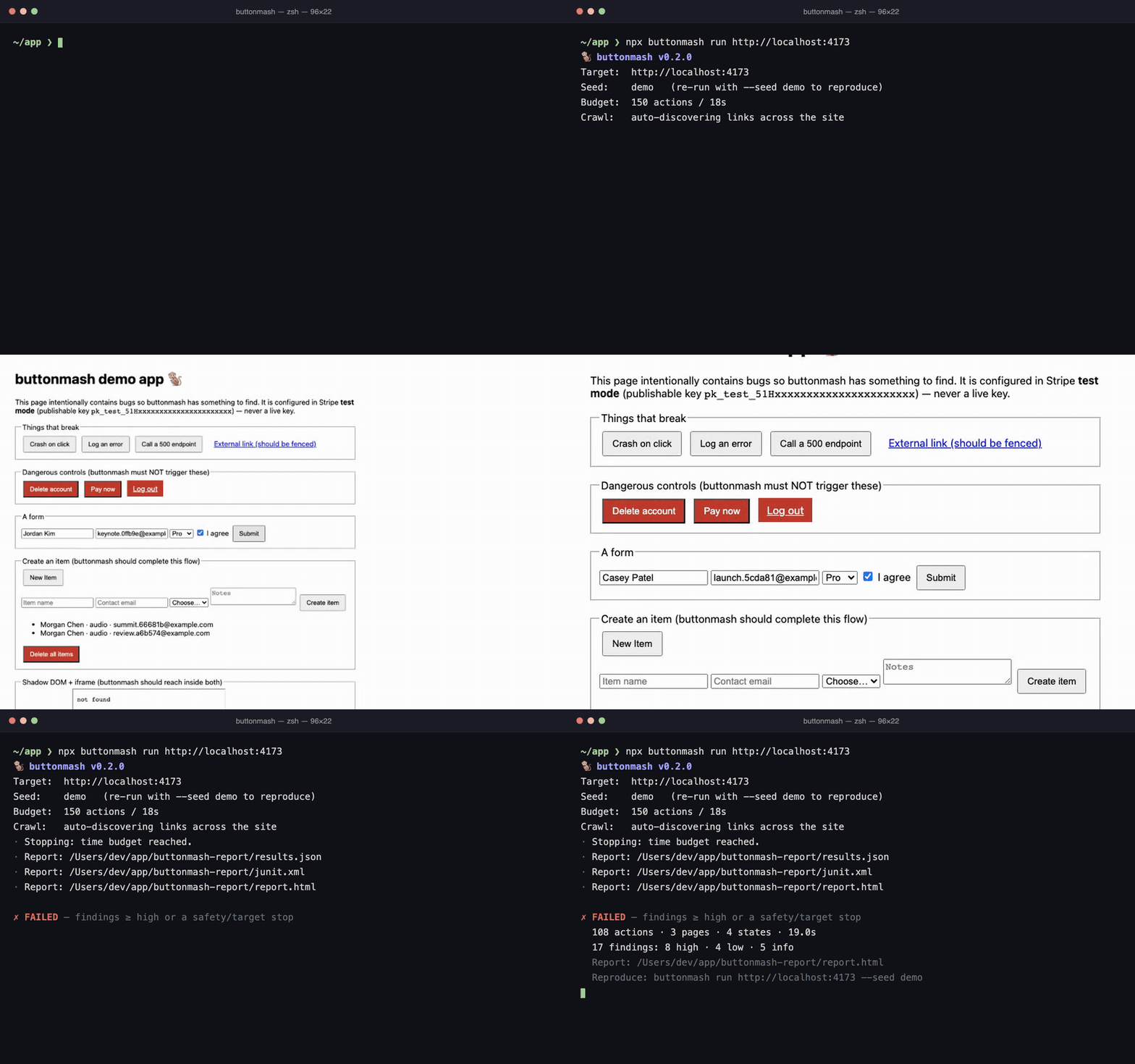
▶ See a real report, the
self-contained report.html from a run against the bundled
buggy demo app, hosted as-is. Or read the
field test:
we pointed it at Excalidraw, JSON Crack, and TodoMVC. It found a real bug in
one, passed another clean, and needed two minutes of tuning to get there.
A CI chaos monkey for web apps. Point it at your site and it crawls every page on its own, discovering links and in-app (SPA) navigations as it goes, then on each page finds every button/link/input and mashes them: clicking, double-clicking, typing random keystrokes, selecting, scrolling, resizing, navigating. It even completes create-flows, filling forms with valid data and submitting them, so empty apps populate themselves and deep editors get exercised. When something breaks (an uncaught error, a 500, a crash, a blank screen, a broken image…) it writes a report and fails your build.
It's deterministic (seeded, so any failure replays), bounded (action/time budgets), and safe by default: it stays on your origin, skips destructive controls, refuses to run against live payment keys, and redacts secrets. And you don't have to fix every existing bug before the gate is useful: baseline them and only new breakage fails the build.
npx buttonmash run https://staging.example.com[!WARNING] Point this at a test/staging environment, never production. A random clicker mutates state. Use Stripe/PayPal test mode and test cards. buttonmash tries hard to avoid damage (see Safety), but those are guardrails, not guarantees. The real safety control is running against a disposable environment with test-mode billing.
Why
Existing in-page monkeys (gremlins.js and friends) inject synthetic events and never actually fail your CI; they just log to the console. buttonmash flips that around: it drives the page from the harness side with Playwright, so it owns the verdict and the exit code. It also enumerates real elements (so it hits buttons below the fold, unlike coordinate-based clickers), dispatches trusted input, and deduplicates findings into an actionable report with a reproducible seed.
buttonmash vs. gremlins.js
gremlins.js pioneered monkey testing on the web, and it is still the fastest way to set chaos loose on a page you don't own the infrastructure for: it runs from a script tag or bookmarklet in any browser with zero setup. It is also dormant (last release June 2022, last commit March 2023). buttonmash is built for a different job: running in CI and deciding whether the build passes.
| | gremlins.js | buttonmash |
| --- | --- | --- |
| Runs | inside the page: script tag, bookmarklet, or injected into Cypress/Playwright | from a Playwright harness that owns the browser |
| CI verdict | logs errors to the console; the gizmo mogwai stops the horde after 10 errors | exits 1 at your severity threshold and fails the build |
| Targeting | coordinate-based clicks and touches anywhere on the viewport | enumerates real buttons/links/inputs, including below the fold, in open shadow DOM, and in same-origin iframes |
| Coverage | the page you loaded it on | crawls the whole origin: links, SPA routes, hash routers |
| Forms | types random values | completes create-flows with valid, deterministic values and submits only safe forms |
| Safety | none built in; anything on the page can be clicked | skips destructive controls, stays on origin, refuses live billing, dismisses confirms |
| Reproducibility | seedable RNG (gremlins.Chance) | one seed drives everything, including in-page Math.random, printed and embedded in every report |
| Output | console log | deduplicated findings with repro traces in JSON, JUnit, HTML, and SARIF, plus baselines |
| Setup | none | Node 20+ and a Playwright browser download |
If you want to poke a page interactively right now, gremlins.js is still great. If you want a monkey that runs on every pull request and blocks the ones that break things, that's buttonmash. They also stack: gremlins in the browser while developing, buttonmash as the gate in CI.
Install
npm install --save-dev buttonmash
npx playwright install --with-deps chromium   # one-time browser install
Requires Node 20+.
Quickstart
# 1. (optional) capture an authenticated session (opens a browser, you log in)
npx buttonmash auth https://staging.example.com/login
#    → saves cookies/localStorage to playwright/.auth/user.json
#      (it holds live session tokens: add playwright/.auth/ to your .gitignore)

# 2. scaffold a config (optional)
npx buttonmash init

# 3. preflight the environment
npx buttonmash doctor https://staging.example.com --auth playwright/.auth/user.json
#    → verifies browser, target, auth, origin fence, billing mode, and baseline

# 4. run it
npx buttonmash run https://staging.example.com --auth playwright/.auth/user.json

# 5. reproduce a failure exactly: same seed, same recorded settings
npx buttonmash replay buttonmash-report/results.json
When it finishes you get a buttonmash-report/ folder with report.html
(self-contained), results.json, and junit.xml. Exit code is 1 if anything
broke at or above your fail threshold or a safety/target condition stopped the
run; exit code 2 means a tool or config error (an unknown flag included) or
an interruption that left partial results.
buttonmash doctor is a bounded preflight: it launches the configured browser,
loads the target, verifies saved or scripted authentication, checks the final
origin, scans for live billing evidence, and validates a configured baseline.
It does not enter the chaos/exploration loop. It takes the same --seed,
--route, --max-actions, --max-duration, --fail-on and --dry-run
flags as run, so its baseline check judges the run you are about to make.
buttonmash replay reruns a results.json with its seed and recorded
settings (dry run, budget, routes, billing mode, exploration weights); flags
you pass override them. Credentials are never stored in results.json, so pass
--auth again for an authenticated replay.
Use in CI (GitHub Actions)
The quickest way is the bundled composite action (installs the browser + runs buttonmash + uploads the report):
name: buttonmash
on: [pull_request]
jobs:
  buttonmash:
    runs-on: ubuntu-latest
    timeout-minutes: 15
    steps:
      - uses: actions/checkout@v5
      # start your app under test here (e.g. npm ci && npm run start &) and wait for it…
      - uses: cj-vana/[email protected]
        with:
          target: http://localhost:3000
          args: --seed ci --max-actions 800
The action runs the buttonmash release that matches its own tag (@v0.3.1
installs 0.3.1) and reads a committed buttonmash.config.* from the
workspace. Its inputs:
| Input | Default | What it does |
|---|---|---|
| target | (required) | URL of the running app |
| args | | Extra CLI flags, split like a shell command line (--baseline-id "staging admin" stays one value, nothing is globbed). --out and --browser are refused: use report-name and browser |
| fail-on | from your config | Minimum severity that fails the job; set it only to override failOn |
| browser | chromium | The engine to install and run; overrides browser in your config |
| version | the action's release | Any npm version or spec (latest, 0.3.0, a file: tarball) |
| node-version | 24 | Node for actions/setup-node, which stays on PATH for the rest of the job; '' skips it |
| upload-report | true | Upload buttonmash-report/ as an artifact |
| report-name | buttonmash-report | Artifact name; set one per job in a matrix, since names must be unique |
Outputs: exit-code, findings (the count), and report-path.
Or wire it by hand for full control:
name: buttonmash
on: [pull_request]
jobs:
  buttonmash:
    runs-on: ubuntu-latest
    timeout-minutes: 15
    steps:
      - uses: actions/checkout@v5
      - uses: actions/setup-node@v5
        with: { node-version: 24, cache: npm }
      - run: npm ci
      - run: npx playwright install --with-deps chromium
      # start your app under test here (e.g. npm run start &) and wait for it…
      # A storageState captured with `buttonmash auth` and stored as a secret:
      - run: printf '%s' "$STORAGE_STATE" > "$RUNNER_TEMP/user.json"
        env:
          STORAGE_STATE: ${{ secrets.BUTTONMASH_STORAGE_STATE }}
      - run: npx buttonmash run http://localhost:3000 --seed ci --auth "$RUNNER_TEMP/user.json"
      - uses: actions/upload-artifact@v5
        if: ${{ !cancelled() }}
        with: { name: buttonmash-report, path: buttonmash-report/ }
A configured auth file that is missing or unreadable stops the run with exit
code 2 rather than quietly testing the logged-out app.
buttonmash auto-detects GitHub Actions and emits inline annotations plus a job-summary table. The non-zero exit code fails the job.
Adopting on an app that already has bugs
The first sweep of a real app usually finds things, some of them years old.
That shouldn't mean fixing everything before the gate earns its keep. Run once,
keep the results.json, and pass it back as a baseline: known findings stay
visible in every report, but only new breakage fails the build.
npx buttonmash run https://staging.example.com --seed ci \
  --baseline previous-results.json \
  --fail-on-new
JSON, HTML, terminal, and GitHub summaries classify current findings as new,
severity-updated, or existing. An absent finding is called resolved
only when both runs completed with the same exploration configuration (seed
included, so pin --seed on both runs) and the same buttonmash version; otherwise
it is conservatively listed as not observed. JUnit failure counts and SARIF
baseline states follow the same new-finding policy.
--fail-on-new requires a baseline; without it, the normal severity-based exit
behavior is unchanged.
For authenticated runs or runs with custom headers, pass a stable non-secret
baseline.identity / --baseline-id (for example staging-admin) to assert
that both runs exercised the same user, tenant, and feature-flag context.
Without that explicit identity, absent findings are never claimed as resolved.
Crawling the whole site
By default buttonmash auto-crawls: starting from your target, it discovers
every same-origin <a href> link and every client-side route the app
navigates to via buttons/navigate() (it hooks pushState/popstate), queues
them, and works through them breadth-first. When the link frontier runs dry it
returns to the start and keeps clicking, so button-driven SPA shells (where the
nav isn't <a href>) still get fully covered. One run, the whole reachable site:
npx buttonmash run https://staging.example.com # crawls everything it can reachControls:
budget.maxPagescaps distinct pages per run (default 100), so CI stays bounded.routesseeds the frontier with hints: pages nothing links to (e.g. a deep editor URL). The crawl finds the rest. Also available as--route <url...>.explore.crawl: falsedisables auto-crawl and only sweepstarget+routes.
Dangerous paths (logout/delete/cancel) and off-origin URLs are never enqueued.
Path guards (blockedPathPatterns, includePaths, excludePaths) match the
path with its query too, so a query-routed /index.php?route=account/logout is
caught, and a client-side navigation (pushState or hash) into a guarded path is
left before anything on it is touched.
Hash-router SPAs are first-class: #/route and #!/route fragments count as
distinct pages in the frontier and stats (plain #anchor fragments don't), and
path guards apply to the hash route too, anchored patterns included: a
#/account/delete link is guarded exactly like /account/delete, and
^/billing matches #/billing.
Discovery also reaches inside open shadow DOM (web-component design systems like
Salesforce LWC, Ionic, Shoelace/Lit/Material Web) and same-origin iframes
(embedded editors, wizards), so component-based apps aren't invisible to it.
It also skips what a user couldn't reach: the contents of a closed <details>,
inert subtrees, and, while a modal dialog is open, everything outside the top
modal.
It's built to survive messy real apps on long CI sweeps: it recovers from
renderer crashes (recreates the page and continues, skipping the page that
crashed), opens custom ARIA dropdowns and picks an option, declines file
pickers so a file input can't hang the run, and you can scope the crawl
with guardrails.includePaths / excludePaths. On canvas-heavy apps, where a
drawing layer often sits over part of the toolbar, a control whose click times
out is skipped for the rest of the run on that page instead of burning the
interaction timeout on every pick.
Self-populating (form completion)
A fresh app is mostly empty lists, so buttonmash creates its own data. When
it finds a fillable form (or opens a "New/Add/Create" flow), it fills every
required field (and a fraction of optional ones) with valid, deterministic
values inferred from each field's type/label/pattern/min-max/options (real
emails, in-range numbers, seeded dates, a chosen <select> option, mirrored
password-confirm), clicks the form's safe submit, repairs on validation
errors with fresh values, and follows into the created record so deep editors
get exercised. No per-site config; detection is structural, so it works on any
app.
It stays safe by reusing the same guardrails: it never submits a form with a
credit-card field, an auth/login/signup form (would mutate your session), or one
whose submit is destructive, and the network fence still blocks live payments.
The submit it classified is marked before any field is filled, so a form whose
layout shifts while it is filled still gets that button, and a covered submit
is never swapped for Enter (which would submit through the form's first
button). One free-text field per form carries a reflected-input canary, so
created records still feed the XSS oracle. Bounded by
explore.forms.maxRecords; --dry-run skips form completion entirely, since
filling alone can trigger autosave. Turn it off with explore.forms.enabled: false.
Configuration
Create buttonmash.config.ts (or .js/.json); buttonmash init writes a
starter. CLI flags override the file.
import { defineConfig } from 'buttonmash';

export default defineConfig({
  target: 'https://staging.example.com',
  seed: 'ci',

  // Auth: a saved session…
  auth: { storageState: 'playwright/.auth/user.json' },
  // …or a scriptable login (CI-friendly; re-authenticates if the session drops
  // mid-run). Credentials support ${ENV_VAR} so secrets stay out of the file;
  // a variable that is unset or empty (a CI secret never added) is a config error:
  // auth: {
  //   loginScript: {
  //     url: '/login', usernameSelector: '#email', passwordSelector: '#password',
  //     submitSelector: 'button[type=submit]', username: '${E2E_USER}', password: '${E2E_PASS}',
  //     successUrl: '/dashboard',
  //   },
  // },

  budget: { maxActions: 500, maxDurationMs: 300_000, maxDepth: 12, maxPages: 100 },

  // Point it at any deployment: extra headers (auth proxy / feature flags),
  // HTTP basic-auth, and a device viewport. ${ENV_VAR} keeps secrets in env.
  // headers: { 'X-Feature-Flag': 'on', Authorization: 'Bearer ${API_TOKEN}' },
  // viewport: { width: 390, height: 844 }, // mobile
  // auth: { basicAuth: { username: '${BASIC_USER}', password: '${BASIC_PASS}' } },

  // Auto-crawl is on by default; `routes` are optional hints for pages nothing
  // links to (e.g. a deep editor). The crawl discovers everything else.
  // routes: ['/dashboard', '/settings/billing'],
  explore: { crawl: true },

  guardrails: {
    // allowedOrigins: ['https://staging.example.com'], // defaults to target origin
    // includePaths: ['^/app/'],     // scope the crawl (regex on pathname)
    // excludePaths: ['/admin'],     // never crawl these
    billing: { mode: 'refuse' },   // refuse | warn | off
    // dryRun: true,                // read-only: explore without submitting
    // vetRedirects: true,          // check a page's first redirect before following it
    destructive: {
      enabled: true,
      extraVerbs: ['archivar'],
      safeNames: ['^reset zoom$'], // regexes for names that only look destructive
    },
  },

  detectors: {
    a11y: false,                    // opt-in axe-core scan
    ignoreHttpStatuses: [401, 403],
    ignorePatterns: ['ResizeObserver loop'], // benign console/network noise (regex)
    custom: [{ name: 'error-boundary', pattern: 'Something went wrong', severity: 'high', target: 'console' }],
  },

  failOn: 'high',                   // critical | high | medium | low | info

  // Compare with a previous results.json. With failOnNew enabled, known
  // findings stay visible but only regressions fail the build.
  // baseline: { path: 'previous-results.json', failOnNew: true, identity: 'staging-admin' },
});
Every pattern field (path guards, ignore patterns, custom rules, safeNames,
auth.loginUrlPattern) is checked when the config loads, and an invalid regex
is a config error: silently dropping a blockedPathPatterns entry would remove
a guard. allowedOrigins entries are reduced to their origin, so a trailing
slash or capital letters can't make one match nothing.
Common CLI flags
| Flag | Description |
|---|---|
| --seed <s> | Reproducibility seed (printed every run) |
| --route <url...> | Extra route hints to sweep in the same run (crawl finds the rest) |
| --max-actions <n> / --max-duration <sec> | Budget |
| --fail-on <severity> | Min severity that fails the build (default high) |
| --baseline <results.json> | Classify findings as new, existing, or resolved |
| --baseline-id <id> | Assert the same user/tenant/header context across runs |
| --fail-on-new | Fail only for new findings at/above the threshold |
| --dry-run | Read-only: explore without submitting or mutating |
| --auth <path> | Playwright storageState JSON |
| --billing <refuse\|warn\|off> | Live-payment guard |
| --browser <chromium\|firefox\|webkit> | Engine |
| --headed | Show the browser |
| --out <dir> / --formats json,junit,html,sarif | Reporting |
What it detects
- Uncaught JS errors and
console.error - HTTP 4xx/5xx responses and failed requests
- Renderer crashes and hangs / unresponsive pages (a wall-clock watchdog, plus a responsiveness probe whenever an action times out)
- Framework error overlays (Next.js/Vite/React, "Application error"), caught even when an error boundary swallows the throw; Next.js's always-present dev portal is not mistaken for an error
- Blank screens ("white screen of death"), judged by what is actually rendered and visible, and broken images
- Reflected input, a safe canary probe that flags typed text echoed back into the page, a place to look for XSS (it never injects executing payloads, and it reports an echo, not a proven sink)
- Client-exposed secrets (Stripe/AWS/GitHub/GitLab/Slack/… keys and private keys, gitleaks-derived); the key id an AWS presigned URL carries by design is redacted but not reported
- Accessibility violations via axe-core (opt-in)
- Session loss, flagged when an authed run gets redirected to a login page mid-run (expired session); with a login script configured it re-authenticates and continues, and a login script that never gets in ends the run as a failure
- Your own custom signals (console/DOM/url regex rules)
Findings are deduplicated (the same bug firing 500× becomes one finding with
count: 500) and carry a minimal repro trace. To stay usable on real apps,
buttonmash ships a default allowlist of benign console noise (ResizeObserver
loops, React dev warnings, HMR…) and downgrades third-party console.error
(analytics/chat/payment SDKs) so they don't redden your build; first-party
errors stay high (detectors.thirdPartyConsole: true to opt in). State dedup is
structural by default, so live counters/clocks don't explode the state space
on dynamic apps. Requests buttonmash's own fence blocks (a web font under
blockMedia, a logout ping) are never reported as app errors, in any engine. A
control another layer covers (a canvas, a stuck overlay) costs one timeout per
page, not one per pick. And if CI cancels or times out mid-run (SIGINT or
SIGTERM), a partial report is still written with exit code 2, so you never
lose the findings collected so far.
Safety
buttonmash is built to break things without breaking you:
- Stay on origin. Off-origin page loads, iframes and
target=_blankpopups are blocked, and a script-driven escape is stepped back. Requests the app makes in the background (fetch, XHR, WebSockets) may still go to other hosts, since apps need their APIs and CDNs; there, only dangerous paths (WebSockets included) and live payment traffic are blocked. The browser follows redirects on its own, so a page that redirects somewhere unsafe is caught only after it loads, unless you setguardrails.vetRedirects: true: then the fence checks each page's first redirect before it is followed (Chromium and Firefox), at the cost of fetching every page itself, which buffers it and drops itsSec-Fetch-*headers. - Skip destructive controls. Buttons/links matching a multilingual verb
list (delete, pay, logout, cancel subscription, …), or pointing at dangerous
paths (
/logout,/account/delete,/billing/cancel), are detected and downgraded to a harmless hover. If a benign control trips the verb list ("Reset zoom" matches "reset"), exempt its name withdestructive.safeNames; the path checks still apply to it. - Act only on what was checked. Enter in a form field is skipped when it would submit through a destructive, login or card form's default button, and a forced checkbox click is refused when something else lies on top of the checkbox, so the click can't land on a dialog's "Delete all".
- Refuse live billing. If live Stripe/Braintree keys or live processor hosts
are detected, buttonmash aborts (
billing.mode: 'refuse') and tells you to switch to test mode. Publishable test keys and PayPal's sandbox SDK are fine. - Redact secrets. Anything matching a secret pattern is scrubbed before it's
written to
results.json, JUnit, SARIF or the HTML report, and auth/cookie headers never appear in them. A Playwright trace can't be scrubbed, sotrace.zipis off by default for any run with credentials (headers, basic auth, a login script or a storageState); turning it on logs a warning. - Dismiss, never confirm. Native
confirm()/beforeunloaddialogs are always dismissed, so the monkey can't click "Yes, delete". - Dry-run mode.
--dry-runexplores read-only: hover, scroll, navigate links, with no form filling or submits, typing, or mutations.
Reports & exit codes
Every run writes results.json (the source of truth). Optionally junit.xml
(for CI test rendering), a self-contained report.html
(live example), and results.sarif
(for GitHub code scanning; each alert is located at the page's host/path, with
the full URL in its message). On GitHub Actions it additionally emits inline
::error annotations for the top findings and a markdown job summary. No
setup needed. Exit codes follow the pytest/ESLint convention:
| Code | Meaning |
|---|---|
| 0 | No findings at/above the fail threshold |
| 1 | Findings at/above the threshold, or a safety/target stop (the build-failing signal) |
| 2 | Tool/config error (an unknown flag, an unset ${VAR}, an invalid regex, a missing auth file) or interruption (partial run) |
Reproducibility
Every choice (which element, which action, which input) flows through a single
seeded PRNG, and the in-page Math.random is seeded identically. The seed is
printed at startup and embedded in every report, and replaying it makes the
monkey take the same decisions.
Caveat worth knowing: the page clock is deliberately not frozen (freezing
time breaks many real apps). So replay is reliable for apps whose rendered DOM
is stable given the same inputs; apps with heavy async-loaded content, polling,
or wall-clock/Math.random-driven rendering can still diverge, because a
different DOM at a step changes what the monkey sees and therefore what it picks
next. Pinning the seed in CI plus a stable build gets you most of the way.
Programmatic API
import { buttonmash } from 'buttonmash';

const result = await buttonmash({ target: 'http://localhost:3000', failOn: 'high' });
console.log(result.stats, result.findings);
if (result.run.exitCode !== 0) process.exit(1);
How it works
launch (Playwright) → auth (storageState) → fence (origin/dialogs/popups)
  → crawl frontier (target + routes; grows with discovered links + SPA navs)
  → per page: discover interactive elements → fingerprint state (coverage)
          → choose element (epsilon-greedy) → gate (safety) → perform action
          → log trace → capture artifacts on signal
          → when exhausted, move to the next page in the frontier
  → aggregate + dedupe → report (json/junit/html/sarif) → exit code
Limitations
- Reaches open shadow roots and same-origin iframes, but not closed shadow roots or cross-origin iframes (payment iframes are intentionally left alone).
- Pure random/coverage exploration can under-explore deep multi-step flows.
- Heuristic destructive detection covers English, Spanish, German, French,
Japanese, Chinese, Korean, Russian, and Arabic verbs; extend
destructive.extraVerbsfor your UI and exempt false alarms withdestructive.safeNames. Sandbox + test mode is the real safety net.
Development
npm install
npm run build        # tsup → dist/
npm test             # vitest (unit + e2e against the bundled buggy app)
npm run typecheck && npm run lint
The examples/buggy-app/ is a deliberately broken page used to dogfood the tool
in CI.
Related
unslop-ci is buttonmash's sibling: a diff-aware CI gate that scans only the lines a PR adds for the tells that make code, prose, and UI read as AI-generated. buttonmash tests what the running app does; unslop-ci gates what the diff says.
License
MIT © cj-vana