
canary
v0.5.5
Published
a music streaming server with DAAP support


Readme
canary: a music streaming server/client
canary is a package consisting of a music streaming server and its companion
iOS/web clients, built on
DAAP. By using
DAAP for streaming and
mDNS/DNS-SD for
service discovery, canary works seamlessly with
Apple Music.
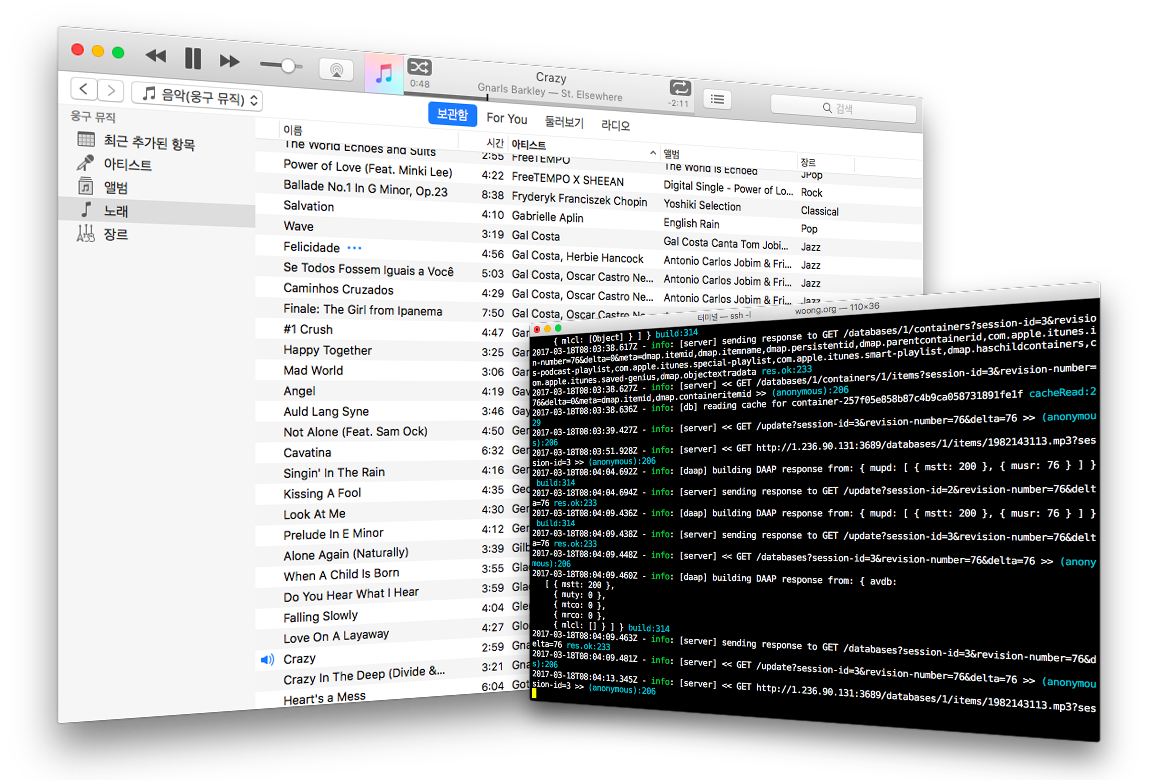
This document describes the server component. For the clients, refer to the
files in the client directory.
Features
The server supports:
- Compatibility with Apple Music or iTunes as a client
- Scheduled rescanning of music files
- Efficient change detection (only rescans modified or newly added files)
- Password-based authentication
- Smart and manual playlists
- Playlists can be easily managed through the web UI
- Streaming of MP3 and OGG files (if supported by the client)
- Multiple directories for storing music
Performance
The initial scan is relatively fast thanks to the high performance of the
music-metadata module. For
example,
- ~7 minutes for 5,000+ songs on a Gentoo system (Intel Atom D525, 4GB RAM and a 5400-rpm HDD)
- ~1 minutes for subsequent rescans under the same conditions
The server tracks file modification times (mtime) and only processes files that have been added or changed.
Prerequisites
No external database is strictly required.
canary supports both:
- A standalone database (NeDB)
- MongoDB (recommended for large music libraries, because NeDB keeps indexed data in memory)
For service discovery, canary can use:
⚠️ Running multiple mDNS/DNS-SD services on the same machine may cause conflicts.
mDNS configuration options
The mdns setting in server.conf determines how service advertisement works:
avahi: usesavahi-publish-servicedns-sd: usesdns-sdmdns-js: uses the built-in implementationauto(default): triesavahiordns-sd, falls back tomdns-jsoff: disables service advertisement
Ensure avahi-publish-service or dns-sd is accessible in your system PATH
if installed.
Configuration
Two configuration files are required:
- Server configuration (
config/server.json) - Database configuration (
config/db.ne.jsonorconfig/db.mongo.json)
Example: config/server.json
{
    "name":     "canary music",
    "port":     3689,
    "runAs": {
        "uid": "userid",
        "gid": "groupid"
    },
    "password": "password",
    "scan": {
        "path":  [ "/path/to/mp3/files" ],
        "cycle": [ "17:00:00" ],
        "utc":   false
    },
    "db":    "neDB",
    "mdns":  "auto",
    "web":   true,
    "debug": false
}
Notes:
name: Advertised server name (visible to DNS-SD clients)port: Must be3689for Apple Music compatibilityrunAs: Drops privileges to specified user(uid)/group(gid) (recommended when starting as root)password: Enables authentication if non-emptypath: directories containing musiccycle: rescan scheduleutc: whether to use UTC time
scan: controls file rescanning behaviorpath: directories containing musiccycleandutc: define the rescan schedule. The format follows theontimescheduling syntax.canarysupports mostontimeoptions, exceptsingle, which is always treated astrue.
db:neDBormongoDBmdns: service discovery methodweb: whether to serve the built web client fromserver/web/. Set tofalseto disable web UI serving entirely. If the directory does not exist, the server logs a warning and skips serving (DAAP and/apiendpoints remain unaffected).debug: enables verbose logging
Example: config/db.mongo.json
{
    "host":          "localhost",
    "port":          27017,
    "db":            "canary",
    "user":          "user",
    "password":      "password",
    "reconnectTime": 2
}- Authentication fields are optional
reconnectTime: retry interval (seconds) after disconnection
Example: config/db.ne.json
{
    "path": "db"
}
Specifies where NeDB stores its persistent files.
Running the server
Run the server like any Node.js application:
node server.js -c config/-cor--config: specifies the configuration directory
Since version 0.2.2, canary can extract cover images. If upgrading from an
older version, rebuild the database:
node server.js -c config/ --rebuildTo serve the web client from the same port, build it first:
cd ../client/web
npm install
npm run build
The server then serves the built artifacts at / (configurable via the web
field in server.json). Without a build, the web UI is silently disabled while
DAAP and /api endpoints continue to work.
Tested clients
- iTunes (Windows)
- Apple Music (Mac)
- Simple DAAP Client (iOS)
- DAAP Media Player (Android)
- Music Pump DAAP Player Demo (Android)
- SharePlay (Android)
- Diapente Music Stream Player (Android)
If your client is not listed or does not work, please report the issue.
INSTALL.md explains how to build and install the library. For the copyright
issues, see the accompanying LICENSE.md file.
If you have a question or suggestion, do not hesitate to contact me via email (woong.jun at gmail.com) or web (https://code.woong.org/).