
capybara-db-mcp
v1.1.2
Published
Minimal, token-efficient Database Read-Only PPI-safe MCP Server for PostgreSQL, MySQL, SQL Server, SQLite, MariaDB. Fork of DBHub with default-schema support.


Readme
capybara-db-mcp
⚠️ Production & Governance Notice
This project is intended for development, sandbox, or formally reviewed environments. Before connecting to any production system:
- Conduct a security review
- Validate data classification and handling requirements
- Ensure compliance with internal AI and data governance policies
- Confirm logging, auditing, and DLP controls are in place
This project is designed to reduce the likelihood of exposing query results to LLMs, but it does not replace enterprise security controls and should not be used to bypass governance processes.
capybara-db-mcp is a community fork of DBHub by Bytebase. The key difference: DBHub sends query results (rows, columns, counts) directly to the LLM, which can expose sensitive data. capybara-db-mcp is designed to reduce the likelihood of exposing query results to LLMs by writing results to local files, opening them in the editor, and returning status-oriented metadata to the MCP client instead of result sets. It uses connector-level read-only connections (PostgreSQL, SQLite), keeps the same internal names (e.g. dbhub.toml) for easy merging from upstream, and adds default-schema support for PostgreSQL and multi-database setups.
- Original project: github.com/bytebase/dbhub
- This fork: github.com/ajgreyling/capybara-db-mcp
To point your clone at this fork:
git remote set-url origin https://github.com/ajgreyling/capybara-db-mcp.gitflowchart LR
subgraph clients["MCP Clients - Supported"]
A[Claude Desktop]
B[Claude Code]
C[Cursor]
D[Codex]
E[Gemini]
end
subgraph server["MCP Server"]
M[capybara-db-mcp]
end
subgraph dbs["Databases"]
P[PostgreSQL]
S[SQL Server]
L[SQLite]
My[MySQL]
Ma[MariaDB]
end
A --> M
B --> M
C --> M
D --> M
E --> M
M --> P
M --> S
M --> L
M --> My
M --> MaUnsupported: VS Code / GitHub Copilot
VS Code and GitHub Copilot are not supported for capybara-db-mcp for security reasons. There is no project-level ignore file (such as .cursorignore or .aiexclude) that Copilot consistently reads to exclude .safe-sql-results/ from AI context. Query result files may therefore be exposed to the LLM when using VS Code/Copilot, undermining the PII isolation design.
Use of capybara-db-mcp in VS Code/Copilot is not recommended. For PII-safe database workflows, use one of the supported editors that provide ignore mechanisms: Cursor, Claude Code, Codex, or Gemini.
Security Model Overview
capybara-db-mcp is designed to reduce the likelihood of transmitting query result data to an LLM by isolating result sets to the local filesystem and returning status-oriented metadata to the MCP client.
- 1) LLM generates SQL: The MCP client sends an
execute_sqlrequest containing SQL text. - 2) Connector is read-only: Database connections are opened in read-only mode (PostgreSQL:
default_transaction_read_only; SQLite: readonly file mode). Write attempts fail at the database level. - 3) Query executes against the database: The query runs using the configured connector.
- 4) Results are written locally: Result sets are written to
.safe-sql-results/and opened in the editor when running in a supported AI editor (Cursor, Claude Code, Codex, Gemini). - 5) LLM receives metadata only: The MCP tool response is formatted to avoid including raw query results in the response payload.
- 6) Logging remains local: Operational logs and diagnostic details are written locally.
This design reduces the likelihood of transmitting result data to an LLM, but it does not eliminate operational, environment, or governance risks. Database-level controls (RBAC, network segmentation, auditing) and approved operating procedures remain required.
For detailed PII safety mechanisms (result isolation, generic errors, log redaction, search_objects names-only, request telemetry redaction, HTTP hardening), see ARCHITECTURE.md.
Result handling and LLM exposure minimization
Query results are written to local files and opened in the editor; the MCP tool response is formatted to return success/failure metadata rather than result sets:
flowchart TB
    subgraph llm["LLM / MCP Client"]
        Q["SQL query"]
        R["Tool response:\n✓ success/failure only"]
    end

    subgraph server["capybara-db-mcp"]
        Exec[Execute SQL]
        Write[Write to .safe-sql-results/]
        Format[createPiiSafeToolResponse]
    end

    subgraph db["Database"]
        DB[(PostgreSQL, SQLite, etc.)]
    end

    subgraph files["Local filesystem"]
        CSV[".safe-sql-results/YYYYMMDD_HHMMSS_execute_sql.csv"]
    end

    Q -->|1. Call execute_sql| Exec
    Exec -->|2. Run query| DB
    DB -->|3. Result rows| Write
    Write -->|4. Data to file, open in editor| CSV
    Write -->|5. Then format success response| Format
    Format -->|6. Success only - no path, count, or columns| R
capybara-db-mcp is a zero-dependency, token-efficient MCP server implementing the Model Context Protocol (MCP). It supports the same features as DBHub, plus a default schema.
Read-only enforcement: Database connections are opened in read-only mode (PostgreSQL: default_transaction_read_only; SQLite: readonly file mode). UPDATE, DELETE, INSERT, and other write operations fail at the connection level. This reduces the risk of accidental writes but does not replace database-level RBAC or permissions configuration.
Output isolation controls: By default, query results are written to local files (.safe-sql-results/) and opened in the editor when running in a supported client (Cursor, Claude Code, Codex, Gemini); tool responses are formatted to avoid returning result sets. Error responses return generic messages only (e.g. "Execution failed. See server logs for details."); no SQL, parameter values, or database error text are returned. Logs never include SQL or parameter values. These mechanisms are designed to reduce LLM data exposure risk when used appropriately, and do not constitute regulatory compliance or replace enterprise data governance and DLP controls.
- Local Development First: Zero dependency, token efficient with just two MCP tools to maximize context window
- Multi-Database: PostgreSQL, MySQL, MariaDB, SQL Server, and SQLite through a single interface
- Multi-Connection: Connect to multiple databases simultaneously with TOML configuration
- Default schema: Use
--schema(or TOMLschema = "...") so PostgreSQL uses that schema forexecute_sqlandsearch_objectsis restricted to it (see below) - Guardrails: Connector-level read-only connections, row limiting, and a 60-second query timeout default (overridable per source via
query_timeoutindbhub.toml) to reduce runaway operations - Designed to reduce LLM data exposure: Results are written to
.safe-sql-results/and opened only in supported editors (Cursor, Claude Code, Codex, Gemini); tool responses return only success/failure metadata (no file path, row data, row counts, or column names). Error responses use generic messages only; no SQL, parameter values, or database error text reach the client. Logs are redacted to avoid SQL and parameter values. - Secure Access: SSH tunneling and SSL/TLS encryption
Why Capybara?
Capybara branding reflects a calm, predictable design philosophy: minimal surface area, conservative defaults, and straightforward operational behavior. Branding is not a security or compliance claim; apply your organization’s governance and review standards before production use.
Supported Databases
PostgreSQL, MySQL, SQL Server, MariaDB, and SQLite.
MCP Tools
- execute_sql: Execute SQL queries with transaction support and safety controls
- search_objects: Search and explore database schemas, tables, columns, indexes, and procedures (names only; summary/full metadata disabled for PII safety)
Default schema (--schema)
When you set a default schema (via --schema, the SCHEMA environment variable, or schema = "..." in dbhub.toml for a source):
- PostgreSQL: The connection
search_pathis set soexecute_sqlruns in that schema by default (unqualified table names resolve to that schema). - All connectors:
search_objectsis restricted to that schema unless the tool is called with an explicitschemaargument.
Example (Cursor / MCP mcp.json):
{
  "command": "npx",
  "args": [
    "capybara-db-mcp",
    "--transport",
    "stdio",
    "--dsn",
    "postgres://user:password@host:5432/mydb",
    "--schema",
    "my_app_schema",
    "--ssh-host",
    "bastion.example.com",
    "--ssh-port",
    "22",
    "--ssh-user",
    "deploy",
    "--ssh-key",
    "~/.ssh/mykey"
  ]
}
Example (TOML in dbhub.toml):
[[sources]]
id = "default"
dsn = "postgres://user:password@host:5432/mydb"
schema = "my_app_schema"
Full DBHub docs (including TOML and command-line options) apply; see dbhub.ai and Command-Line Options.
Output isolation (designed to reduce LLM exposure)
By default, execute_sql writes query results to .safe-sql-results/ in your project directory and opens them in the editor when running in a supported AI editor (Cursor, Claude Code, Codex, Gemini). The MCP tool response sent back to the MCP client is formatted to return success/failure metadata rather than result sets. This reduces the likelihood of transmitting result data to an LLM, but it does not eliminate data handling risk and does not by itself satisfy regulatory or compliance requirements.
To reduce exfiltration risk via dynamic SQL (e.g. SELECT secret AS "password_is_hunter2"), tool responses are formatted to avoid including file paths, row data, row counts, or column names. Error responses return generic messages only (e.g. "Execution failed. See server logs for details."); no SQL, parameter values, or database error text are returned. Logs never include SQL or parameter values.
Read-only enforcement
Database connections are opened in read-only mode (PostgreSQL: default_transaction_read_only; SQLite: readonly file mode). UPDATE, DELETE, INSERT, and other write operations fail at the connection level. This is a guardrail and does not substitute for database-level RBAC, permissions, or audit controls.
Workbench
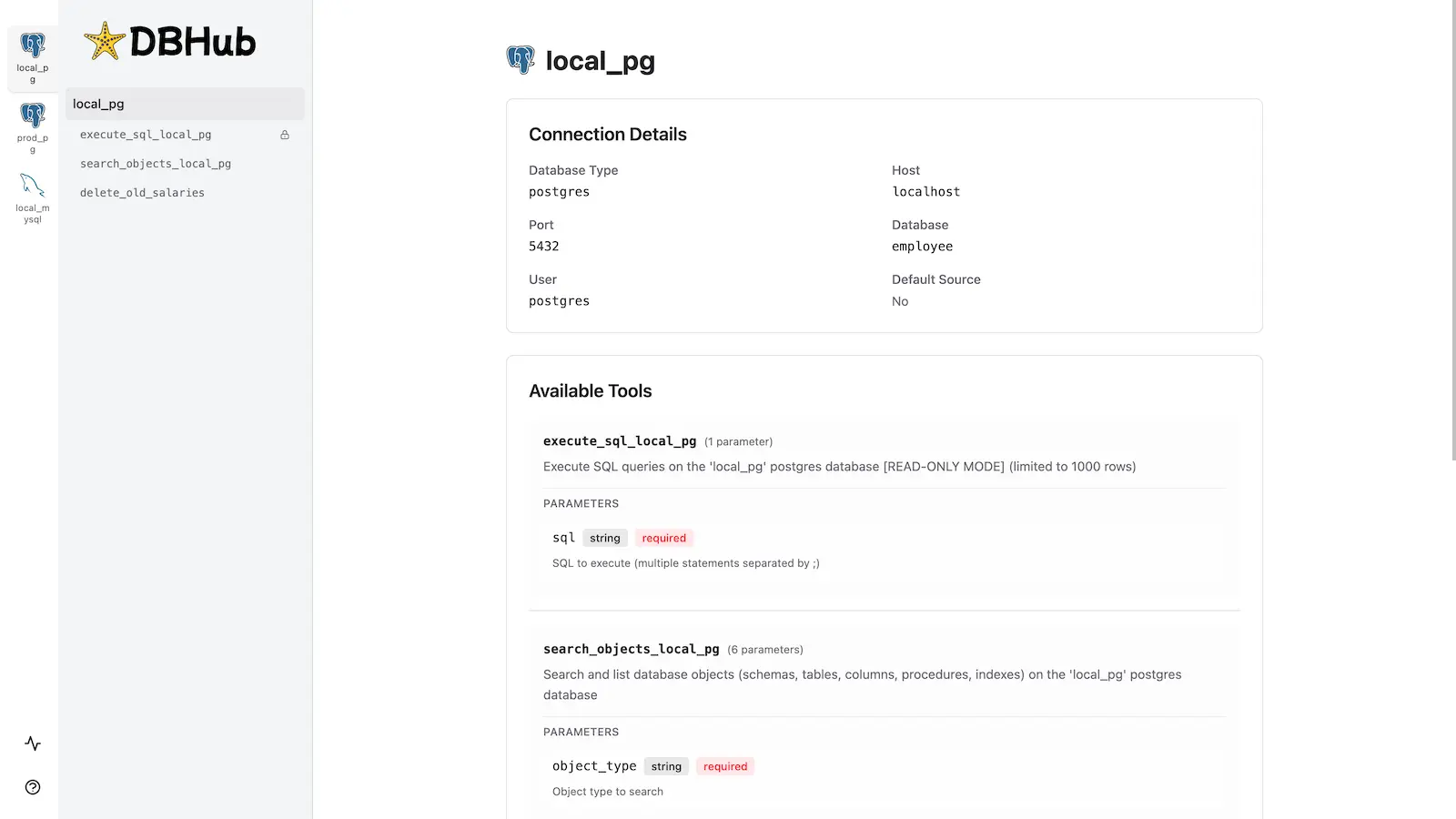
capybara-db-mcp includes the same built-in web interface as DBHub for interacting with your database tools.
Installation
Quick Start
NPM (from this repo, after build):
pnpm install && pnpm build
npx capybara-db-mcp --transport http --port 8080 --dsn "postgres://user:password@localhost:5432/dbname?sslmode=disable"
With a default schema:
npx capybara-db-mcp --transport stdio --dsn "postgres://user:password@localhost:5432/dbname" --schema "public"Demo mode:
npx capybara-db-mcp --transport http --port 8080 --demoSee Command-Line Options for all parameters.
Multi-Database Setup
Use a dbhub.toml file as in DBHub. See Multi-Database Configuration. You can set schema = "..." per source to apply the default schema for that connection.
Development
pnpm install
pnpm dev
pnpm build && pnpm start --transport stdio --dsn "postgres://user:password@localhost:5432/dbname"
To build and publish to npm: npm run release.
Contributors
Based on bytebase/dbhub. See that repository for upstream contributors and star history.