
caspian-opencode-plugin
v0.1.7
Published
OpenCode plugin — bidirectional Caspian messaging (email, Telegram, Discord) with a reliability-critical path

Maintainers
 dipanshusingh
Readme
caspian-opencode-plugin

OpenCode plugin that gives your agent a Caspian inbox — email, Telegram, and Discord — with sessions, slash commands, and a reliability-critical path.
No Caspian account required. On first start the plugin creates a sandbox project for you (same as caspian init).
Package: npmjs.com/package/caspian-opencode-plugin
Quick start
# 1) Register the plugin + install /caspian:* slash commands
#    Global (all projects):
bunx caspian-opencode-plugin setup
#    Or only this repo:
bunx caspian-opencode-plugin setup --project

# 2) Restart OpenCode
That’s it. OpenCode pulls the plugin (tools/hooks) from npm on startup (plugin docs). You should see toasts: Caspian ready → Caspian inbox ready (with your agent email).
| Scope | Config | Commands | Skills |
|---|---|---|---|
| setup (default) | ~/.config/opencode/opencode.jsonc and opencode.json (whichever exist) | ~/.config/opencode/commands/ | ~/.config/opencode/skills/ |
| setup --project | ./opencode.jsonc / ./opencode.json / .opencode/opencode.json(c) | ./.opencode/commands/ | ./.opencode/skills/ |
What setup does:
- Adds
"caspian-opencode-plugin"to thepluginarray in everyopencode.json/opencode.jsoncit finds (tools/hooks). JSONC comments and trailing commas are preserved. - Merges
/caspian:*command templates - Copies slash commands and skills into OpenCode discovery paths
OpenCode only discovers skills/commands from those folders — not from inside the
npm tarball (skills docs). Always run setup
once after install or upgrade.
If you use opencode.jsonc (common with oh-my-opencode / custom providers),
setup registers the plugin there too. Tools only appear when
caspian-opencode-plugin is in the config file OpenCode actually loads — skills
alone are not enough.
Tools missing after setup? Check OpenCode’s log for
failed to load plugin … caspian-opencode-plugin. OpenCode requires the package
entry to export only plugin functions (no helper constants). Use
caspian-opencode-plugin@>=0.1.7. Then fully quit and relaunch OpenCode (or clear)
~/.cache/opencode/packages/caspian-opencode-plugin* and bunx's cached 0.1.1).
Manual install (no setup CLI)
Add the plugin yourself:
{
  "$schema": "https://opencode.ai/config.json",
  "plugin": ["caspian-opencode-plugin"]
}
Then either run bunx caspian-opencode-plugin setup once for slash commands, or copy
node_modules/caspian-opencode-plugin/src/commands/*.md into
.opencode/commands/ (or ~/.config/opencode/commands/).
Try it
After restart:
| Command | What it does |
|---|---|
| /caspian:inbox | List connections + recent messages |
| /caspian:email | Send or reply by email |
| /caspian:connect-email | Credentials (sandbox or dashboard paste) → connect inbox → admit email |
| /caspian:connect-telegram | Connect Telegram (TELEGRAM_BOT_TOKEN in .env) |
| /caspian:telegram @user hi | Send a Telegram DM |
| /caspian:connect-discord | Connect Discord (OAuth or bot token) |
| /caspian:discord <channelId> hi | Post to a Discord channel |
Email works with zero config. Telegram / Discord need a connect step, then restart
OpenCode so "channels" in ~/.config/opencode/caspian.json is reloaded.
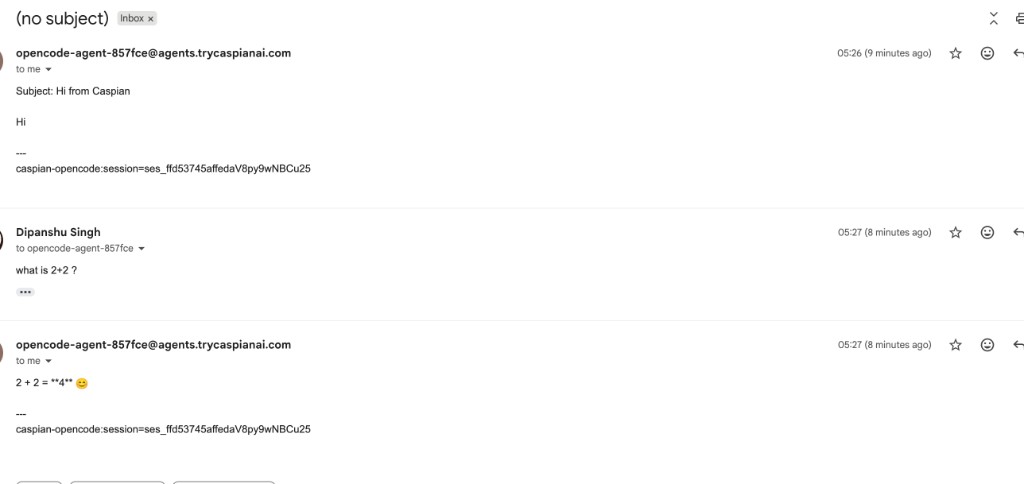
Someone emails your agent inbox → OpenCode answers on the same thread. Follow-ups
stay in one session via the caspian-opencode:session=… footer:
Local monorepo (developing this package)
mkdir -p .opencode/plugins.opencode/package.json:
{
  "dependencies": {
    "caspian-opencode-plugin": "file:.."
  }
}.opencode/plugins/caspian.ts:
export { default } from "../../src/index.ts"Also keep this package’s root opencode.json (slash command templates) for the
dev checkout.
First run (zero signup)
You do not need a Caspian account, CLI, or .env.
- Start OpenCode with the plugin loaded.
- If
CASPIAN_API_KEYis missing, the plugin:- Reuses env / project
.env/~/.config/opencode/caspian.envif present - If
caspianis on PATH →caspian init(12s timeout) - Else HTTP mint (no CLI):
POST https://api.trycaspianai.com/v1/projects/sandbox - Writes credentials to
<project>/.envand~/.config/opencode/caspian.env - Starts listen, then
connectEmailin the background
- Reuses env / project
- Toast: Caspian ready → Caspian inbox ready with the agent address.
Cold start (no CLI / no .env) is typically ~1–3s to mint + inbox.
Optional CLI-only setup (same APIs):
pipx install caspian-cli   # or: uvx caspian-cli …
caspian init
caspian connect email
Config (optional)
~/.config/opencode/caspian.json:
{
  "displayName": "OpenCode Agent",
  "allowFrom": [],
  "channels": ["email"],
  "threading": {
    "enabled": true,
    "sharedSessionKey": "caspian:shared"
  },
  "switches": {
    "enabled": true,
    "autoOnboard": true,
    "autoConnectEmail": true,
    "degradedCapacityReply": true
  }
}
Threading + session footer (TUI ↔ Gmail sync)
Default: on. Each Caspian conversation maps to an OpenCode session, and outbound mail/replies stamp a footer:
---
caspian-opencode:session=ses_0691…
That lets you:
- Start in the TUI
/caspian:email [email protected] I am alive(footer uses current session id)- Friend replies in Gmail (quote usually keeps the footer)
- Plugin routes the reply back into the same TUI session
| Setting | Default | Meaning |
|---|---|---|
| threading.enabled | true | One Caspian thread → one OpenCode session |
| threading.sessionFooter | true | Stamp/parse session footer for cross-channel sync |
| threading.sharedSessionKey | caspian:shared | Session key/title when threading is disabled |
Disable footer sync only if you explicitly want to:
{
  "threading": { "sessionFooter": false }
}
Collapse all inbound mail into one session:
{
  "threading": { "enabled": false }
}
| Switch | Default | Meaning |
|---|---|---|
| autoOnboard | true | Create sandbox project when no API key |
| autoConnectEmail | true | Provision email inbox on start |
| enabled | true | Global kill switch |
Inbound notifications
When mail is delivered into an OpenCode session, the server plugin (no TUI plugin) can alert you:
- OpenCode toast — in-app banner (any OS where OpenCode runs)
- System notification
- macOS → Notification Center (
osascript) - Linux →
notify-send(installlibnotifyif missing) - Windows → PowerShell balloon tip (
NotifyIcon)
- macOS → Notification Center (
Default (~/.config/opencode/caspian.json):
{
  "notify": {
    "enabled": true,
    "toast": true,
    "system": true
  }
}
| Field | Default | Meaning |
|---|---|---|
| enabled | true | Master switch |
| toast | true | OpenCode TUI toast |
| system | true | Desktop / Notification Center |
Thinking in channel replies
Model reasoning parts are stripped from Caspian replies by default (so Telegram / email get only the final answer). OpenCode’s TUI may still show thinking locally.
{
  "thinking": {
    "enabled": false,
    "channels": {
      "telegram": false,
      "email": false
    }
  }
}
| Field | Default | Meaning |
|---|---|---|
| enabled | false | Global: include reasoning in channel replies |
| channels.<name> | (unset) | Per-channel override (wins over enabled) |
Example: keep global off, but include thinking on email only:
{ "thinking": { "enabled": false, "channels": { "email": true } } }On macOS, allow notifications for Script Editor / osascript (or Terminal) if the first alert is silent.
Env (also read from .env / caspian.env):
CASPIAN_API_KEYCASPIAN_BASE_URL(defaulthttps://api.trycaspianai.com)
Inbound vs outbound
| Direction | How |
|---|---|
| Inbound (default) | Someone emails your agent inbox → new/threaded OpenCode session → reply |
| Outbound (new) | /caspian:email → ask if needed → caspian_send_email → Caspian initiate |
| Outbound (thread) | In an inbound email session → caspian_reply_email → Caspian reply (same Gmail thread) |
| Outbound (Telegram) | /caspian:telegram @user hi → caspian_send_telegram |
Also: /caspian:reply, /caspian-email, tools caspian_reply_email / caspian_send_email / caspian_send_telegram / caspian_inbox.
Telegram DM note: bots cannot start a private chat. The recipient must message
your bot first before DMs work. The /caspian:telegram skill always surfaces this.
Important: if the session already has inbound mail, the agent must ask whether to
reply on that thread or send a separate new email. New emails require a real
subject (not bare Re:).
Caspian Inbox skill (caspian:Inbox)
OpenCode skill caspian-inbox (alias caspian:Inbox) lists connections and
recent conversations/messages on configured channels (email by default; pass
other channels when connected).
| How | What |
|---|---|
| Skill | skill({ name: "caspian-inbox" }) or ask “show Caspian inbox” |
| Slash | /caspian:inbox or /caspian-inbox |
| Tool | caspian_inbox (list=true default; optional channels, limits) |
Skill path: src/skills/caspian-inbox/SKILL.md (also linked under .opencode/skills/ in this repo).
Connect email / Telegram (skills)
Skills edit ~/.config/opencode/caspian.json so admit includes the channel, then
tell you to restart OpenCode (config is loaded at plugin start).
| How | What |
|---|---|
| Slash | /caspian:connect-email · /caspian:connect-telegram · /caspian:connect-discord |
| Tools | caspian_connections · caspian_connect_* · caspian_send_telegram · caspian_send_discord |
| Skills | caspian-connect-email · caspian-connect-telegram · caspian-connect-discord · caspian-discord |
Discord
| How | What |
|---|---|
| Connect | /caspian:connect-discord — one-click install (authorize URL) or DISCORD_BOT_TOKEN |
| Send | /caspian:discord <channelId> <message> — channel snowflake (Copy Channel ID) |
| Tool | caspian_send_discord |
After connect, restart OpenCode so "channels" includes discord (admit blast-radius).
Telegram token: put TELEGRAM_BOT_TOKEN in project .env or
~/.config/opencode/caspian.env — never in caspian.json. After connect you
should see "channels": ["email", "telegram"] (or your merged list). Until you
restart, Telegram is still rejected at admit.
Which email identity?
Caspian can have multiple email connections on one API key. By default the plugin uses the first active email inbox (and won’t create a second if one exists).
Pin listen/send identity in ~/.config/opencode/caspian.json:
{
  "email": {
    "connectionId": "conn_fcce6ffe002befa41f33322a",
    "address": "[email protected]",
    "listenConnectionIds": [],
    "listenAddresses": []
  }
}
| Field | Meaning |
|---|---|
| email.connectionId | Prefer this connection for send; also listen-filter if listen lists empty |
| email.address | Prefer this inbox address; also listen-filter if listen lists empty |
| email.listenConnectionIds | Only handle inbound for these connection ids |
| email.listenAddresses | Only handle inbound for these inbox addresses |
List identities: uvx --from caspian-cli caspian status
How it works
Inbound:
  Human email → Caspian → listen() → OpenCode session.prompt → reply

Outbound:
  /caspian:email … → caspian_send_email tool → Caspian initiate(to, body)
Reliability model: RELIABILITY.md.
Develop / test / publish
cd packages/opencode
bun install
bun run build     # dist/ for npm
bun test          # unit + onboard + fault + capacity
bun run typecheck
npm publish       # runs prepublishOnly → build
For local monorepo work against the TypeScript SDK checkout:
bun add caspian-sdk@link:../../sdks/typescript(Published installs resolve caspian-sdk from npm ^0.1.2.)
| Suite | Proves |
|---|---|
| onboard.test.ts | CLI init, HTTP mint failover, .env persist |
| pipeline.test.ts | Email → prompt → reply critical path |
| fault.test.ts / capacity.test.ts | Fail-fast + isolation |
Manual email check
bunx caspian-opencode-plugin setupand restart OpenCode.- Note the inbox address from the Caspian inbox ready toast (or logs).
- Email that address (or
caspian test-email "ping"if you have the CLI). - Confirm an OpenCode session opens and the reply lands on the thread.
License
Apache-2.0