
cb-clihp
v1.2.0
Published
A Lightweight Command Line Interface (CLI) Helper
Downloads
31


Readme
Clihp
v1.1.0
A lightweight Command Line Interface (CLI) helper.
Usage
Install the module using npm install --save cb-clihp, and load the module. After loaded, the Clihp object will be available on the global object.
require('cb-clihp');

// Creating parser instance.
var clp = new Clihp.Parser();

// Creating helper instance.
var clh = new Clihp.Helper();
When parsing the CLI call, Clihp will mark the first argv as the command name. Aruments that paired with (=) will be marked as config, arguments started with single or double dash (-) without (=) will be marked as option, and the rest will be marked as value.
Example
node app.js build api app --host="localhost" --port=2343 --verboseFrom that sample, the result will be:
clp.cmd:buildclp.val:[ "api", "app" ]clp.cfg:{ '--host': 'localhost', '--port': 2343 }clp.opt:[ '--verbose' ]
Parser Properties
.cmd- A string represent the command name, taken from the first env. E.g:build.opt- An array contains options list. Options are string that started with single or double dash. E.g:--version,-v.val- An array contains values list. Values are string that not started with single or double dash. E.g:script,style.cfg- An object contains configs. Configs are string that paired with=. E.g:host=localhost,port=8023
Example
node app.js build script host=localhost port=3000 --verboseapp.js
require('cb-clihp');

var clp = new Clihp.Parser();

console.log(clp.cmd); // build
console.log(clp.opt); // ['--verbose']
console.log(clp.val); // ['script']
console.log(clp.cfg); // { 'host': 'localhost', 'port': 3000 }
Parser Methods
All parser methods are accept multiple arguments. The examples below is related to the sample above.
.ask(QUESTIONS, CALLBACK)
A wrapper of Inquirer.prompt() module. For more informations about the QUESTIONS and CALLBACK, please refer to Inquirer Docs.
.hasopt(OPTIONS...)
Check does the cli has options.
Example
clp.hasopt('--verbose', '-vb'); // True
clp.hasopt('--debug');          // False
.hasval(VALUES...)
Check does the cli has values.
Example
clp.hasval('script'); // True
clp.hasval('styles'); // False
.hascfg(CONFIGS...)
Check does the cli has configs.
Example
clp.hascfg('host', 'port');   // True
clp.hascfg('envi');           // False
Helper
With helper, you can easily create a CLI app with simple steps, including showing the helps on the console. When creating helper, the class will create a default commands to show the help (-h, --help, help) and show the version (-v, --version, version).
Example (app.js)
// Creating helper instance.
new Clihp.Helper()

// Setting up the CLI helper.
    .setup({
        name    : 'Clihp',
        info    : 'A Lightweight Command Line Interface (CLI) Helper',
        version : require('./package.json').version,
        usage   : `node app.js command [options...]`,
        prefix  : [
            `-->`,
            `-------- CLI HELPER ----------------------------------->`,
            `-->`,
        ]
    })

    // Adding commands
    .add('cmd', {
        name  : 'start',
        alias : '-s',
        about : 'Start the server',
        usage : 'node app.js start host=hostname\r\n',
        exec( val, cfg, opt ) {
            if ( this.hasopt('--verbose') ) {
                console.log('Starting server');
            }

            if ( !this.hascfg('host') ) {
                this.help('The host config is required!');
            }
            else {
                console.log(`Server running at "${this.cfg.host}"`);
            }
        }
    })
    .add('cmd', {
        name  : 'stop',
        alias : '-q',
        about : 'Stop the server',
        usage : 'node app.js stop\r\n',

        exec ( val, cfg, opt ) {
            console.log('Stopping server');
        }
    })

    // Adding configs
    .add('cfg', {
        name  : 'host',
        type  : 'String',
        about : 'Server hostname'
    })
    .add('cfg', {
        name  : 'port',
        type  : 'Number',
        about : 'Server port'
    })

    // Adding options
    .add('opt', {
        name  : '--verbose',
        alias : '-b',
        about : 'Display the logs on the screen'
    })
    .add('opt', {
        name  : '--debug',
        alias : '-d, -g',
        about : 'Debug the process'
    })

    // Initialize the helper. Helper will never working without running this method.
    .init();
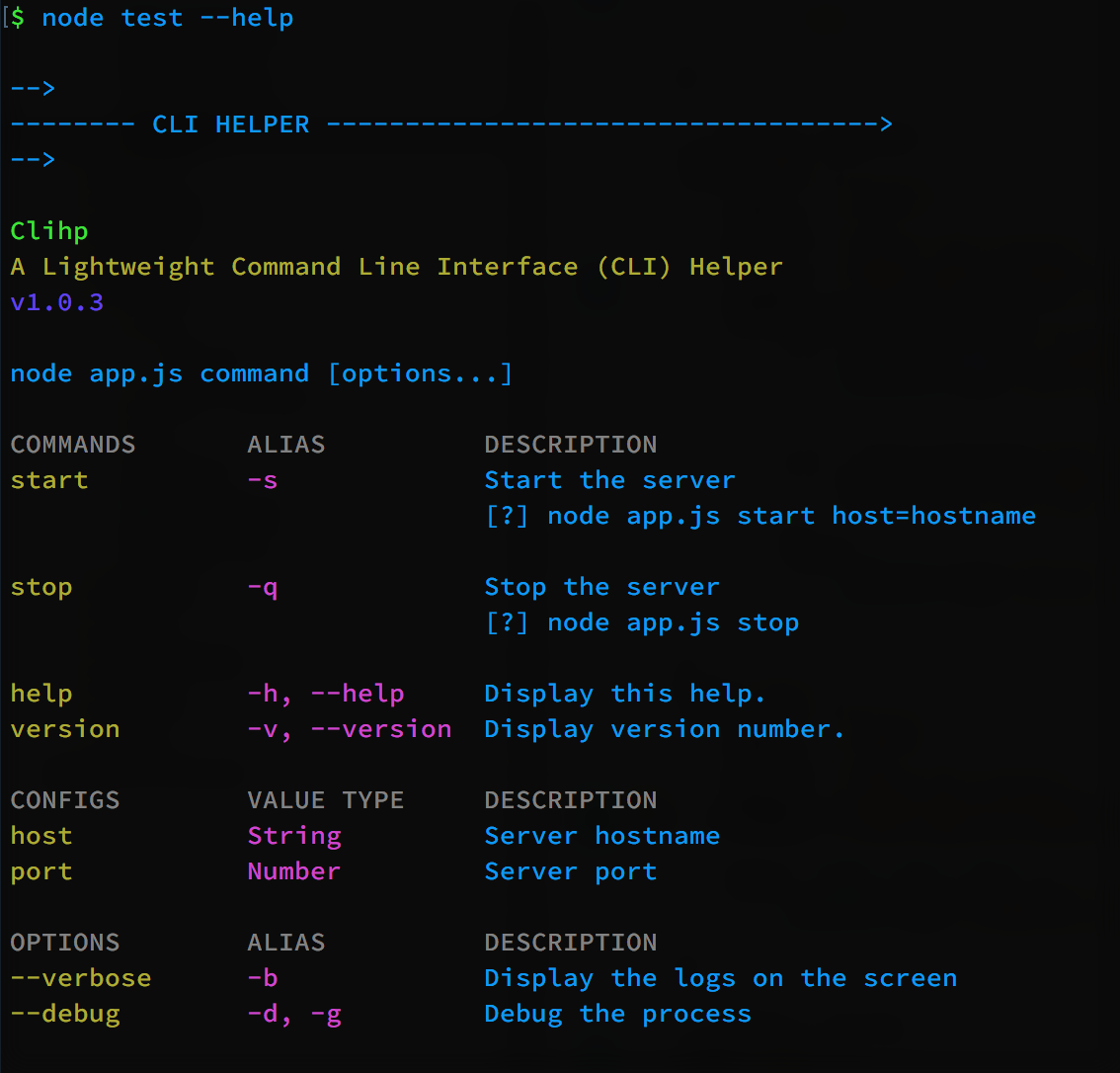
node app.js --helpRunning the command above will resulting:
node app.js start host=localhost --verboseRunning the command above will resulting:
Starting serverMethods
.setup(OPTIONS)
Setting up the CLI helper to show the help header.
.add(TYPE, OPTIONS)
Add commands, configs, and options to the helper. Add command with default as name will makes that command as default handler.
Default handler is used when no arguments defined on the CLI call, or the given command is not found. If no default command defined, then the Clihp will show warning when the CLI called without arguments.
Example
Say the app will use server as name.
#! /usr/bin/env node

new Clihp.Helper()
	.add('cmd', {
  		name: 'default',
        exec: function(val, cfg, opt) {
  			console.log(this.cmd, val, cfg, opt);
		}
	});
# Call without arguments, will show warning when no default command registered.
server
# Call with undefined command (index.js), will use default command if registered.
server index.js --host=localhost --port=8080 --verboseUsage
cli.add(type, options);type- Stringcmd,cfg, oropt. Cmd is to add command, cfg is to add config, and opt is to add option.options- Object contains the command or option options.name-[Required]String the primary command/option name.alias-[Optional]String the command/option alias, separated by,.about-[Optional]String about the command/option. Leave blank to hide the command on the helper.usage-[Optional]String about the how to use the command.type-[Optional]String about the config value type.exec-[Required]Function that will be executed when the command name is match with the command from cli. Optional for adding options and configs. The function call will receive(arg, cfg, opt)arguments. The function also will become the helper it self.
.help(MESSAGES)
Show the cli helps, with or without message.
Example
clp.help('The command is not registered!');.init()
Run the Clihp Helper to get the CLI call to run the registered command.
TODOS
Changelog
v1.2.0 - (Feb 24, 2016)
- Added
clp.ask(questions, callback)to wrap theInquirermodule. - Added ability to set multiple config name with single value. E.g:
cli-cmd set-env DB_USERNAME=DB_PASSWORD=DB_DATABASE=dockerwill resulting{ DB_USERNAME: 'docker', DB_PASSWORD: 'docker', DB_DATABSE: 'docker}`
v1.1.0 - (Feb 17, 2016)
- Call
defaultcommand if no arguments defined, or the given command is not registered. Ifdefaultcommand is not registered, will show warning. - Change the
execarguments order from(opt, val, cfg)to(val, cfg, opt) - Leave
options.aboutandoptions.usageblank to hide the commands from help. - Added
Configsgroup to the helper.$.add('cfg', OPTIONS) - Added ability to use Array[String…] and String on
options.aboutandoptions.usage