npm package discovery and stats viewer.

Discover Tips

  • General search

    [free text search, go nuts!]

  • Package details

    pkg:[package-name]

  • User packages

    @[username]

Sponsor

Optimize Toolset

I’ve always been into building performant and accessible sites, but lately I’ve been taking it extremely seriously. So much so that I’ve been building a tool to help me optimize and monitor the sites that I build to make sure that I’m making an attempt to offer the best experience to those who visit them. If you’re into performant, accessible and SEO friendly sites, you might like it too! You can check it out at Optimize Toolset.

About

Hi, 👋, I’m Ryan Hefner  and I built this site for me, and you! The goal of this site was to provide an easy way for me to check the stats on my npm packages, both for prioritizing issues and updates, and to give me a little kick in the pants to keep up on stuff.

As I was building it, I realized that I was actually using the tool to build the tool, and figured I might as well put this out there and hopefully others will find it to be a fast and useful way to search and browse npm packages as I have.

If you’re interested in other things I’m working on, follow me on Twitter or check out the open source projects I’ve been publishing on GitHub.

I am also working on a Twitter bot for this site to tweet the most popular, newest, random packages from npm. Please follow that account now and it will start sending out packages soon–ish.

Open Software & Tools

This site wouldn’t be possible without the immense generosity and tireless efforts from the people who make contributions to the world and share their work via open source initiatives. Thank you 🙏

© 2026 – Pkg Stats / Ryan Hefner

cc-bunline

v0.1.2

Published

Multi-line Claude Code statusline for Bun: model info, cost, tokens, rate limits, and git status

Readme

cc-bunline

English | 正體中文 | 简体中文

Bun 專屬的 Claude Code 多行狀態列—在終端機中顯示模型資訊、費用、Token 用量、速率限制和 Git 狀態。

Bun License

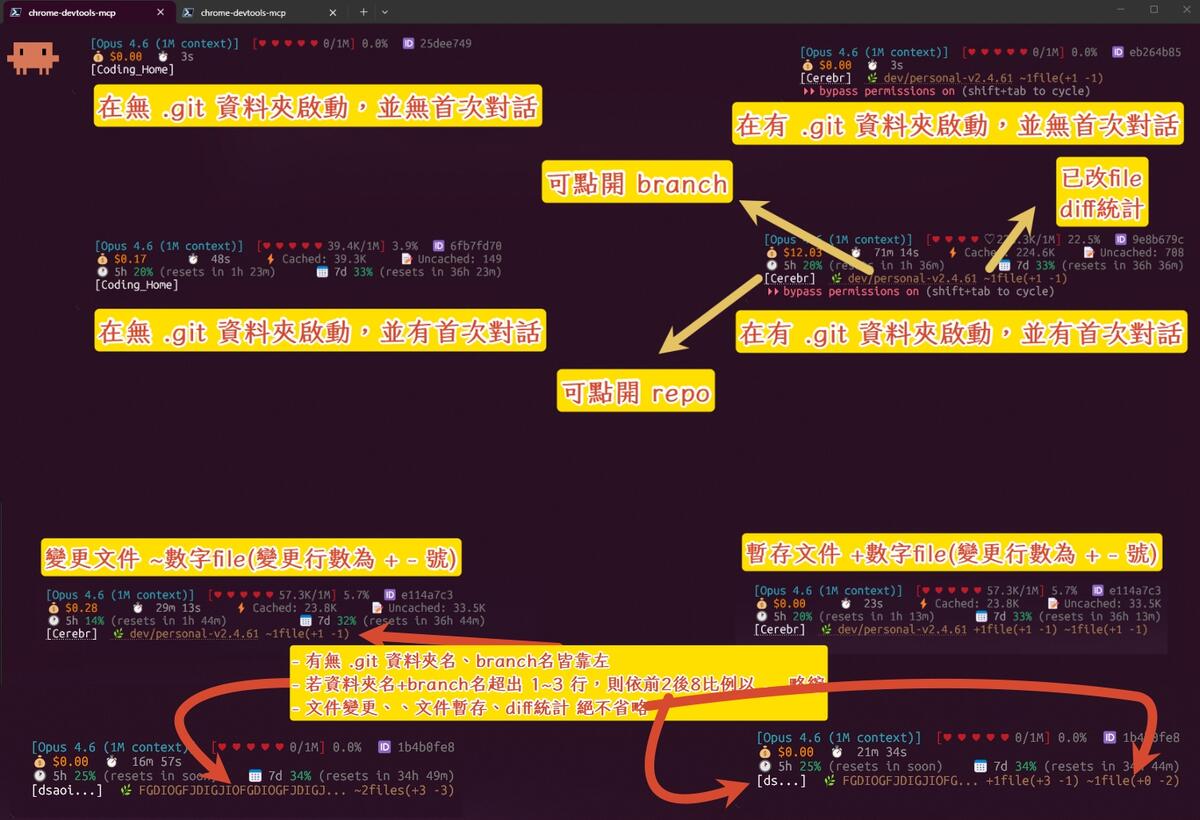
功能展示

渲染四行 ANSI 狀態列:

  1. 模型 —名稱、上下文用量進度條、Session ID
  2. 費用 —本次費用、持續時間、快取 / 非快取 Token 明細
  3. 速率限制 —5 小時與 7 天視窗,含重置倒計時
  4. Git —儲存庫名稱、分支、工作區變更統計

截圖

系統需求

安裝

全域安裝(建議)

bun add -g cc-bunline

免安裝直接執行

bunx cc-bunline

手動下載

curl -o ~/.claude/statusline.mts https://raw.githubusercontent.com/zeta987/cc-bunline/main/statusline.mts

設定方式

在 Claude Code 設定檔(~/.claude/settings.json)中加入:

{
  "statusLine": {
    "type": "command",
    "command": "cc-bunline"
  }
}

或使用 bunx(不需全域安裝):

{
  "statusLine": {
    "type": "command",
    "command": "bunx cc-bunline"
  }
}

若使用手動下載方式:

{
  "statusLine": {
    "type": "command",
    "command": "bun ~/.claude/statusline.mts"
  }
}

運作原理

Claude Code 將 JSON 狀態物件透過 stdin 傳入,cc-bunline 解析後將 ANSI 格式化的多行文字輸出到 stdout。不需要設定檔—所有資料都由 Claude Code 提供的 JSON 輸入驅動。

授權條款

MIT