
cc-expand
v0.5.2
Published
Expand Claude Code capabilities via plugin-based binary patching

Maintainers
 lionad
Readme

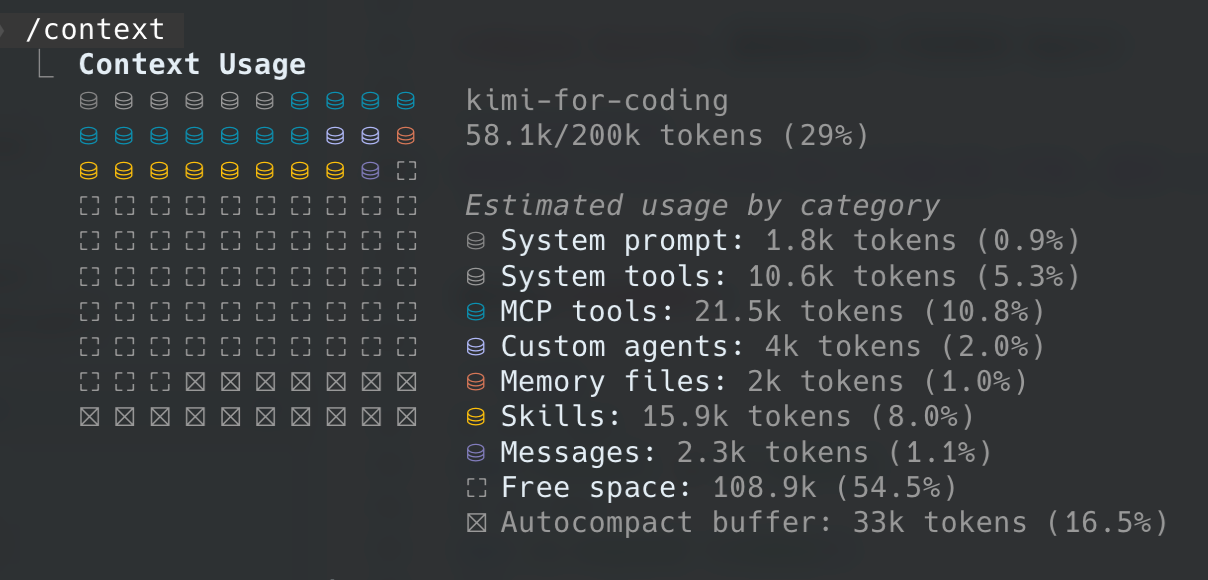
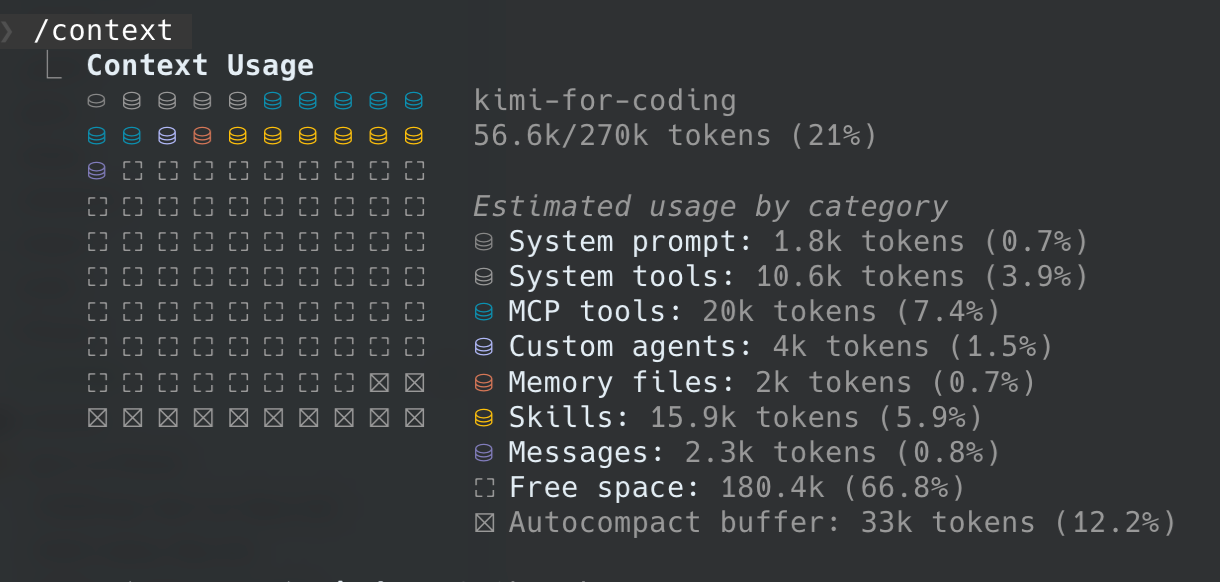
cc-expand patches the Claude Code binary to change hard-coded behavior. The most common use case is raising the context-window limit so longer conversations delay auto-compaction:
- Break through the 200K context window limit to delay auto-compaction. When a model supports 256K, Claude Code's native 200K ceiling becomes a bottleneck.
- Cap 1M models at a lower target to stay in the optimal performance range, since quality drops noticeably past 256K/512K.
| Before | After |
|--------|-------|
| 200K limit, ~110K free context | 270K limit, ~180K free context |
|  |
|  |
|
Model performance degrades over very long contexts. Image from the mimo-v2.5 pro blog.
Install
The fastest way is to ask your agent:
Help me expand Claude Code's context window to 270k using cc-expand (npx -y cc-expand@latest)Or install manually:
npm install -g cc-expand
# or
npx cc-expand <command>
Features
- Cross-platform: macOS, Windows, Linux
- Patch the context window up or down without losing auto-compaction
- Plugin system for third-party binary modifications
- Dynamic pattern updates from OSS; usually no npm reinstall required for new Claude Code versions
Usage
| Command | Description |
|---------|-------------|
| ccx install [version] | Download Claude Code to ~/.cc-expand/packages/ |
| ccx patch <version> | Patch the binary and save it to ~/.cc-expand/bin/ |
| ccx patch remove <version> [combo] | Remove a patched binary |
| ccx run [combo] | Launch the patched Claude Code binary |
| ccx setup | Install cc/c shell shortcuts |
| ccx self-update [channel] | Update cc-expand itself; pass latest/alpha or an exact version to force a specific target |
| ccx restore | Restore the original binary from backup |
| ccx verify | Verify whether the binary has been patched |
| ccx status | Show version and patch status |
| ccx supports | List supported Claude Code versions |
| ccx --version | Show cc-expand version |
- Install version:
latestor2.1.170 - Token counts accept plain numbers,
kfor thousands, orwfor ten-thousands:256000,270k, and27wall mean 270000 tokens. - Patch options:
<version> Claude Code version to patch (e.g. 2.1.170) -t, --target <count> Target context window size (default: 256000) -y, --yes Skip confirmation and overwrite shell shortcuts - After
patchsucceeds,cc/cshortcuts are maintained to use the patched binary. runaccepts combos such asccx run 270korccx run 27w-flow.
Supported Claude Code Versions
Supported versions are determined by remote pattern shards stored on Aliyun OSS. Run:
ccx supportsto see the dynamically updated list for your platform. Patterns are cached locally under ~/.cc-expand/cache/patterns/ with ETag conditional requests to minimize bandwidth.
When a new Claude Code version is released, the watch-patch skill discovers its obfuscated constants and uploads a new pattern shard. You usually do not need to update the cc-expand npm package to get support for a newer CC version.
If your CC version is not yet supported, temporarily use an older version (e.g. npx @anthropic-ai/[email protected]) or generate a pattern locally by running the watch-patch skill/agent against the project source.
Extending with Plugins
cc-expand treats every binary modification as a plugin. The context-window expansion is just one built-in plugin; you can install third-party plugins to alter other Claude Code behaviors.
ccx plugins add owner/repo        # install a plugin
ccx plugins list                  # list installed plugins
ccx plugins enable/disable <name> # enable or disable
ccx plugins remove <name>         # remove
When multiple plugins are enabled, ccx patch applies them all in one pass. The resulting binary name encodes the plugin set, e.g. claude-27w-flow.
Want to write your own? See the Plugin Authoring Guide and ADR 0003.
Support Me
Please star to support me in developing more interesting apps.
License
MIT © Lionad Morotar