
cc-journal
v0.1.0
Published
Local analytics & daily journal for Claude Code — sessions, token usage, GitHub-style heatmap dashboard, and daily work reports. 100% offline, nothing leaves your machine.

Maintainers
 nakamasa
Readme
Claude Code Journal
Claude Code 使用统计与日报工具——会话数、token 消耗、GitHub 风格活跃热力图,以及"我今天干了什么"日报。
🔒 100% 本地离线。 解析的是 Claude Code 本来就存在你机器上的会话记录(~/.claude/projects/**/*.jsonl),不上传任何数据、不需要 API key、无遥测。
快速开始
npx cc-journal serve就这一条——Dashboard 自动在 http://localhost:3777 打开。首次运行全量解析(几秒钟),之后增量刷新秒级完成。
或全局安装:
npm i -g cc-journal
journal serve
功能
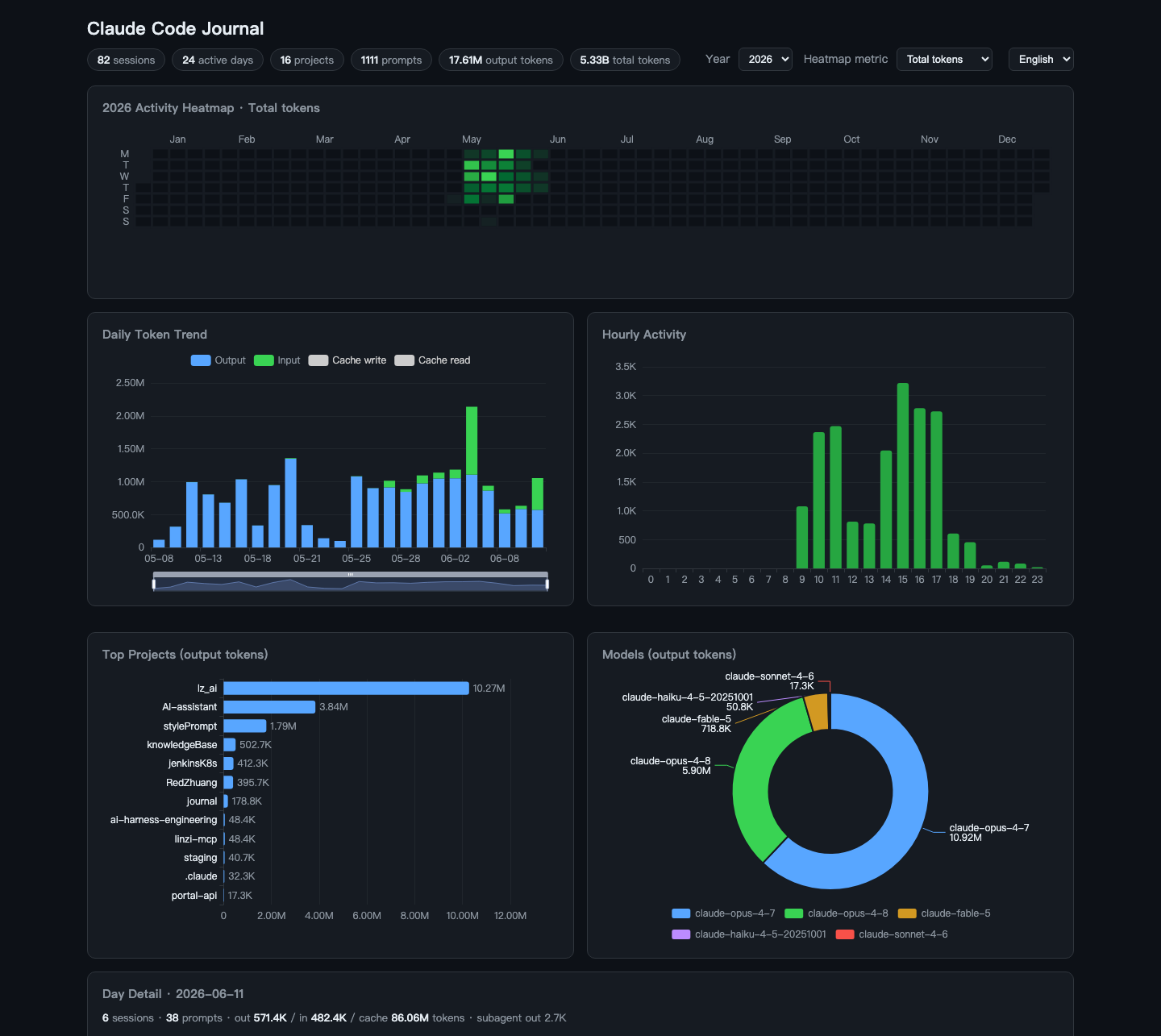
- 活跃热力图 —— GitHub 风格年度日历,指标可切换(总 tokens / 输出 tokens / 会话数 / 指令数),点击某天看明细
- 每日 token 趋势 —— 输入 / 输出 / cache 创建 / cache 读取 堆叠柱状图(cache 量级约大 100 倍,默认隐藏,图例可开)
- 时段分布 —— 看你一天中几点最肝
- 项目排行 / 模型分布 —— 按输出 tokens
- 当日明细 —— 每个会话的时间段、项目、首条指令、token 消耗
- 日报 —— 规则提取当天干了什么(即时、零成本);可选 LLM 浓缩版,通过本机
claudeCLI 生成(走你现有的订阅,不用配 API key),按天缓存 - 中英文界面 —— 自动检测、可切换、支持
?lang=zh|en
命令
journal serve   [--port 3777] [--no-open]          # 本地 Dashboard
journal stats   [--days 30]                        # 终端速览
journal summary [--date YYYY-MM-DD] [--llm] [--model haiku]   # 日报
journal refresh                                    # 更新解析缓存
# 全局选项:--lang zh|en · --claude-dir <dir> · --data-dir <dir>
工作原理
- 流式逐行解析
~/.claude/projects/**/*.jsonl(含<session>/subagents/下的子代理转录)。 - 解析结果缓存在
~/.claude-journal/,按文件 size + mtime 增量更新。历史长期积累:Claude Code 默认 30 天清理旧记录(cleanupPeriodDays),但 cc-journal 会保留已清理文件的解析历史——从你首次运行那天起,热力图只增不减。 - Dashboard 是单个静态页 + 极简 JSON API,只监听
127.0.0.1;无框架、运行时无构建,ECharts 本地打包(不依赖 CDN)。
统计口径
Claude Code 的会话记录很容易统计出错,cc-journal 的处理:
- input / output / cache 创建 / cache 读取四项分开统计(混算会虚高约 100 倍);
- 按
message.id + requestId去重——一次 API 响应在记录里占多行,每行都带完整 usage; - 跨文件全局去重——fork / resume 会复制历史记录;
- 子代理用量计入总量,但不算独立会话;
- 只统计人工输入的指令(过滤命令回显、hook 输出、工具结果);
- 按本地时区归天/归小时;
- 排除本工具自身生成日报产生的会话(
[journal-summary]标记),不污染统计。
常见问题
需要安装 claude CLI 吗?
只有 --llm 日报需要,其他功能完全独立。
为什么我的数据一开始只有最近 30 天?
Claude Code 会清理旧记录(~/.claude/settings.json 的 cleanupPeriodDays)。从首次运行起,cc-journal 会在源文件被清理后保留已解析的历史。
我的数据存在哪?
~/.claude-journal/(缓存 + 生成的日报)。随时可删;除已被清理的历史外,下次运行会全部重建。