
cc-ssd-enh
v1.3.15
Published
Enhanced Spec-Driven Development with AI-DLC, WebSearch Integration, Knowledge Management, Error Documentation, and Self-Review Mistake Detection. Transform your coding workflow with intelligent research, documentation, and automatic quality control.

Maintainers
 untadotmy
Readme
cc-ssd-enh
✨ Enhanced Spec-Driven Development with WebSearch Integration & Knowledge Management




Enhanced version of cc-sdd by Gota with WebSearch integration, knowledge management, error documentation, and knife surgery coding capabilities.
Brings AI-DLC (AI Driven Development Lifecycle) to Claude Code, Cursor IDE, Gemini CLI and Windsurf IDE. AI-native processes with minimal human approval gates: AI drives execution while humans validate critical decisions at each phase.
🎯 Perfect for: Escaping the 70% overhead trap of traditional development (meetings, documentation, ceremonies) to achieve weeks-to-hours delivery with AI-native execution and human quality gates.
Kiro compatible — Same proven workflow used in professional environments.
🚀 Installation
# Basic installation (defaults: English docs, Claude Code agent)
npx cc-ssd-enh@latest

# With language options (default: --lang en)
npx cc-ssd-enh@latest --lang ja    # Japanese
npx cc-ssd-enh@latest --lang zh-TW # Traditional Chinese
# Supported languages: en, ja, zh-TW, zh, es, pt, de, fr, ru, it, ko, ar

# With agent options (default: claude-code)
npx cc-ssd-enh@latest --gemini-cli --lang ja # For Gemini CLI instead
npx cc-ssd-enh@latest --cursor --lang ja # For Cursor IDE instead
npx cc-ssd-enh@latest --windsurf --lang ja # For Windsurf IDE instead
🌐 Supported Languages
- English (
en) - Japanese (
ja) - Traditional Chinese (
zh-TW) - Chinese (
zh) - Spanish (
es) - Portuguese (
pt) - German (
de) - French (
fr) - Russian (
ru) - Italian (
it) - Korean (
ko) - Arabic (
ar)
✨ Quick Start
For New Projects
# Launch AI agent and start spec-driven development immediately
/kiro:spec-init Build a user authentication system with OAuth # AI creates structured plan
/kiro:spec-requirements auth-system # AI asks clarifying questions
/kiro:spec-design auth-system # Human validates, AI designs
/kiro:spec-tasks auth-system # Break into implementation tasks
/kiro:spec-impl auth-system # Execute with TDD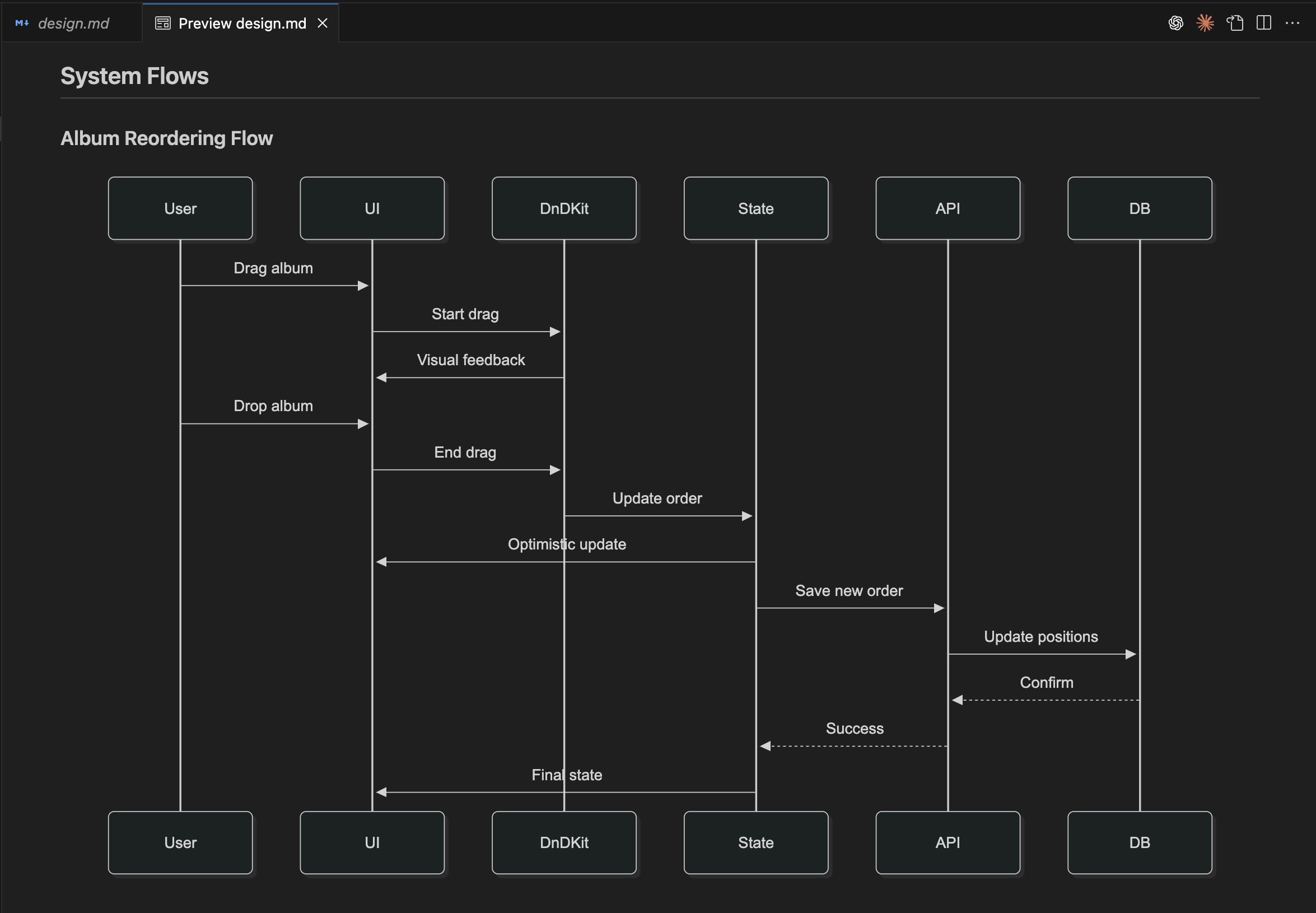 Example of system flow during the design phase
 design.md
For Existing Projects (Recommended)
# First establish project context, then proceed with development
/kiro:steering                                                 # AI learns existing project context

/kiro:spec-init Add OAuth to existing auth system              # AI creates enhancement plan
/kiro:spec-requirements oauth-enhancement                      # AI asks clarifying questions
/kiro:validate-gap oauth-enhancement                           # Optional: Analyze existing vs requirements
/kiro:spec-design oauth-enhancement                            # Human validates, AI designs
/kiro:validate-design oauth-enhancement                        # Optional: Validate design integration
/kiro:spec-tasks oauth-enhancement                             # Break into implementation tasks
/kiro:spec-impl oauth-enhancement                              # Execute with TDD
30-second setup → AI-driven "bolts" (not sprints) → Hours-to-delivery results
✨ Key Features
- 🚀 AI-DLC Methodology - AI-native processes with human approval. Core pattern: AI executes, human validates
- 📋 Spec-First Development - Comprehensive specifications as single source of truth driving entire lifecycle
- 🔍 WebSearch Integration - Automatic research for latest versions, best practices, and official documentation
- 📚 Knowledge Management - Structured documentation in
{kiro-dir}/knowledge/with research findings and error solutions - ⚡ Knife Surgery Coding - Context-aware code changes with minimal impact, reads target files before modification
- 🔍 Self-Review & Mistake Detection - Automatically re-reads modified files to detect and fix mistakes before testing
- 🛠️ Error Documentation - Web-searched solutions documented for reuse, no assumptions allowed
- 🧠 Persistent Project Memory - AI maintains comprehensive context across all sessions via steering documents
- 🌍 Team-Ready - Multi-language, cross-platform, standardized workflows with quality gates
🤖 Supported AI Agents
| Agent | Status | Commands | Config |
|-------|--------|----------|--------|
| Claude Code | ✅ Full | 10 slash commands | CLAUDE.md |
| Gemini CLI | ✅ Full | 10 commands | GEMINI.md |
| Cursor IDE | ✅ Full | 10 commands | AGENTS.md |
| Windsurf IDE | ✅ Full | 10 commands | WINDSURF.md |
| Others | 📅 Planned | - | - |
📋 Commands
Spec-Driven Development Workflow (Specs Methodology)
/kiro:spec-init <description>             # Initialize feature spec
/kiro:spec-requirements <feature_name>    # Generate requirements
/kiro:spec-design <feature_name>          # Create technical design
/kiro:spec-tasks <feature_name>           # Break into implementation tasks
/kiro:spec-impl <feature_name> <tasks>    # Execute with TDD
/kiro:spec-status <feature_name>          # Check progress
Specifications as the Foundation: Based on Kiro's specs - specs transform ad-hoc development into systematic workflows, bridging ideas to implementation with clear AI-human collaboration points.
Kiro IDE Integration: Specs are portable to Kiro IDE for enhanced implementation with guardrails and team collaboration features.
Quality Validation (Optional - Brownfield Development)
# Before spec-design (analyze existing functionality vs requirements):
/kiro:validate-gap <feature_name>         # Analyze existing functionality and identify gaps with requirements

# After spec-design (validate design against existing system):
/kiro:validate-design <feature_name>      # Review design compatibility with existing architecture
Optional for Brownfield Development:
validate-gapanalyzes existing vs required functionality;validate-designchecks integration compatibility. Both are optional quality gates for existing systems.
Project Memory & Context (Essential)
/kiro:steering                            # Create/update project memory and context
/kiro:steering-custom                     # Add specialized domain knowledge
Critical Foundation Commands: Steering creates persistent project memory - context, rules, and architecture that AI uses across all sessions. Run first for existing projects to dramatically improve spec quality.
⚙️ Configuration
# Language and platform
npx cc-ssd-enh@latest --lang ja --os mac   # macOS
npx cc-ssd-enh@latest --lang ja --os linux # Linux (shares mac templates)

# Safe operations
npx cc-ssd-enh@latest --dry-run --backup

# Custom directory
npx cc-ssd-enh@latest --kiro-dir docs/specs
📁 Project Structure
After installation, your project gets:
project/
├── .claude/commands/kiro/    # Enhanced slash commands
├── .kiro/
│   ├── specs/                # Feature specifications
│   ├── steering/             # AI guidance rules
│   └── knowledge/            # Research & error documentation (NEW)
│       ├── research-*.md     # Web research findings
│       ├── docs-*.md         # Fetched documentation
│       └── errors/           # Error solutions
└── CLAUDE.md                 # Enhanced project configuration
🗑️ Uninstall Instructions
Remove Generated Files
# Remove all generated files and folders
rm -rf .claude .cursor .gemini .windsurf .kiro CLAUDE.md AGENTS.md GEMINI.md WINDSURF.md

# Windows PowerShell
Remove-Item -Recurse -Force .claude, .cursor, .gemini, .windsurf, .kiro, CLAUDE.md, AGENTS.md, GEMINI.md, WINDSURF.md
Agent-Specific Cleanup
Claude Code
rm -rf .claude CLAUDE.mdCursor IDE
rm -rf .cursor AGENTS.mdGemini CLI
rm -rf .gemini GEMINI.mdWindsurf IDE
rm -rf .windsurf WINDSURF.mdGlobal Package Removal
# If installed globally
npm uninstall -g cc-ssd-enh
🆕 Enhanced Features
WebSearch Integration
- Requirements Phase: Automatic research for latest versions and best practices
- Design Phase: Technology analysis and architecture patterns research
- Error Handling: Web search for solutions (GitHub, Stack Overflow, Reddit)
Knowledge Management
- Research Documentation:
{kiro-dir}/knowledge/research-{topic}-{number}.md - Error Solutions:
{kiro-dir}/knowledge/errors/{errorname}.mdwith working solutions - Best Practices:
{kiro-dir}/knowledge/bestpractices-{type}-{number}.md
Knife Surgery Coding
- Context Understanding: Always reads target files before making changes
- Minimal Impact: Surgical modifications preserving existing functionality
- Self-Review & Mistake Detection: Automatically re-reads all modified files to check for mistakes
- Self-Correction Loop: Detects and fixes mistakes immediately before testing
- No Assumptions: Mandatory web search for unknown errors
📚 Documentation & Support
- Enhanced Repository - This enhanced version
- Issues & Support - Bug reports and questions for enhanced version
- Original Project - Created by Gota
- NPM Package - Install cc-ssd-enh
- Kiro IDE - Professional spec-driven development environment
🙏 Credits & Attribution
Original Author
This enhanced version is built upon the excellent foundation of cc-sdd created by Gota.
🌟 Original Project: https://github.com/gotalab/cc-sdd
👨💻 Original Author: Gota
📦 Original NPM: cc-sdd
All core spec-driven development methodology, AI-DLC concepts, and foundational architecture are credited to the original author.
Enhanced Version
🚀 Enhanced by: UntaDotMy
📦 Enhanced NPM: cc-ssd-enh
🏠 Enhanced Repository: https://github.com/UntaDotMy/Cursor-Spec-Development
✨ Enhancements Added: WebSearch integration, knowledge management, error documentation, self-review mistake detection, and knife surgery coding capabilities.
Original Author
This enhanced version is built upon the excellent foundation of cc-sdd created by Gota.
🌟 Original Project: https://github.com/gotalab/cc-sdd
👨💻 Original Author: Gota
📦 Original NPM: cc-sdd
All core spec-driven development methodology, AI-DLC concepts, and foundational architecture are credited to the original author.
Enhanced Version
🚀 Enhanced by: UntaDotMy
📦 Enhanced NPM: cc-ssd-enh
🏠 Enhanced Repository: https://github.com/UntaDotMy/Cursor-Spec-Development
✨ Enhancements Added: WebSearch integration, knowledge management, error documentation, self-review mistake detection, and knife surgery coding capabilities.
MIT License | Built with ❤️ on the foundation by Gota | Enhanced by UntaDotMy
Platform Support
- Supported OS: macOS, Linux, Windows (auto-detected by default)
- Linux uses the same command templates as macOS. Windows has dedicated templates
- CI/CD automated builds and testing across all platforms