
ccakashic
v0.3.1
Published
A cross-project dashboard for your Claude Code sessions (~/.claude/projects/) — browse logs as beautiful HTML, see which sessions are waiting for you, and resume any of them in one click via cmux
Downloads
659

Maintainers
 ashimon83
Readme
ccakashic
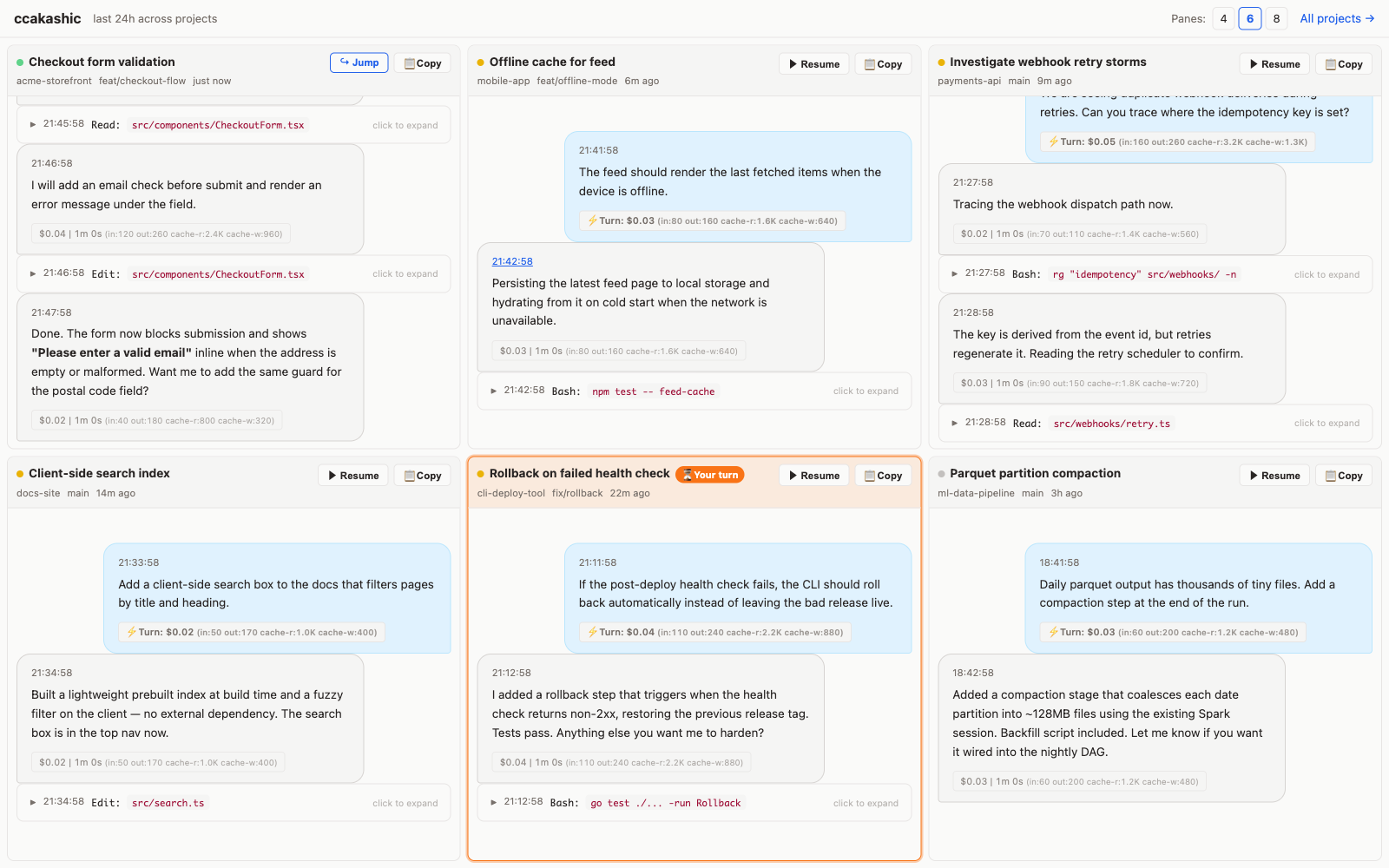
An Akashic Record of your Claude Code sessions — a cross-project dashboard for your ~/.claude/projects/ logs, rendered as beautiful HTML in your browser. See every recent session side by side, spot at a glance which ones are waiting for your input, and resume any of them in one click straight into a cmux workspace.
Usage
npx
npx ccakashicRun from source
git clone [email protected]:ashimon83/ccakashic.git
cd ccakashic
npm start
A local HTTP server starts and your browser opens automatically.
Features
- Dashboard — The top page shows your 4/6/8 most recently active sessions across all projects side by side, each pane an independently scrollable thread of the last 24h, with live status dots (🟢 active / 🟡 recent / ⚪ idle) refreshed by polling
- Waiting-for-you indicator — Sessions cmux is notifying you about (an unread "Claude is waiting for your input" / "needs your permission") get an orange frame and a
⏳ Your turn/🔐 Permissionbadge. cmux marks the notification read the moment you focus that workspace, so the highlight self-clears on the next poll once you open the tab — it mirrors cmux's own badge exactly. The browser tab title shows the count ((2) ccakashic) and the favicon turns orange, so a glance at the tab tells you how many sessions need you. (Requires cmux; covers sessions resumed through ccakashic, which are tracked in the resume map.) - Fully browser-based — Dashboard → Project list → Session list → Conversation detail
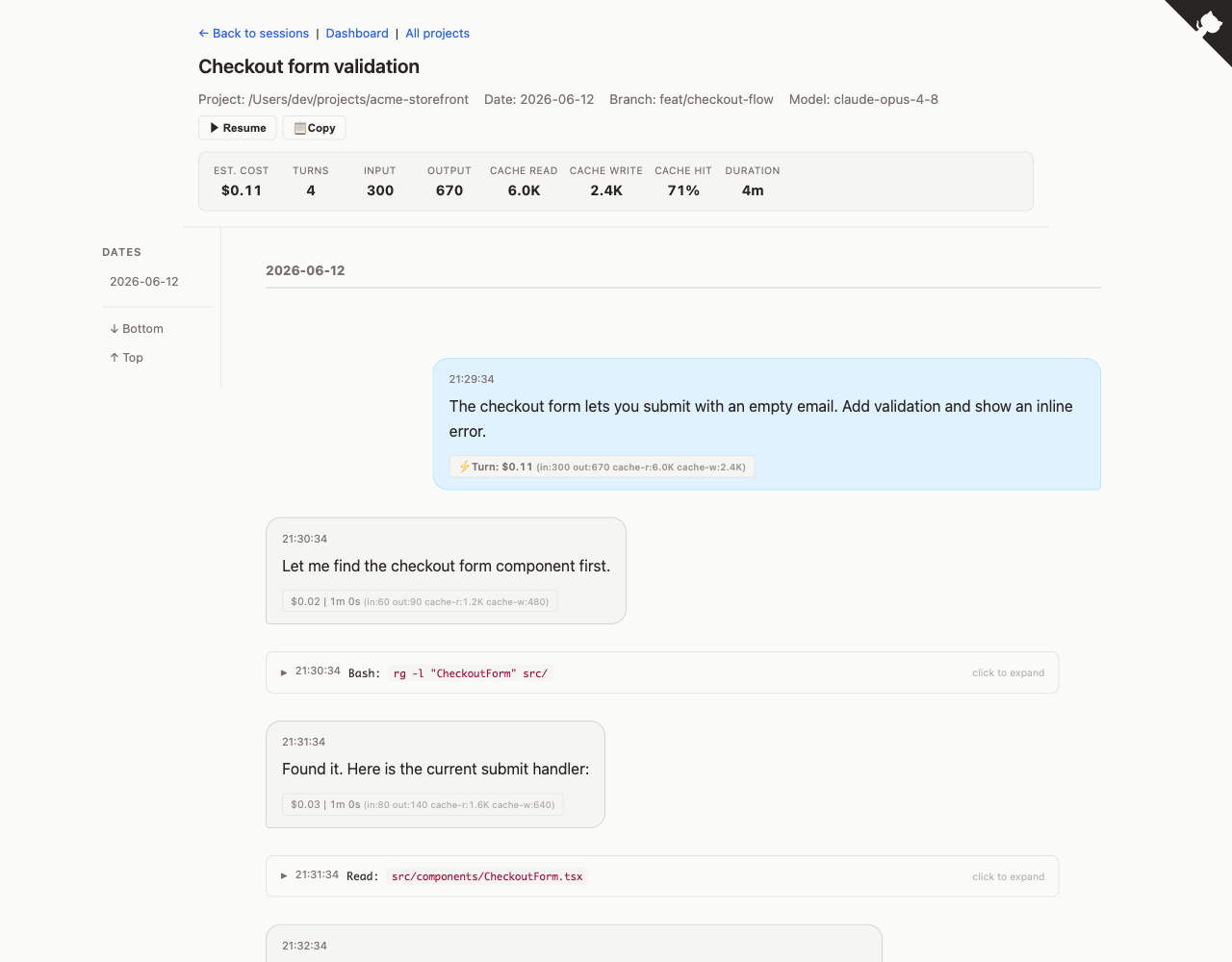
- Chat-style layout — User / assistant messages in chat bubbles
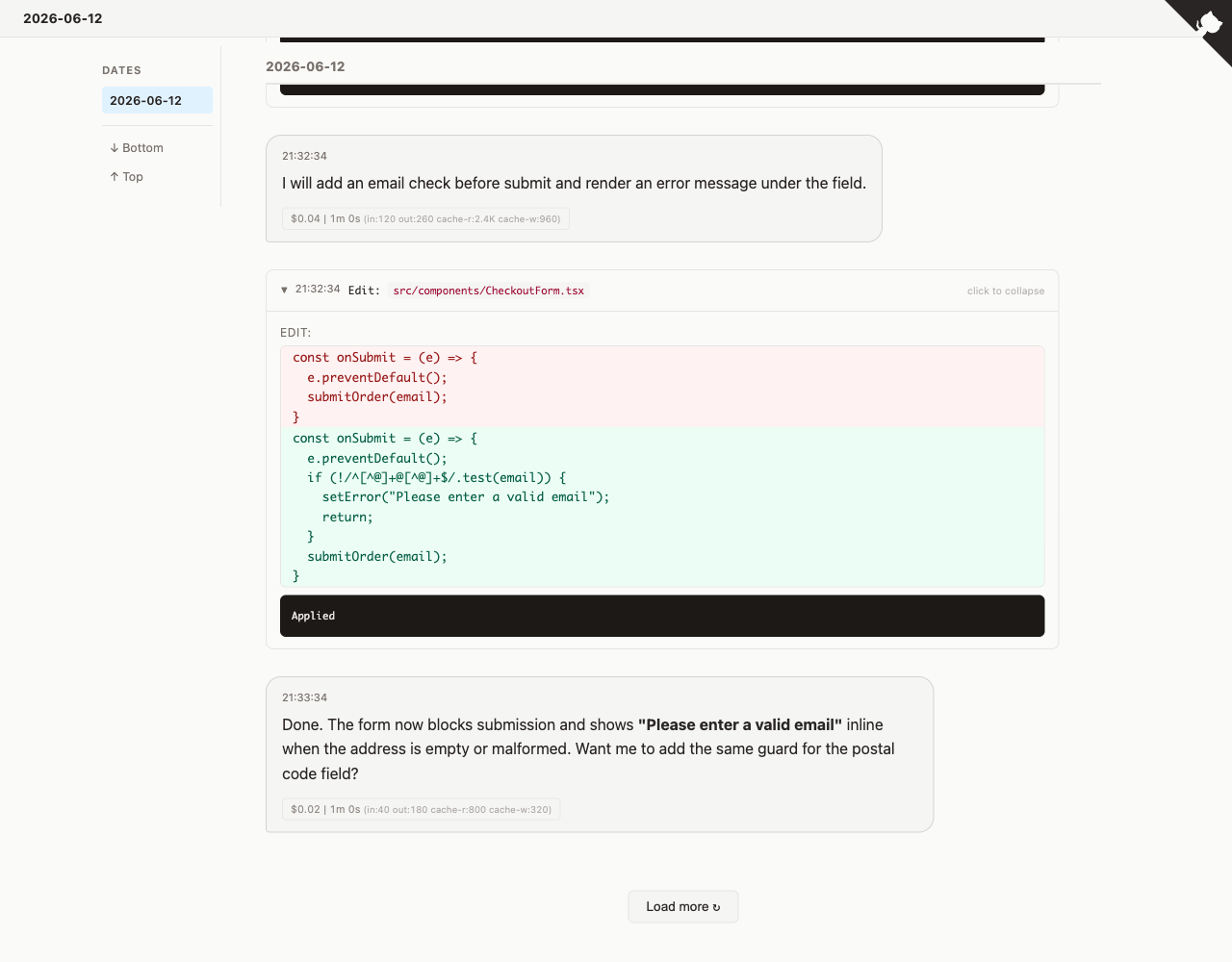
- Collapsible tool calls — Bash, Read, Edit, and other tool invocations collapsed by default
- Diff view — File edits shown with red/green line highlights
- Date navigation — Side nav and sticky headers to jump between dates
- Cost estimation — Per-turn and per-message USD cost based on Claude Opus 4 pricing (input / output / cache read / cache write breakdown)
- Elapsed time — Per-turn duration and per-tool execution time derived from timestamps
- Local command display —
!shell commands rendered with prompt and output - Inline subagent conversations — Subagent dialogues nested inside the Agent tool_use that spawned them
- Permalinks — Click any message timestamp to get a shareable URL (
#t20260416103045) - Session-level stats — Estimated cost, turns, token breakdown, cache hit rate, and duration in the header
- Dark mode — Follows
prefers-color-schemeautomatically - Filter search — Incremental filtering on list pages
- Keyboard navigation —
j/kto move between messages - One-click resume in cmux —
▶ Resumespawns a cmux workspace that runscd <session cwd> && claude --resume <id>;📋 Copycopies the same command for any terminal - Zero dependencies — Node.js built-in modules only
cmux integration
When the cmux terminal is detected (cmux ping succeeds), ccakashic becomes a session dashboard:
- The UI opens in a cmux browser pane instead of your default browser
- Every session with a recorded
cwdgets a▶ Resumebutton: one click creates a new cmux workspace,cds into the session's directory, and runsclaude --resume <session-id>— the workspace is renamed to the session title - Resuming the same session again jumps to the already-open workspace instead of forking the conversation (the button turns into
↪ Jump) - Alt-click
▶ Resumeto open the workspace in the background and stay on the list - Sessions that look active (modified in the last 2 minutes) ask for a second click before resuming, since resuming a live session forks it
- Without cmux, the
📋 Copybutton still gives you a ready-to-pastecd … && claude --resume …command
Notes:
- The resume CSRF token is persisted to
~/.config/ccakashic/token(mode 600), so restarting the server doesn't break the buttons on already-open tabs - cmux's socket only accepts callers inside the cmux process tree, so run
npx ccakashicfrom a terminal inside cmux (or configure a socket password in cmux settings and exportCMUX_SOCKET_PASSWORD) - The
cmuxbinary is found via$PATH, then the common Homebrew locations. If it lives elsewhere, pointCCAKASHIC_CMUXat it (e.g.CCAKASHIC_CMUX=/path/to/cmux npx ccakashic) - Disable the integration with
--no-cmuxorCCAKASHIC_NO_CMUX=1
Options
# Custom port (default: 3333)
CCAKASHIC_PORT=3000 npx ccakashic

# Skip cmux detection (regular browser, no resume buttons)
npx ccakashic --no-cmux

# Start the server without opening a browser
npx ccakashic --no-open
Requirements
- Node.js >= 18
License
MIT