
ccbrief
v0.3.2
Published
Minimal, configurable status line for Claude Code — context, tokens, cost and rate limits at a glance in your terminal.
Downloads
70

Maintainers
 shehab-hawary
Readme
ccbrief — a minimal status line for Claude Code
A minimal, configurable status line (statusline) for Claude Code — your context window, tokens, session cost and rate-limit usage, at a glance in your terminal.


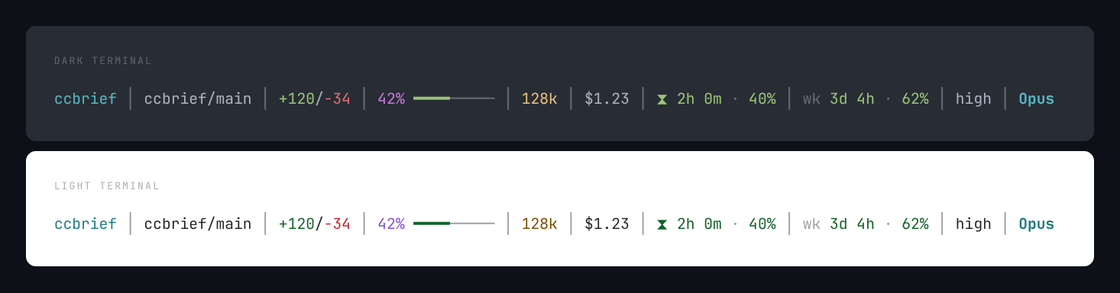
ccbrief │ ccbrief/main │ +120/-34 │ 42% ━━━━───── │ 128k │ $1.23 │ ⧗ 2h 0m · 40% │ wk 3d 4h · 62% │ high │ OpusOne line, shown above on a dark and a light terminal — the same colors, resolved by each theme. See Colors and symbols.
Not affiliated with, or endorsed by, Anthropic. ccbrief is an independent, open-source project that reads the data Claude Code already exposes. No network calls, no telemetry.
Install
npx ccbrief initThat copies a self-contained renderer into ~/.claude/ccbrief/, backs up your settings.json, and
merges in the statusLine block — leaving everything else in your settings untouched. It finishes by
showing you a preview and what to do next.
No restart needed. Claude Code reloads its settings on its own, so your status line appears the next time you interact with it.
Requires Node ≥ 22. Works on Windows, macOS, Linux and WSL.
Update
npx ccbrief@latest initRe-running init is how you upgrade — it copies the renderer into ~/.claude/ccbrief/, so a
newer package on its own changes nothing until you run it again. It's safe to re-run: it keeps the
config you've tuned and your existing settings.
npm install -g ccbrief@latest
ccbrief init
Uninstall
npx ccbrief uninstallRestores your backed-up settings.json, or strips just the statusLine block ccbrief added. It asks
before removing the ~/.claude/ccbrief/ directory.
Presets
Standard — the default. The four things you actually look at: where you are, how full the context is, when your limit resets and how much of it you've spent, and which model you're on.
ccbrief/main │ 42% ━━━━───── │ ⧗ 2h 0m · 40% │ OpusDetailed — everything ccbrief knows, one p away in the picker. Turn off what you don't want
rather than hunt for what you're missing.
ccbrief │ ccbrief/main │ +120/-34 │ 42% ━━━━───── │ 128k │ $1.23 │ ⧗ 2h 0m · 40% │ wk 3d 4h · 62% │ high │ OpusToo wide for your terminal? ccbrief packs whole segments across up to three rows — it never splits a segment or lets the terminal wrap mid-field:
ccbrief │ ccbrief/main │ +120/-34 │ 42% ━━━━───── │ 128k │ $1.23
⧗ 2h 0m · 40% │ wk 3d 4h · 62% │ high │ Opus
A segment with no data is hidden, never faked. Context % and rate limits are null early in a
session and right after /compact — you'll see fewer segments, never a made-up 0%.
Configure
npx ccbrief configAn interactive picker with a live preview. Every segment ccbrief has is listed — the ones you're
showing, then the ones you could be — each with a plain-English name, so you never have to guess what
fiveHour means:
Segments — 4 of 15 shown ──────────────────────────────
▸ [x] repo        repository / branch  diff ○
  [x] context     context used
  [x] fiveHour    session limit (5h)   time ●  percent ●
  [x] model       model
  [ ] directory   current folder
  [ ] pr          pull request
  ...
Saving also re-syncs settings.json, so changes take effect on Claude Code's next render — no reinstall.
| Key | Does |
|-----|------|
| space | show / hide the focused segment |
| ↑ ↓ | move between segments |
| ← → | reorder the focused segment |
| p y c i l | cycle preset · symbols · colors · icons · layout |
| d | on repo: show/hide the working-tree diff (+3/-1) |
| t % | on fiveHour / weekly: show/hide the countdown / the usage percent |
| ↵ | save and exit |
| esc | quit without saving |
The config file
Lives at ~/.claude/ccbrief/config.json (set CLAUDE_CONFIG_DIR to move the base directory). It's
optional — missing or malformed falls back to defaults and never breaks the status line.
| Key | Values | Default |
|-----|--------|---------|
| preset | standard · detailed · custom | standard |
| layout | auto · single-line · multi-line | auto |
| maxRows | 1–3 | 3 |
| symbols | simple · emoji · nerd-font · ascii | simple |
| colors | true · false | true |
| icons | true · false | true |
| segments | ordered list — only read when preset is custom | — |
symbols used to be called glyphs. Configs written by an older version still work — the old name is read as symbols.
The picker writes this for you. Written by hand, a custom config looks like:
{
  "preset": "custom",
  "segments": [
    { "id": "repo", "enabled": true, "showDiff": true },
    { "id": "context", "enabled": true },
    { "id": "fiveHour", "enabled": true, "showTime": true, "showPercent": true },
    { "id": "model", "enabled": true }
  ]
}
A named preset (standard, detailed) derives its own list, so it carries no segments key —
editing one there would do nothing. Unknown ids are ignored rather than fatal.
Segments
Every segment hides itself when its data isn't there, so you only ever see live values.
| Segment | Shows | Hidden when |
|---------|-------|-------------|
| directory | Current directory (ccbrief) | No workspace directory |
| repo | Repo/branch (ccbrief/main); showDiff adds +3/-1 | Not in a git repo |
| context | Context used, with a bar (42% ━━━━─────) | Null early in a session / after /compact |
| tokens | Tokens in context (128k) | Before the first response / after /compact |
| cost | Session cost ($1.23) | Absent |
| fiveHour | Session limit — reset countdown + usage (⧗ 2h 0m · 40%) | Not on Pro/Max |
| weekly | Weekly limit — reset countdown + usage (wk 3d 4h · 62%) | Not on Pro/Max |
| lines | Lines Claude added/removed this session (+120/-34) | Absent |
| effort | Reasoning effort (high) | Absent |
| model | Active model (Opus) | Absent |
| pr | PR number + review state, clickable (OSC 8) | No associated PR |
| worktree | Active git worktree name | Not in a worktree |
| thinking | Thinking indicator | Thinking not enabled |
| outputStyle | Output style name (concise) | Absent |
| agent | Active subagent name | No active subagent |
The last five aren't in either preset, but the picker lists them like everything else — space switches one on.
The rate-limit countdown runs toward a reset, so it never turns red — a small number is good news.
The usage % beside it is the part that warns you.
Colors and symbols
Each field has its own color, so you can find it without reading it — context is magenta, tokens yellow, the reset timer green, the model cyan. Color says which field this is. Only the context bar and the rate-limit percent change color to signal state (green → yellow → red as they fill).
Colors come from the standard ANSI palette, never hard-coded RGB — so your terminal theme resolves them against its own background and the line stays readable on dark and light themes alike. Nothing is dimmed except separators; information is never greyed out.
Four symbol sets — they pick the icons, the bar characters and the separator. simple is the default
because it's the only one that looks the same for everyone:
simple    ccbrief/main │ 42% ━━━━───── │ 128k │ ⧗ 2h 0m · 40% │ high │ Opus
emoji     🌿ccbrief/main │ 42% ━━━━───── │ 🔸128k │ ⏳2h 0m · 40% │ ⚡high │ 🧠Opus
nerd-font  ccbrief/main │ 42% ━━━━───── │ 128k │ ⧗ 2h 0m · 40% │  high │  Opus
ascii     ccbrief/main | 42% ####----- | 128k | S 2h 0m · 40% | high | Opus
nerd-font renders blank boxes unless you have a Nerd Font installed — the picker labels it and
the live preview shows you before you commit. ascii drops to plain | and #.
Set colors: false or icons: false (or press c / i in the picker) to turn either off.
How it works
Claude Code spawns a fresh process per update, pipes the session JSON on stdin, and captures
stdout as the status line. ccbrief is that process: one Node start, one JSON parse — replacing the
usual bash-plus-many-jq-spawns approach.
The installed renderer is bundled and has zero runtime dependencies. No network calls, no
telemetry, no postinstall script — nothing is installed until you run npx ccbrief init yourself.
It reads terminal width from COLUMNS (output is captured, so there's no TTY to ask) and falls back
to 80 columns. It refreshes on Claude Code's events, plus every 60s only when a time-based segment
is on.
FAQ
How do I add a status line to Claude Code?
Run npx ccbrief init. It writes the renderer to ~/.claude/ccbrief/ and merges a statusLine block
into your settings.json, backing the file up first, then tells you what to do next. No restart: Claude
Code reloads its settings on its own and the line appears the next time you interact with it.
Why did my context percentage disappear?
Because Claude Code hasn't reported one yet. used_percentage is null early in a session and right
after /compact, so ccbrief hides the segment rather than printing a 0% it would have to invent.
It comes back on the next response.
Can I see my 5-hour and weekly rate limits?
Yes — the fiveHour and weekly segments show the reset countdown and the percent used. Claude Code
only reports rate limits on Pro and Max plans, so on other plans those segments stay hidden.
Does it work on Windows? Yes — Windows, WSL, macOS and Linux, on Node 22 and 24. CI runs the full suite on all three.
How is this different from a shell script with jq?
A typical bash status line spawns jq once per field — around twenty processes on every render.
ccbrief is a single Node process that parses the session JSON once, with zero runtime dependencies.
Can I choose which segments to show?
Run npx ccbrief config. All fifteen segments are listed with a live preview — see
Segments.
Development
npm test           # node --test
npm run build      # bundle the renderer → dist/statusline.js
npm run demo       # regenerate the README images from the real renderer
Changes are logged in CHANGELOG.md. Security policy and private vulnerability reporting: SECURITY.md.
License
MIT © shehab267. Not affiliated with or endorsed by Anthropic.