
ccsidekick
v1.7.0
Published
Free Claude Code status line with a reactive character plus cost, git, and usage widgets. Zero token spend, local-first, MIT.

Maintainers
 krayong
Readme
ccsidekick
Claude Code status line with a reactive ASCII character, 33 widgets, and 75+ themes.
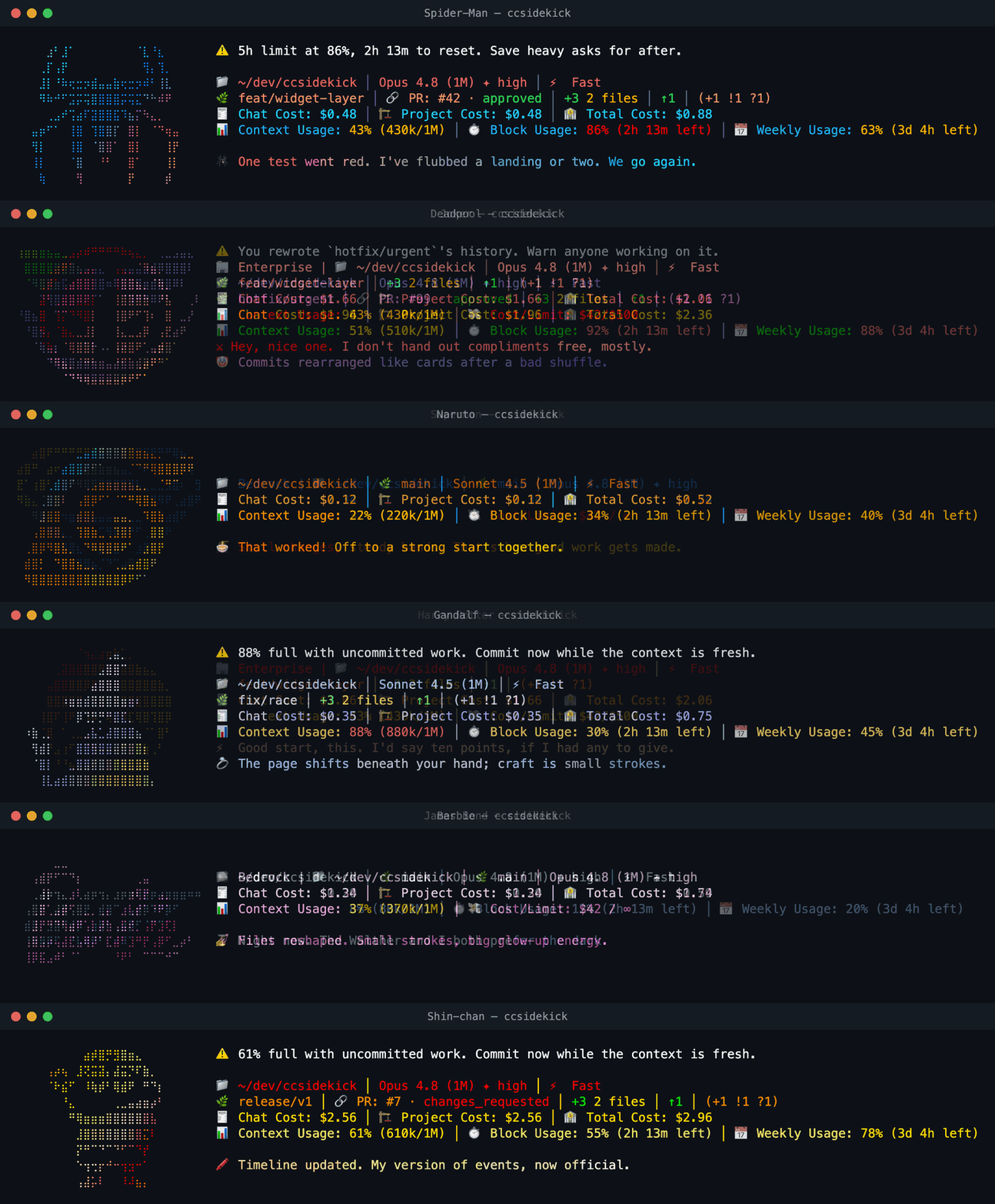
The character notices what Claude is doing (tests passing, builds breaking, commits landing, a struggle and then a recovery) and comments in character. Everything it reads comes off disk, so there is no Claude API call and no token spend on the render path. The only network is an optional weekly currency-rate refresh and an optional account-usage lookup, both off the render path and disableable.
npx ccsidekickRunning ccsidekick in a terminal opens the setup UI: a first run walks you through a short guided
wizard (character, theme, comments), a later run opens the full dashboard. Either way it picks a
Claude config dir and wires the status line and the tool-call hooks into your settings.json.
Remove it with npx ccsidekick uninstall.
New characters and widgets land regularly. Releases lists what has shipped; set the repo's Watch menu to Releases to hear about the next one.
Characters
Eighteen packs ship bundled with the engine, so a fresh install has every one of them. There is no download step and no network call to pick a character. Fixed mode pins one; random mode rotates a roster and picks per session.
Barbie, Batman, Ben 10, Darth Vader, Deadpool, Gandalf, Harry Potter, Hello Kitty, Iron Man, James Bond, Joker, Naruto, Pikachu, Sherlock Holmes, Shin-chan, Spider-Man, Superman, Yoda.
Each pack also registers its own theme, so every character you install adds a palette to the 75+ built-in ones. See them animated at ccsidekick.krayong.com.
Author your own character
A pack is data, not code: one pack.json holding a single ASCII figure, a message library, a theme,
and its spinner verbs. Nothing to compile, no plugin API. If your favourite character is missing,
add it.
What a pack needs:
- One figure, at most 9 rows by 25 columns, sourced through the
ascii-artimage-to-ASCII skill rather than drawn freehand, crediting the original artist inattribution. - A voice: the message library plus at least 25 in-character spinner verbs.
- A theme (optional), which then becomes selectable by every user rather than only yours.
The authoring kit width-normalizes the figure, checks coverage and legibility, and generates the
pack's README with a live statusline preview in its own theme.
bun run pack:lint packages/packs/<name> gates all of it before you open a pull request.
Start at
CONTRIBUTING.md.
The full contract lives in the pack-author skill at
.claude/skills/pack-author,
which Claude Code picks up in a clone of this repo, so you can just ask it to author a pack.
Would rather just ask? Open a character request.
Non-interactive setup (for scripts and AI agents)
No TTY required. npx ccsidekick setup configures and wires everything from flags, so an agent can
install it in one command:
npx ccsidekick setup --character spiderman --theme houston --mode fixedOnly the flags you pass are applied (a partial patch onto the existing config, or the defaults on a
fresh install), then it writes config.toml and wires settings.json exactly like the TUI.
| Flag | Sets |
| ------------------------ | --------------------------------------------------------------- |
| --character <name> | the fixed character |
| --mode <fixed\|random> | fixed one character, or rotate the roster |
| --roster <a,b,c> | the random-mode roster |
| --theme <name> | a theme, or character (the default) to match the character |
| --currency <code> | statusline currency, e.g. USD |
| --budget <usd> | monthly budget |
| --comments <on\|off> | the character's comment line |
| --helpful <on\|off> | the helpful-tip line |
| --min-severity <sev> | low\|medium\|high\|critical |
| --widgets <a,b,c> | statusline widgets to enable (others turn off) |
| --global / --local | save target (default global) |
| --config-dir <path> | Claude config dir (default $CLAUDE_CONFIG_DIR or ~/.claude) |
Discover valid values for scripting, and see every flag:
npx ccsidekick list characters # also: themes, widgets
npx ccsidekick setup --help
An unknown value (e.g. a misspelled theme) exits non-zero and prints the valid set — it never silently falls back.
The two binaries
ccsidekick-renderis the hot path. Claude Code callsccsidekick-render renderon every status-line tick andccsidekick-render classifyon every tool call. It loads no UI and runs under plain Node.ccsidekickis the user-facing entry: the setup UI, plussetup,list, anduninstall. Only the TUI loads the Ink interface;setup/list/uninstallrun under plain Node.
Every character ships bundled as a runtime dependency, so a fresh install has them all — there is no download or install step, and no network to pick a character.
For the full feature tour, configuration reference, and contributor docs, see the repository README.
Licensed under MIT.