
ccstatusline-jb
v2.2.31
Published
A customizable status line formatter for Claude Code CLI — JetBrains fork of ccstatusline, adds JetBrains Central quota widgets

Maintainers
 jetserge
Readme
ccstatusline
🎨 A highly customizable status line formatter for Claude Code CLI Display model info, git branch, token usage, and other metrics in your terminal







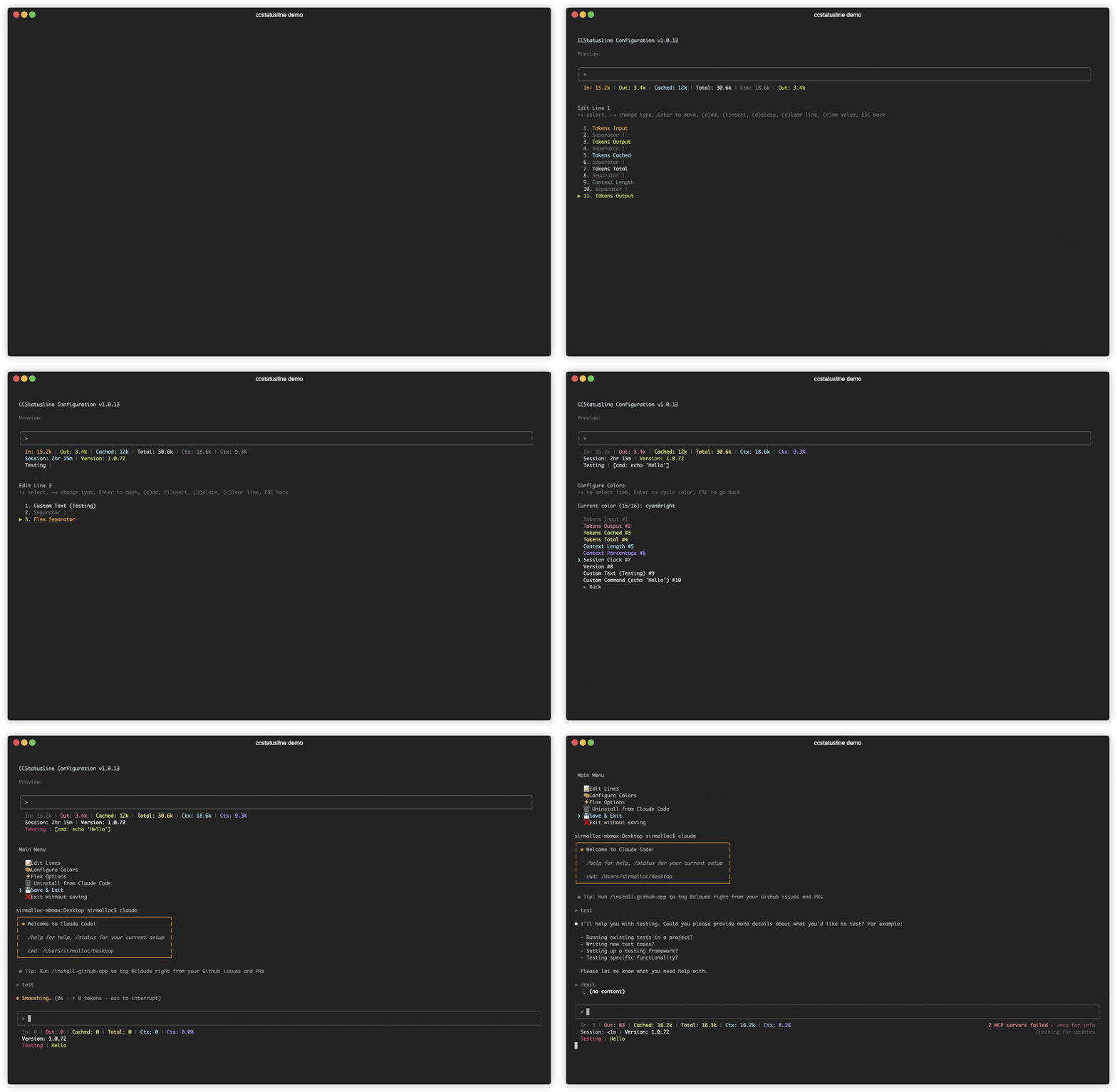
📚 Table of Contents
- JetBrains Fork
- Recent Updates
- Features
- Localizations
- Quick Start
- Windows Support
- Usage
- Development
- Contributing
- License
- Related Projects
🧩 JetBrains Fork
This is a fork of sirmalloc/ccstatusline, published to npm as ccstatusline-jb. It stays in sync with upstream and adds one extra widget category for JetBrains tooling.
JetBrains Central widgets
Nine widgets that surface your JetBrains AI quota, parsed from the central quota CLI (falling back to the legacy jbcentral binary name when central is not installed):
| Widget | Example |
|--------|---------|
| Account | [email protected] |
| Plan | JetBrains AI Ultimate |
| Usage | $3.96 |
| Quota | $200.00 |
| Usage % | 2.0% |
| Remaining | $196.04 |
| Period Start | Jun 1, 2026 |
| Reset Date | Jun 30, 2026 |
| Days Until Reset | 29d |
Both the legacy Resets: <date> output and the current Quota period: <start> - <end> range (CLI 0.4.1+) are parsed. Reset Date and Days Until Reset track the period end in either format; Period Start shows the period start and is blank on the older CLI.
The central CLI is invoked only when at least one of these widgets is in your status line; its output is parsed once and cached for 180 seconds, so it never runs on every status-line render. The widgets appear under a JetBrains Central group in the widget picker.
The installed command stays
ccstatusline— only the npm package name differs (ccstatusline-jb) — so existing hooks andsettings.jsonintegrations keep working. If you also have upstreamccstatuslineinstalled globally, only one of them can own the globalccstatuslinecommand.
Everything below this section is inherited from upstream.
🆕 Recent Updates
v2.2.22 - v2.2.23 - Powerline flex mode, layout controls, composable metrics, and safer config

- ⚡ Powerline flex mode - Flex separators now work in Powerline mode, letting Powerline status lines right-align content or absorb available width.
- 🌗 Per-widget dim styling - The color editor can dim an entire widget or only parenthesized text, with reset and clear-all actions covering dim state.
- 🧯 Safer settings recovery - Invalid
settings.jsonfiles are left untouched, defaults render in memory, and the status line shows an invalid-config warning. - 🧭 Selective Powerline alignment - Press
xin the line editor to let a widget and the rest of its line keep their natural widths while earlier Powerline columns stay auto-aligned. - 📏 Git widget width limits -
Git BranchandGit Root Dircan cap their visible width with ellipsis-safe truncation while preserving hyperlink targets. - 🔣 Current directory glyphs -
Current Working Dircan prepend an optional custom glyph, including in raw-value mode. - 🧠 Configurable context fallback -
CCSTATUSLINE_CONTEXT_SIZE_FALLBACKoverrides the default 200k last-resort context window when Claude Code and the model name do not report one. - 🧩 Composable compaction metrics -
Compaction Countercan render count, auto, manual, unknown, or reclaimed-token values independently for custom layouts. - 🏷️ CLI version flag -
ccstatusline --versionnow prints the installed package version and exits. - 🛡️ Guarded invalid-config saves - The TUI warns when it loaded defaults for an invalid settings file and requires confirmation before replacing that file.
- 🔄 Usage display and cache fixes - Used/remaining direction now works in every percentage mode, account switches invalidate cached usage, and fetch locks no longer cause repeated requests or stale timeout output.
- ⏱️ Calmer reset timer startup - Reset timers show labeled loading placeholders instead of transient rate-limit errors while Claude Code's embedded usage-window data is still arriving.
- 🔇 Quieter install detection - Best-effort npm and Bun probes no longer leak expected package-manager errors into the TUI.
v2.2.21 - Cache widgets, compaction details, extra usage currency, and package fixes
- 🔣 Custom widget glyphs - Git and JJ symbol widgets can override or suppress their built-in glyphs from the TUI.
- 🔁 Compaction counter details -
Compaction Counternow counts explicitcompact_boundarymarkers and can optionally show trigger splits plus tokens reclaimed. - 💸 Extra usage improvements - Added
Extra Usage Usedand formats extra usage amounts with the billing currency reported by the usage API. - 📏 Custom command width context -
Custom Commandwidgets receiveterminal_widthin stdin JSON when ccstatusline can detect the terminal width. - 🧠 Prompt cache widgets - Added
Cache Hit Rate,Cache Read, andCache Writewidgets with turn/session scopes and hide-when-empty behavior. - 🔢 Token rounding fix - Token counts from
999950through999999now render as1.0Minstead of1000.0k.
v2.2.20 - Gradients, token accuracy, usage reliability, and Git PR/MR fixes
- 🌈 Gradient colors - Added per-widget and whole-line foreground gradients with named presets, custom hex stops, TUI picker support, and Powerline-aware rendering. Press
gon the Edit Colors screen for widget gradients, or pressgfor Override FG Color in Global Overrides for a line-wide gradient. - 🎯 More accurate token counts -
Tokens InputandTokens Outputnow prefer cumulative transcript metrics before falling back to context-window totals. - 💸 Extra usage no-limit fix - Extra usage widgets no longer get stuck on
[Timeout]for accounts with overage enabled but no monthly limit configured. - 🔁 Compaction glitch filtering -
Compaction Counterignores transient below-1% context readings so incomplete status frames do not create false compaction counts. - 🔀 SSH alias Git PR/MR detection - Git PR/MR detection resolves SSH host aliases while preserving canonical GitHub and GitLab hosts for CLI selection and fallback repo links.
- 🧪 Usage test cache isolation - Usage-fetch test probes now isolate
HOME,USERPROFILE,CLAUDE_CONFIG_DIR, and proxy variables so local tests cannot touch the real ccstatusline cache. - 📦 Dependency refresh - Refreshed React/React DOM and Bun lockfile development-tooling resolutions for the release.
v2.2.14 - v2.2.19 - Version pinning, npm provenance, usage overage widgets, and Git lock avoidance
- 📌 Version pinning support - Added support for pinned global installs so Claude Code can keep running a specific ccstatusline version.
- 🔐 npm provenance attestations - Published packages now use trusted publishing provenance so users can verify where releases were built while avoiding long-lived npm publish tokens.
- 🔄 Moving from auto-update installs - If you currently use an auto-updating install, use the TUI uninstall option first, then reinstall to go through the version pinning flow. Your ccstatusline settings are preserved when uninstalling.
- 💸 Extra usage widgets - Added Extra Usage Utilization and Extra Usage Remaining widgets for monthly pay-as-you-go overage limits, with null rate-limit buckets handled as zero usage.
- 🔒 Git lock avoidance - Git helpers now pass
--no-optional-locksso background status checks avoid creatingindex.lockraces. - 🧱 Older Git compatibility - Git widgets avoid newer command forms so repository status works on older Git installations.
- ⚡ Persistent Git cache - Git command output is cached under
~/.cache/ccstatusline/git-cachewith configurable TTL and.git/HEAD/.git/indexmtime checks to reduce repeated subprocess work. - 🧭 Install flow polish - Pinned global install is now the default install option, with clearer wording for install and migration flows.
- 🪟 Hidden helper processes - Runtime child processes set
windowsHideso helper commands do not open extra windows on Windows. - 📏 Terminal width override -
CCSTATUSLINE_WIDTHcan provide an explicit terminal width when automatic probing is unavailable.
v2.2.13 - Weekly model usage, voice status, hooks, and docs
- 📊 Weekly Sonnet/Opus usage widgets - Added separate weekly usage widgets for Sonnet and Opus API buckets, matching Claude Code's
/usagemodel split. - 🎤 Voice Status widget - Added a widget that shows whether Claude Code voice input is enabled, with icon, text, word, and optional Nerd Font display modes.
- 📉 Timer short bars - Block Timer, Block Reset Timer, and Weekly Reset Timer now support compact short-bar progress displays.
- 🔕 Quieter hook output - Hook handling now suppresses no-op JSON output so non-status updates stay silent.
v2.2.9 - v2.2.12 - GitLab support, reset timers, context, compaction, and git widgets
- 🦊 GitLab PR/MR support -
Git BranchandGit PR/MRnow support GitHub, GitLab, and compatible self-hosted remotes, usingghorglabas appropriate. - 🔄 Status line refresh interval - Installed configs can set Claude Code's
statusLine.refreshIntervalfrom the TUI when Claude Code >=2.1.97 supports it. - 🧭 Wrap-around TUI navigation - Menu/list navigation and move/reorder modes now wrap at the first and last items.
- 📋 Clone widget shortcut - Press
kin the item editor to duplicate the selected widget, with fresh Powerline background color for cloned Powerline items. - 📊 Short bar display modes - Context percentage, Context Bar, Session Usage, Weekly Usage, Block Timer, and reset timer widgets can use compact bar variants.
- ⏱️ Usage time cursor - Session Usage and Weekly Usage progress bars can show the elapsed time position within the current usage window.
- 🕒 Reset timer timestamps - Block and Weekly Reset Timer widgets can show exact reset timestamps with compact formatting, 12/24-hour display, IANA time zones, and locale selection.
- 🪟 Context Window widget - Added a
Context Windowwidget for total model window size, keepingContext Lengthfocused on current context usage. - 🔁 Compaction Counter widget - Added a
Compaction Counterwidget that tracks session context compactions, with icon/text/number formats, optional Nerd Font icon, and hide-when-zero behavior. - 🧮 Git file status widgets - Added
Git Staged Files,Git Unstaged Files,Git Untracked Files, andGit Clean Statusfor file counts and clean/dirty state. - 🏷️ Clear context percentage labels -
Context %andContext % (usable)now label rendered values as used or left when toggling used/remaining mode. - ⚡ More Powerline caps - The Powerline separator editor now supports more than three start/end caps.
- 🧠 Thinking Effort updates - Added
xhigh, showdefaultwhen no effort is set, mark unknown future effort levels with?, and track live status JSON plus/effortcommand changes. Claude Code reports Ultracode asxhighin status line data. - 🧮 More accurate token counts - Streaming duplicate JSONL entries are deduped so token widgets do not overcount live Claude Code output.
- 🏷️ Cleaner model display - The Model widget strips trailing context suffixes like
(1M context); useContext Windowwhen you want the total window size shown. - 🧹 Cleaner empty-widget separators - Manual separators now collapse around widgets that render empty, avoiding dangling separators when hide-when-empty widgets disappear.
- 🧱 More resilient Git helpers - Git widgets handle missing or unusual git command output more defensively.
v2.2.8 - Git widgets, smarter picker search, and minimalist mode
- 🔀 New Git PR widget - Added a
Git PRwidget with clickable PR links plus optional status and title display for the current branch. - 🧰 Major Git widget expansion - Added
Git Status,Git Staged,Git Unstaged,Git Untracked,Git Ahead/Behind,Git Conflicts,Git SHA,Git Origin Owner,Git Origin Repo,Git Origin Owner/Repo,Git Upstream Owner,Git Upstream Repo,Git Upstream Owner/Repo,Git Is Fork,Git Worktree Mode,Git Worktree Name,Git Worktree Branch,Git Worktree Original Branch, andCustom Symbol. - 👤 Claude Account Email widget - Added a session widget that reads the signed-in Claude account email from
~/.claude.jsonwhile respectingCLAUDE_CONFIG_DIR. - 🧼 Global Minimalist Mode - Added a global toggle in
Global Overridesthat forces widgets into raw-value mode for a cleaner, label-free status line. - 🔎 Smarter widget picker search - The add/change widget picker now supports substring, initialism, and fuzzy matching, with ranked results and live match highlighting.
- 📏 Better terminal width detection - Flex separators and right-alignment now work more reliably when ccstatusline is launched through wrapper processes or nested PTYs.
- 🎨 Powerline theme continuity - Built-in Powerline themes can now continue colors cleanly across multiple status lines instead of restarting each line.
v2.2.0 - v2.2.6 - Speed, widgets, links, and reliability updates
- 🚀 New Token Speed widgets - Added three widgets: Input Speed, Output Speed, and Total Speed.
- Each speed widget supports a configurable window of
0-120seconds in the widget editor (wkey). 0disables window mode and uses a full-session average speed.1-120calculates recent speed over the selected rolling window.
- Each speed widget supports a configurable window of
- 🧩 New Skills widget controls (v2.2.1) - Added configurable Skills modes (last/count/list), optional hide-when-empty behavior, and list-size limiting with most-recent-first ordering.
- 🌐 Usage API proxy support (v2.2.2) - Usage widgets honor the uppercase
HTTPS_PROXYenvironment variable for their direct API call to Anthropic. - 🧠 New Thinking Effort widget (v2.2.4) - Added a widget that shows the current Claude Code thinking effort level.
- 🍎 Better macOS usage lookup reliability (v2.2.5) - Improved reliability when loading usage API tokens on macOS.
- ⌨️ New Vim Mode widget (v2.2.5) - Added a widget that shows the current vim mode, with ASCII and optional Nerd Font icon display.
- 🔗 Git widget link modes (v2.2.6) -
Git Branchcan render clickable GitHub branch links, andGit Root Dircan render clickable IDE links for VS Code and Cursor. - 🤝 Better subagent-aware speed reporting - Token speed calculations continue to include referenced subagent activity so displayed speeds better reflect actual concurrent work.
v2.1.0 - v2.1.10 - Usage widgets, links, new git insertions / deletions widgets, and reliability fixes
- 🧩 New Usage widgets (v2.1.0) - Added Session Usage, Weekly Usage, Block Reset Timer, and Context Bar widgets.
- 📊 More accurate counts (v2.1.0) - Usage/context widgets now use new statusline JSON metrics when available for more accurate token and context counts.
- 🪟 Windows empty file bug fix (v2.1.1) - Fixed a Windows issue that could create an empty
c:\dev\nullfile. - 🔗 New Link widget (v2.1.3) - Added a new Link widget with clickable OSC8 rendering, preview parity, and raw mode support.
- ➕ New Git Insertions widget (v2.1.4) - Added a dedicated Git widget that shows only uncommitted insertions (e.g.,
+42). - ➖ New Git Deletions widget (v2.1.4) - Added a dedicated Git widget that shows only uncommitted deletions (e.g.,
-10). - 🧠 Context format fallback fix (v2.1.6) - When
context_window_sizeis missing, context widgets now infer 1M models from long-context labels such as[1m]and1M contextin model identifiers. - ⏳ Weekly reset timer split (v2.1.7) - Added a separate
Weekly Reset Timerwidget. - ⚙️ Custom config file flag (v2.1.8) - Added
--config <path>support so ccstatusline can load/save settings from a custom file location. - 🔣 Unicode separator hex input upgrade (v2.1.9) - Powerline separator hex input now supports 4-6 digits (full Unicode code points up to
U+10FFFF). - 🌳 Bare repo worktree detection fix (v2.1.10) -
Git Worktreenow correctly detects linked worktrees created from bare repositories.
v2.0.26 - v2.0.29 - Performance, git internals, and workflow improvements
- 🧠 Memory Usage widget (v2.0.29) - Added a new widget that shows current system memory usage (
Mem: used/total). - ⚡ Block timer cache (v2.0.28) - Cache block timer metrics to reduce JSONL parsing on every render, with per-config hashed cache files and automatic 5-hour block invalidation.
- 🧱 Git widget command refactor (v2.0.28) - Refactored git widgets to use shared git command helpers and expanded coverage for failure and edge-case tests.
- 🪟 Windows UTF-8 piped output fix (v2.0.28) - Sets the Windows UTF-8 code page for piped status line rendering.
- 📁 Git Root Dir widget (v2.0.27) - Added a new Git widget that shows the repository root directory name.
- 🏷️ Session Name widget (v2.0.26) - Added a new widget that shows the current Claude Code session name from
/rename. - 🏠 Current Working Directory home abbreviation (v2.0.26) - Added a
~abbreviation option for CWD display in both preview and live rendering. - 🧠 Context model suffix fix (v2.0.26) - Context widgets now recognize the
[1m]suffix across models, not just a single model path. - 🧭 Widget picker UX updates (v2.0.26) - Improved widget discovery/navigation and added clearer, safer clear-line behavior.
- ⌨️ TUI editor input fix (v2.0.26) - Prevented shortcut/input leakage into widget editor flows.
- 📄 Repo docs update (v2.0.26) - Migrated guidance from
CLAUDE.mdtoAGENTS.md(with symlink compatibility).
v2.0.16 - Add fish style path abbreviation toggle to Current Working Directory widget
v2.0.15 - Block Timer calculation fixes
- Fix miscalculation in the block timer
v2.0.14 - Add remaining mode toggle to Context Percentage widgets
- Remaining Mode - You can now toggle the Context Percentage widgets between usage percentage and remaining percentage when configuring them in the TUI by pressing the 'u' key.
v2.0.12 - Custom Text widget now supports emojis
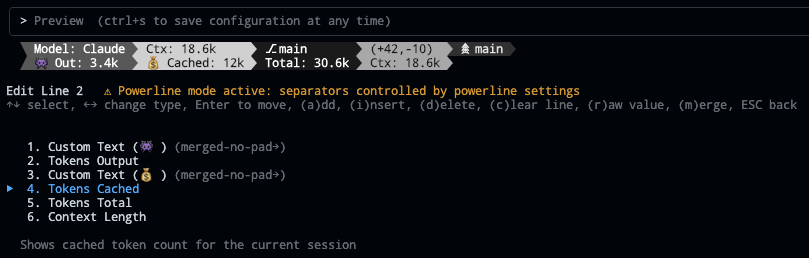
- 👾 Emoji Support - You can now paste emoji into the custom text widget. You can also turn on the merge option to get emoji labels for your widgets like this:
v2.0.11 - Unlimited Status Lines
- 🚀 No Line Limit - Configure as many status lines as you need - the 3-line limitation has been removed
v2.0.10 - Git Updates
- 🌳 Git Worktree widget - Shows the active worktree name when working with git worktrees
- 👻 Hide 'no git' message toggle - Git widgets now support hiding the 'no git' message when not in a repository (toggle with 'h' key while editing the widget)
v2.0.8 - Powerline Auto-Alignment
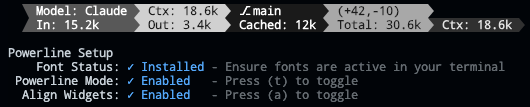
- 🎯 Widget Alignment - Auto-align widgets across multiple status lines in Powerline mode for a clean, columnar layout (toggle with 'a' in Powerline Setup)
v2.0.7 - Current Working Directory & Session Cost

- 📁 Current Working Directory - Display the current working directory with configurable segment display
- Set the number of path segments to show (e.g., show only last 2 segments:
.../Personal/ccstatusline) - Supports raw value mode for compact display
- Automatically truncates long paths with ellipsis
- Set the number of path segments to show (e.g., show only last 2 segments:
- 💰 Session Cost Widget - Track your Claude Code session costs (requires Claude Code 1.0.85+)
- Displays total session cost in USD
- Supports raw value mode (shows just
$X.YZvsCost: $X.YZ) - Real-time cost tracking from Claude Code session data
- Note: Cost may not update properly when using
/resume(Claude Code limitation)
- 🐛 Bug Fixes
- Fixed Block Timer calculations for accurate time tracking across block boundaries
- Improved widget editor stability with proper Ctrl+S handling
- Enhanced cursor display in numeric input fields
v2.0.2 - Block Timer Widget

- ⏱️ Block Timer - Track your progress through 5-hour Claude Code blocks
- Displays time elapsed in current block as hours/minutes (e.g., "3hr 45m")
- Progress bar mode shows visual completion percentage
- Two progress bar styles: full width (32 chars) or compact (16 chars)
- Automatically detects block boundaries from transcript timestamps
v2.0.0 - Powerline Support & Enhanced Themes
- ⚡ Powerline Mode - Beautiful Powerline-style status lines with arrow separators and customizable caps
- 🎨 Built-in Themes - Multiple pre-configured themes that you can copy and customize
- 🌈 Advanced Color Support - Basic (16), 256-color (with custom ANSI codes), and truecolor (with hex codes) modes, plus multi-stop gradients (per-widget or spanning the whole line)
- 🔗 Widget Merging - Merge multiple widgets together with or without padding for seamless designs
- 📦 Easy Installation - Install directly with
npxorbunx- no global package needed - 🔤 Custom Separators - Add multiple Powerline separators with custom hex codes for font support
- 🚀 Auto Font Install - Automatic Powerline font installation with user consent
✨ Features
- 📊 Real-time Metrics - Display model name, git branch, token usage, per-model weekly usage, extra usage limits, voice input state, session duration, compaction count, block timer, and more
- 🎨 Fully Customizable - Choose what to display and customize colors for each element
- ⚡ Powerline Support - Beautiful Powerline-style rendering with arrow separators, caps, and custom fonts
- 📐 Multi-line Support - Configure multiple independent status lines
- 🖥️ Interactive TUI - Built-in configuration interface using React/Ink
- 🔎 Fast Widget Picker - Add/change widgets by category with search and ranked matching
- ⚙️ Global Options - Apply consistent formatting across all widgets (padding, separators, bold, minimalist mode, and color overrides)
- 🚀 Cross-platform - Works seamlessly with both Bun and Node.js
- 🔧 Flexible Configuration - Supports custom Claude Code config directory via
CLAUDE_CONFIG_DIRenvironment variable - 📏 Smart Width Detection - Automatically adapts to terminal width with flex separators
- ⚡ Zero Config - Sensible defaults that work out of the box
🌐 Localizations
The localizations in this section are third-party forks maintained outside this repository. They are not maintained, reviewed, or endorsed by this repository, so review their code and releases before using them.
- 🌏 中文版 (Chinese): ccstatusline-zh
🚀 Quick Start
No installation needed! Use directly with npx or bunx:
# Run the configuration TUI with npm
npx -y ccstatusline-jb@latest

# Or with Bun (faster)
bunx -y ccstatusline-jb@latest
Both commands launch the same TUI. During the initial setup flow, choose Pinned global install if you want Claude Code to stay on the ccstatusline version you are running instead of following @latest; the TUI will install that version globally with npm or Bun and write the pinned ccstatusline command to Claude Code settings. After a pinned install, you can run ccstatusline directly to launch the TUI in the future.
The interactive configuration tool provides a terminal UI where you can:
- Configure multiple separate status lines
- Add/remove/reorder status line widgets
- Customize colors for each widget
- Configure flex separator behavior
- Configure Claude Code status line refresh interval when supported
- Edit custom text widgets
- Install/uninstall to Claude Code settings
- Preview your status line in real-time
💡 Tip: Your settings are automatically saved to
~/.config/ccstatusline/settings.json
🔧 Custom Claude Config: If your Claude Code configuration is in a non-standard location, set the
CLAUDE_CONFIG_DIRenvironment variable:# Linux/macOS export CLAUDE_CONFIG_DIR=/custom/path/to/.claude
🌐 Usage API proxy: Usage widgets honor the uppercase
HTTPS_PROXYenvironment variable for their direct API call to Anthropic.
🪟 Windows Support: PowerShell examples, installation notes, fonts, troubleshooting, WSL, and Windows Terminal configuration are in docs/WINDOWS.md.
When you install from the TUI, ccstatusline writes a statusLine command object to your Claude Code settings:
{
  "statusLine": {
    "type": "command",
    "command": "npx -y ccstatusline-jb@latest",
    "padding": 0,
    "refreshInterval": 10
  }
}
refreshInterval is written only when your Claude Code version supports it (>=2.1.97). The TUI can set it to 1-60 seconds, or remove it by leaving the input empty.
Other supported command values are:
bunx -y ccstatusline-jb@latestccstatusline(for self-managed/global installs)
For pinned installs, launch the TUI with npx -y ccstatusline-jb@latest or bunx -y ccstatusline-jb@latest, then choose Pinned global install. The TUI pins the active version by installing it globally and writing "command": "ccstatusline" to settings.json; afterward, you can run ccstatusline directly to open the TUI.
🤝 Contributing
Contributions are welcome! Please feel free to submit a Pull Request.
- Fork the repository
- Create your feature branch (
git checkout -b feature/amazing-feature) - Commit your changes (
git commit -m 'Add some amazing feature') - Push to the branch (
git push origin feature/amazing-feature) - Open a Pull Request
Support
If ccstatusline is useful to you, consider buying me a coffee:
📄 License
MIT © Matthew Breedlove
👤 Author
Matthew Breedlove
- GitHub: @sirmalloc
🔗 Related Projects
- ccstatusline-editor - A visual editor for building ccstatusline configurations — drag, drop, preview, ship.
- tweakcc - Customize Claude Code themes, thinking verbs, and more.
- ccusage - Track and display Claude Code usage metrics.
- codachi - A tamagotchi-style statusline pet that grows with your context window.
- AIWatch - Live status monitor for 30+ AI APIs and apps; pairs with a Custom Command widget to surface provider outages in your status line.
- crispy-recall - Searchable memory for your Claude Code and Codex sessions. Local, fast, no daemon.
🙏 Acknowledgments
- Built for use with Claude Code CLI by Anthropic
- Powered by Ink for the terminal UI
- Made with ❤️ for the Claude Code community
Star History
🌟 Show Your Support
Give a ⭐ if this project helped you!








