
ccusage-ledger
v0.1.5
Published
Agent CLI usage dashboard: visualize cost, tokens, and cache hit rates from ccusage data

Maintainers
 ba0918-dev
Readme
ccusage Ledger
A personal dashboard that visualizes usage, token counts, and costs of agent CLIs (Claude Code / Codex / OpenCode, etc.).
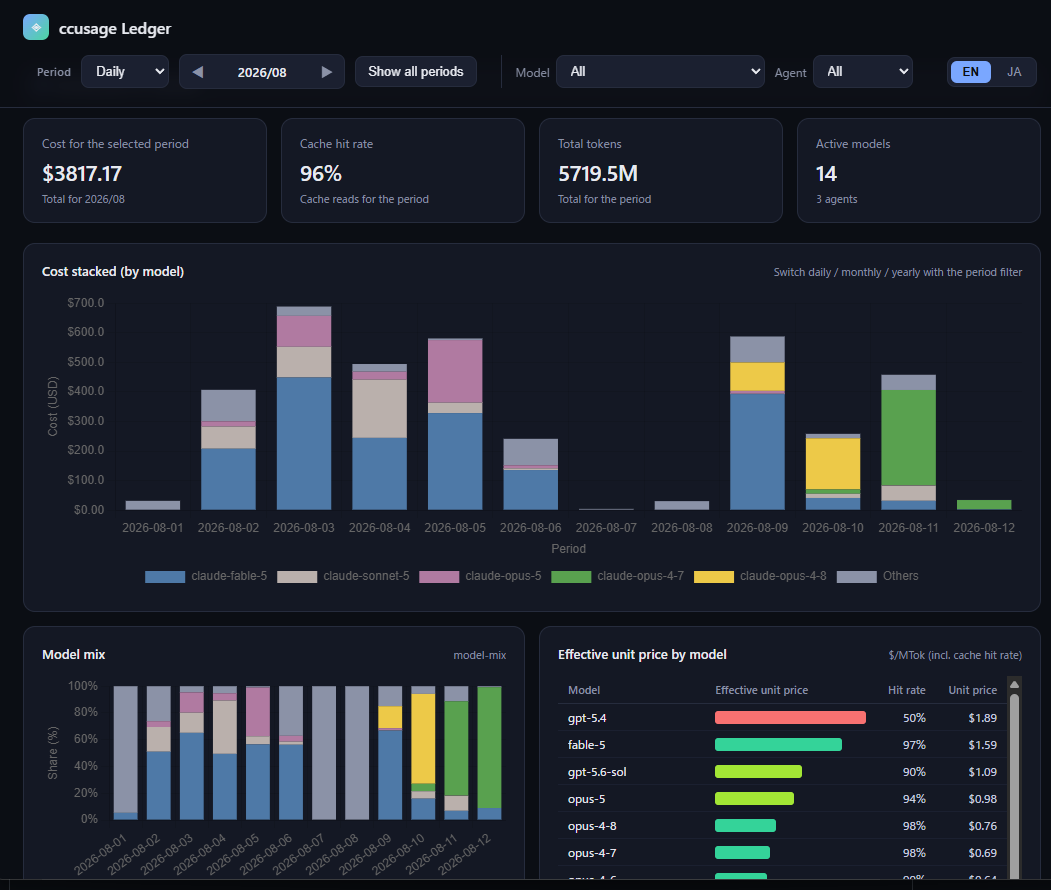
It reads JSON emitted by ccusage and displays daily / monthly / yearly cost, tokens, and cache hit rate, plus per-model and per-agent breakdowns in charts and tables.
Screenshot
Requirements
Bun is required for development (build / test / typecheck). The ccusage-ledger bin starts via #!/usr/bin/env node, so the published package does not require Bun to start.
Getting Started
From the repository:
bun install
bun run dev
From the npm distribution:
npx ccusage-ledger
# or
bunx ccusage-ledger
The browser opens http://127.0.0.1:3737 on start (local interactive environments only; it does not auto-open in a non-TTY environment).
Use --port to listen on a different port:
npx ccusage-ledger --port 4000Options
| Option | Description |
|---|---|
| --host <address> | Bind address (default: 127.0.0.1, also accepts --host=<address>). Takes precedence over the HOST env var |
| -p, --port <number> | Port to listen on (default: 3737, also accepts --port=<number>). Takes precedence over the PORT env var |
| --rebuild-cache | Reconcile the entire usage history, including older edits and pricing changes |
| -h, --help | Show usage and exit |
--host has no short form on purpose, so it cannot be confused with -h (help) and expose the dashboard by accident. A non-loopback --host goes through exactly the same guards as HOST — see About LAN exposure.
When a value is not the default, the startup log shows where it came from ((host from --host), (port from PORT), and so on), so a leftover env var is easy to spot.
What it shows
- Period granularity: daily / monthly / yearly
- Period navigation: all periods, or select a specific month / year with ◀▶
- By model: cost / token stacking (toggle), mix ratio, effective unit price, cost ranking
- Period model comparison: click a bar (day / month / year) to compare every model used in that period by effective unit price in a side panel
- By agent: share donut (cost / token toggle), efficiency table
- Detailed table by period × agent
- Language: toggle Japanese / English in the top-right corner (initial language is English; the choice is saved in the browser and restored on the next launch)
Configuration
| Env var | Default | Description |
|---|---|---|
| HOST | 127.0.0.1 | Bind address (overridden by --host) |
| PORT | 3737 | Bind port (overridden by --port) |
| CCUSAGE_LEDGER_ALLOW_LAN | (none) | Set to 1 to start with only a warning for a non-loopback bind |
| CCUSAGE_LEDGER_ALLOW_UNVERIFIED_NATIVE | (none) | Set to 1 to start with a warning (instead of refusing) when the ccusage native binary hash for the platform is not recorded |
About LAN exposure
By default the server binds only to 127.0.0.1. With a non-loopback bind such as --host 0.0.0.0 or HOST=0.0.0.0, anyone on the network can view the dashboard (usage data), and plaintext HTTP can be eavesdropped and tampered with. Both spellings are treated identically — the guards below apply to the resolved bind address, not to how it was specified.
- On a TTY, a warning is shown and confirmation is requested at startup
- On a non-TTY, startup is refused unless
CCUSAGE_LEDGER_ALLOW_LAN=1is set - For non-loopback connections,
/api/usagedata is not served: a request with a non-loopback Host header gets 400, and a request from a non-loopback source IP gets 403 (the Host gate runs first, then the source-IP gate). The source-IP decision is based on the connection's source IP, so an SSH tunnel reaching loopback still works
To view from another device, use an SSH tunnel. The tunnel itself acts as access control, and the connection source becomes loopback, so /api/usage works as well. The SSH tunnel encrypts the network segment, but the connection between the tunnel endpoint and the dashboard on the server still uses plain HTTP end-to-end (the encryption boundary is the SSH connection, not the dashboard itself).
ssh -L 3737:127.0.0.1:3737 your-serverAuthentication is intentionally not implemented. This server assumes single-user local use; the boundary is enforced by limiting who can reach the screen (loopback / SSH tunnel).
A local reverse proxy that forwards to
127.0.0.1:3737(e.g. nginxproxy_pass) makes every proxied connection appear to come from loopback, so/api/usageis served to anyone the proxy is reachable from without triggering any LAN-bind warning. Do not put the dashboard behind a LAN-facing reverse proxy unless that is exactly what you want.
HTML Export
bun run exportOutputs a single HTML file to dist/ccusage-ledger.html in the current working directory.
Caution: The exported file contains your ccusage usage data. Only export it when sharing with someone you trust. For external distribution, set X-Frame-Options: DENY in the server response headers (the exported HTML's CSP is injected via <meta>, which browsers ignore for frame-ancestors; iframe embedding is only prevented by the JS frame buster). If the output lands inside a git repository other than ccusage-ledger, export is refused by default to prevent accidental commits of personal data — set CCUSAGE_LEDGER_EXPORT_ALLOW_FOREIGN=1 to export anyway.
Data
The server runs ccusage (pinned as [email protected]) directly and keeps a private aggregate cache at ~/.cache/ccusage-ledger/usage.json (based on XDG_CACHE_HOME if set). Secrets such as API keys are not passed to the child process.
The first collection reads full history. Repeat startups refresh from the first day of the previous calendar month, replacing all daily and monthly records in that coverage, including deleted or now-empty periods. Earlier months stay cached. Monthly totals still come from ccusage itself.
Run npx ccusage-ledger --rebuild-cache to reconcile older edits, deletions, backfills, or pricing changes immediately. Otherwise the next startup at least seven days after the last successful full collection rebuilds the history. Failed collections do not advance that deadline. Upstream pricing behavior is preserved, so historical costs outside the refreshed months may remain stale until reconciliation.
Cache metadata is stored atomically with the data and fingerprints the pinned implementation, aggregation revision, command, discovered configuration, source directories, working directory, and timezone; it does not store raw configuration or source paths. Incompatible source/configuration caches are neither merged nor served as fallback. Legacy aggregate caches can remain explicitly stale fallback while a full collection is attempted. Custom commands, configured date limits, or a timezone that cannot safely be matched disable window collection. The child still excludes TZ; when the parent sets it, collection conservatively uses the full command. If configuration cannot be fingerprinted within the bounded read, full collection remains available without cache reuse or persistence. Configured named pi store directories are included in source identity; stores using ~ or ~/ also take this conservative full-collection path because their upstream home is temporary.
Startup shows observed stages and elapsed monotonic time on a single stderr line in an interactive terminal. CI/nonterminal runs use ordinary lines. Fresh data, valid empty data, stale fallback, initial failure, and cache-write warnings have distinct outcomes. The browser opens only after usable fresh/fallback data is ready. Ctrl+C cancels collection and its child processes, clears the display, removes temporary resources, and prevents browser opening. The collection timeout remains 60 seconds.
The child process gets an empty temporary HOME and only a small allowlist of non-secret env vars (PATH, TERM, TMPDIR, etc.) plus the agent data-directory env vars (CLAUDE_CONFIG_DIR, CODEX_HOME, GEMINI_DATA_DIR, OPENCODE_DATA_DIR) — never the real HOME or API keys — so it cannot discover ~/.ssh, ~/.aws, etc. by default. At startup the installed ccusage wrapper is sha256-verified against a pinned value on every platform, and the platform native binary against a per-platform table (all 6 platforms shipped by [email protected] are registered; on an unregistered platform startup is refused unless CCUSAGE_LEDGER_ALLOW_UNVERIFIED_NATIVE=1 is set).
This guards against accidental access and post-install tampering. The hash constant ships inside the artifact it verifies, so a supply-chain compromise of the pinned release itself (or a same-user attacker) is out of scope for this control.
Development
bun run build      # bundle the frontend into dist/bundle.js and the CLI into dist/ccusage-ledger.js
bun test           # run tests
bun run typecheck  # type-check
License
MIT