
ccusage-team
v1.0.27
Published
Enhanced Claude Code usage analysis tool with live team monitoring and collaboration features

Maintainers
 vichoho
Readme
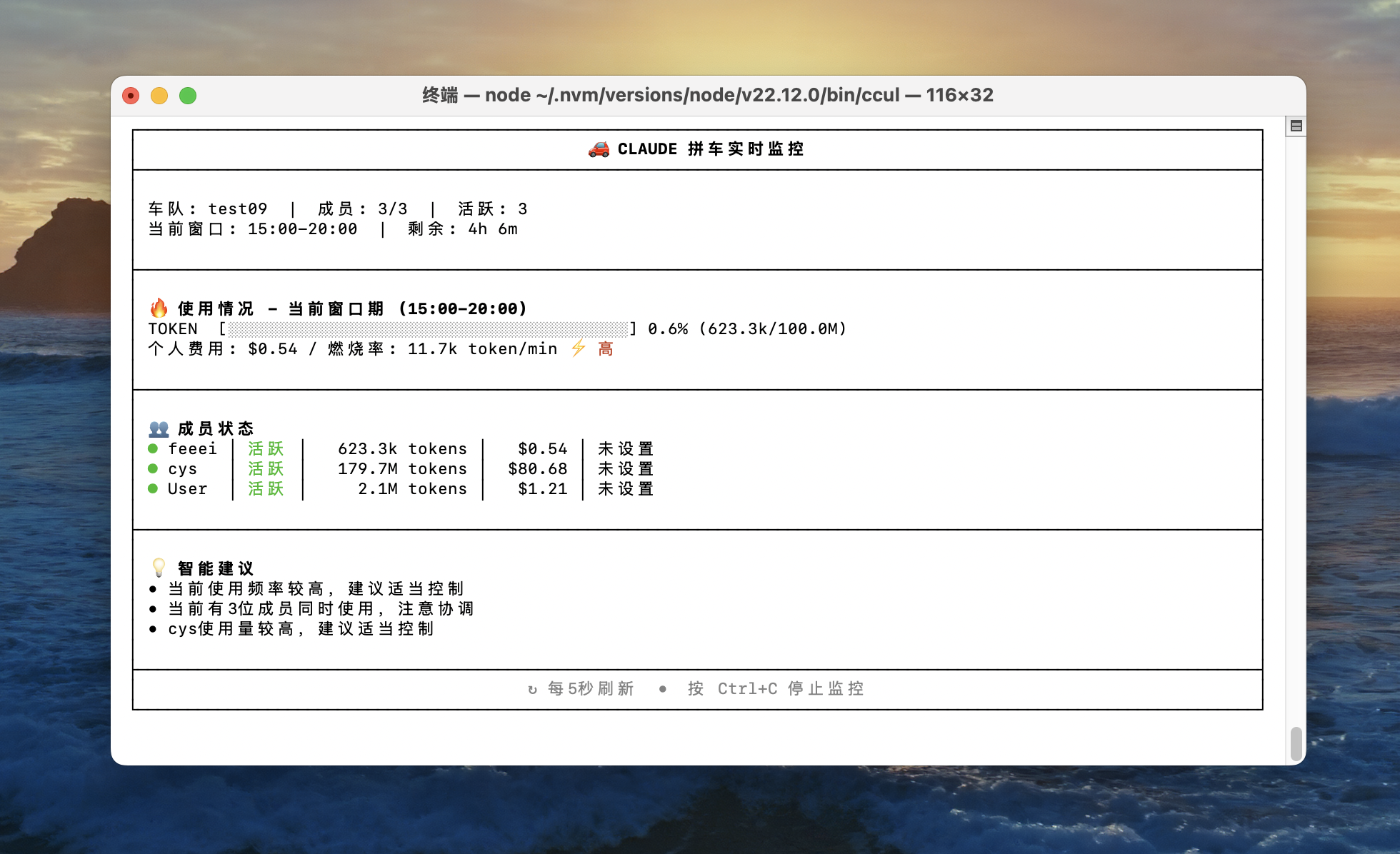
分析您的 Claude Code 使用情况,提供强大的团队协作功能——现在支持实时监控、团队管理和实时同步!
基于 @ryoppippi 出色的 ccusage 构建,这个增强版本添加了团队协作、实时监控和高级管理功能。
安装
全局安装(推荐)
全局安装 ccusage-live 以便在任何地方使用:
# Using npm
npm install -g ccusage-live

# Using bun (faster)
bun install -g ccusage-live

# Using pnpm
pnpm install -g ccusage-live
无需安装快速使用
您也可以直接运行而无需安装:
# Using bunx (recommended for speed)
bunx ccusage-live

# Using npx
npx ccusage-live@latest
💡 提示:我们推荐使用
bun以获得更快的安装和执行速度!
使用方法
安装后,您可以使用完整的命令名称或简短别名:
# 使用完整命令名称
ccusage-live daily    # 每日 token 使用量和费用
ccusage-live monthly  # 月度汇总报告
ccusage-live session  # 按对话会话统计使用量
ccusage-live blocks   # 5 小时计费窗口

# 使用简短别名(方便!)
ccul daily    # 等同于 ccusage-live daily
ccul monthly  # 等同于 ccusage-live monthly
ccul session  # 等同于 ccusage-live session
ccul blocks   # 等同于 ccusage-live blocks

# 团队协作功能
ccul team create "我的团队"           # 创建新团队
ccul team join <team-id>             # 加入现有团队
ccul team list                       # 列出您的团队
ccul team members <team-id>          # 显示团队成员
ccul team sync                       # 同步使用数据到团队数据库

# 实时监控和实时功能
ccul blocks --active                 # 显示活跃计费区块和预测
ccul blocks --recent                 # 显示最近区块(最近 3 天)
ccul blocks --live                   # 实时使用仪表板(团队模式)

# 高级选项
ccul daily --json                    # JSON 输出
ccul daily --mode calculate         # 强制成本计算
ccul monthly --since 2025-01-01     # 日期过滤
ccul session --project myproject    # 按项目过滤

# MCP 服务器(用于 Claude Desktop 集成)
ccul mcp                            # 启动 MCP 服务器
ccul mcp --type http --port 8080    # HTTP MCP 服务器
✨ 增强功能
🏢 团队协作
- 👥 团队管理:使用唯一标识符创建和管理团队
- 🔗 轻松加入:使用简单的团队代码加入团队
- 👨👩👧👦 成员管理:查看和管理团队成员
- 📊 集中分析:汇总团队成员的使用数据
- 🔄 实时同步:与团队数据库自动同步
- 🌐 Web 仪表板:基于浏览器的团队管理界面
📈 实时监控和实时功能
- ⏰ 活跃区块跟踪:监控当前 5 小时计费窗口进度
- 🚨 智能警报:可配置的 token 阈值警告
- 📊 实时仪表板:带有消耗率计算的实时使用更新
- 💰 成本预测:基于当前使用模式预测成本
- 🔄 自动刷新:具有可自定义间隔的持续监控
📊 核心使用分析
- 📅 每日报告:按日期统计 token 使用量和费用
- 📆 月度报告:汇总的月度统计
- 💬 会话报告:按对话会话分组的使用情况
- ⏰ 5 小时区块:跟踪 Claude 的计费窗口使用情况
- 🤖 模型跟踪:按 Claude 模型(Sonnet、Opus 等)详细分解
- 📊 成本分析:具有多种计算模式的精确美元成本跟踪
🛠️ 高级功能
- 🔌 MCP 集成:为 Claude Desktop 内置的模型上下文协议服务器
- 📄 JSON 导出:用于程序化使用的结构化数据输出
- 📅 日期过滤:灵活的日期范围过滤
- 🎨 智能显示:具有自动紧凑模式的响应式表格
- 🌐 多目录支持:处理多个 Claude 安装
- ⚡ 高性能:以最小包大小优化速度
🔧 配置和设置
- 🔄 预配置:包含服务器设置,开箱即用
- 🔧 环境变量:灵活的配置选项
- 📝 交互式设置:引导式配置向导
- 🔒 安全:内置验证和错误处理
🔧 配置
CCUsage Live 预配置了团队协作功能。该包包含开箱即用的默认服务器设置。
环境变量(可选)
您可以使用环境变量覆盖默认配置:
# Supabase 配置
export SUPABASE_URL="https://your-project.supabase.co"
export SUPABASE_ANON_KEY="your-anon-key"

# 功能控制
export CCUSAGE_TEAM_MODE="true"      # 启用团队功能
export CCUSAGE_WEB_INTERFACE="true"  # 启用 Web 仪表板
export CCUSAGE_MCP_SERVER="true"     # 启用 MCP 服务器

# 使用分析
export CLAUDE_CONFIG_DIR="/custom/path"  # 自定义 Claude 数据目录
成本计算模式
控制如何计算成本:
--mode auto(默认):可用时使用预计算成本--mode calculate:始终使用模型定价从 token 计算--mode display:仅使用预计算的成本值
团队设置
- 创建团队:
ccul team create "我的团队" - 分享团队 ID:将团队 ID 给您的同事
- 加入团队:其他人运行
ccul team join <team-id> - 同步数据:运行
ccul team sync上传使用数据 - 一起监控:使用
ccul blocks --live进行实时监控
🌐 Web 仪表板
CCUsage Live 包含用于团队管理的基于 Web 的仪表板:
# 启动 Web 界面(通常在端口 3000 上运行)
ccul web

# 或通过 MCP 服务器访问
ccul mcp --type http --port 8080
Web 仪表板提供:
- 团队概览和成员管理
- 实时使用监控
- 阈值配置
- 使用分析和图表
📋 要求
- Node.js:版本 20.19.4 或更高
- Claude Code:任何版本(支持
~/.claude和~/.config/claude) - 互联网:团队功能和成本计算需要(提供离线模式)
🚀 开发和贡献
此包基于 @ryoppippi 出色的 ccusage,增强了团队协作和实时监控功能。
针对发布者
如果您要为团队设置此包,请在发布前运行配置脚本:
# 配置您的 Supabase 设置
node scripts/setup-config.js

# 构建和发布
bun run build
npm publish
从源码构建
# 克隆仓库
git clone https://github.com/Calderic/ccusage-live.git
cd ccusage-live

# 安装依赖
bun install

# 构建项目
bun run build

# 运行测试
bun run test

# 开始开发
bun run start daily
🙏 致谢
- @ryoppippi - 原始 ccusage 的创作者
- Claude Code 社区 - 提供出色的 CLI 工具和社区支持
- 所有贡献者 - 感谢所有帮助改进此工具的人