
ccxray
v2.3.1
Published
X-ray vision for AI agent sessions — a transparent HTTP proxy and dashboard for Claude Code

Maintainers
 lis186
Readme
ccxray
AI 代理工作階段的透視鏡。零設定的 HTTP 代理,記錄 Claude Code、Codex 與上游 API 之間的每一次呼叫,搭配即時儀表板與工作流程時間軸,讓你看清代理內部到底在做什麼。


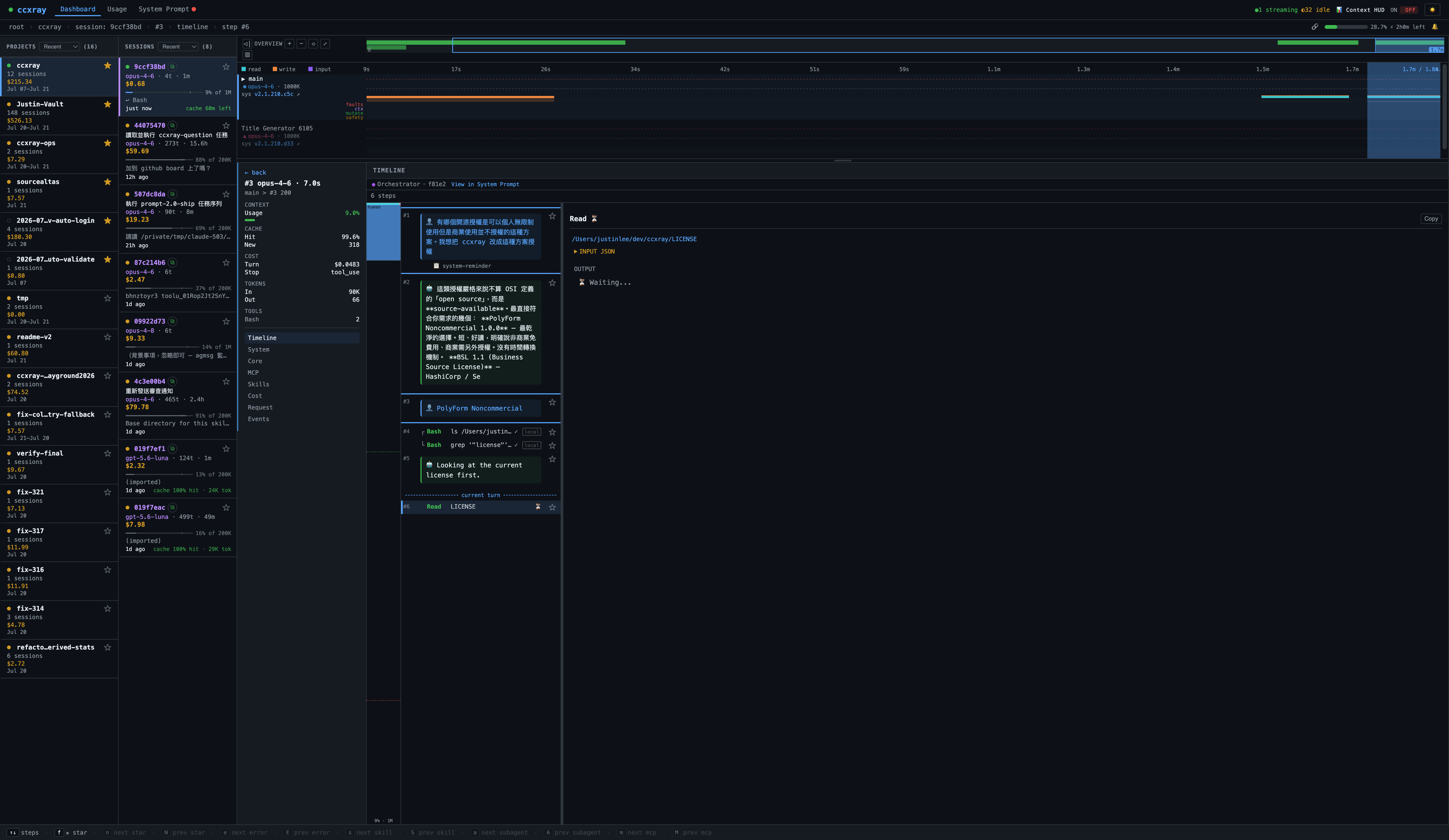
為什麼需要
Claude Code 是個黑盒子。你看不到:
- 它送出了什麼 system prompt(以及版本間的變化)
- 每次 tool call 花了多少錢
- 為什麼它思考了 30 秒
- 什麼東西吃掉了你的 200K token 上下文窗口
ccxray 讓它變成透明的。
快速開始
npx ccxray claude
# 或
npx ccxray codex
# 或
npx ccxray grok
就這樣。代理啟動、選定的 CLI 經由它啟動、儀表板自動在瀏覽器中開啟。在多個終端機執行時會自動共用同一個 dashboard。
launcher 參數由 provider registry 管理。目前支援 claude、codex 與 grok;未知的 provider command 會直接失敗,避免靜默啟動未設定的 proxy。
其他執行方式
ccxray                           # 只啟動代理 + 儀表板
ccxray claude --continue         # 所有 claude 參數直接穿透
ccxray codex exec "hello"        # 所有 codex 參數直接穿透
ccxray grok -p "hello"           # 所有 grok 參數直接穿透
ccxray --port 8080 claude        # 自訂 port(獨立模式,不共用 hub)
ccxray claude --no-browser       # 不自動開啟瀏覽器
ccxray status                    # 顯示 hub 資訊及已連線的 client
ANTHROPIC_BASE_URL=http://localhost:5577 claude   # 將現有 claude session 指向運行中的 ccxray hub
多專案
在多個終端機執行 ccxray claude 會自動共用同一個 proxy 和 dashboard — 無需任何設定。
# Terminal 1
cd ~/project-a && ccxray claude     # 啟動 hub + claude

# Terminal 2
cd ~/project-b && ccxray claude     # 連線至現有 hub

# 兩個專案都顯示在 http://localhost:5577 的 dashboard
如果 hub 意外終止,已連線的 client 會在數秒內自動恢復。
$ ccxray status
Hub: http://localhost:5577 (pid 12345, uptime 3600s)
Connected clients (2):
  [1] pid 23456 — ~/dev/project-a
  [2] pid 34567 — ~/dev/project-b
使用 --port 可改為獨立模式。
支援的 agent 模組
Launcher 註冊在 server/providers.js(共用同一 hub + dashboard):
| 命令 | Wire 家族 | 預設上游 |
|------|-----------|----------|
| ccxray claude | Anthropic Messages | api.anthropic.com |
| ccxray codex | OpenAI Responses | api.openai.com / ChatGPT |
| ccxray grok | OpenAI Responses(client 模組) | cli-chat-proxy.grok.com(XAI_BASE_URL 可覆寫) |
非 Codex 的 OpenAI-wire 客戶端(目前:Grok)列在 OPENAI_WIRE_CLIENTS:共用 parser、各自 host/agent/raw-session。多 agent hub 可並存,不必改 OPENAI_BASE_URL。驗收備註:docs/grok-testing.md。
Grok 帳單揭露: 代理 Grok CLI 流量時,ccxray 會呼叫 cli-chat-proxy.grok.com/v1/billing(使用 CLI 已經透過 proxy 傳送的同一組 auth token)來填充 Usage 分頁的帳戶卡片。成功回應後的 60 秒內會抑制重複呼叫(per alias+credential)。設定 XAI_BASE_URL 可將呼叫導向其他主機。
Codex 支援(Beta)
npx ccxray codexAPI key 與 ChatGPT 認證的 codex session 都支援。當 codex 帶著 chatgpt-account-id header 時,會自動路由到 chatgpt.com/backend-api/codex — 不需額外設定。Codex 啟動時的平台輪詢(plugin 清單、connector 目錄、app metadata)會照常代理,但不顯示在儀表板上,讓 timeline 只呈現對話流量。
Beta 注意事項:
- WebSocket 傳輸(
/v1/responses升級)會逐 frame 解碼:每個 codex turn 記錄 model、token 用量、請求的 instructions/input/tools 與回應事件。少數大型 envelope 事件只保留精簡的時間錨點(供 TTFT 計算)而非完整內容,所以 codex turn 的細節在部分地方仍不及 Claude turn。 - 相較 Claude 路徑,實際使用的驗證量較少。
可調整的環境變數:OPENAI_BASE_URL、CHATGPT_BASE_URL、CCXRAY_WS_IDLE_TIMEOUT_MS、CCXRAY_WS_MAX_QUEUE_BYTES。詳見 CLAUDE.md。
歡迎到 GitHub 回報問題 — Beta 的意思就是我們想收到粗糙邊角的回報。
功能
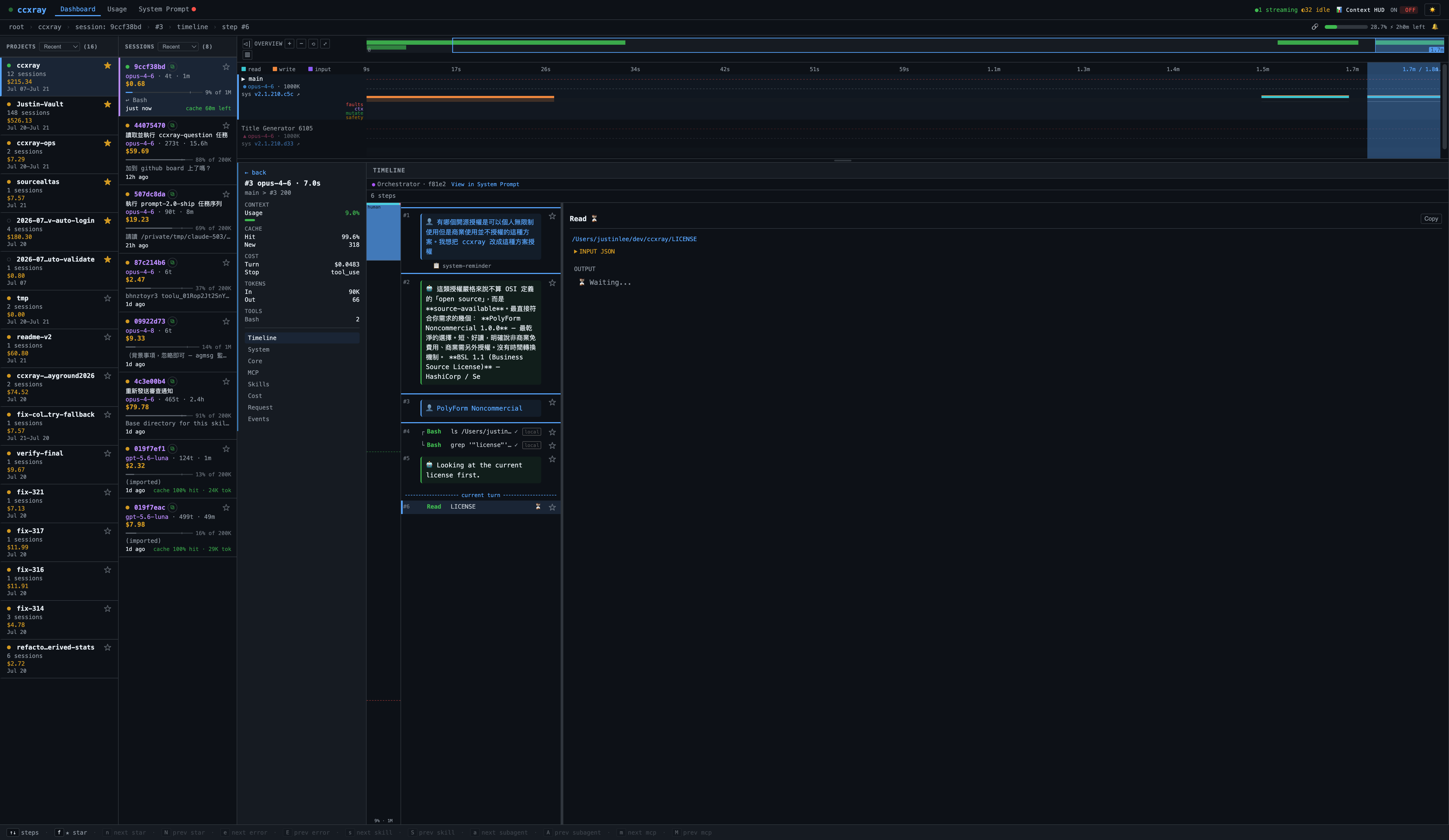
工作流程時間軸
即時觀看代理的思考過程與並行結構。
Turn 卡片:每個回合渲染成五行資訊卡——cost、cache 熱度(含 turn 間空檔時間,及時抓出 cache miss)、tool 失敗風險訊號、hit:0% 紅色警示、tools 列前置於標題上方。不用展開任何一張卡片,就能掃完整場 session 的健康狀態。
Lane 視覺化:多 agent session 自動拆分為平行 lane——orchestrator 走主 lane,subagent 分出 Fork / Teammate lane。每條 lane 有 WCAG ≥3:1 對比的獨立色彩,支援混合 model 標示。Sequential-interleave tracker 標記同一對話中哪些 turn 是循序、哪些是並行。
鳥瞰模式:切換 birdseye overview 可將 overview 區域放大到約 80% viewport,搭配放大版 minimap 與範圍摘要,掌握長 session 的全貌。
L1/L2 雙層選取:Tab / ▲▼ 選取 lane(L1),j/k 在 lane 內選取 turn(L2),Esc 逐層退出。取代舊的單層 click 模型。
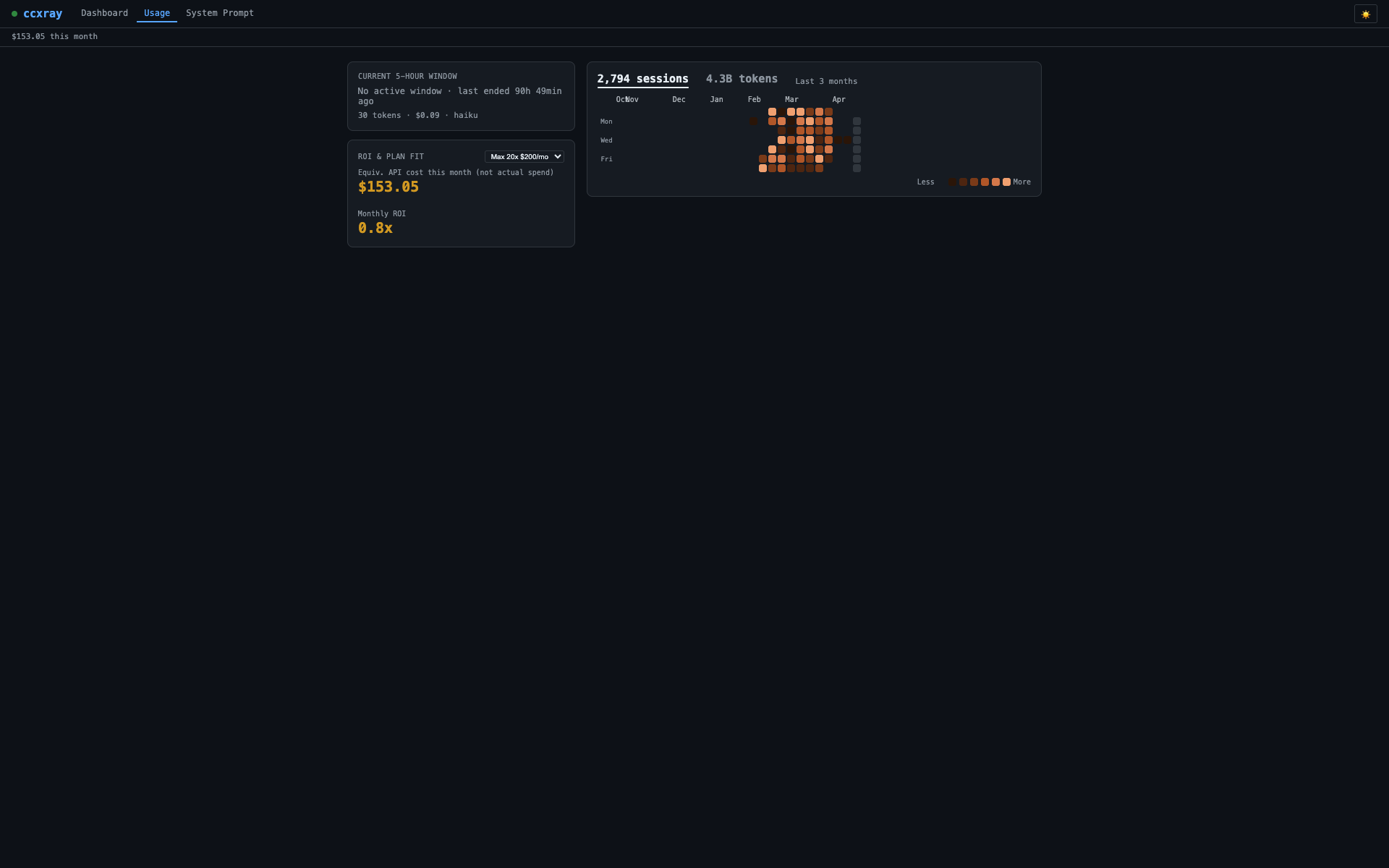
用量與成本
追蹤你的實際花費。消耗速率、各帳號 Claude 及 Codex 速率限制卡片 — 精確掌握 token 流向。
System Prompt 追蹤
自動偵測版本變更,內建 diff 檢視器。瀏覽多種已辨識 agent 類型的 prompt,精確掌握每次更新的差異。不確定的項目會誠實標為 unknown。
鍵盤導航
整個儀表板都能用鍵盤操控。每個畫面底部都有情境感知的快捷鍵提示列,會隨你移動即時更新目前有效的按鍵。按 ? 展開完整快捷鍵清單。從 projects → sessions → timeline → 個別 diff hunk,全程不用碰滑鼠。
工作流程導航:Tab / ▲▼ 在 lane 之間切換(L1 選取),j/k 在 lane 內的 turn 之間切換(L2 選取),Esc 逐層退出回上一層。
步驟類型跳轉:e/E 跳到下/上一個錯誤,s/S 跳到 Skill 呼叫,a/A 跳到 subagent(Agent/Task)呼叫,m/M 跳到 MCP 工具呼叫。每次跳轉都有位置感知——從目前位置往前或往後找最近的符合步驟,並同步更新網址列。
n/N 可在整個儀表板中跳到下/上一個加星項目——跨越 projects、sessions、turns 及 timeline 的個別步驟。快捷鍵列只在目前畫面有可到達的加星項目時才顯示此按鍵。
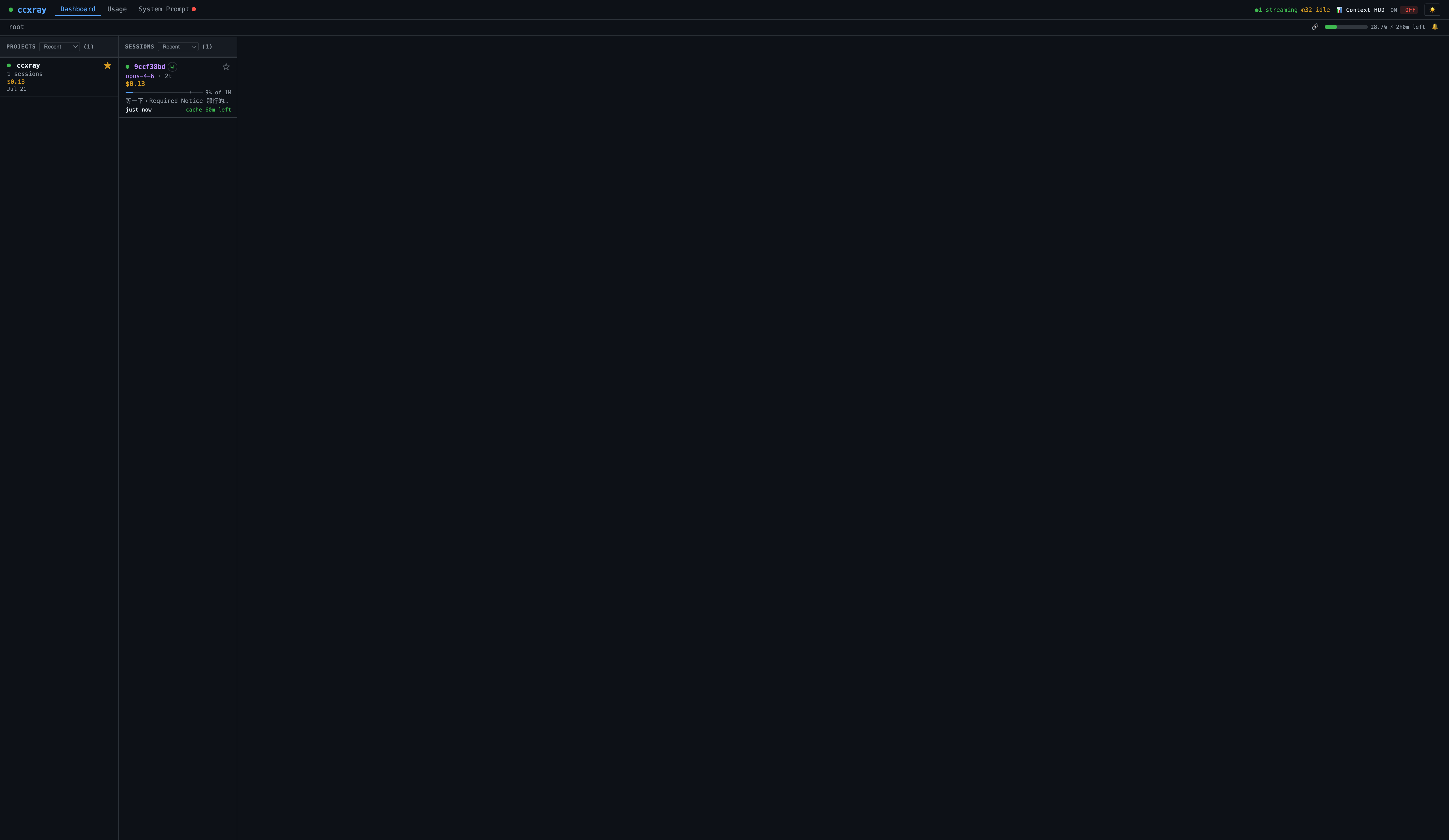
Session 標題與 Cache 提醒
Session 卡片顯示 Claude Code 自動生成的標題(例如 Fix login button on mobile),並附有即時 cache TTL 倒數(cache 4m left),不到 1 分鐘時變紅閃爍。任何 session 接近到期時,瀏覽器分頁標題會在 ccxray 和 ⚠ ccxray 之間交替。可選的瀏覽器通知會在計畫感知的提前時間觸發 — Max 提前 5 分鐘、Pro/API key 提前 60 秒。直接 API 呼叫或仍在進行中的 session 退回顯示短雜湊。
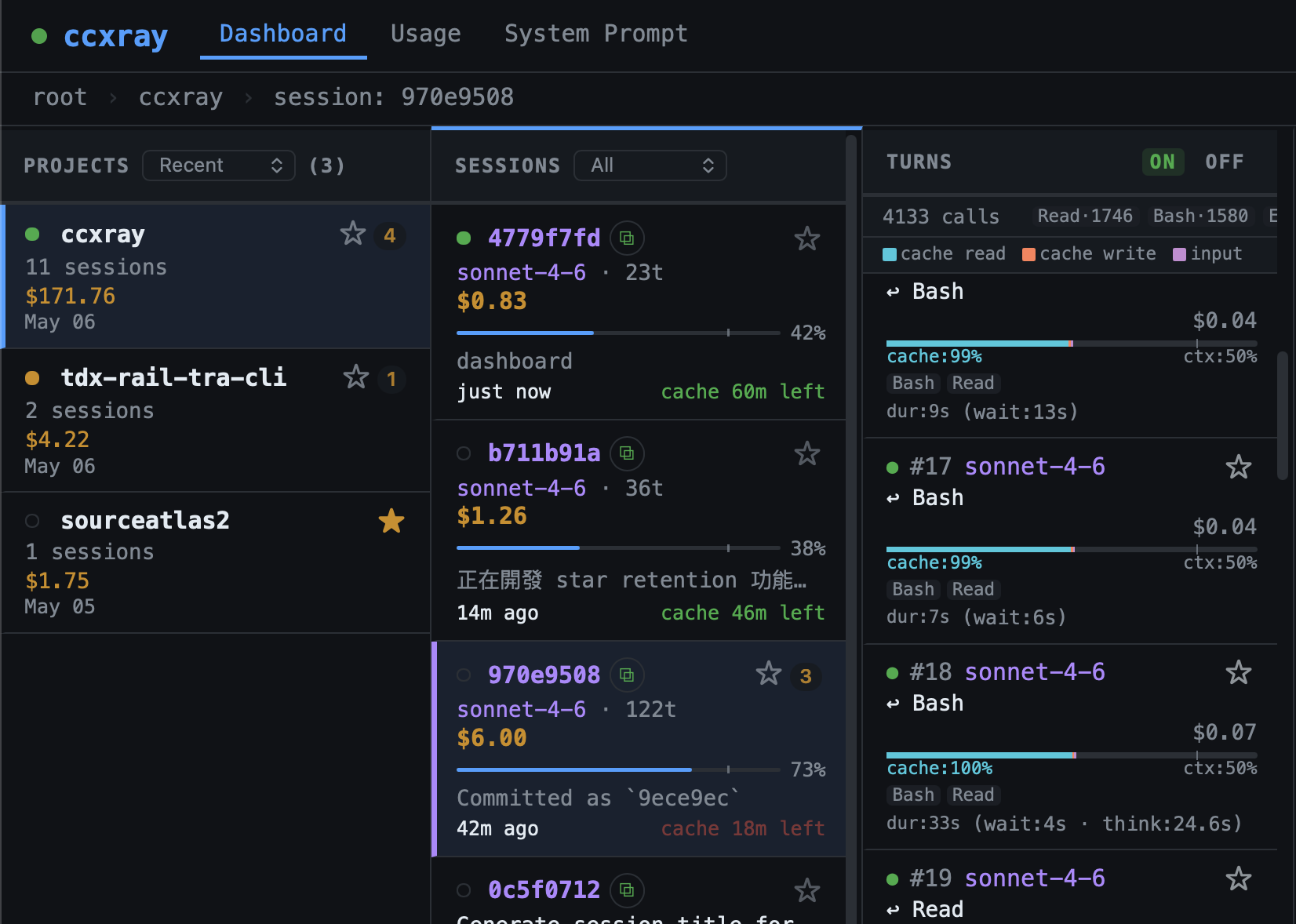
Session 天氣
每張 session 卡片顯示天氣 emoji(☀️ 晴天 → ⛈️ 暴風雨),濃縮八項健康訊號——context 壓力、compaction、截斷、卡住迴圈、延遲漂移、錯誤率、cache 效率——為一個一目瞭然的指標。Hover 可看分解。詳見 docs/weather.md。
注意(2.3.1): 天氣顯示預設關閉,因為工具失敗訊號正在修復中。計算仍在背景持續進行。在 dashboard URL 後加
?weather=on可臨時檢視,或在 console 執行localStorage.setItem('ccxray-weather-display', 'on')持久啟用。詳見 docs/weather.md。
計畫自動偵測
ccxray 透過讀取 Anthropic 的 cache_creation 用量欄位,自動偵測你的訂閱計畫(Pro、Max 5x、Max 20x),無需任何設定。Cache TTL 和配額門檻均使用偵測到的計畫。若偵測結果有誤,可用 CCXRAY_PLAN 覆蓋。
各帳號速率限制
在同一個儀表板上查看每個 Claude 和 Codex 帳號的 5 小時和每週配額用量。自動偵測 ~/.codex-*/sessions/ 以支援多帳號 Codex 設定,並透過 ccxray setup-statusline 讀取 Claude statusline 資料。Business/unlimited Codex 計畫顯示 ∞ Unlimited。資料每 30 秒在背景非同步刷新,不阻塞 proxy。
請求攔截與編輯
在請求送出至 Anthropic 之前先暫停。在 session 上開啟攔截後,下一個來自 Claude Code 的請求會被儀表板留住 — 你可以即時編輯 system prompt、訊息、tools 或 sampling 參數,再選擇放行(轉發你編輯後的版本)或拒絕(回傳錯誤給 Claude Code)。適合 prompt engineering、把高風險 tool call 隔離在沙箱裡、或在不分叉 agent 的情況下做實驗。
Context HUD
可選的上下文統計區塊,會被附加到 Claude Code 中 Claude 的回覆尾端:📊 Context: 28% (290k/1M) | 1k in + 800 out | Cache 99% hit | $0.15。預設啟用;可從儀表板頂部列切換。
為什麼需要這個開關? 當主 agent 透過 Agent / Task tool 呼叫 sub-agent 時,附加的區塊可能會把 sub-agent 的回傳內容截斷在父 agent 看到的範圍之外,造成多 agent 工作流程靜默地遺失資料。跑 sub-agent 較重的 session 時請關掉 HUD。狀態保存在 ~/.ccxray/settings.json。
加星永久保留
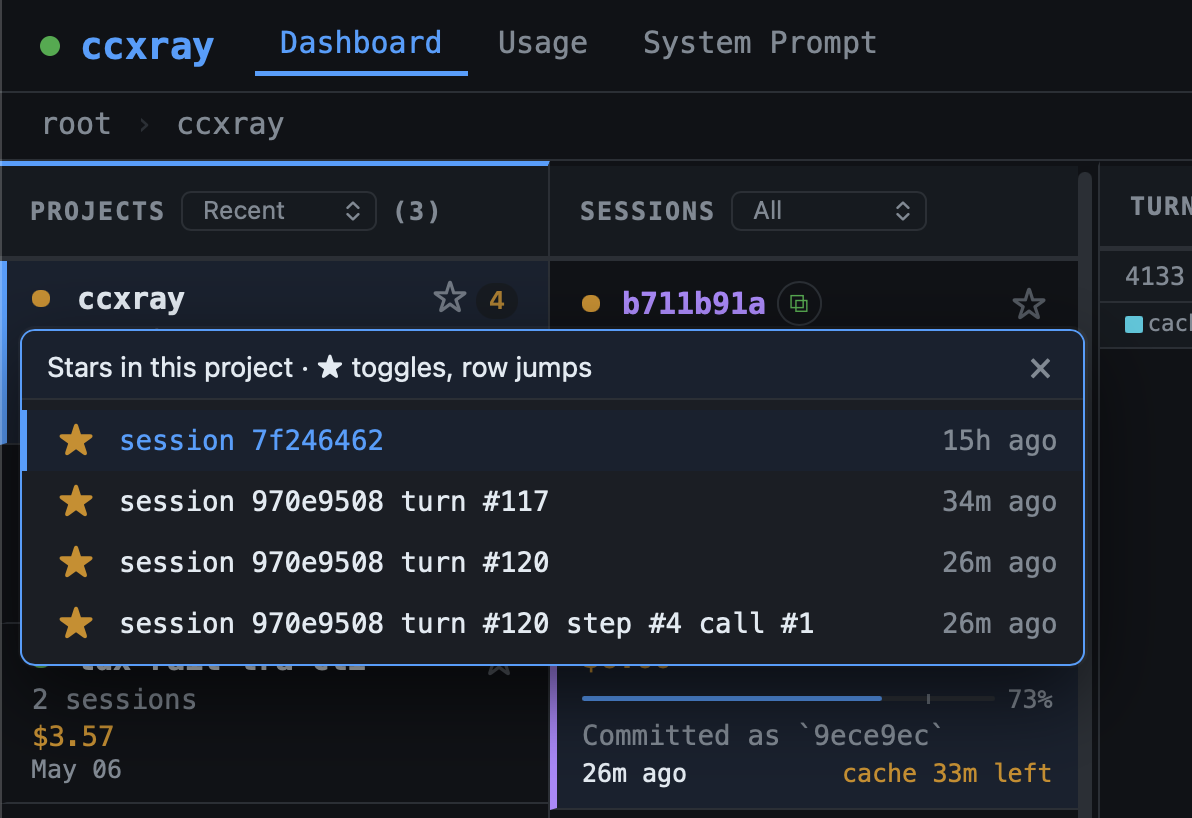
在 turn、session 或 project 卡片上點星號,即可標記為永久保留。加星項目不會被 LOG_RETENTION_DAYS 的自動清理刪除;狀態存於 ~/.ccxray/settings.json,server 端持續、跨瀏覽器同步。Star 一個 turn 連帶保護整個 session 的所有 turn;star 一個 session 保護其下所有 turn;star 一個 project 保護其下所有資料。Catch-all bucket(direct-api、(unknown)、(quota-check))禁止在 bucket 層加星——請對裡面的個別 turn 加星即可。
Timeline 的個別步驟也可以加星(每個步驟 row 上有 ★/☆ toggle)。加星的步驟與直接對 turn 加星效果相同,同樣保護其 parent turn 和 session。
當父層因為下方有 starred 子項目而被間接保留,badge 會顯示 ☆ [N] 而非 ★。點 chip 數字會展開 popover,列出究竟是哪些子項目在保它。每筆的星號是獨立 toggle;點 row 主體則直接跳到該 turn / session。
使用量分析 CLI
ccxray usage                          # 人類可讀摘要
ccxray usage --json                   # JSON 輸出,供 agent 消費 (< 4KB)
ccxray usage --last 7d                # 最近 7 天(支援 d/h/m)
ccxray usage --cwd myproject          # 目錄名子字串智慧比對
ccxray usage --cwd ~/code/app         # 絕對路徑或 ~ 路徑 → 子目錄樹前綴比對
ccxray usage --cwd proj-a,proj-b      # 多個專案 → 比較表
ccxray usage --session latest         # 最近的 session
ccxray usage --session costliest      # 最貴的 session
ccxray usage --session "fix login"    # 依 session 標題搜尋
ccxray usage --session 950432         # UUID 前綴比對
ccxray usage --session costliest --open  # 在儀表板開啟該 session
ccxray usage --tools                  # 完整工具呼叫明細
0.6 秒完成自動化使用量分析 — 不用手動翻 log 就能知道 token 和錢花在哪。直接讀取 index.ndjson,不需要啟動 server。顯示模型成本分佈、工具與 skill 使用量、prompt hash 穩定性(system/tools/core prompt 在 turn 間的變化頻率)、依 turn 間隔的 cache 命中率、以及花費最高的 10 個 session(含標題)。
--json 輸出是 agent-facing 契約 — 完整的逐欄位 schema、multi-cwd 與錯誤輸出形狀、以及過濾語意見 docs/usage.md。
其他功能
- Deep Link 導航 — 每個選取狀態(project / session / turn / step)都會反映在網址列 URL 中。把 URL 貼到新分頁,儀表板會直接導航到相同的畫面。
- 可收合側欄 — overview 面板可收合,給 timeline 更多空間。
- Cache TTL 分項 — turn 詳情顯示 cache 使用的是 5 分鐘或 1 小時 TTL。
- 隱藏專案 — 在
settings.json設定hiddenProjects隱藏特定專案,分享時不洩漏。 - Per-session 還原上限 —
CCXRAY_SESSION_ENTRY_CAP限制啟動還原時單一 session 載入的條目數,防止巨量 session 擠掉其他 session。 - 工作階段偵測 — 自動依 Claude Code session 分組,含專案/工作目錄擷取
- Token 記帳 — 每回合明細:input/output/cache-read/cache-create tokens、美元成本、上下文窗口使用率
運作原理
Claude Code  ──►  ccxray (:5577)  ──►  api.anthropic.com(或 ANTHROPIC_BASE_URL)
                      │
                      ▼
                  ~/.ccxray/logs/ (JSON)
                      │
                      ▼
                  儀表板(同一連接埠)
ccxray 是透明的 HTTP 代理。它將請求轉發到上游 API(Anthropic 或 OpenAI),將請求與回應記錄為 JSON 檔案,並在同一連接埠提供網頁儀表板。所有端點均強制認證:launcher 啟動的 CLI 會自動注入 X-Ccxray-Auth header,使用者無感;直接呼叫 /v1/* 的 script 需自行帶上此 header(詳見 CHANGELOG)。Hub 間通訊透過 Unix domain socket(~/.ccxray/hub.sock)而非 HTTP。
設定
CLI 參數
| 參數 | 說明 |
|---|---|
| --port <number> | 代理 + 儀表板的連接埠(預設:5577)。使用後不共用 hub。 |
| --no-browser | 不自動在瀏覽器中開啟儀表板 |
環境變數
| 變數 | 預設值 | 說明 |
|---|---|---|
| PROXY_PORT | 5577 | 代理 + 儀表板的連接埠(--port 會覆蓋此值) |
| BROWSER | — | 設為 none 可停用自動開啟 |
| AUTH_TOKEN | (自動產生) | 存取控制用金鑰。未設定時由 <CCXRAY_HOME>/local-secret 衍生(預設 ~/.ccxray/local-secret)。非 loopback 請求需要它;loopback 預設信任(見 SECURITY.md 與 CCXRAY_LOOPBACK_REQUIRE_AUTH)。 |
| CCXRAY_SESSION_ENTRY_CAP | 500 | 啟動還原時單一 session 最多載入的條目數。超過此值的 session 只保留最新 1 筆(runtime 不限制) |
| CCXRAY_LOOPBACK_REQUIRE_AUTH | (未設定) | Loopback 預設免認證;設為 1 可強制 loopback 也走認證閘門 |
| CCXRAY_HOME | ~/.ccxray | 基底目錄,存放 hub lockfile、logs、hub.log |
| CCXRAY_MAX_ENTRIES | 5000 | 記憶體中最多保留的條目數(最舊的會被淘汰;磁碟日誌不受影響) |
| LOG_RETENTION_DAYS | 14 | 啟動時自動清除超過 N 天的日誌檔案。加星的 turn / session / project(及其下所有條目)會受保護;仍被還原條目參照的檔案也會受保護。設為 0 可停用。 |
| RESTORE_DAYS | 14 | 限制啟動時讀回的日誌天數(0 = 全部,仍受 CCXRAY_MAX_ENTRIES 上限影響)。日誌目錄非常大時很有用。 |
| CCXRAY_PLAN | (自動) | 覆蓋計畫偵測:pro、max5x、max20x、api-key |
| CCXRAY_DISABLE_TITLES | (未設定) | 設為 1 可停用 session 標題擷取(退回顯示短雜湊) |
| CCXRAY_MODEL_PREFIX | (未設定) | 轉發前在 model 名稱前加上前綴(例如 databricks-)。適用於上游需要廠商前綴 model 名稱、但 Claude Code 只接受標準名稱的情況。 |
| HTTPS_PROXY / https_proxy | (未設定) | 透過 HTTP CONNECT tunnel 將對外 HTTPS 流量導向企業 proxy。 |
| ANTHROPIC_BASE_URL | — | 自訂上游 Anthropic 端點(例如企業閘道)。支援 base path — https://host/serving-endpoints/anthropic 直接可用。設定了 ANTHROPIC_TEST_* 時以其為準。 |
日誌儲存在 ~/.ccxray/logs/,格式為 {timestamp}_req.json 和 {timestamp}_res.json。從 v1.0 升級?./logs/ 中的日誌會在首次啟動時自動遷移。
ccxray 目前僅將日誌儲存於本機檔案系統。遠端物件儲存後端(S3 / R2)尚未支援——它還需要在儲存介面以及「把 request/response 日誌送出本機」的安全模型上做更多設計。
Docker
docker build -t ccxray .
docker run -p 5577:5577 ccxray
系統需求
- Node.js 18+
作者的其他作品
- SourceAtlas — 任何 codebase 的導航地圖
- AskRoundtable — 讓你的 AI 像 Munger、Feynman、Paul Graham 一樣思考
- 在 X 上追蹤 @lis186 獲取最新動態
授權
PolyForm Noncommercial 1.0.0 — 見 LICENSE