
cds-data-pipeline
v0.3.3
Published
A CAP application-layer plugin for declarative, traceable, scheduled data pipelines between CAP services. Each pipeline is a linear READ -> MAP -> WRITE job between exactly one source and one target, with built-in tracker, retry, concurrency guard, manage

Maintainers
 mike.zaschka
Readme
cds-data-pipeline






A CAP plugin for declarative, scheduled data pipelines between CAP services. Each pipeline moves data from one source to one target in a linear READ → MAP → WRITE flow — with tracking, retry, delta support, and a management API out of the box.
Beyond CAP
CAP already gives you the moving parts — cds.connect.to, consumption views, cds.ql, UPSERT, cds.spawn, the Event Queues scheduling API (CDS 10), and the standard before / on / after hook API on services. Reference samples assemble the read–map–write loop by hand: paging, delta watermarks, error handling, and scheduling copied into every project.
This plugin reuses those primitives and adds the orchestration layer on top:
| Reuses from CAP | Adds on top |
|---|---|
| cds.connect.to for source and target I/O | Fixed READ → MAP → WRITE run envelope with PIPELINE.* events |
| cds.spawn / Event Queues scheduling API / external execute | Three scheduling engines — see below |
| UPSERT / INSERT / DELETE via target adapters | Delta modes, retry with backoff, concurrency guard, run history |
| Standard service hooks | Per-pipeline before / on / after on every phase — opt-in only |
| Consumption views (when used with federation) | Management OData at /pipeline, data inspector, Pipeline Console |
You call addPipeline({ source, target, … }) once; the engine owns the loop. Hooks are the CAP escape hatch when a run needs custom logic — not a requirement for every pipeline.
Install
npm add cds-data-pipeline| Dependency | Version | Notes |
|---|---|---|
| @sap/cds | >= 9 | CDS 9 and CDS 10 |
| Node.js | >= 22 | |
Connect: cds.connect.to('data-pipeline'). Full feature list: Features.
Features
Pipeline intents
Intent is inferred from the config shape — no kind flag.
| Intent | Typical shape |
|---|---|
| Replicate | Remote entity → local DB table |
| Materialize | source.query (aggregates, joins) → local table |
| Move-to-service | Local/remote source → remote OData target |
| Fan-in | Multiple sources → one table via source.origin |
Source adapters
OData V2/V4, REST (cursor/offset/page), CQN, server-driven paging, custom. See Sources.
Target adapters
Local DB (default), remote OData, custom. See Targets.
Delta, scheduling, hooks
| Area | Highlights |
|---|---|
| Delta | timestamp, key, datetime-fields, or full refresh |
| Scheduling | spawn (cds.spawn), queued (Event Queues API), or external trigger — see below |
| Event hooks | PIPELINE.START → READ → MAP → WRITE → DONE via standard before / on / after |
| Housekeeping | Opt-in PipelineRuns retention (retentionDays, maxRuns) |
Scheduling engines
| Engine | CAP primitive | When to use |
|---|---|---|
| spawn (default) | cds.spawn({ every }) | Dev, single instance, best-effort interval |
| queued | cds.queued(srv).schedule(...).every(...) — the June 2026 scheduling API | Scaled deployments: single-winner across instances, survives restarts, cron (engine: 'queued'). On CDS 10, named tasks (.as(...)) enable live setSchedule / clearSchedule via unschedule |
| External | POST /pipeline/execute | BTP Job Scheduling Service, Kubernetes CronJob, corporate cron |
schedule: 600_000,                              // spawn — implicit engine
schedule: { every: '10m', engine: 'queued' }, // Event Queues: .schedule().every()
schedule: { cron: '0 2 * * *', engine: 'queued' },
Details: Internal scheduling (queued) · External scheduling · Recipes · Event hooks
Management API and observability
OData at /pipeline: pipeline list, run history, statistics, execute, flush, inspectData, configuration overrides. See Management service.
Resilience
Retry with exponential backoff on remote I/O, concurrency guard (no parallel runs), transactional batches.
Quick example
const cds = require('@sap/cds');

cds.on('served', async () => {
    const pipelines = await cds.connect.to('data-pipeline');

    await pipelines.addPipeline({
        name: 'BusinessPartners',
        source: { service: 'API_BUSINESS_PARTNER', entity: 'A_BusinessPartner' },
        target: { entity: 'db.BusinessPartners' },
        delta: { field: 'modifiedAt', mode: 'timestamp' },
        schedule: 600_000,
    });
});

module.exports = cds.server;
Step-by-step: Get started
Used by cds-data-federation
cds-data-federation composes this engine for annotation-driven sync — you install both packages, but rarely call addPipeline yourself:
@federation.replicate— federation scans consumption views at boot and registers entity-shape pipelines viapipeline-binding.js(source entity → local table, schedule, delta from annotation options).cache.strategy: 'entity'on@federation.delegate— on TTL miss, a pipeline fills a SQLite snapshot of the projected entity.
Federation-bound pipelines show up in /pipeline and the Pipeline Console alongside programmatic ones. For custom transforms on a federation pipeline, hook the pipeline by name (defaults to the entity name). See the federation README and first replication.
Event hooks (optional)
DataPipelineService is a normal cds.Service. The default path needs no handler code — register before / on / after on PIPELINE.* only when a run needs filtering, enrichment, side effects, or observability beyond the built-in MAP/WRITE. That is the usual CAP pattern: declarative wiring by default, intercept when processing gets non-trivial.
const pipelines = await cds.connect.to('data-pipeline');

// Filter source rows before rename mapping (federation replicate or addPipeline)
pipelines.before('PIPELINE.MAP', 'ReplicatedPartners', (req) => {
    req.data.sourceRecords = req.data.sourceRecords.filter(r => !r.blocked);
});

// Per-batch side effect after the default WRITE commits its statistics
pipelines.after('PIPELINE.WRITE', 'Shipments', async (_results, req) => {
    const { runId, batchIndex, statistics } = req.data;
    await cds.tx(req).run(INSERT.into('BatchMetrics').entries({
        runId, batchIndex, created: statistics?.created ?? 0,
    }));
});
Full event reference: Event hooks · Management service
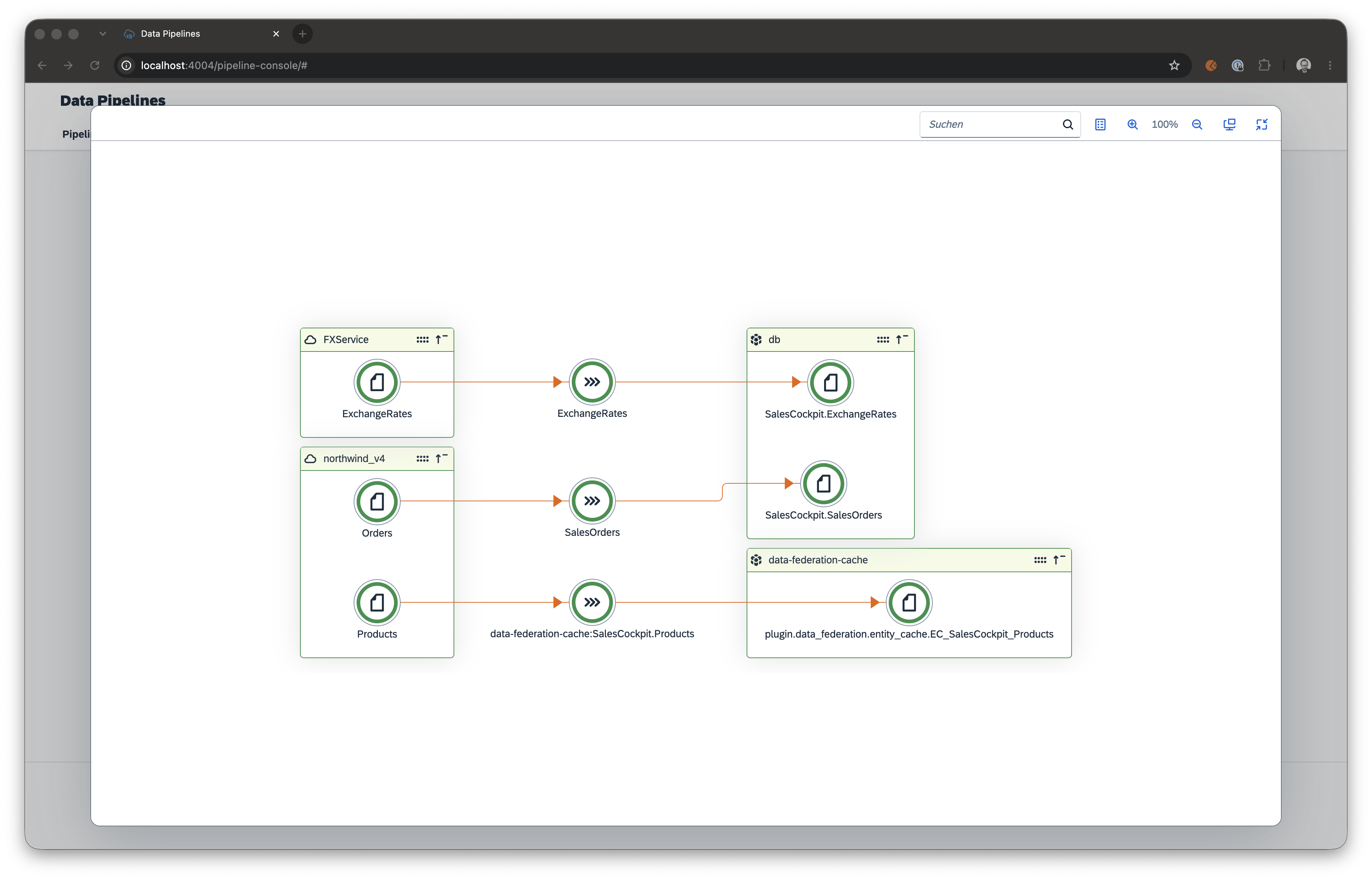
Pipeline Console
Pre-built UI for /pipeline — enable via config reuse or cds add pipeline-console:
{
  "cds": {
    "requires": {
      "data-pipeline": {
        "impl": "cds-data-pipeline",
        "management": {
          "reuse": {
            "api": true,
            "console": true
          }
        }
      }
    }
  }
}
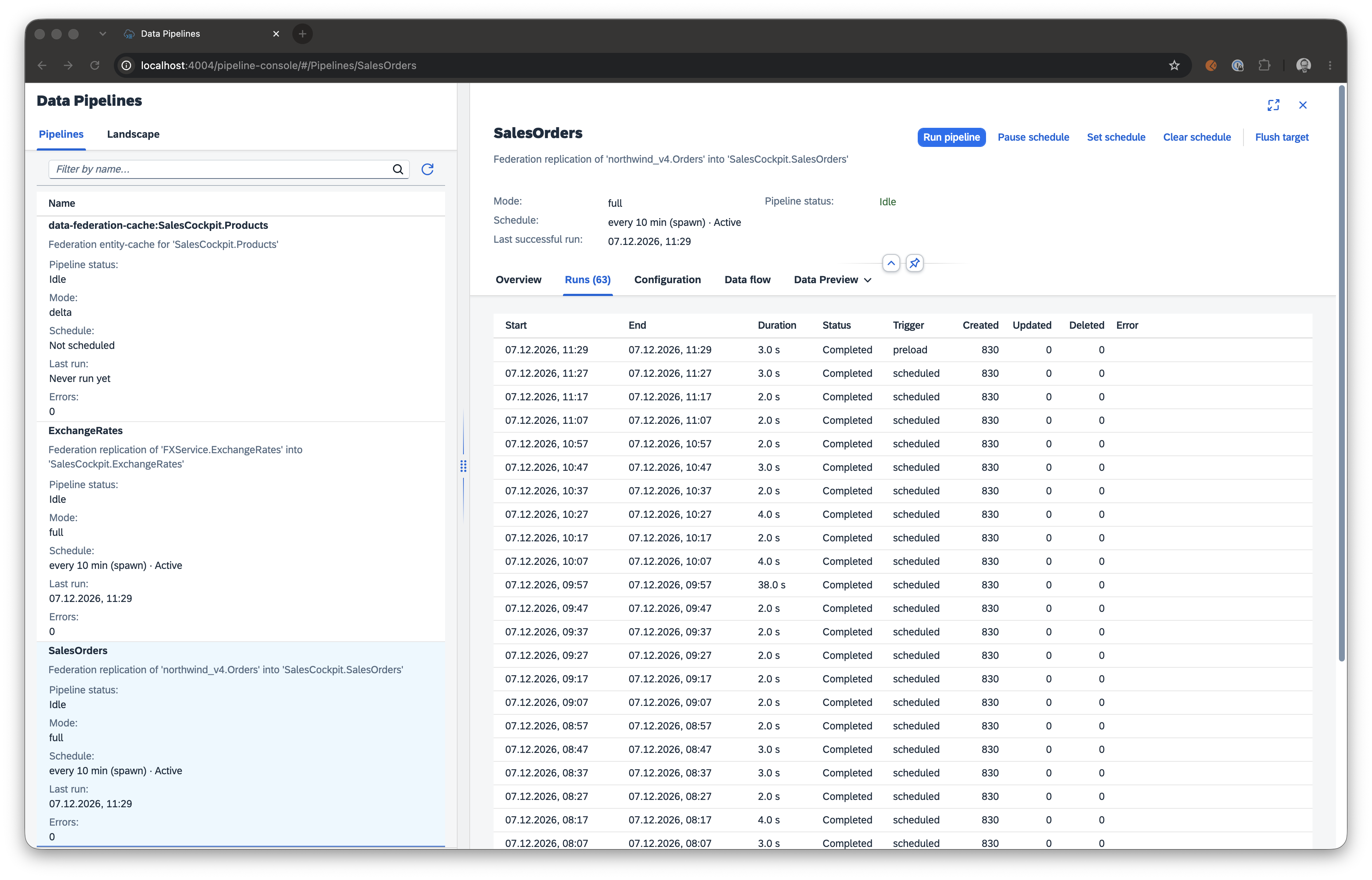
Details: Pipeline Console · Feature activation
Documentation
- Pipeline guide — concepts, recipes, adapters
- Feature catalog
- Programmatic API
- Management service
AI assistants
Coming soon. Agent guidance (AGENTS.md) and task skills for coding assistants will ship in a future release.
SAP data extraction.
@sap/cdsships under the SAP Developer License Agreement (3.2 CAP). Section 1 limits mass extraction from an SAP product to a non-SAP product unless required for interoperability with an SAP product. When pointing a pipeline at an SAP source, stay within that carve-out.