
chalk-css
v0.2.0
Published
Low-fidelity UI primitives for AI-assisted wireframing. One CSS file. Zero decisions.
Downloads
399

Maintainers
 okatarismet
Readme


AI agents currently produce wireframes by writing raw HTML + CSS from scratch — hundreds of tokens per screen, slow to generate, slow to read back.
Chalk replaces that with a fixed vocabulary of ~60 semantic wf- class names. The agent picks class names instead of inventing styles. The output is pure HTML with no custom CSS. A full screen takes 80–200 tokens instead of 800–1,500 — and is just as fast to read as it is to write.
One CSS file. No build step. No framework. No configuration.
Why Chalk?
It's a new abstraction layer. Writing wireframes as raw HTML + CSS forces the AI to invent every rule — colors, spacing, borders, layout. Chalk collapses that into a shared vocabulary. The AI stops generating and starts selecting.
10× fewer tokens, both ways. Custom CSS + HTML runs ~800–1,500 tokens per screen. Chalk runs ~80–200. That saving applies in both directions: generation is faster, and when the agent reads back its own output it spends far less context doing so.
Renders in any browser, instantly. Pure HTML + one CSS file. No build step, no server, no runtime.
Constrained by design. Black and white only. Monospace throughout. No shadows or gradients. Constraints keep outputs looking like wireframes so the focus stays on structure, not aesthetics.
Diffs cleanly. Because every screen uses the same vocabulary, edits ("move the sidebar right", "add a timeline below the kanban") produce a small diff, not a full rewrite.
Works with any AI. Claude, GPT-4, Cursor, any agent framework. Give it the vocabulary once and it produces renderable wireframes on demand.
Screenshots
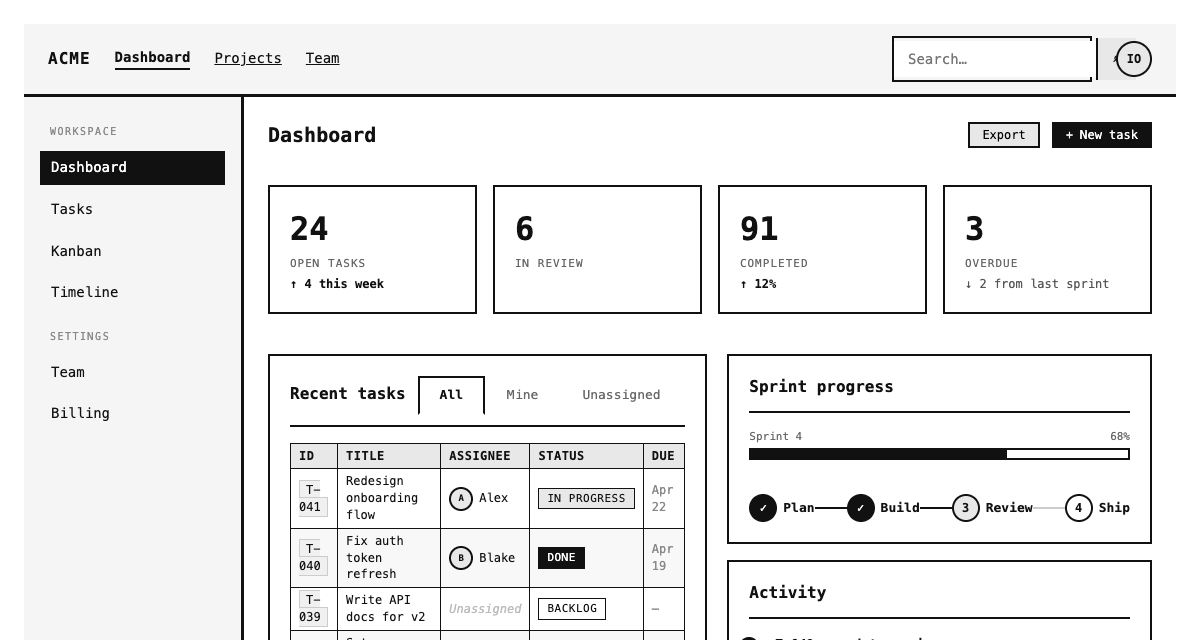
Open demo/index.html in any browser to see all components live — no server needed.
Quick start
npm:
npm install chalk-cssCDN:
<link rel="stylesheet" href="https://unpkg.com/chalk-css/chalk.css">Download: grab chalk.css from this repo and link it directly.
Then use wf- class names in any HTML file — no JavaScript, no PostCSS, no configuration:
<!DOCTYPE html>
<html lang="en">
<head>
  <meta charset="UTF-8">
  <title>My Wireframe</title>
  <link rel="stylesheet" href="chalk.css">
</head>
<body>

<!-- A full search screen. 10 lines. No CSS written. -->
<div class="wf-centered">
  <div class="wf-h1">Dashboard</div>
  <p class="wf-placeholder">Find anything in your workspace</p>
  <div class="wf-searchbar" style="width: 520px">
    <input type="text" placeholder="Search tickets, docs, agents..." />
    <span class="search-icon">⌕</span>
  </div>
  <div class="wf-row">
    <span class="wf-badge">All</span>
    <span class="wf-badge">Tasks</span>
    <span class="wf-badge">Agents</span>
  </div>
  <div class="wf-img" style="width: 520px; min-height: 180px"><span>[ results ]</span></div>
</div>

</body>
</html>
Open in any browser. Done.
Usage: npm & web projects
Import in your bundler entry point (webpack, Vite, Parcel):
import 'chalk-css';Or reference from node_modules directly:
<link rel="stylesheet" href="node_modules/chalk-css/chalk.css">No PostCSS, no purge configuration, no setup — the file is intentionally small. Use wf- class names directly in your HTML:
<div class="wf-centered" style="min-height: 100vh">
  <div class="wf-h2">Sign in</div>
  <div class="wf-col" style="width: 360px; gap: 16px; margin-top: 24px">
    <div class="wf-field">
      <label class="wf-label">Email</label>
      <input class="wf-input" type="email" placeholder="[email protected]" />
    </div>
    <div class="wf-field">
      <label class="wf-label">Password</label>
      <input class="wf-input" type="password" placeholder="••••••••" />
    </div>
    <button class="wf-btn primary full">Sign in</button>
    <div class="wf-muted" style="text-align:center">Forgot password?</div>
  </div>
</div>
Usage: Claude Code
Add a /wireframe slash command to any project so you can generate screens on demand.
Create .claude/commands/wireframe.md in your project root:
# Wireframe

Produce a Chalk wireframe for the described screen.

1. Identify what screen or component is being requested
2. Output a complete HTML file using only wf- class names from chalk.css
3. Do not write custom CSS — use inline style only for width and min-height
4. Black and white only — no color values
5. Link the stylesheet: <link rel="stylesheet" href="path/to/chalk.css">
6. Name the file screen-{name}.html and confirm the path so the user can open it
Then in any Claude Code session:
/wireframe a dashboard for a PM — active agents, sprint progress, quick ticket creationClaude produces a complete screen-dashboard.html that opens in any browser instantly.
For system-level integration (embedding Chalk into an agent's permanent context via system prompt), see AGENT-GUIDE.md.
Design constraints
| Rule | Why |
|------|-----|
| Black and white only | Removes color decisions from the wireframe stage |
| Monospace font | Signals "this is a sketch" — prevents mistaking it for a finished design |
| No shadows, gradients, or decoration | Forces focus on structure and flow |
| Inline style only for width / min-height | Sizing placeholders is legitimate; styling is not |
Component reference
Full HTML snippets for every component: COMPONENTS.md
Contributing
See CONTRIBUTING.md. Every addition must answer: "Would an AI produce better wireframes with this, using fewer tokens?"
License
MIT — Ismet Okatar