
chartli
v1.0.0
Published
CLI for terminal charts from numeric data
Downloads
77


Readme
chartli
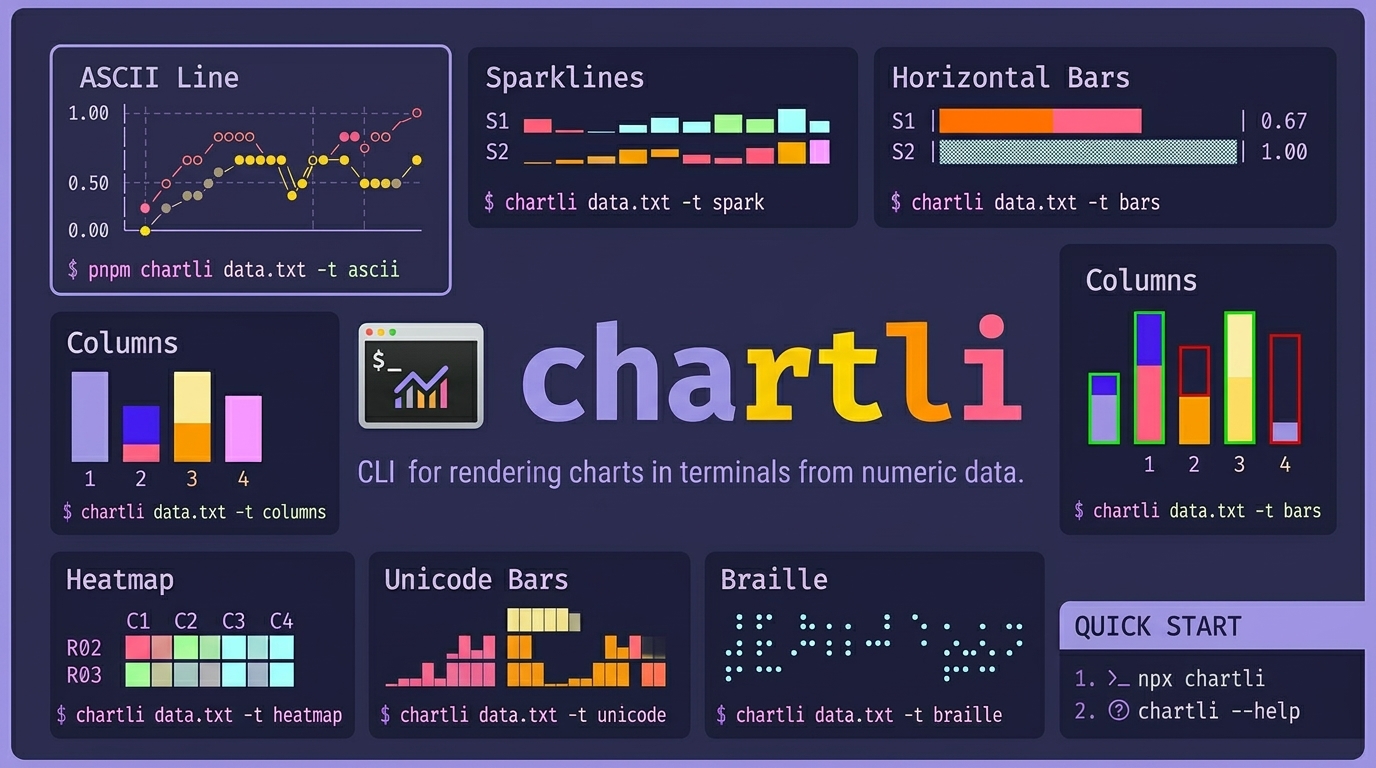
CLI for rendering charts in terminals from numeric text data. chartli turns plain numbers into terminal charts. ascii, spark, bars, columns, heatmap, unicode, braille, svg.
Install
Run instantly:
npx chartli --helpOr install globally:
npm i -g chartliAgent skill install
Install the repository skill for agents:
npx skills add ahmadawais/chartliQuick start:
npx chartli
npx chartli --help
Usage
npx chartli [file] [options]Usage: chartli [options] [file]
Render terminal charts from numeric data
Arguments:
file Input file (reads from stdin if not provided)
Options:
-v, --version Output the version number
-t, --type <type> Chart type: svg, ascii, unicode, braille, spark, bars,
columns, heatmap (default: "ascii")
-w, --width <number> Chart width
-h, --height <number> Chart height
-m, --mode <mode> SVG mode: circles or lines (default: "circles")
--x-axis-label <label> Title to render for the x-axis
--y-axis-label <label> Title to render for the y-axis
--x-labels <labels> Comma-separated labels for x-axis ticks or row labels
--series-labels <labels>
Comma-separated labels for plotted series or categories
--data-labels Show raw values near plotted data when supported
--first-column-x Treat the first numeric column as x labels instead of a
plotted series
--help Display help for commandLabels and metadata
- Use
--x-axis-labeland--y-axis-labelto add axis titles. - Use
--x-labelsfor explicit tick labels. - Use
--series-labelsto replace generic labels likeS1andC1. - Use
--data-labelsto print raw values on or near the plotted data where the renderer supports it. - Use
--first-column-xwhen the first numeric column is a domain likeday,month, oryear.
With --first-column-x, chartli will:
- use the first numeric column as x-axis labels
- use the first header cell as the x-axis title when a header row exists
- use the remaining header cells as series labels
- use the second header cell as the y-axis title for common two-column data
Example:
pnpm chartli examples/assets/core-single-series.txt -t ascii -w 24 -h 8 --first-column-x --data-labelspnpm chartli examples/assets/core-multi-series.txt -t columns -h 8 --first-column-x --series-labels sales,costs,profit --x-axis-label Metrics --y-axis-label Value --data-labelsLabeled chart examples
ASCII line with inferred axis labels and data labels
pnpm chartli examples/assets/weekly-signups.txt -t ascii -w 28 -h 8 --first-column-x --data-labels signups
91 │ ● 87
│ 91 ●
│ 73
│ ● 68
66.5 │ 58 ●
│ ● 49
│42 ●
42 │●
└────────────────────────────
1 2 3 4 5 6 7
dayColumns with explicit axis titles and inferred series names
pnpm chartli examples/assets/weekly-metrics.txt -t columns -h 8 --first-column-x --x-axis-label Metrics --y-axis-label Count --data-labelsCount
176 29 10
█
█
█
█
█ ▓ ▒
█ ▓ ▒
────────────────────
visits trials paid
MetricsSVG with axes, x labels, and point labels
pnpm chartli examples/assets/weekly-signups.txt -t svg -m lines -w 320 -h 120 --first-column-x --data-labels | sed -n '/^<?xml/,$p' > examples/assets/output/weekly-signups-chart.svgThis writes examples/assets/output/weekly-signups-chart.svg.
Types
asciisparkbarscolumnsheatmapunicodebraillesvg
Example data files
examples/assets/core-single-series.txtexamples/assets/core-multi-series.txtexamples/assets/image-data.txtexamples/assets/image-single-series.txtexamples/assets/image-columns-variant.txtexamples/assets/weekly-signups.txtexamples/assets/weekly-metrics.txt
Image chart set (text diagrams)
ASCII Line
pnpm chartli examples/assets/image-data.txt -t ascii -w 24 -h 8 day=● sales=○ costs=◆ profit=◇
1.00 │ ○
│
│ ◇ ◇
│ ◆ ●
0.50 │ ● ◆
│ ◇ ◆ ●
│ ○ ◆
0.00 │◇ ◆ ◇ ◇
└────────────────────────Sparklines
pnpm chartli examples/assets/image-data.txt -t sparkday ▁▂▃▄▅▆
sales ▁▄▂▇▅█
costs ▁▂▄▃▆▅
profit ▁▄▂▇▂▇Horizontal Bars
pnpm chartli examples/assets/image-data.txt -t bars -w 28day |███████████████████ | 0.67
sales |▓▓▓▓▓▓▓▓▓▓▓▓▓▓▓▓▓▓▓▓▓▓▓▓▓▓▓▓| 1.00
costs |▒▒▒▒▒▒▒▒▒▒▒▒▒▒▒ | 0.53
profit |░░░░░░░░░░░░░░░░░░░░░░░ | 0.83Columns
pnpm chartli examples/assets/image-data.txt -t columns -h 8 ▓
▓ ░
▓ ░
█ ▓ ░
█ ▓ ▒ ░
█ ▓ ▒ ░
█ ▓ ▒ ░
█ ▓ ▒ ░
───────────────────────────
day sales costs profitColumns (Variant)
pnpm chartli examples/assets/image-columns-variant.txt -t columns -h 8
         ▓             ░
  █      ▓             ░
  █      ▓             ░
  █      ▓      ▒      ░
  █      ▓      ▒      ░
  █      ▓      ▒      ░
───────────────────────────
 day   sales  costs  profit
Heatmap
pnpm chartli examples/assets/image-data.txt -t heatmap day sales costs profit
R01
R02 ░ ▒ ░ ▒
R03 ░ ░ ▒ ░
R04 ▒ ▓ ░ ▓
R05 ▒ ▒ ▓ ░
R06 ▓ █ ▒ ▓Unicode Bars
pnpm chartli examples/assets/image-data.txt -t unicode day sales costs profit
█
▃ █ ▅ ▅
▃ █ █ ▃ █ █
▂█ █▆█ █▂ █ █
▂██ ▂ ███ ▂ ██ ▃ █ █
▁███ █ ███ █▁██ █ █ █
▁████ █▅███ ▁████ █▁█▁█
█████ █████ █████ █████Braille
pnpm chartli examples/assets/image-data.txt -t braille -w 16 -h 6profit
⠀⠀⠀⠀⠀⠀⠀⠀⠀⠀⠀⠀⠀⠀⠀⠀
⠀⠀⠀⠀⠀⠀⠀⠀⠀⠁⠀⠀⠀⠀⠀⠈
⠀⠀⠀⠀⠀⠀⠀⠀⠀⠀⠀⠀⠀⠀⠀⠀
⠀⠀⠀⠄⠀⠀⠀⠀⠀⠀⠀⠀⠀⠀⠀⠀
⠀⠀⠀⠀⠀⠀⠀⠀⠀⠀⠀⠀⠀⠀⠀⠀
⡀⠀⠀⠀⠀⠀⠁⠀⠀⠀⠀⠀⠁⠀⠀⠀SVG Chart
pnpm chartli examples/assets/image-data.txt -t svg -m lines -w 320 -h 120 | sed -n '/^<?xml/,$p' > examples/assets/output/image-chart.svg<?xml version='1.0'?>
<svg xmlns='http://www.w3.org/2000/svg' width='650' height='120' version='1.1'>
<polyline ... />
<polyline ... />
<polyline ... />
<polyline ... />
</svg>
Examples
All examples are data-file driven from examples/assets/.
Data files
examples/assets/core-single-series.txtexamples/assets/core-multi-series.txtexamples/assets/image-data.txtexamples/assets/image-single-series.txtexamples/assets/image-columns-variant.txtexamples/assets/weekly-signups.txtexamples/assets/weekly-metrics.txtexamples/assets/output/
Core commands
pnpm chartli examples/assets/core-single-series.txt -t ascii -w 24 -h 8pnpm chartli examples/assets/core-multi-series.txt -t sparkpnpm chartli examples/assets/core-multi-series.txt -t bars -w 28pnpm chartli examples/assets/core-multi-series.txt -t columns -h 8pnpm chartli examples/assets/core-multi-series.txt -t heatmappnpm chartli examples/assets/core-multi-series.txt -t unicodepnpm chartli examples/assets/core-single-series.txt -t braille -w 16 -h 6pnpm chartli examples/assets/core-multi-series.txt -t svg -m lines -w 320 -h 120 | sed -n '/^<?xml/,$p' > examples/assets/output/core-chart.svg
Image commands
pnpm chartli examples/assets/image-data.txt -t ascii -w 24 -h 8pnpm chartli examples/assets/image-data.txt -t sparkpnpm chartli examples/assets/image-data.txt -t bars -w 28pnpm chartli examples/assets/image-data.txt -t columns -h 8pnpm chartli examples/assets/image-columns-variant.txt -t columns -h 8pnpm chartli examples/assets/image-data.txt -t heatmappnpm chartli examples/assets/image-data.txt -t unicodepnpm chartli examples/assets/image-data.txt -t braille -w 16 -h 6pnpm chartli examples/assets/image-data.txt -t svg -m lines -w 320 -h 120 | sed -n '/^<?xml/,$p' > examples/assets/output/image-chart.svg
Labeled commands
pnpm chartli examples/assets/weekly-signups.txt -t ascii -w 28 -h 8 --first-column-x --data-labelspnpm chartli examples/assets/weekly-metrics.txt -t columns -h 8 --first-column-x --x-axis-label Metrics --y-axis-label Count --data-labelspnpm chartli examples/assets/weekly-signups.txt -t svg -m lines -w 320 -h 120 --first-column-x --data-labels | sed -n '/^<?xml/,$p' > examples/assets/output/weekly-signups-chart.svg
Run grouped examples
pnpm run example:kitchen-sinkpnpm run example:image-set:kitchen-sinkpnpm run example:labeled:kitchen-sinkpnpm run example:all-kitchen-sink
Run all examples
Image-set chart run:
pnpm run example:image-set:kitchen-sinkCore + image run:
pnpm run example:all-kitchen-sinkLicense
Apache-2.0 by Ahmad Awais built with Command Code.