
chatwoot-discord-relay
v0.52.0
Published
Run Chatwoot support from a Discord forum with humans and AI agents: a post per conversation, slash commands, AI drafts, and AI triage.

Maintainers
 phala-npm
Readme
chatwoot-discord-relay


Mirror every Chatwoot conversation into a Discord forum post, and answer customers from Discord with slash commands and buttons. It is for support teams that already work in Discord and use Chatwoot as their help desk, and who want humans and AI agents to handle tickets together without leaving Discord. It runs on Cloudflare Workers (the Free plan is enough).
- One forum post per conversation, kept in sync: every message, private note, and activity line, tagged by account, status, assignee, topic, and priority; resolved posts are archived.
- Work from Discord. Slash commands and each ticket's card reply, add notes, assign, label, snooze, resolve, and block, with the agent's own Chatwoot token, so Chatwoot's permissions and audit trail apply (Commands and buttons).
- Ready for AI workflows. Any Discord bot joins as an AI agent without integration code: it is called on each customer message, reads the whole ticket in its post, and proposes a reply that a human sends with Reply with draft. Budgets per ticket and per hour bound its cost (Connecting an AI agent).
- AI triage with chatwoot-router. A separately deployed Worker assigns owners, adds topic and kind labels, and optionally sends canned replies or sets tickets aside. The relay holds pending bot conversations until their turn ends, and calls the Discord triage bot only for unanswered messages on open tickets (Routing).
- A support queue. Every hour, the tickets waiting for a reply or an assignee, pinging their assignees and escalating long-unassigned ones (Support queue).
- Reliable and secure. Work is queued durably and retried, and a sweep every 5 minutes catches up on new messages a missed webhook left out; webhooks and interactions are signature-checked, mentions are locked down, and logs hold no message bodies (Security model).
- Private configuration. Deploy from a repository of your own with the npm package, published with provenance (Deploy).
[!NOTE] An independent, community-maintained integration. It is not affiliated with, endorsed by, or supported by Chatwoot or Discord.
Status: in production use. Versions are 0.x: per SemVer,
a minor release may change configuration or setup; the changelog says what to
do when it does.
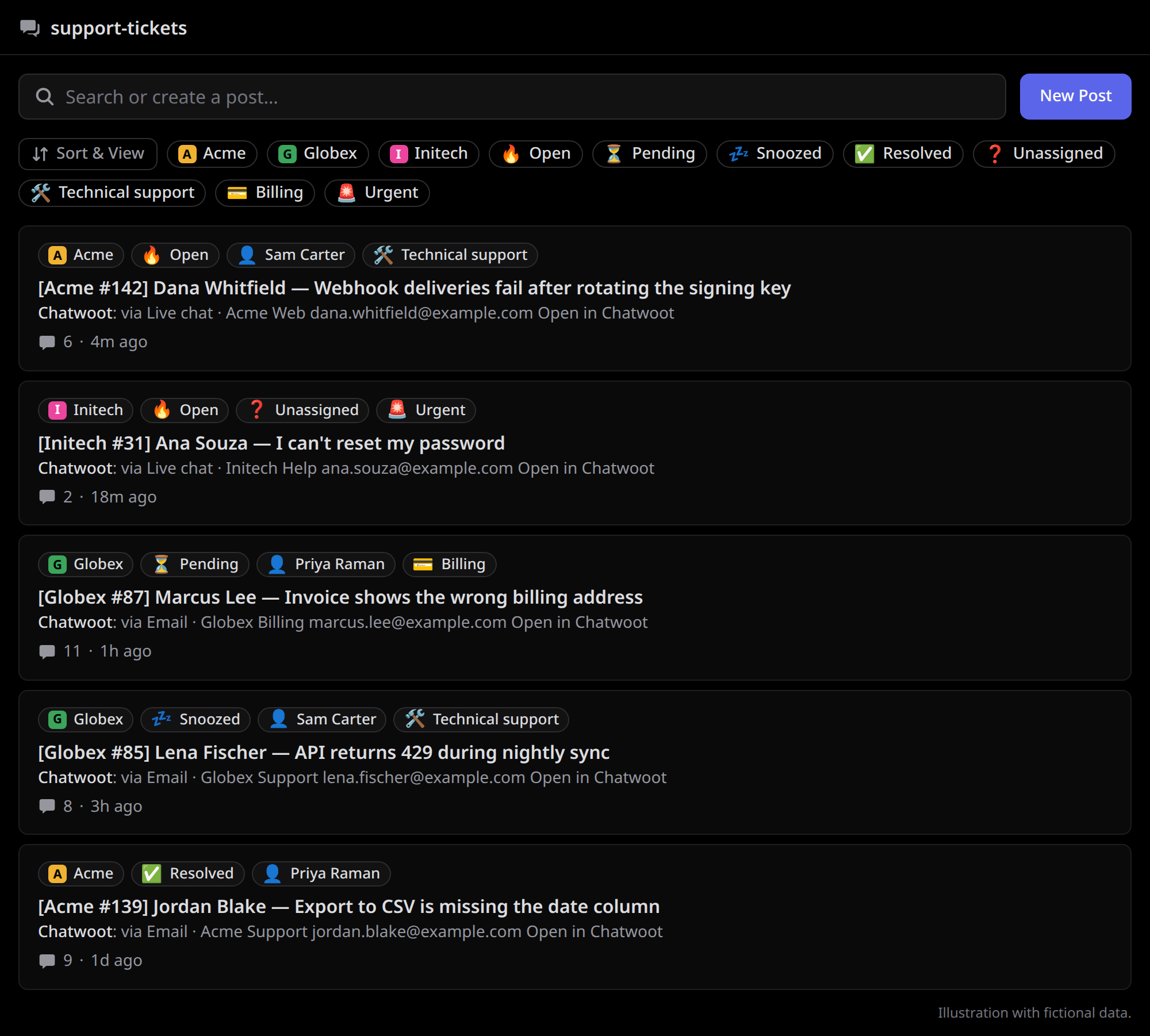
Each conversation is a forum post, tagged by account, status, assignee, topic, and priority.
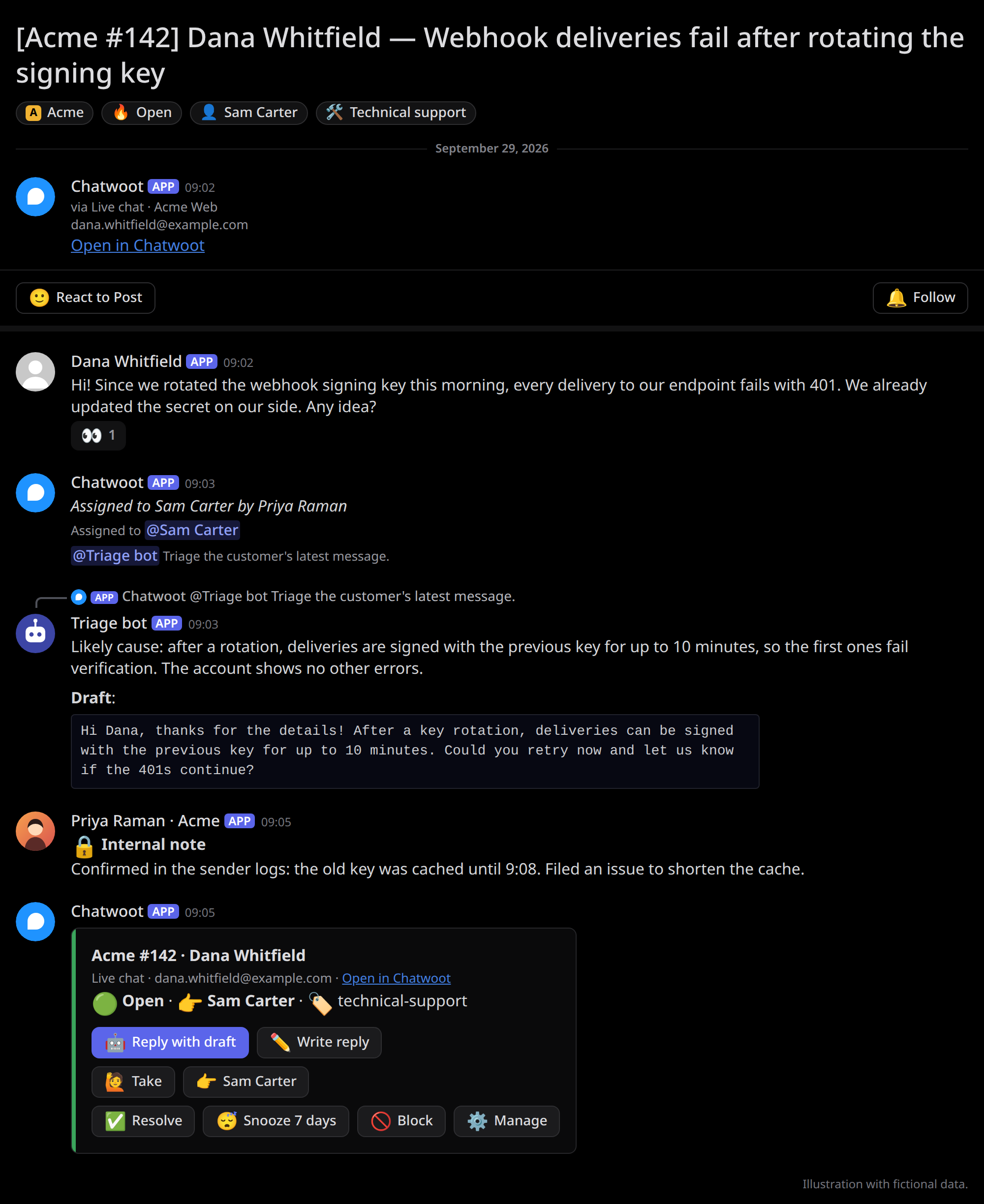
Inside a post: a notice after the customer's message calls the triage bot, whose answer carries a draft; the ticket's card at the bottom offers Reply with draft and the other actions. Illustrations with fictional data.
Contents
- How it works
- Deploy
- Commands and buttons
- Configuration reference
- Routing, Triage bot hook, Support queue
- Security model
- Limits and the Workers Free plan
- Development
- More: Connecting an AI agent, How conversations are relayed, Operations (existing Chatwoot, cutover, recovery), Internals
How it works
Chatwoot ──webhook──▶ Worker ──▶ Conversation Durable Object ──▶ Discord forum post (via webhook)
Discord ─/command───▶ Worker ──▶ Conversation Durable Object ──▶ Chatwoot REST API (as that agent)
Cron (every 5 min) ─▶ Worker ──▶ Hub Durable Object ──▶ sweep: hands missed conversations to their objects- One post per conversation. Its title is
[<Account> #<id>] <customer> — <subject or first message>. It opens with a ticket header (channel, inbox, customer contact, the customer's earlier tickets, "Open in Chatwoot"), every message follows under its sender's name (customers, agents, 🔒 private notes, activity lines), and it ends with the ticket's card: status, assignee and labels, how long the customer has waited for a reply and, when snoozed until a time, when it wakes, with buttons. Forum tags follow the conversation (account, status, assignee, topic, priority, labels); resolved posts are archived. How conversations are relayed has the details. - Email inline images that Chatwoot stores under its own Active Storage URL are shown as image attachment links; duplicate
attachment URLs and third-party tracking images are ignored. Customer messages longer than
relay.maxChunkskeep their complete body in amessage.txtupload on the truncation note when Discord accepts it. - Work from the post. The card's buttons and commands run in Chatwoot with the agent's own access token, so Chatwoot's permissions and audit trail apply. Talking in a post never reaches the customer; only commands do.
- AI drafts, humans send. A live customer message on an open ticket that no public reply has answered yet
calls the triage bot set in
triage.userId, within hourly budgets, in a notice after everything posted with it; history relayed later, automatic email, and resolved or snoozed tickets stay silent (Internals). The bot answers in the post with a draft, and a human sends it with Reply with draft or Apps → Reply with this. See Connecting an AI agent. - Pings. Live customer messages ping the linked assignee. An agent bot is never a person: a ticket assigned to one shows as Unassigned.
- AI triage. With chatwoot-router,
a ticket is the inbox bot's while it is pending. When the inbox is linked to a bot, a pending ticket's customer
messages are held until the bot's turn ends, then posted;
/pendinghands a ticket back to the bot (routing). - Support queue. Optionally, every hour a message lists the tickets waiting for a reply or an assignee (support queue).
Design choices:
- Chatwoot stays the system of record. Discord is where the team, people and bots alike, works. The post URL
is stored in the conversation's link attribute (
relay.linkAttribute, defaultdiscord_thread), and the header links back to Chatwoot. - An AI agent joins without code changes. The call is a literal
<@bot>with notifications suppressed, so a Discord bot that reacts to mentions, and reads the messages before one, wakes up for customer messages and nothing else. - Cost and abuse are bounded. The bot is called at most
triage.perConversationPerHourtimes per conversation andtriage.perHourtimes in total each hour; beyond that a visible note says it was not called. Messages from blocked contacts are never relayed. - Reliable and isolated. Chatwoot sends each webhook once, without retry, so webhooks are only triggers: the conversation's own Durable Object reads Chatwoot's API and retries until it succeeds, and a sweep every 5 minutes finds what a missed webhook left out. One slow conversation never delays another, and a command runs next in its conversation. Internals has the guarantees and their limits.
Deploy
You need a Cloudflare account, a Chatwoot instance (v4.18 or later) reachable from the internet, and a Discord server where you can add an application and a forum channel. To install on a Chatwoot that already has conversations, or to replace another relay, read Operations first.
1. Discord
- Create an application at https://discord.com/developers/applications; note its Application ID and Public Key, and create a bot token. No privileged intent is needed: Reply with draft takes the draft the triage bot's hook sends (see Triage bot hook). The Message Content intent only lets it read an answer whose draft was not kept (an app in 100 or more servers, or exposed to a large one, needs Discord's review first).
- Invite the bot with the
botandapplications.commandsscopes. - Create a forum channel. Give the bot View Channels, Read Message History (Use
draft), Manage Threads (tags, archiving), and Manage Webhooks (it creates a webhook,
named
Chatwoot, that posts the messages; it only uses a webhook its own application created). - Create the forum tags you want: one per account, one per status (
Open,Pending,Snoozed,Resolved), one for unassigned posts, one per agent, one per topic value, and any priorities and Chatwoot labels you want to see. A forum has at most 20 tags. Their names are only shown to people: the relay binds each tag by its id inforumTags, so a tag can be renamed freely. List the ids, afternpm ciin a checkout, withDISCORD_BOT_TOKEN=... npm run forum-tags -- --forum <forum channel id>. If the forum's Require tags setting is on, make sure every post gets at least one tag (for example the account tag), or Discord rejects the new post.
2. Chatwoot
- Create a relay user (e.g. "Discord Relay") that is an agent in every relayed inbox, or an administrator, and copy its access token (Profile → Access Token). It only reads, and writes the link attribute.
- In each account, add a conversation custom attribute
discord_threadwith display type Link (or setrelay.linkAttributeto another key, or""to disable). - Each agent who will use commands creates their own access token.
The account must have the API/webhooks feature enabled (it is by default on self-hosted).
3. Cloudflare
Deploy with the Cloudflare CLI (cf, in beta), from a
checkout of this repository or from a repository of your own. Requirements: Node 24 (24.15 or
later) and npm (the version in packageManager in package.json); sign in once with
npx cf auth login.
The secrets are described in .dev.vars.example and the
secrets table. Copy it to a file outside the repository and fill it in, with {} for
CHATWOOT_WEBHOOK_SECRETS until step 4 and {"<discord user id>":"<chatwoot token>"} for
CHATWOOT_AGENT_TOKENS, then pass it to the first deploy with --secrets-file. Later deploys keep
the secrets; to change some, deploy again with a file that holds only those (the others are kept).
Every configured account needs a webhook secret: until step 4 supplies them, configuration is not ready and
/healthz returns 503.
Do not leave the file lying around: it holds every credential.
From a checkout. Install dependencies at the workspace root, then deploy the package. Run npm and build commands inside Docker as shown in the root contribution guide.
npm ci
cd packages/chatwoot-discord-relay
# Replace the placeholder CONFIG in cloudflare.config.ts (see the configuration reference).
npx cf deploy --secrets-file <secrets file>
From a repository of your own, to keep your configuration private: depend on the
chatwoot-discord-relay package,
published from this repository's releases with npm provenance, at an exact version. Your project
needs cf, vite, and @cloudflare/vite-plugin as dev dependencies, a vite.config.ts like this
repository's, src/index.ts with export { Conversation, default, Hub } from "chatwoot-discord-relay";, the
configuration as JSON with comments in a file of its own (config.jsonc), and a
cloudflare.config.ts that binds a KV namespace and the
configuration's key instead of CONFIG:
import { bindings, defineConfig, exports, triggers } from "cf/config";
import { storedConfig } from "chatwoot-discord-relay/stored-config";

export default defineConfig({
  accountId: "<account id>",
  worker: {
    name: "chatwoot-discord-relay",
    entrypoint: "src/index.ts",
    compatibilityDate: "2026-08-15",
    domains: ["<worker host>"],
    triggers: [triggers.scheduled({ schedule: "*/5 * * * *" })],
    exports: {
      Hub: exports.durableObject({ storage: "sqlite" }),
      Conversation: exports.durableObject({ storage: "sqlite" }),
    },
    env: {
      HUB: bindings.durableObject({ worker: "chatwoot-discord-relay", exportName: "Hub" }),
      CONVERSATION: bindings.durableObject({ worker: "chatwoot-discord-relay", exportName: "Conversation" }),
      CONFIG_STORE: bindings.kv({ id: "<namespace id>" }),
      CONFIG_KEY: bindings.text(storedConfig(new URL("config.jsonc", import.meta.url)).key),
    },
  },
});
Store the configuration, then deploy. In CI, follow Use cf in CI
without --mode (this configuration has no modes): npx cf build, then npx cf deploy --prebuilt after storing
the configuration. By hand:
npx cf kv namespaces create --title chatwoot-discord-relay-config   # once
npx chatwoot-discord-store-config config.jsonc --namespace-id <namespace id> && npx cf deploy
Both validate the file. Its key is derived from its content, so each version reads the configuration
it was deployed with, also after a rollback (stored keys are kept). KV is eventually consistent: a
read that fails is retried with the next request. This is also the way to deploy a configuration
larger than the 5 KB a var holds; in this repository, the same command is
npm run -s store-config --, and cloudflare.config.ts imports ./scripts/stored-config.ts.
Whichever way you deploy, check the Worker: curl https://<worker>/healthz answers
{"ok":true}, or 503 while the configuration or a secret is invalid; the reason is in Workers
Logs. It checks the configuration only: send a test message to check that Chatwoot, the Worker,
and Discord reach each other.
4. Connect
- In the Discord application, set Interactions Endpoint URL to
https://<worker>/discord/interactions. Discord verifies it with a signed request, so the Worker must be deployed first. - Commands register themselves in every configured forum's server within an hour of a deploy,
using the Worker's bot token. Adding or moving a configured forum also triggers registration.
Unchanged commands and forum channel ids make no Discord calls; failures are logged and retried
the next hour. For local setups, the registration script remains available from a checkout
after
npm ci:DISCORD_BOT_TOKEN=... npm run register-commands -- --application <app id> --guild <guild id> - In each Chatwoot account, add a webhook (Settings → Integrations → Webhooks) for
https://<worker>/chatwoot/webhook, subscribed tomessage_created,message_updated(deleted messages, responses to interactive messages, and replies that could not be delivered),conversation_updated(assignee, topic, priority, and labels), andconversation_status_changed. Then store the webhook secrets by account id,{"<account id>":"<webhook secret>"}, in theCHATWOOT_WEBHOOK_SECRETSsecret.
Commands and buttons
Commands and buttons work inside a ticket post, for Discord users linked in agents[] who have a
token in CHATWOOT_AGENT_TOKENS; others get a refusal only they see.
The card. Every post ends with the ticket's card, coloured by its status: the ticket and its
customer; the channel, the customer's email or phone number, and a link to Chatwoot; the status,
the assignee, and the labels. With accounts[].cardNoteBotId, the latest private note of that agent bot follows (up
to 2,000 characters): a service's own record about the ticket, such as what it knows of the customer, kept in view
while the note itself stays in the post. Then a row of buttons per concern:
- Answering: Write reply, led by Reply with draft (highlighted) after a triage bot's answer with a draft.
- Who owns the ticket: Take, and Assign to…, named after the assignee once there is one.
- Its state: Resolve and Snooze 7 days while it is open or pending; Reopen and Resolve while it is snoozed; Reopen once it is resolved; then Block and Manage.
The card is edited when the ticket changes (at once after a button or command), and moves to the bottom (posted again, the previous one deleted) when the relay posts messages or the triage bot reports an answer, so a post has one card, under the latest of those (a message posted in Discord by anyone else does not move it). After a triage bot's answer with a draft, reported by the bot's hook, the card moves under the answer and is led by Reply with draft until the draft is used (sent with Reply with draft, or Reply with this on its answer, edited or not); a teammate's request for a follow-up or a rewrite gets one too. Buttons under older messages keep working, and the commands work everywhere.
| Command | Card button | Effect in Chatwoot |
|---|---|---|
| /reply [message] [attachment] | Write reply | Without options, an editor with a message field and an optional upload field; with either option, sends it at once. Sends to the customer; an unassigned conversation is assigned to the sender. Refused when the channel does not accept a reply (Chatwoot's can_reply, e.g. after WhatsApp's 24-hour window). With chatwoot.sendAsAgent, the editor's Send from my email address sends an email reply from the agent's own mailbox name on the inbox's domain ([email protected] answering [email protected] sends as [email protected]); it needs a Chatwoot build that reads content_attributes.send_as_agent (Phala-Network/chatwoot, phala/* branches), so it is off by default. |
| Apps → Reply with this (message menu) | Reply with draft | The /reply editor, prefilled. Reply with this: from the triage bot, the last code block of its message (none: no draft); from anyone else, the last code block or the whole message. Reply with draft: the draft the hook sent, or else the answer's last code block read from Discord, which needs the Message Content intent; without it, it links to the answer for Reply with this. |
| /note [message] [attachment] | | Like /reply, for a private note. |
| /resolve, /reopen | Resolve, Reopen | Change the status. |
| /pending | | Hand back to the inbox bot; ordinary pending status when no bot is linked. |
| /snooze [until] | Snooze 7 days | Snooze for 7 days (default, and the button) or for an hour. The card shows when it wakes. A reply from the customer reopens it early. |
| /priority <level> | | Set the priority (Urgent, High, Medium, Low), or clear it with None. |
| /assign [agent] | Take, Assign to… | Assign to yourself (Take) or another linked Discord user, who must be an agent of the account. Assign to… shows you a menu of the account's agents (and Unassigned), and the menu turns into the result. |
| /unassign | | Remove the assignee, like choosing "None" as the assignee in Chatwoot. |
| /label add <label>, /label remove <label> | | Add one of the account's labels, or remove one of the conversation's; the other labels stay. The name is matched in lower case, as Chatwoot stores labels. |
| /block | Block | Like Chatwoot's "Block contact": resolves the conversation and blocks the contact, so their future messages are muted. The button asks you to confirm first (only you see the question). |
| /unblock | | Like Chatwoot's "Unblock contact": their new messages are posted again (messages received while blocked are not). The status is unchanged. |
| | Manage | A card only you see, to change the assignee, the label, and the status (below). |
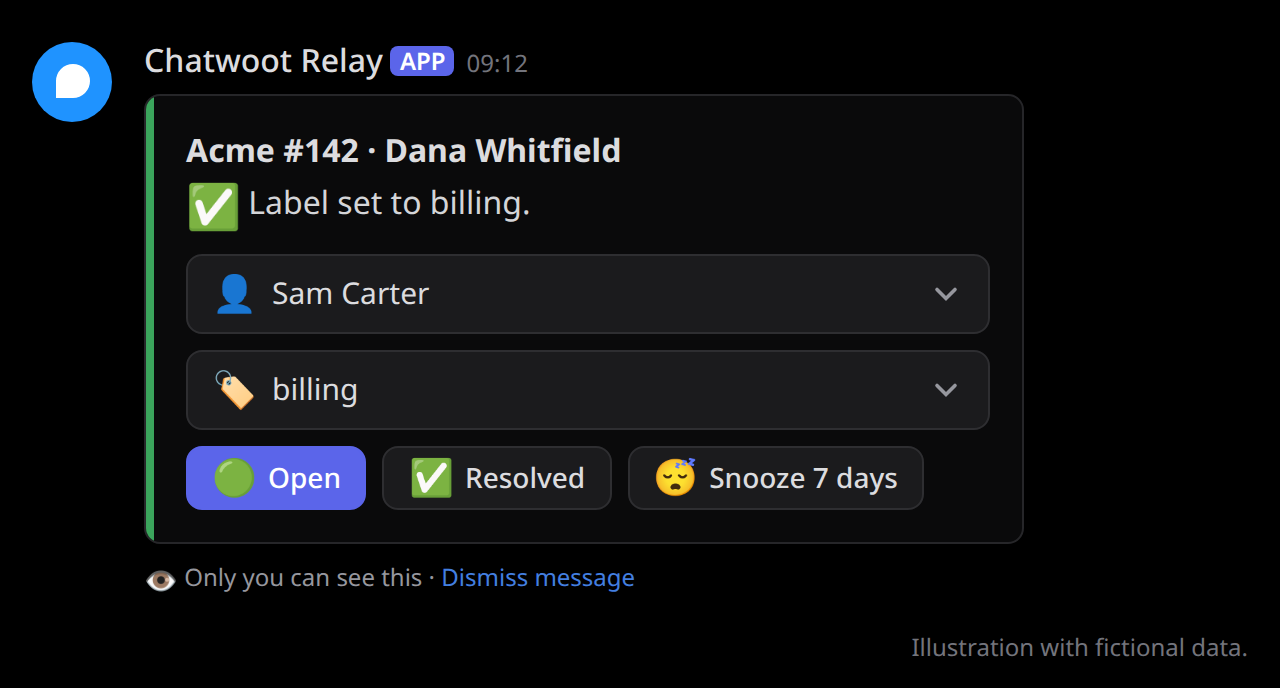
Manage opens a card only you see, drawn with the ticket as it is and coloured by its status:
menus for its assignee and its label (the card sets the one topic label: choosing one replaces
the ticket's labels except its kinds), and Open, Resolved, and Snooze 7 days
buttons with the current status highlighted. A change is made at once, and the
card is drawn again with the result; a change someone else makes shows the next time it is
drawn. A menu lists at most 25 choices (the current assignee and label among them; a label
longer than a menu option can be is named in the menu's placeholder instead, and changed in
Chatwoot); assign other linked agents with /assign (agents not linked to Discord in Chatwoot),
and set priority, "pending", and several labels with /priority, /pending, and /label.
A command that changes the ticket answers only when it fails, in a message only the invoker sees: the post shows
what it did (the card updates in place, then Chatwoot's activity line follows). A button or a submitted editor
acknowledges without a message; a slash command's ephemeral "thinking…" is deleted once the change is done, and a menu it came
from (Assign to, Block's question) goes with it. The Manage panel and Assign to's menu show as before. A slash
command's message option is a single line of text and attachment is one file: use the editor
(no options) for multi-line text or several files. Chatwoot's other snooze options reopen at a
time of day in the agent's browser time zone, which Discord does not share; use Chatwoot for
those. Discord does not allow commands in an archived post: in a resolved post, first send any
message, which unarchives it. The relay archives it again on its next update while the
conversation is resolved.
Configuration reference
Non-secret settings live in CONFIG in cloudflare.config.ts, validated at startup; an
unknown key (for example a typo) makes it invalid. The committed values are placeholders to
replace. A var holds at most 5 KB (Workers limits):
a larger configuration goes in a KV namespace bound as
CONFIG_STORE, under the key in the CONFIG_KEY var, as when deploying
from a repository of your own. Set CONFIG or CONFIG_KEY, not both.
| Key | Type and constraints | Default | Meaning |
|---|---|---|---|
| chatwoot.baseUrl | http(s) URL | required | Chatwoot base URL for API calls. |
| chatwoot.publicUrl | http(s) URL | baseUrl | Base URL for dashboard links posted in Discord. |
| chatwoot.sendAsAgent | boolean | false | The Chatwoot build sends email replies with content_attributes.send_as_agent from the agent's own address; the reply editor offers Send from my email address. |
| accounts[] | at least one; unique id | required | Relayed Chatwoot accounts. Accounts may share a forum. |
| accounts[].id | integer > 0 | required | Chatwoot account id. |
| accounts[].name | non-empty string | required | Shown in post titles ([<name> #12] …) and command menus. |
| accounts[].forumChannelId | Discord id (17–20 digits) | required | The forum channel of the account's posts. |
| accounts[].inboxIds | non-empty array of integers > 0 | every inbox | Relay only conversations of these inboxes. |
| accounts[].cardNoteBotId | integer > 0 | unset | The account's agent bot whose latest private note the card shows (the card). |
| agents[] | unique discordUserId, unique chatwootUserId | [] | Links Discord users to Chatwoot agents: commands, assignee pings, mentions in private notes, /assign targets, and the Discord avatar on the agent's messages. |
| agents[].discordUserId | Discord id (17–20 digits) | required | The agent's Discord user. |
| agents[].chatwootUserId | integer > 0 | required | The agent's Chatwoot user id, the same in every account: the id from GET /api/v1/profile with the agent's own access token, or from an administrator's GET /api/v1/accounts/<account id>/agents. |
| forumTags | object: forum channel id → (key → tag id) | {} | The forum tags posts get, by what each tag stands for. Keys: account:<account id>, status:open, status:pending, status:snoozed, status:resolved, assignee:<Chatwoot user id>, assignee:none, topic:<value>, priority:urgent, priority:high, priority:medium, priority:low, label:<label>. Tag ids come from npm run forum-tags. |
| triage.userId | Discord id (17–20 digits) | unset | Discord user id of an AI agent (triage bot) to call after customer messages. Unset: no call. |
| triage.name | 1–100 characters | Triage bot | Name used in budget notes. |
| triage.perConversationPerHour | integer ≥ 1 | 5 | Calls of the triage bot per conversation each hour. |
| triage.perHour | integer ≥ 1 | 30 | Calls of the triage bot in total each hour. |
| relay.maxChunks | integer 1–10 | 4 | Discord messages per Chatwoot message before truncation. Incoming customer messages that exceed this limit include the complete UTF-8 body as message.txt on the truncation note when Discord accepts the upload. |
| relay.topicAttribute | non-empty string | topic | Conversation custom attribute used as a topic tag. |
| relay.linkAttribute | string | discord_thread | Conversation custom attribute that receives the post URL ("" disables it). |
| relay.startAfterMessageId | integer ≥ 0 | 0 | Messages with an id at or below this are never relayed (cutover watermark, see Operations). |
| relay.maxAttempts | integer ≥ 1 | 5 | Attempts before a message Discord refuses as invalid is skipped with a notice. |
| relay.subrequestBudget | integer 20–1000, and ≥ relay.maxChunks + 34 | 45 | Outbound requests per alarm or command-registration invocation (Free plan limit: 50). Registration needs 1 + distinct forums + distinct servers, plus any retries. The minimum for alarms includes one retry if a long-message file upload falls back to the truncation link (src/relay/limits.ts). |
| avatars.chatwoot | https URL | <publicUrl>/favicon-512x512.png | Avatar of activity lines, cards, notices, agent bots without an https Chatwoot avatar, and agents with neither a linked Discord user nor an https Chatwoot avatar. |
| avatars.contact | https URL | Gravatar "mystery person" | Avatar of customers without an https avatar in Chatwoot. |
| queue | object | unset | The hourly support queue. Unset: off. Requires relay.subrequestBudget ≥ 6 × accounts + 4. |
| queue.channelId | Discord id (17–20 digits) | required | Channel or forum post the queue is posted in. The bot needs Send Messages there (Send Messages in Threads for a post). |
| queue.escalationRoleId | Discord id (17–20 digits) | unset | Role pinged for tickets unassigned too long. To ping a role that is not mentionable, the bot needs Mention @everyone, @here, and All Roles in the channel. Unset: no escalation. |
| queue.escalationUserId | Discord id (17–20 digits) | unset | A user pinged instead of a role (set one of the two). |
| router | object | unset | Labels to preserve for the separate chatwoot-router; bot-inbox discovery needs no routing account list. |
| router.keepLabels | array of lower-case label names | [] | Every kind label Manage keeps when replacing or clearing a topic, including older tickets. |
| reconcile.lookbackSeconds | integer ≥ 60 | 3600 | Minimum sweep window (conversations with activity within it are checked). Messages older than this are relayed without notifications. |
| reconcile.maxCatchUpSeconds | integer ≥ 60 | 604800 (7 days) | Maximum sweep window after downtime. |
| attachments.maxFiles | integer 0–10 | 10 | Files per /reply or /note (0 hides the editor's upload field). |
| attachments.maxFileBytes | integer > 0 | 26214400 (25 MB) | Size cap per file (files are held in memory). |
| attachments.maxTotalBytes | integer 1–83886080 (80 MB) | 52428800 (50 MB) | Size cap per command. |
Secrets
Worker secrets, never in the configuration, also validated at startup:
| Secret | Format | Meaning |
|---|---|---|
| DISCORD_BOT_TOKEN | non-empty | The Discord application's bot token. |
| DISCORD_PUBLIC_KEY | 64 hex characters | The Discord application's public key (verifies interactions). |
| CHATWOOT_RELAY_TOKEN | non-empty | Access token of the Chatwoot user the relay reads as (an agent in every relayed inbox, or an administrator). |
| CHATWOOT_WEBHOOK_SECRETS | JSON object, {"<account id>":"<secret>"} | Required for every configured account; missing entries fail configuration validation. |
| CHATWOOT_AGENT_TOKENS | JSON object, {"<Discord user id>":"<token>"}; optional, default {} | Each linked agent's own Chatwoot access token; commands act with it. |
| TRIAGE_HOOK_SECRET | 32+ characters; optional | Signs the triage bot's hook (triage bot hook). Unset: the route is off. |
Routing
chatwoot-router is a separate Worker that runs as each account's native Chatwoot agent bot and routes new tickets with TypeSafe's System One API (Jev). The two Workers coordinate only through Chatwoot's status: a ticket is the bot's while it is pending, and people's otherwise.
The relay needs no bot credentials. It finds an inbox's bot with Chatwoot's GET inboxes/{id}/agent_bot (its
user token must see every relayed inbox) and holds a customer message while that bot's ticket is pending. The
message is posted once the turn ends: at once on the status webhook, or by the conversation's own recheck every
five minutes. Disconnecting the inbox's bot ends the holding. The relay keeps its own account webhook, including
conversation_status_changed. List the router's kind labels in router.keepLabels, so Manage keeps them
when it sets a topic.
Upgrading from a relay with built-in routing (0.28.0 or earlier) and rolling back are described in Operations and the router's upgrade and rollback instructions.
Triage bot hook
The Worker does not see Discord messages, so a triage bot's side reports each answer once it is
in the post: POST
/triage/answered with {"threadId":"<post id>","answerId":"<answer message id>","replyTo":"<the
message it answers>","draft":"<the reply draft>"}, signed like a Chatwoot webhook (x-timestamp, Unix seconds, and x-signature,
sha256= and the hex HMAC-SHA256 of <timestamp>.<body> with TRIAGE_HOOK_SECRET). The Worker
keeps the draft for 14 days and moves the post's card under the answer, led by Reply with draft,
once per answer (a repeated call adds nothing), while the message it answers is the customer's
latest (an answer to an earlier one, or older than one already reported, changes nothing). Report only answers that
have a draft, and only after they were sent, so the card follows them (right after the answer unless another message
came in between). The hook is a convenience: if a call is lost, the card offers no draft, and Reply with this still works. See Connecting an AI agent for the agent's side.
Support queue
With queue, the cron run at minute 0 of every hour posts a message in queue.channelId that lists
the open tickets of every account whose customer waits for a reply (Chatwoot's waiting_since) or
that have no assignee, longest wait first. Its header counts the open tickets waiting for a reply
and those with no assignee; each line is the ticket's post (or its dashboard link), when the customer
asked (a Discord timestamp each reader sees as relative, "3 hours ago"), and its assignee, whom it pings when they are a linked agent. A
ticket with no assignee pings queue.escalationRoleId (or escalationUserId) after its customer
has waited 1, 2, 4, 8, and 16 hours, and every 24 hours after that, once per step, until someone
takes it or replies. Snoozed tickets (with when they wake, if snoozed until a time) and pending bot turns are listed after them, marked 💤 and 🤖 respectively,
without pings or escalations. Once Chatwoot wakes a snoozed ticket, it is treated like any other open ticket:
the normal counts, pings, and escalation rules apply. Pending age uses the existing waiting_since; it is not the current turn's start.
Nothing is posted when there is no such ticket. A line holds no customer text, and mentions are
allowed from the tickets' fields only, never from text. The queue reads up to four pages (100
tickets) of open tickets, one page (25) of snoozed and one page of pending per account and takes at most four
messages; tickets beyond that are counted at the end.
Security model
- Chatwoot webhooks: HMAC-SHA256 (
X-Chatwoot-Signature,sha256=+ HMAC of"<timestamp>.<raw body>") with a per-account secret, verified in constant time (WebCrypto), ±5 minute timestamp window, and the signing account must match the payload. A replayed webhook only queues a sync, which changes nothing when the post is up to date. - Discord interactions: Ed25519 signature verified (
discord-interactions) before parsing; unsigned requests, and requests signed more than 5 minutes ago, get 401. A command is queued once per interaction id, so a replayed request never runs it again. - A command runs with the invoker's own Chatwoot token only if that token's user is the Chatwoot
user
CONFIGlinks them to; a token stored for the wrong Discord user does nothing. - Chatwoot and Discord API requests never follow redirects, which could carry a token to another host.
- Commands act only for linked users; others get an ephemeral refusal. The ticket is resolved from the stored post → conversation mapping, never from the post title.
- Discord messages are sent with
allowed_mentionslocked down; only linked agents can be pinged: the conversation's assignee, and agents mentioned in a private note; the support queue also pings its configured escalation role or user. Customer text cannot call a bot either (see Message content). - Attachments are fetched only from Discord's CDN (
cdn.discordapp.com,media.discordapp.net) over HTTPS, without following redirects, with size caps. - Logs carry ids and outcomes only, never message bodies or tokens. Errors shown to users are
generic; details go to Workers Logs (
observabilityincloudflare.config.ts).
See SECURITY.md to report a vulnerability.
Limits and the Workers Free plan
| Free plan limit | How this service stays within it |
|---|---|
| 10 ms CPU per Worker request | The Worker verifies a signature, parses JSON, and makes one Durable Object call. Bodies over 2 MB are rejected; a very large webhook that fails is relayed by the next sweep. |
| 50 subrequests per invocation | Alarms count requests against relay.subrequestBudget and yield to a fresh invocation before it runs out. A conversation run needs 5 requests to set up; it starts a message only while relay.maxChunks + 29 requests remain (its parts, 17 for everything else a message may need, including a failed message.txt upload and fallback, and 12 to finish the run), so the budget must be at least relay.maxChunks + 34 (src/relay/limits.ts). A command starts only with 20 left, a sweep page with 1. |
| 128 MB memory | Attachments are capped at 25 MB each / 50 MB per command. |
| 100,000 Worker requests/day | See the estimate below. |
| Durable Objects (SQLite): 100,000 requests/day, 100,000 rows written/day | See the estimate below. |
| 5 cron triggers | One is used. |
Estimate for a busy desk, 1,000 Chatwoot messages and 200 commands per day: about 2,000 webhook requests (Chatwoot sends about 2 per message), 200 interaction requests, and 288 cron runs, ≈2,500 Worker requests/day (2.5%); 2,000 enqueues, ~400 command lookups and enqueues, 288 sweeps, and up to ~2,700 alarm runs, ≈5,400 Durable Object requests/day (5.4%); roughly 12–18 rows written per relayed message plus a few per command and sweep, ≈18,000/day (18%). Each relayed message needs about 3–6 subrequests. Durable Object duration is also metered; check Cloudflare's current pricing for the Free allowance.
Development
Run these commands inside Docker; the root contribution guide has the complete container command and checks both packages.
npm ci
cd packages/chatwoot-discord-relay
npm run lint && npm run typecheck && npm test   # tests run inside workerd (@cloudflare/vitest-pool-workers)
npm run build                                   # cf build into .cloudflare/output (no deploy)
npm run dev                                     # local Worker (cf dev); copy .dev.vars.example to .dev.vars first
npm run types                                   # regenerate .cloudflare/types (typecheck runs it)
npm run gen:chatwoot                            # regenerate ../../shared/chatwoot/schema.d.ts (Chatwoot v4.18.0 OpenAPI)
sh docs/assets/render.sh                        # re-render the README illustrations (needs Docker)
See CONTRIBUTING.md for guidelines and releases, Internals for how the service is built, and CHANGELOG.md for the release history. This project follows the Contributor Covenant.
Getting help
- Questions and setup help: GitHub Discussions.
- Bug reports and feature requests: GitHub Issues.
- Security vulnerabilities: report privately as described in SECURITY.md, not in a public issue.
- Chatwoot or Discord behaviour itself: their own documentation and support channels.
License
MIT, see LICENSE.
Chatwoot and Discord are trademarks of their respective owners, used here only to describe what this project works with.