
claude-code-branching
v1.3.0
Published
Branching for Claude Code conversations: branch tree, global catalogue, restart from any message
Downloads
940

Maintainers
 sasha_bolea
Readme
cb
Branching for Claude Code conversations: the tree of a conversation's branches, a global catalogue of your sessions, and restarting from any message — including the branches you abandoned with a restore.
The problem
Claude Code has "restore code and conversation" (Esc Esc), but it is a one-way undo: once you have restored, the interface offers no way back to the prompts and answers you left behind.
The data is all still there, though: transcripts are append-only, so the abandoned branch physically stays in the file. All that is missing is something to show it to you and put you back on it.
Before you use it
Unofficial project, no relationship with Anthropic. It leans on Claude Code internals that may change with any release:
- it reads and writes the transcripts in
~/.claude/projects/(append only, never deleting, plus the files of the new sessions it creates); - it reads the archive of copies that Claude Code uses to restore files
(
~/.claude/file-history/), which is an internal detail and may change; - restoring files overwrites unsaved work made after the point you picked (cb keeps a
copy of it in
~/.claude/cb/file-history/, but there is no command to fish it back out yet).
Verified on Claude Code v2.1.220, Windows 11, PowerShell 7. See Requirements
for the other platforms. Backing up ~/.claude/projects/ before trying it is time well spent.
Requirements
| | |
|---|---|
| Node.js | 18 or newer |
| Claude Code | installed and working (claude on your PATH, or CB_CLAUDE_EXE) |
| Windows 10/11 | the tested platform, PowerShell 7 for the optional commit hook |
| macOS, Linux | best effort — see below |
On macOS and Linux transcript parsing, the tree and the pickers work, but the key interception has not been tested and the automatic-commit hook is PowerShell only.
⚠️ On Linux npm install compiles. node-pty publishes prebuilt binaries for
win32-* and darwin-* but not for linux-*, so on Linux the install falls back to
node-gyp and you need python3, make and a C++ compiler (build-essential).
Install
npm install -g claude-code-branchingThe command is cb. From the sources instead:
git clone https://github.com/sasha-bolea/claude-code-branching.git
cd claude-code-branching
npm install
npm link          # makes `cb` available from any folder
First run
The first time you start cb it asks three things, once:
  cb  settings
  chosen once, remembered — cb --impostazioni to come back

  ▸ language            English
    work folder         ~/projects
    shortcut            f2

    fatto

  ↑↓ pick the setting   ←→ change   enter acts on the row   esc keep these
↑↓ move between settings, ←→ change the value, enter acts on the row you are on — on the
work folder it opens the folder tree. Esc keeps what is on screen: the screen never comes
back on its own, cb --impostazioni reopens it.
Settings live in ~/.claude/cb/impostazioni.json. Environment variables still win over them,
so nothing documented below changes.
Use
Run cb where you would run claude. You work as usual; when you press the shortcut the
branch tree appears. You move with the arrows, press enter, and choose what to roll back:
what do I roll back?
▸ 1. the conversation and the files
  2. the conversation only (files stay as they are)
  3. the files only (the conversation stays where it is)

  ←→  the prompt you picked stays sent, with the answer it got
   r  [ ] remember this for next time
↑↓ pick the entry (or the digits 1-3), enter confirms. The first two restart on a new
branch without leaving the session; the third does not even restart Claude, it only brings
the files back. Next to the prompt's time you see how much code that turn changed
(+42 -7).
←→ decide a separate thing, which applies to all three: where the prompt you picked
ends up.
- stays sent, with the answer it got — the cut lands after that turn: you restart from there with the answer already given. This is the way it has always worked.
- comes back in the bar, still unsent — the cut lands before the prompt: that turn leaves the conversation, the files go back to how they were before it ran, and the text reappears in the input bar for you to edit and send again. It is what Claude's own rewind (Esc Esc) does. With "the files only" just the second half applies, i.e. whether that turn's edits stay or go.
r ticks "remember this for next time": on confirm the preference lands in
~/.claude/cb/impostazioni.json (promptDaRimandare) and the menu opens that way from then
on.
When you resume a conversation from outside (cb -r, cb --scegli, the c/p keys) the
prompt choice is still there, arrows included: only the checkbox goes. There it holds for
that one time, and it always starts from "stays sent" — a remembered preference would
decide for you exactly when you reopen a months-old conversation, which is when you no longer
remember it.
what do I roll back?
▸ 1. the conversation and the files
  2. the conversation only (files stay as they are)
  3. the files only (the conversation stays where it is)

  ←→  the prompt you picked stays sent, with the answer it got
⚠️ Restoring files overwrites unsaved work made after that message. With --senza-file the
preselected entry becomes "conversation only".
cb                      Claude wrapped: Esc Esc opens the tree
cb --scegli             ask for folder and conversation first (see below)
cb --tasto f2           another shortcut ("f2", "esc esc", "ctrl+shift+b")
cb --senza-file         on a branch switch, do NOT restore files
cb --profilo <name>     launch under a profile of variables (see "Profiles")
cb --tasti              print the bytes of the keys pressed (diagnostics)
cb ls [filter]          list the sessions of every project
cb tree <session>       branch tree of a session
cb open <session> [n]   resume from outside, optionally from point n
cb pick                 interactive catalogue from outside
cb prune [--esegui]     remove what cb leaves behind: truncated sessions, file
                        copies, auto commits older than 7 days (--giorni N).
                        Without --esegui it only shows what it would remove.
                        cb also does it by itself, once a day, over 2 months
cb --impostazioni       settings screen (opens by itself the first time)
cb --version            version number
Environment variables
| Variable | What it does |
|---|---|
| CB_TASTO | the shortcut that opens the tree (f2, esc esc, ctrl+shift+b) |
| CB_LINGUA | interface language: en or it. Without it, the system locale decides |
| CB_RADICE | root of the folder picker tree (default ~/Documents/REPOSITORY, else your home) |
| CB_CLAUDE_EXE | full path of the Claude Code executable, for non-standard installs |
| CB_CARTELLA_SCELTA | file where cb writes the folder you picked, for the calling shell |
| CB_IMPOSTAZIONI | path of the settings file, if you want it somewhere else |
| CB_GIORNI_PULIZIA | age in days of what the automatic cleanup removes (default 60, 0 turns it off) |
Order of precedence, for all of them: environment variable → settings file → default.
To set the shortcut once and for all: setx CB_TASTO "f2" on Windows, or
export CB_TASTO=f2 in your .bashrc / .zshrc.
Picking folder and conversation at startup
With cb --scegli cb puts two screens in front of Claude: the tree of the folders under
your home (root configurable with CB_RADICE), where r toggles between a normal start and
a resume, and — on resume — the list of that folder's conversations, each with its own tree
on top. ↑↓ scroll the conversations, enter goes into the tree, where you pick the point to
restart from. In the menu that shows up there the prompt choice is available, but it always
starts from "stays sent" and cannot be remembered: it holds for that one time.
Why not the claude -r picker: that one lists session files, and since a fork creates a
new one, the branches of the same conversation show up as different conversations. Here
sessions are grouped by root uuid, and a conversation is its whole tree.
The same two screens reopen from inside a running session: press c or p — from the tree,
or from the notice you get when there is no transcript yet. Both land on the folder
navigator, and r there switches between resuming a conversation and starting a new one. So
you change conversation, change project, or start over, without closing Claude.
If CB_CARTELLA_SCELTA points to a file, cb writes the chosen folder into it: whoever
launched cb can read it on exit and move there (a child process cannot change the current
folder of its parent).
A single key (f2) fires immediately. A repeated shortcut (esc esc) costs 300 ms of delay
on the first press, the time needed to see whether a second one is coming. The two presses
count as the shortcut if they arrive within one second: after that the first Esc has
already been forwarded and counts as an interrupt. The flip side is that two separate
interrupts pressed less than a second apart open the tree.
Which key to pick. Function keys are the safe choice: Claude Code does not use them, and
neither does command-line editing. Avoid f10 and f11, which the terminal grabs for the
menu bar and full screen. Ctrl combinations are almost all taken: by editing
(ctrl+a/e/k/u/w), by history (ctrl+r), by Claude Code's own commands (ctrl+g among
them), and ctrl+s/ctrl+q are the terminal's flow control — with those the screen freezes.
<session> accepts a full id, an id prefix, or the path of the .jsonl.
The tree inside a session
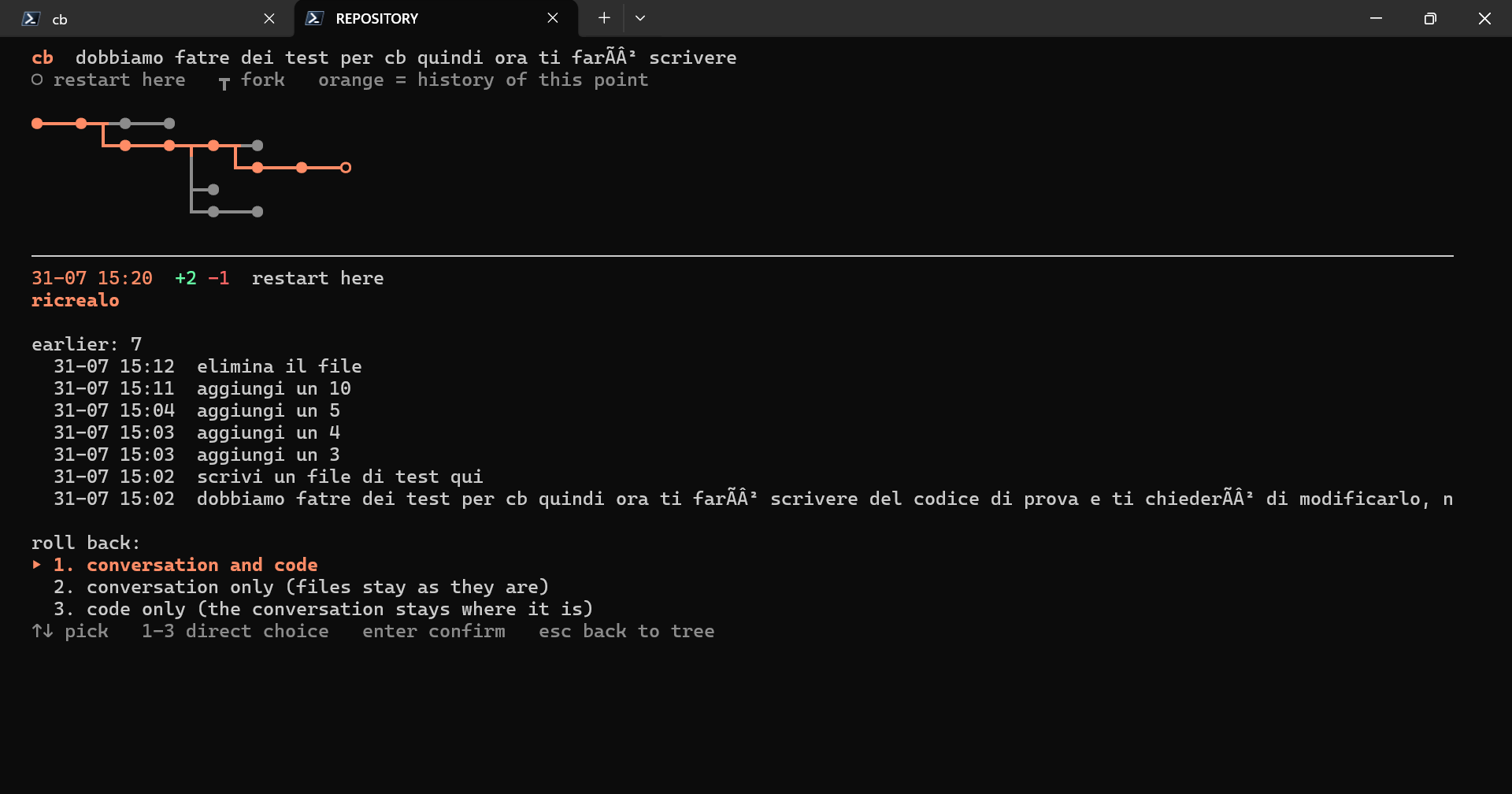
The conversation runs left to right, one node per prompt; every fork sends a branch down. Under the tree there is the prompt the cursor is on, and under that the history that point carries with it, back to the root.
  cb  branches of the conversation
  ◯ restart here   ┳ fork   orange = history of this point

  ⬤━━━⬤━━━⬤━━━⬤━┳━⬤━━━⬤━━━⬤━━━⬤
                ┗━⬤━┳━⬤━━━◯
                    ┗━⬤━━━⬤━━━⬤

  ───────────────────────────────────────────────────────────────────
  24-07 15:51  restart here
  the app got very slow, rendering the list freezes

  earlier: 3
    24-07 15:40  add the date filter
    24-07 15:12  /login
    24-07 15:10  let's do the customer list

  ←→ ad back and forth   ↑↓ ws switch branch   enter = restart   esc = back to Claude
← → walk up and down the conversation, ↑ ↓ move between the branches of the same
fork. a d and w s work too, if your hand would rather stay on the letters. The
cursor starts where you are now. Enter grows a new branch from that point: the previous one
stays where it was.
The commands from outside (cb tree, cb pick, cb open) use the numbered vertical list
instead, because cb open <session> 3 needs a number to refer to:
 22  └─ ● 07-24 15:51  the app got very slow ⑂3
 23     ├─ ○ 07-24 15:57  much smoother, but still choppy
 24     │  └─ ○ 07-24 17:26  Ultraplan terminated…
 27     ├─ ○ 07-29 10:17  much smoother, but still choppy
 28     └─ ● 07-29 10:18  it had got much smoother but I sent another prompt…
● active branch · ○ branch set aside · ⑂n fork with n branches.
How it works
Four mechanisms. The three that touch data are all additive: nothing is deleted.
Claude runs inside a pseudo-terminal (
node-pty).cbsits between the keyboard and Claude: it forwards everything except the tree shortcut. It never reads or interprets what Claude draws — only the transcript on disk — so a CLI update does not break it.Keys have to be decoded, not compared byte by byte: Claude turns on win32-input-mode (it sends
ESC[?9001h), so on Windows every key arrives asESC[Vk;Sc;Uc;Kd;Cs;Rc_— Esc isESC[27;1;27;1;32;1_, and release events arrive too.src/tasti.jshandles the three possible encodings (raw bytes, kittyESC[27u, win32) and normalises everything into one key descriptor.The tree is read from the
.jsonlfiles. Every record has aparentUuid: the branches are already there. Technical forks (tool retries) are filtered out, only real restores remain.The new branch is a session cb writes. In interactive mode the CLI ignores
--resume-session-at(andlast-prompt.leafUuidtoo): it rebuilds the conversation from the last message record in the file, so picking an intermediate point always brought the later turns back. With-pit does cut — the help says so, "use with --resume in print mode".So
cbwrites a new session file containing only the chain up to the end of the chosen turn (the prompt and its answer), and resumes that with--resume. The original file is not touched: the later turns stay in the tree as a branch set aside.Switching branch brings the files back to the state of that turn, automatically.
Claude Code does not use git for its checkpoints: it saves whole copies of the files in
~/.claude/file-history/<session>/, noting them in the transcript next to the messages. Every copy is the content before the change that produced it, so the state of a file at a given instant is the first copy after that instant.cb reads that archive instead of calling the native restore: no process to launch, and above all it looks at the copies of the whole family of sessions — the native command knows only one, while the branches of a conversation live in different files. Evidence: reconstructed the state at the beginning of a real session, 20 files out of 20 identical byte for byte to the commit that was HEAD at that moment.
Two limits worth knowing: the archive only covers the files Claude touched, and it expires after a few weeks. For the rest there is the commit hook (below).
The tree merges the whole family of sessions.
--fork-sessioncreates a new file that copies the history only up to the fork point: the abandoned branches stay in the original file and, looking at the current session alone, become invisible. Evidence on real data: parent sessionhi → how are you? → how do you feel?, childhi → boo, forks visible from the child: zero.The fork does copy the records keeping the same uuids (87% overlap measured), and related sessions share the same root uuid. So
cbgroups transcripts by root (sessioniDellaFamiglia, which reads only the head of each file) and merges nodes by uuid: the complete tree re-emerges. Every node carries itsorigini, so a branch of the parent is resumed from the right session and the reactivation is written to the right file.Abandoned branches are reactivated by appending a
last-prompt.--resume-session-atlooks for the message in the active chain, which the CLI rebuilds from the lastlast-prompt.leafUuid. A node on an abandoned branch is not in that chain and the CLI answersNo message found. By appending alast-promptpointing at the leaf of the branch you want, that branch becomes walkable again. Seesrc/attiva.js.
Hooking it to the claude command
So you do not have to remember to type cb, you can route claude through it. In
PowerShell, inside $PROFILE:
function claude {
    $cbEntry = "C:/path/to/cb/bin/cb.js"
    $claudeShim = "$env:APPDATA/npm/claude.ps1"

    # With no arguments (or with -r) open the folder and conversation pickers.
    $scegli = @()
    if ($args.Count -eq 0 -or $args[0] -in @('-r', '--resume')) { $scegli = @('--scegli') }

    # cb writes the chosen folder here: the shell moves there on exit.
    $fileCartella = Join-Path ([IO.Path]::GetTempPath()) "cb-cartella-$PID.txt"
    Remove-Item $fileCartella -ErrorAction SilentlyContinue
    $env:CB_CARTELLA_SCELTA = $fileCartella

    try {
        if ((Test-Path $cbEntry) -and (Get-Command node -ErrorAction SilentlyContinue)) {
            & node $cbEntry @scegli -- @args
            if ($LASTEXITCODE -ne 78) { return }   # 78 = cb did not start
        }
        & $claudeShim @args                        # fallback: Claude directly
    } finally {
        if (Test-Path $fileCartella) {
            $scelta = (Get-Content $fileCartella -Raw).Trim()
            Remove-Item $fileCartella -ErrorAction SilentlyContinue
            if ($scelta -and (Test-Path -LiteralPath $scelta)) { Set-Location -LiteralPath $scelta }
        }
        $env:CB_CARTELLA_SCELTA = $null
    }
}
Back up your profile before editing it.
Three precautions so it cannot make things worse:
- Automatic fallback: if cb does not start it exits with 78, and the function relaunches Claude directly. A normal Claude exit never uses that code, so it is never relaunched by mistake. If node is not installed, cb is not even attempted.
- Non-interactive uses (
-p,--print, non-TTY stdin): no pseudo-terminal, cb runs Claude directly. Otherwise the pty would dirty the output in scripts. - Arguments: everything after
--goes to Claude, not to cb. That way-r, prompts and flags do not collide with cb's own commands.
With --resume/--continue the session id is Claude's choice: cb does not force
--session-id and discovers the session from the most recent transcript in the folder.
Note there is no --tasto in the snippet: the shortcut comes from your settings, so
cb --impostazioni is enough to change it. Passing --tasto here would override the setting
every time and the settings screen would have no effect on it — the flag wins on purpose,
being the most explicit choice.
Note: the tab title is preserved (ConPTY would overwrite it with the path of claude.exe
at every process start, so at every branch switch).
Using it alongside other tools
cb owns the terminal and reads Claude Code's own files. Whether another tool coexists with it depends on where that tool sits:
cb            ← above: owns the terminal (pty, keys, tree, transcripts)
  claude      ← the real CLI, untouched
    a proxy   ← below: intercepts the HTTP calls and picks a provider
Below Claude Code — API proxies and routers (OmniRoute, claude-code-router, LiteLLM, a
self-hosted gateway). These work with no changes at all. cb makes no network calls of its
own and passes the whole environment to the pty, so ANTHROPIC_BASE_URL and the auth token
reach the CLI untouched:
$env:ANTHROPIC_BASE_URL = "http://localhost:20128/v1"
$env:ANTHROPIC_AUTH_TOKEN = "<your gateway token>"
cb
The tree, the cut and the file restore keep working even when another model answered the
turn: the .jsonl transcript, the structuredPatch diffs and the backup copies under
~/.claude/file-history/ are written by the CLI, not by whoever answered. Two things worth
knowing: a router with free "keyless" providers sends your prompts — and the code in them —
to third parties you did not pick one by one; and a proxy that compresses requests means the
context Claude actually saw may be smaller than what the tree shows. If a branch seems
forgetful, that is where to look, not in cb.
Above Claude Code — terminal wrappers, TUIs, session multiplexers. These usually clash, because cb needs three things exclusively:
- stdin and the pty. cb reads the keys before Claude does; two wrappers wanting stdin do not coexist.
- The native executable. cb looks for
claude.exe, never the npm shim: node-pty cannot launch.ps1/.cmdfiles. A tool that only exposes a shim or a shell function cannot be launched by cb. - The real transcripts under
~/.claude/projects/. A tool that reimplements the client, or keeps the conversation in its own format, takes away the only thing cb reads.
Above cb — this one is supported: it is how the claude function above works. The
contract is the exit code. 78 means cb did not start and the caller should fall back to
plain Claude; any other code is Claude's own exit and must not be relaunched.
Profiles: switching provider without losing the conversation
Setting the variables before launching cb works, but changing them means quitting. A profile is a named set of variables, and cb can relaunch Claude under a different profile without moving the conversation. That is the one thing the shell cannot do: the variables are read by the process at startup, and the process belongs to cb.
In ~/.claude/cb/impostazioni.json:
{
  "profili": {
    "gateway": {
      "ANTHROPIC_BASE_URL": "http://localhost:20128",
      "ANTHROPIC_MODEL": "some-gateway-model"
    },
    "direct": {
      "ANTHROPIC_BASE_URL": null
    }
  }
}
null (or "") removes the variable instead of overriding it: you need that when it is
the starting environment that has something the profile must get rid of.
From the tree, m opens the list:
which profile?
    Claude, the way you launched it
  ▸ gateway
    direct

  the conversation stays where it is: only the process restarts
On confirm, cb closes Claude and reopens it on the same session with the new environment.
No cut, no file restore: the conversation carries on where it was. To start on a profile
right away: cb --profilo gateway.
You can also pick one in the two places where there is no tree:
- before the first exchange, from the screen telling you the transcript does not exist yet — the best moment, in fact, with no conversation to carry over;
- in the folder navigator, where
mcycles the profiles in the header just likertoggles resume and normal start. There you decide where to work and with what in one step, and Claude starts already configured.
Every process is built from the snapshot of the environment cb had at startup, with the active profile on top. That is why going back to "Claude, the way you launched it" restores the starting conditions exactly, and a profile's added variables disappear on their own.
Two things worth knowing:
- The values sit in plain text in a config file. For secrets, leave them to the shell and keep only non-credentials in the profile. cb never writes the values to its log: of a profile switch it records the name only.
- Switching provider on a long conversation can fail immediately, if the new one has a smaller context window than what is already used. cb cannot predict that, but if the relaunched process dies within seconds it tells you instead of vanishing.
With no profili in the file, m opens nothing: if you do not configure them, the feature
is not there.
To check a setup quickly, cb ls and cb tree <session> only read from disk, so after a few
turns they tell you straight away whether the transcripts are still the ones cb expects.
Automatic commits (optional, Windows)
hooks/cb-commit.ps1 is a Stop hook: at the end of every turn that changed files, it
saves the whole working tree onto a hidden ref refs/cb/<session>/auto.
- It does not show up in
git log,git branch,git tag,git status - It does not touch the branch you work on nor the staging area (it uses a temporary index)
- Manual recovery:
git show refs/cb/<session>/auto~2:path/to/file.js
The uuid of the turn's last message goes into the commit body: that is the hook between the tree and the code history. When the native copy of a file has expired, cb walks from that point to the commit and fishes the file out of there — one file at a time, not the whole tree.
Install: add this under hooks.Stop in ~/.claude/settings.json (appended to the existing
hooks, not replacing them):
{
  "type": "command",
  "command": "pwsh -NoProfile -ExecutionPolicy Bypass -File \"C:/path/to/cb/hooks/cb-commit.ps1\"",
  "timeout": 60
}
⚠️ The hook runs on every Claude session in every git repo, not just this project.
Do not make it async: running in parallel it could read the working tree while a branch
switch is rewriting it.
There is no shell equivalent for macOS and Linux yet.
Tests
npm testKnown limits
- Every branch switch restarts the Claude process: a conversation cannot be reloaded into a running process. The wrapper makes that invisible, it does not avoid it — you see the TUI startup time at every jump. "Code only" is the exception: it does not touch the conversation, so nothing is restarted.
- Restoring only covers the files Claude touched. Changes made by hand, from another terminal or by a build are not in the archive: restoring a point gives you a mixed tree. Automatic commits cover everything, but today they only serve as a fallback for expired copies.
- No cleanup: cb's archive of copies, the
refs/cb/*refs and the truncated sessions created at every branch switch pile up with no expiry. - No way to look inside the archives: no preview of what will change, no undo. The restore is not atomic: if a write fails halfway, the tree stays mixed.
- Stealing
Esc Esccosts 300 ms of delay on a single Esc (the interrupt), and replaces the native restore menu. With a single-key shortcut (--tasto f2) the delay disappears and the native menu stays available. - The jump is only possible after the first turn: before that there is no transcript to read.
--resume-session-atis undocumented: it may change with a CLI update.- The kinship between forked sessions lives in the
forkParentSessionIdfields written by the CLI;cbdoes not aggregate them into a cross-session view yet. - The horizontal tree starts each branch at the column where it forked: with forks very far along the conversation, the branch starts on the right and wraps early. You see where it comes from, you lose some width.
- The commands from outside (
tree,pick,open) still show the numbered vertical list, not the horizontal tree. node-ptyneeds Claude's native binary, not the npm shim.cblooks for it on its own (explicit paths first, then yourPATH); if your install is unusual, setCB_CLAUDE_EXE.
License
MIT — see LICENSE.