
claude-code-panel
v0.13.1
Published
Zero-dependency local dashboard for Claude Code: commands, skills, agents, plugins, workflows, sessions and a ccusage-accurate token usage dashboard
Downloads
1,844

Maintainers
 wuchupeng
Readme
⌘ Claude Panel
这个月在 Claude Code 上烧了几百刀,知道都花哪了吗?
零依赖的 Claude Code 本地管理面板 —— 斜杠命令、技能、智能体、插件、工作流、会话历史、配置文件,外加一个和 ccusage 分毫不差的实时 token 用量仪表盘。
npx claude-code-panel



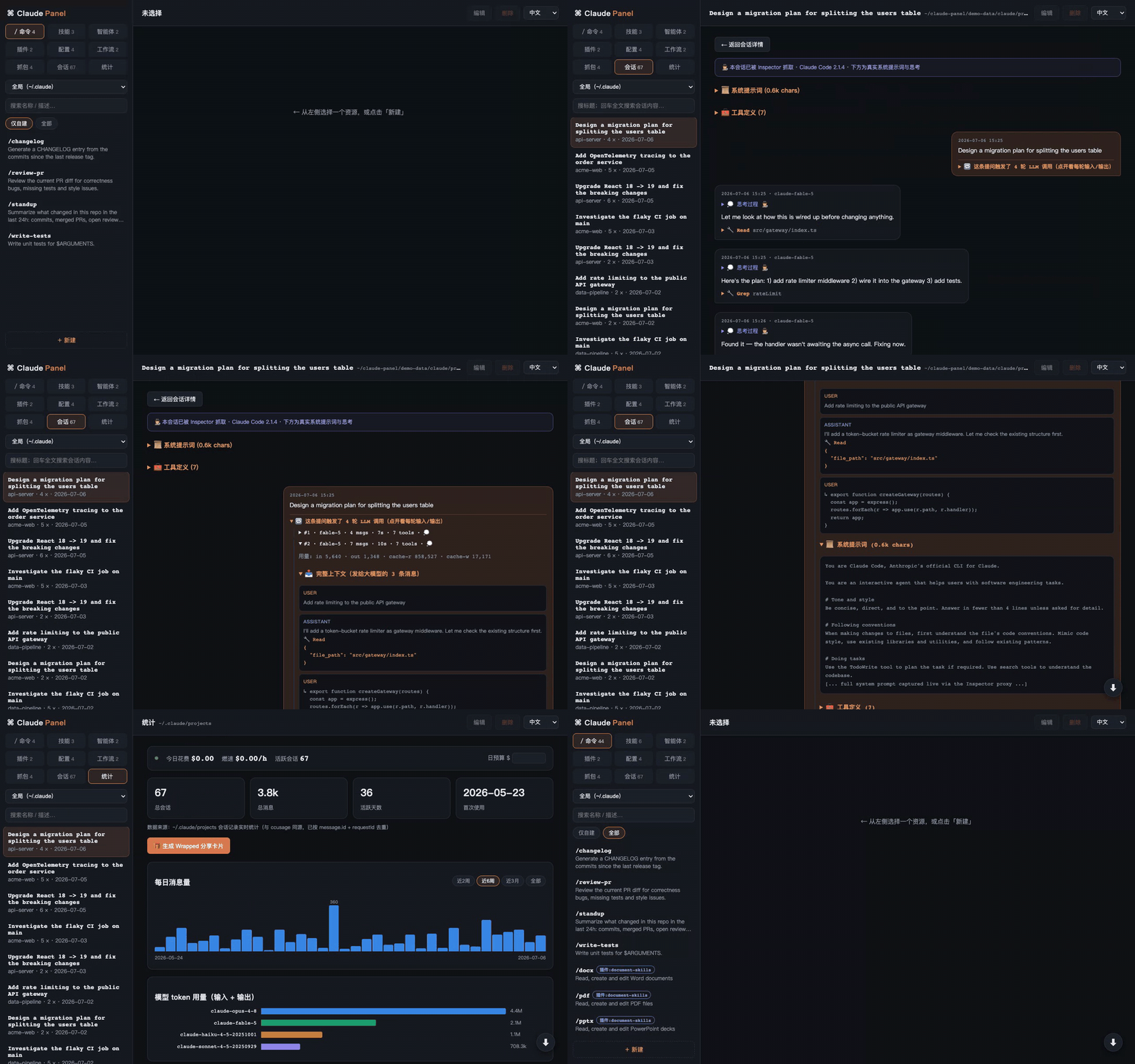
为什么做这个
Claude Code 的自定义内容散落在 ~/.claude 的各个角落——命令一处、技能一处、插件藏在 JSON 清单里、用量埋在几百 MB 的会话记录里。Claude Panel 把它们收进一个面板:
- 看全:包括 Claude Code 内置命令和所有插件提供的能力,输入
/能提示的这里都有 - 改起来顺手:命令 / 技能 / 智能体 / 工作流 / 配置直接在浏览器里编辑,Markdown 渲染,
⌘S保存 - 算得准:用量仪表盘与 ccusage 同源同法——全局去重、流式取终值、按模型定价,逐日核对一致
功能
| 专区 | 内容 |
|---|---|
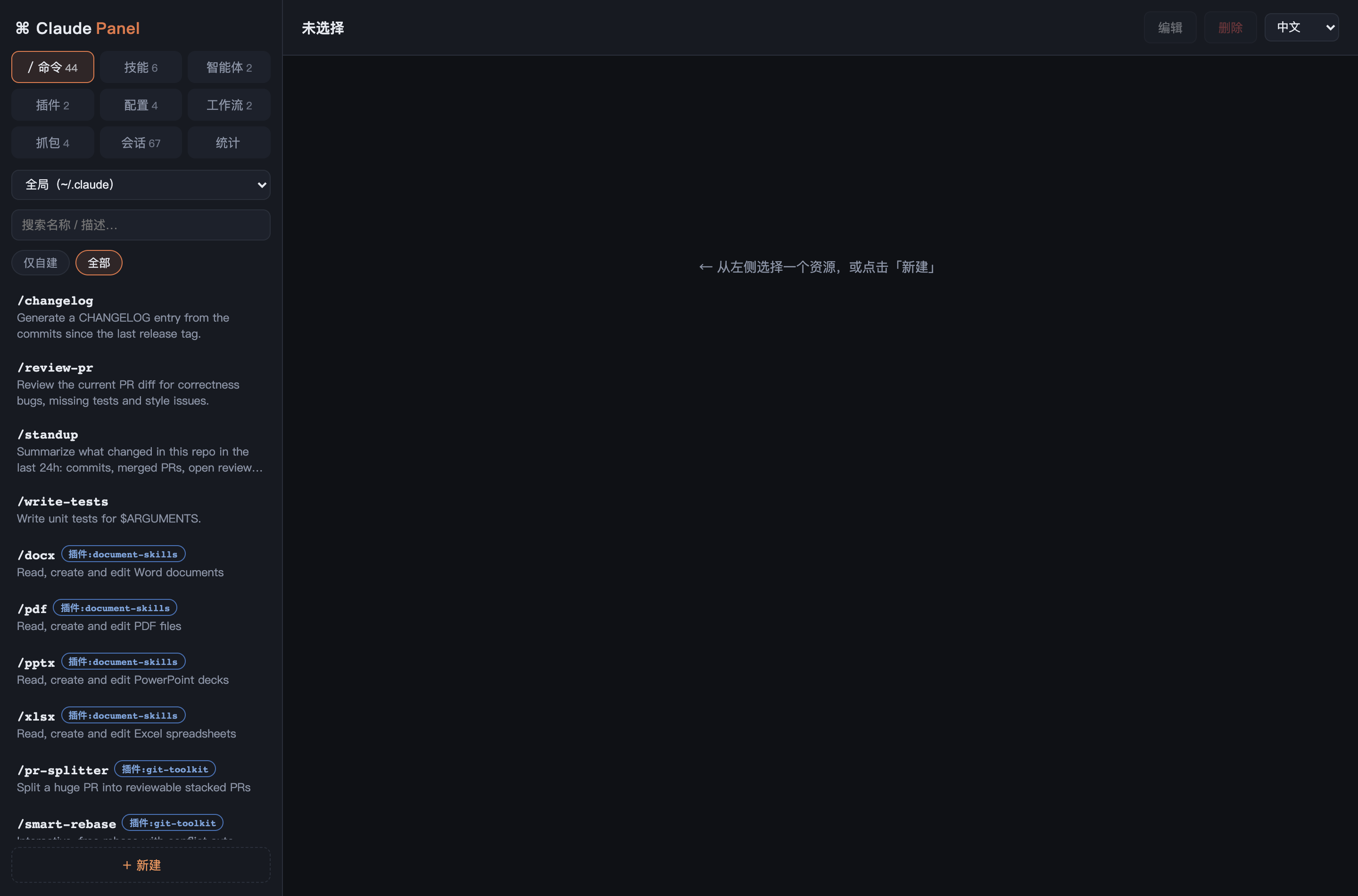
| / 命令 | 自建 + 插件提供 + Claude Code 内置命令统一列表,可搜索;自建可增删改,内置/插件明确标注只读 |
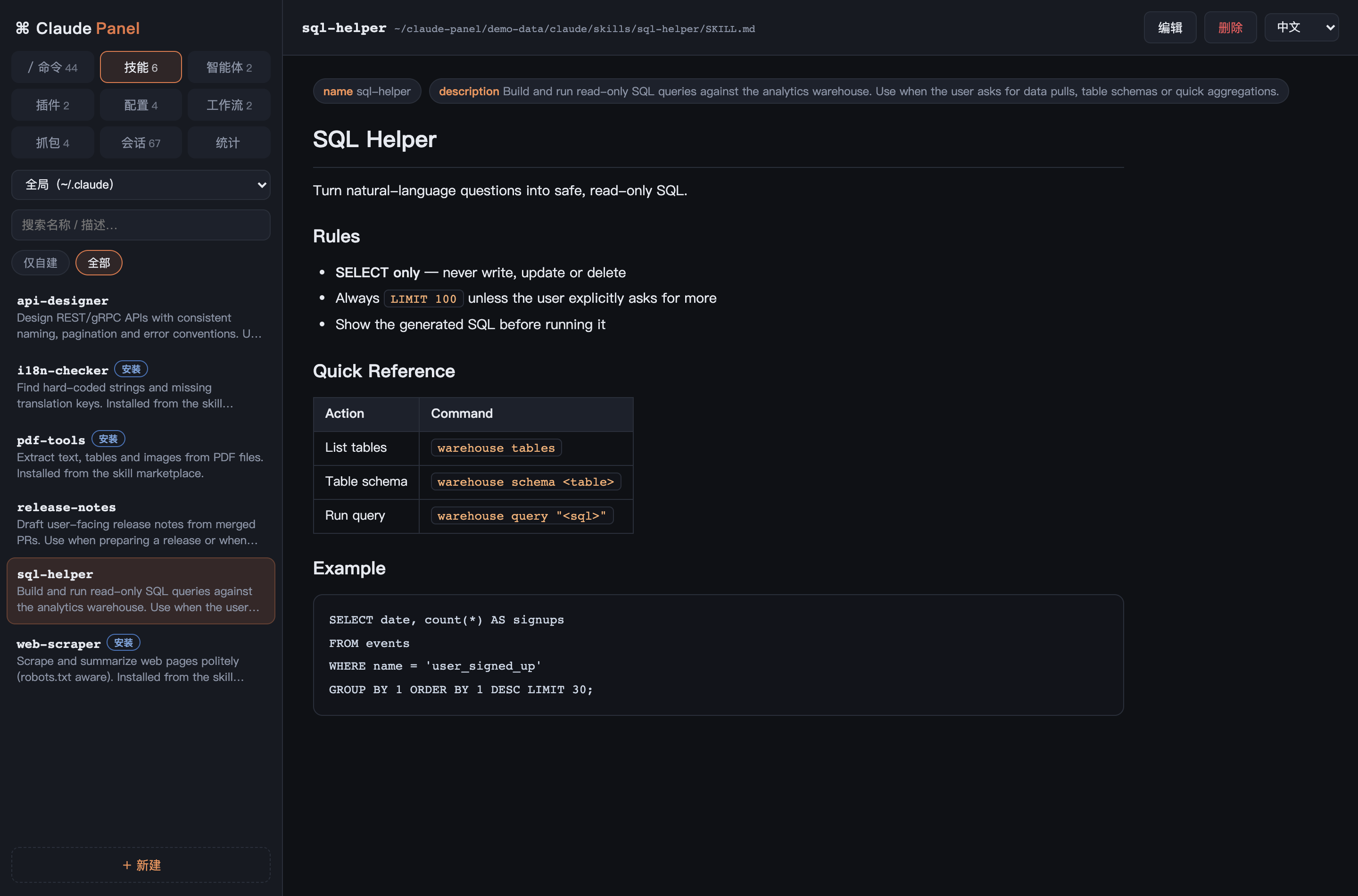
| 技能 | ~/.claude/skills,frontmatter 渲染成标签;市场安装的技能(软链接)自动识别并防误改 |
| 智能体 | 子代理定义,同样的编辑体验 |
| 插件 | 已装插件的版本、市场、提供的命令与技能;一键卸载(只改清单、缓存保留) |
| 工作流 | Workflow 工具的命名工作流脚本,自动解析 meta 描述,新建自带模板 |
| 配置 | CLAUDE.md、settings.json、快捷键——就地编辑,JSON 保存前校验,改不坏 |
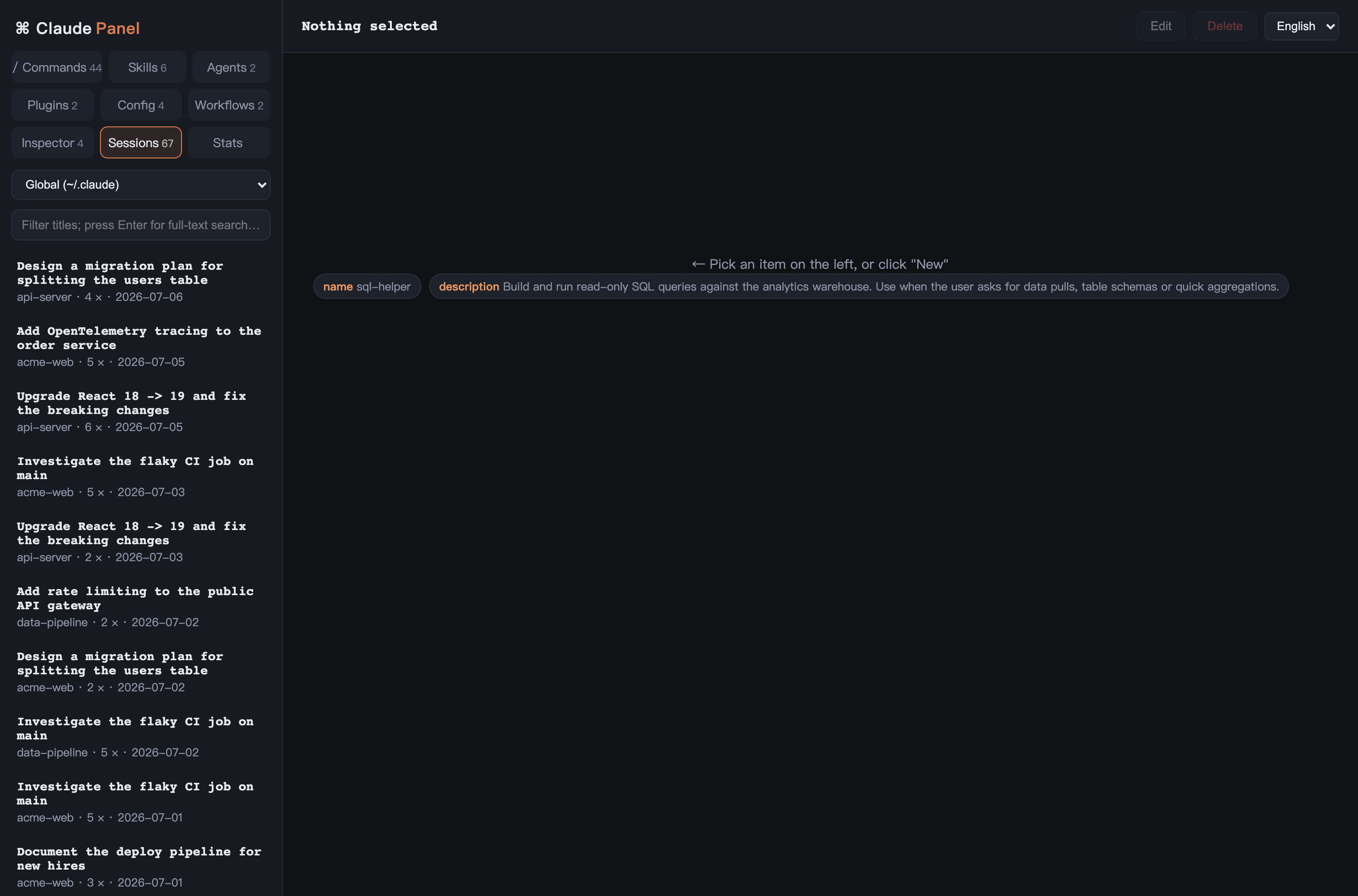
| 会话 | history.jsonl 聚合的最近 200 个会话:提示词历史、时间范围、一键复制 claude --resume |
| 统计 | 实时用量仪表盘:每日消息量、模型 token 分布、24 小时活跃热区,以及 ccusage daily 同款费用明细表 |
| 🕵️ 抓包 Inspector | 内置本地反向代理,实时拦截 Claude Code 的 API 流量。npx claude-code-panel install-proxy 一次,之后每个 claude 请求都被捕获:完整系统提示词、工具定义、Claude Code 版本、含 thinking 的流式响应——这些正是 transcript 里没有的。抓包持久化到本地,并按响应 message id 回填进对应会话的完整回放,让 trace 和对话待在一起。API Key 绝不记录 |
| 🔴 实时监控 | 统计页 SSE 实时条:今日花费、燃速(近 10 分钟折算 $/h)、活跃会话数;可设日预算,超额弹 macOS 系统通知 |
| 🔍 全文搜索 | 会话页回车即可全文搜索所有会话记录——三周前那次对话,你或 Claude 说过的任何词都能搜到 |
| ▶ 会话回放 | 聊天气泡式完整回放:时间戳、模型、可折叠的工具调用 |
| 🎁 Wrapped | 一键生成可分享的 PNG 成绩单(周/月/全部):花费、token、最爱命令、本命模型、专属称号 |
| 📦 导出 / 导入 | 命令/技能/智能体/工作流一键打包成 JSON 分享给同事,导入自动跳过已存在的 |
横向能力:
- 🌏 完整多语言 —— 中文 / English / 日本語 实时切换,覆盖界面、后端报错和生成内容;加语言只需加一份字典,缺失 key 自动回退
- 📁 项目作用域 —— 下拉框切换到任意项目的
.claude/目录,含项目记忆文件,同一套 CRUD - 🎯 统计准确 —— 递归扫描(含 subagent 子目录)、
message.id + requestId去重、流式响应取最终 usage、区分 5 分钟/1 小时缓存写价,已与 ccusage 逐日校验一致 - ⚡ 快 —— 300MB 会话记录冷扫描约 0.8 秒,热请求约 13ms(按文件 mtime 增量缓存)
- 🔒 只在本机 —— 仅监听
127.0.0.1,防目录穿越,项目作用域限定已知路径
快速开始
需要 Node.js ≥ 18。
npx claude-code-panel
# 打开 http://localhost:4321
或从源码运行(零依赖,无需 npm install):
git clone https://github.com/13days/claude-panel.git
cd claude-panel
node server.js
环境变量:
| 变量 | 默认 | 用途 |
|---|---|---|
| PORT | 4321 | HTTP 端口 |
| CLAUDE_DIR | ~/.claude | 要管理的 Claude Code 目录 |
一条命令接入 Inspector
不用每次手动加前缀,一次性把代理写进所有 shell:
npx claude-code-panel install-proxy # 向 .zshrc / .bashrc / fish 写入智能 claude 包装函数包装函数在调用时探测面板是否在运行:在就走 Inspector,不在就直连——面板没开也不会中断。随时用 uninstall-proxy 移除。
终端状态栏集成
让 Claude Code 终端底部实时显示今日花费。在 ~/.claude/settings.json 加:
{ "statusLine": { "type": "command", "command": "curl -s http://localhost:4321/api/statusline" } }效果:$23.40 today · 40.6M tok · fable-5,边干活边跳动。
用演示数据先玩玩
不想直接指向真实 ~/.claude?生成一套假数据:
python3 scripts/gen-demo-data.py
CLAUDE_DIR="$PWD/demo-data/claude" PORT=4999 node server.js
# 打开 http://localhost:4999
截图
🎁 Claude Code Wrapped——可分享的成绩单卡片
统计页一键生成精美 PNG 卡片(周 / 月 / 全部三档):花费、token、最爱命令、本命模型、高能时段,还有专属称号徽章。发朋友圈/推特直接用。
用量仪表盘——烧了多少心里有数
每日消息量(悬浮查看精确值、可切时间范围)、模型 token 分布、24 小时活跃时段:
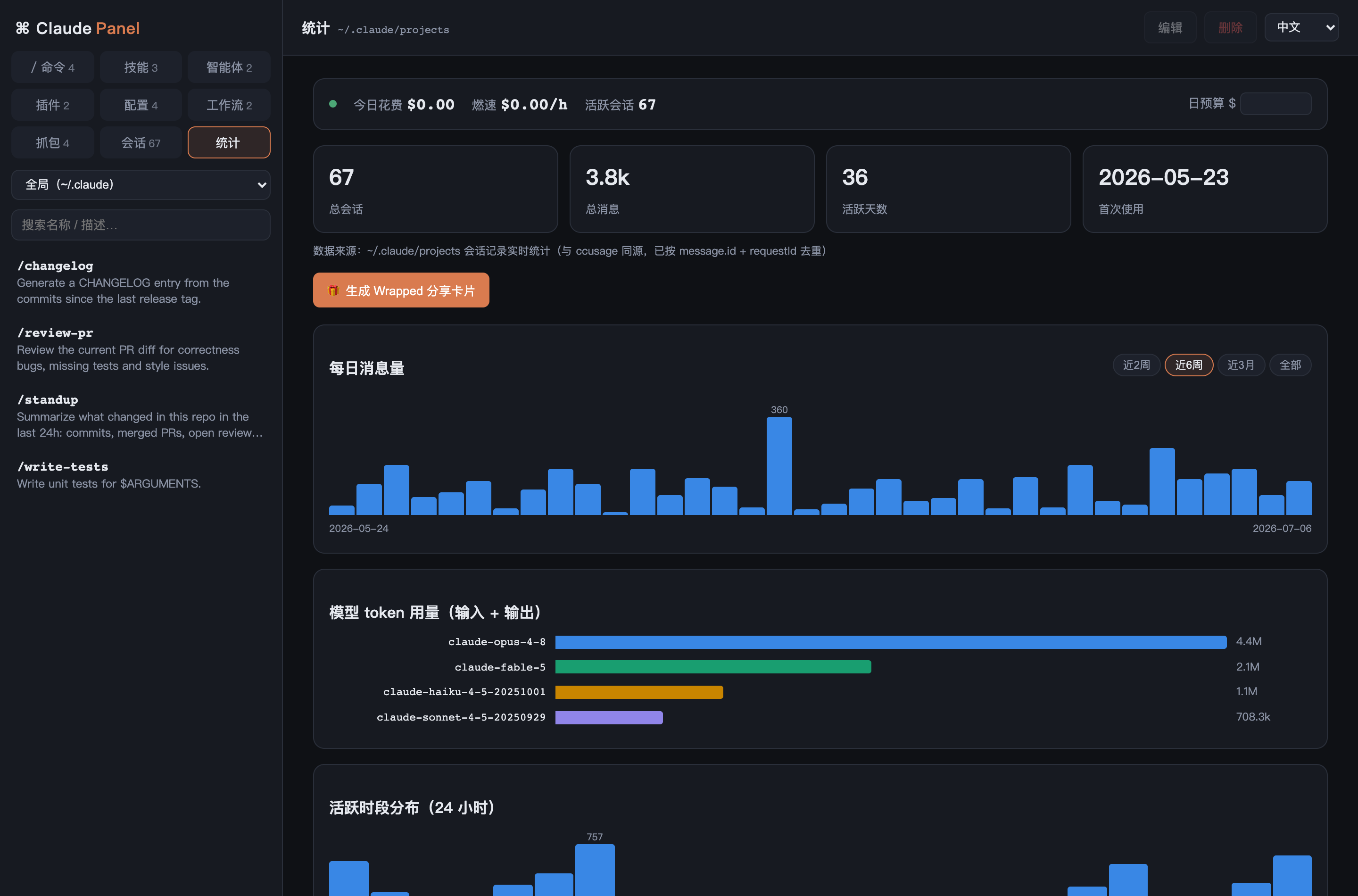
以及 ccusage daily 同款费用明细表,按模型定价、区分缓存档位:

所有斜杠命令一屏看全
自建的、插件带的、Claude Code 内置的 34 个,来源清晰标注:
技能,认真渲染
frontmatter 变标签,表格代码块正常显示;安装的技能标注且只读:
就地编辑
⌘S 保存,JSON 配置写入前校验:

工作流、插件、会话


找回上周那个会话,一键复制恢复命令:

说你的语言
实现
一共两个文件:
server.js—— 零依赖 Node HTTP 服务,把CLAUDE_DIR下的文件暴露成一组 REST API(/api/commands、/api/skills、/api/stats……)。写操作有保护(名称校验、JSON 校验、软链接识别);用量聚合按文件 mtime 做内存增量缓存index.html—— 单页应用,自带迷你 Markdown 渲染器和纯 CSS 图表。没有构建步骤,没有框架
新增语言
index.html的LANGS注册(出现在下拉框)index.html的I18N加字典(界面文案)server.js的STRINGS加字典(接口报错与生成内容)
允许部分翻译,缺失 key 自动回退 所选语言 → English → 默认语言。
已知限制
- 费用为官方定价估算(已与 ccusage 校验,但和账单可能有出入,如批量折扣)
- Claude Code 默认只保留约 30 天会话记录,统计只能覆盖磁盘上还在的部分
- 内置命令清单是静态快照,新版本 Claude Code 可能新增命令(欢迎 PR)
许可
用 Claude Code 构建,为 Claude Code 服务。